Resolve WFLYTX0013: Default node-identifier in transaction subsystem in WildFly. A hands-on guide for developers configuring unique Narayana Xid node IDs.
Step-by-Step Guide: Architecting the Fix for WFLYTX0013: Default node-identifier in transaction subsystem
When provisioning a clustered environment or deploying multiple WildFly instances, you will frequently encounter the WFLYTX0013 warning at server bootstrap (or its legacy JBoss EAP equivalent, JBAS010153).
The exact log entry looks like this: WARN [org.jboss.as.txn] WFLYTX0013: The node-identifier attribute on the /subsystem=transactions is set to the default value. This is a danger for environments running multiple servers. Please make sure the attribute value is unique..
This is not a generic, harmless warning. It is a critical architectural risk for distributed transactions. If you ignore it, you risk severe data corruption. This guide breaks down exactly why the Narayana transaction manager flags this issue and provides production-ready strategies to resolve it across your architecture.
Architectural Flow: Why Node Identifiers Matter
WildFly relies on Narayana as its underlying transaction manager. To ensure ACID compliance across distributed systems, Narayana leverages the Two-Phase Commit (2PC) protocol.
When Narayana creates a transaction, it generates an Xid (Transaction Identifier). Each Xid encodes the node-identifier of the instance that generated it. During a crash recovery phase, the transaction manager parses this Xid to ensure it only recovers transaction branches matching its specific node identifier.
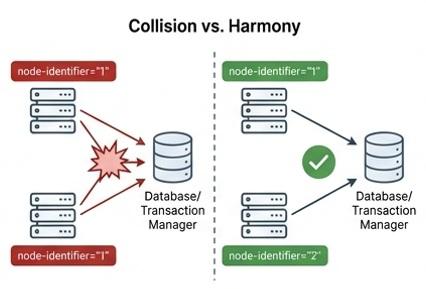
If multiple WildFly nodes share the default identifier (which is typically "1"), their Xids will collide.
[WildFly Node A (ID=1)] ──(Generates Xid: 1-xxx)──┐
                                                  ▼
                                       [ Database / Object Store ] <── FATAL COLLISION!
                                                  ▲
[WildFly Node B (ID=1)] ──(Generates Xid: 1-yyy)──┘
If Node A crashes, Node B might incorrectly attempt to recover or roll back Node A's transaction branches, mixing up the states and destroying data consistency. It is imperative that this identifier is strictly unique across all application server instances that share an object store or access common resource managers.
Prerequisites
Before modifying your configurations, ensure you have:
- A target environment running WildFly or JBoss EAP with the
transactionssubsystem enabled. - Access to the startup scripts (
standalone.sh/domain.sh) or orchestration manifests (e.g., Docker/Kubernetes). - Administrative access to the JBoss CLI.
Step-by-Step Implementation
There are multiple ways to inject a unique node identifier into the transaction subsystem. Choose the method that best aligns with your infrastructure provisioning strategy.
Method 1: The JVM System Property (Best Practice)
Injecting the identifier dynamically at JVM startup is the cleanest and most scalable approach, especially for environments running 100+ JVMs or utilizing container orchestration (Docker/Kubernetes).
By default, the WildFly transactions subsystem defines the core environment using an expression: <core-environment node-identifier="${jboss.tx.node.id:1}">. This means you can override it seamlessly via the command line without editing the XML file.
Pass the -Djboss.tx.node.id property to your startup script. Ensure the value is unique per server:
# Starting Node 1 with a unique TX ID
$WILDFLY_HOME/bin/standalone.sh -c standalone-full.xml -Djboss.tx.node.id=Node_1

# Starting Node 2 with a unique TX ID and port offset
$WILDFLY_HOME/bin/standalone.sh -c standalone-full.xml -Djboss.tx.node.id=Node_2 -Djboss.socket.binding.port-offset=100
Inline Comment: The -Djboss.tx.node.id flag overrides the default value of 1 directly in the subsystem's expression logic.
Method 2: JBoss CLI Configuration
If your infrastructure relies on immutable XML configurations managed by automation tools (like Ansible), you can statically write the value into the standalone.xml or domain.xml file using the JBoss CLI.
Execute the following CLI command to modify the model:
# Connect to the CLI and update the transaction subsystem
/subsystem=transactions:write-attribute(name=node-identifier, value="UNIQUE_NODE_ID_1")
Note: Modifying the node-identifier requires a JVM restart to take effect, as the transaction manager initializes this value at boot.
Method 3: Direct XML Modification
If you are manually bootstrapping an environment, you can define the property directly within the <core-environment> tag of the transactions subsystem.
<subsystem xmlns="urn:jboss:domain:transactions:6.0">
  <!-- Set a hardcoded unique value here -->
  <core-environment node-identifier="AppServer_Instance_01">
    <process-id>
      <uuid/>
    </process-id>
  </core-environment>
  <!-- ... remaining config ... -->
</subsystem>
Warning: While functional, hardcoding values in XML is an anti-pattern for horizontally scaled environments, as you must maintain separate XML files for every node. Method 1 is strongly preferred.
Edge Cases / Pitfalls
- Length Restrictions: While there are generally no strict character limitations on the JVM property length upon creation, extreme lengths might cause database column truncation if you are utilizing a JDBC object store (
use-jdbc-store="true") for the transaction log. Keep names descriptive but concise (e.g.,srv-prod-01). - Domain Mode Profiles: If you are using Managed Domain mode (
domain.xml), setting thenode-identifierdirectly in the profile will cause all servers inheriting that profile to share the same ID. In Domain mode, always use host-level system properties or the-Djboss.tx.node.idvariable to enforce uniqueness at the host controller level.
Frequently Asked Questions
Can I ignore the WFLYTX0013 warning if I only have one server? Technically, yes. If you are running a single standalone instance of WildFly, a default node identifier of 1 will not collide with anything. However, it is an architectural best practice to suppress the warning by assigning a deliberate name to prepare the environment for future clustering.
What is the difference between JBAS010153 and WFLYTX0013? They are the exact same warning. JBAS010153 is the legacy message code utilized in older JBoss EAP 6.x architectures, while WFLYTX0013 is the updated code mapping to modern WildFly subsystems.
Will changing the node identifier affect active transactions? Yes. You should never change a node-identifier while the server has in-flight transactions or pending heuristic logs in the object store. If you change a node's ID after a crash, Narayana will fail to recover the pending Xid branches from the previous ID because they no longer match. Ensure your object store is clean before mutating identifiers.
Conclusion Resolving WFLYTX0013 is a mandatory checkpoint when graduating a WildFly architecture from development to a clustered, production-ready state. By dynamically passing the -Djboss.tx.node.id JVM parameter into your deployment scripts, you guarantee Xid branch uniqueness within the Narayana subsystem, completely eliminating the risk of transaction collisions across your environment.
Recommended Articles
Retrieve and Monitor Transactions with JBoss-WildFly AS
Learn how to retrieve transaction information from your Java EE applications running on JBoss/WildFly and combine it with the Narayana Transaction Analyser application.
WildFly Transaction Timeout: Configure It (and Fix ARJUNA012117)
Configure the WildFly/JBoss EAP transaction timeout at every level (subsystem, EJB, MDB, BMT) and fix the ARJUNA012117 TransactionReaper timeout warning when the default-timeout change alone doesn't seem to work.
Debugging Narayana Transactions with WildFly and Java 21 Using Enhanced Logger Configuration
Learn how to debug JTA transactions in WildFly using a custom Logger. Increase verbosity for detailed logging.
Configure and Monitor Transactions with Java Transaction API (JTA) on WildFly Application Server
Learn how to configure and monitor transactions using JTA on WildFly application server for improved system reliability.