A simple Java LDAP Client
This step-by-step guide will show you how to create a minimal Java LDAP Client to test the connection to an LDAP Server and show the LDAP tree using a graphical interface. We will use Docker to trigger a simple LDAP Server so you don’t need to install anything!
Step # 1 Start LDAP with Docker
There are several open source LDAP distributions. In this tutorial we will start openldap using the following Docker command:
docker run --rm --name my-ldap \
  --env LDAP_ORGANISATION="Example Org" \
  --env LDAP_DOMAIN="example.org" \
  --env LDAP_ADMIN_PASSWORD="admin" \
  --publish 389:389 \
  --detach osixia/openldap:1.5.0
Note: the osixia/openldap image is no longer actively maintained (no updates in several years, still bundling OpenLDAP 2.4) — it still works fine for this kind of local, throwaway test, but avoid it for anything production-facing. If you want an actively maintained alternative, check the osixia/container-openldap v2 successor project, or your distro/cloud vendor’s current OpenLDAP package.
Then, verify that LDAP is running on your localhost, forwarding traffic from the local port 389 to the container port 389:
docker ps
CONTAINER ID   IMAGE                   COMMAND                 CREATED             STATUS             PORTS                                            NAMES
f3e9384a0b1f   osixia/openldap:1.5.0   "/container/tool/run"   About an hour ago   Up About an hour   0.0.0.0:389->389/tcp, :::389->389/tcp, 636/tcp   my-ldap
Next, we need to insert some example users in it. For example, the following users.ldif will define two Users for the domain dc=example,dc=org:
dn: ou=users,dc=example,dc=org
objectClass: organizationalUnit
ou: users

dn: uid=jdoe,ou=users,dc=example,dc=org
objectClass: inetOrgPerson
cn: John Doe
sn: Doe
uid: jdoe
mail: jdoe@example.org
userPassword: password123

dn: uid=asmith,ou=users,dc=example,dc=org
objectClass: inetOrgPerson
cn: Alice Smith
sn: Smith
uid: asmith
mail: asmith@example.org
userPassword: password123
Finally, you can load the LDIF file directly into the Docker container with:
docker exec -i my-ldap ldapadd -x -D "cn=admin,dc=example,dc=org" -w admin < users.ldifThat’s all. Let’s wrap a simple Java code as Client
Step #2 Writing the java LDAP Client
To code the Java Client we will use a simple set of libraries:
- The UnboundID LDAP SDK for Java is a fast, powerful, user-friendly, and completely free Java library for communicating with LDAP directory servers.
- Java Swing to display the LDAP tree
Finally, we will use JBang to bundle the dependencies. if you are new to JBang you can check this article: JBang: Create Java scripts like a pro
//DEPS com.unboundid:unboundid-ldapsdk:6.0.7

import com.unboundid.ldap.sdk.*;
import javax.swing.*;
import javax.swing.tree.*;
import java.awt.*;
import java.util.*;

public class ldaptree {

    public static void main(String[] args) throws Exception {
        // Connessione al server LDAP
        LDAPConnection connection = new LDAPConnection("localhost", 389, "cn=admin,dc=example,dc=org", "admin");

        String baseDN = "dc=example,dc=org";
        SearchResult result = connection.search(baseDN, SearchScope.SUB, "(objectClass=*)");

        // Crea la radice del JTree
        DefaultMutableTreeNode root = new DefaultMutableTreeNode(baseDN);

        // Mappa per costruire l'albero gerarchico
        Map<String, DefaultMutableTreeNode> nodeMap = new HashMap<>();
        nodeMap.put(baseDN, root);

        // Ordina DN in base alla profondità per evitare problemi di ordine
        result.getSearchEntries().stream()
            .sorted(Comparator.comparingInt(e -> e.getDN().split(",").length))
            .forEach(entry -> {
                String dn = entry.getDN();
                if (!dn.equalsIgnoreCase(baseDN)) {
                    try {
                        String parentDN = entry.getParentDNString();  // Aggiunto try-catch
                        DefaultMutableTreeNode parentNode = nodeMap.get(parentDN);
                        if (parentNode != null) {
                            DefaultMutableTreeNode newNode = new DefaultMutableTreeNode(dn);
                            parentNode.add(newNode);
                            nodeMap.put(dn, newNode);
                        }
                    } catch (LDAPException e) {
                        e.printStackTrace();  // Stampa l'errore
                    }
                }
            });

        // Costruzione interfaccia grafica
        SwingUtilities.invokeLater(() -> {
            JFrame frame = new JFrame("LDAP Tree Viewer");
            frame.setDefaultCloseOperation(JFrame.EXIT_ON_CLOSE);
            JTree tree = new JTree(root);
            JScrollPane scrollPane = new JScrollPane(tree);
            frame.add(scrollPane, BorderLayout.CENTER);
            frame.setSize(400, 500);
            frame.setVisible(true);
        });
    }
}(javax.swing.* here is the JDK’s own Swing UI toolkit, unrelated to Jakarta EE — it keeps its javax.* package name permanently and needs no migration.)
Alternatively, you can add the UnboundID LDAP SDK to the Classpath of your Java application. Check the Maven Central listing for the current UnboundID LDAP SDK release before pinning a version — 6.0.7 was current when this article was written, but the library has moved forward since.
Step #3 Test your application
You can run and test your LDAP Client as follows:
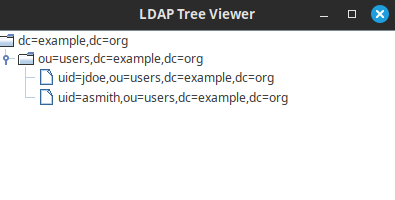
jbang ldaptree.javaHere is the LDAP Client in action:
Common errors and FAQ
- LDAPException: Unable to connect (connection refused): make sure the container finished its startup sequence before you connect —
osixia/openldaptakes a few seconds to initialize the directory on first run; checkdocker logs my-ldap. - Empty tree / no entries found: the LDIF import step is easy to skip — verify with
docker exec -i my-ldap ldapsearch -x -D "cn=admin,dc=example,dc=org" -w admin -b "dc=example,dc=org"that the users you added are actually present before debugging the Java code. - Is plaintext LDAP (port 389, no TLS) safe here? Only for local testing, as shown in this tutorial — for anything beyond your own machine, use LDAPS (port 636) or StartTLS, since credentials and directory data otherwise travel unencrypted.
- Can I use this same code against Active Directory? Largely yes — the UnboundID SDK talks standard LDAP protocol, but you’ll need to adjust the bind DN format and search base to match AD’s schema/naming conventions.
Conclusion
This article provided a step-by-step guide to connect to an LDAP Server from Java using a simple set of libraries available in UnboundID LDAP SDK for Java.
Recommended Articles
Secure Your Enterprise Java Applications with LDAP: 2 Simple Strategies
Learn how to test your Java applications with LDAP using two simple strategies: embedded ApacheDS server and Docker-based OpenLDAP. Get started with these easy-to-follow tutorials.
5 Ways to Create an HTTP Client in Java: From HttpURLConnection to Apache HttpComponents
Explore five ways to create an HTTP client in Java, including HttpURLConnection and Apache HttpComponents. Learn about their performance and use cases.
Convert JSON String to Java Object Using Jackson in Java with JBang
Learn how to use Jackson and JBang to convert JSON strings to Java objects in this tutorial. Basic Java knowledge required.
Create a Startup Class for Java Enterprise Applications: Deploying EJBs and ServletContextListeners
Learn how to create a startup class for a Java EE application server like WildFly, including deploying ServletContextListeners and EJBs.