How to Check the Content of a Java KeyStore (PKCS12 & JKS)
Java KeyStores provide a secure mechanism to store cryptographic keys, X.509 certificates, and trusted CA certificates. They are widely used by Java application servers like WildFly, Spring Boot, and JBoss EAP to enable TLS/SSL encryption, authenticate client certificates, and handle data signing.
While legacy Java versions relied on the proprietary JKS (Java KeyStore) format, modern JDK releases (Java 9 and newer) use PKCS12 as the default, industry-standard keystore format. In this step-by-step tutorial, we will explore three distinct ways to inspect and verify the contents of a Java KeyStore: using the keytool CLI, using OpenSSL, and using the Java Security API programmatically.
Prerequisites
- A installed Java Development Kit (JDK 17, JDK 21, or newer).
- Basic familiarity with command-line tools.
Creating a Sample PKCS12 KeyStore
Before inspecting a keystore, let's create a standard PKCS12 keystore using Java's keytool utility:
# Generate a self-signed keypair in PKCS12 format (industry standard)
keytool -genkeypair -alias myAlias -keyalg RSA -keysize 2048 -keystore myKeystore.p12 -storetype PKCS12 -validity 365 -storepass password
Option 1: Use the keytool Command Line
The keytool command-line utility bundled with the JDK includes a -list option to display keystore contents. Adding the -v (verbose) flag provides comprehensive details, including fingerprints (SHA256), certificate validity dates, subject/issuer DNs, and serial numbers.
# Verbose inspection of a PKCS12 keystore
keytool -v -list -keystore myKeystore.p12 -storepass password

# Inspection of a legacy JKS keystore
keytool -v -list -keystore myKeystore.jks -storetype JKS
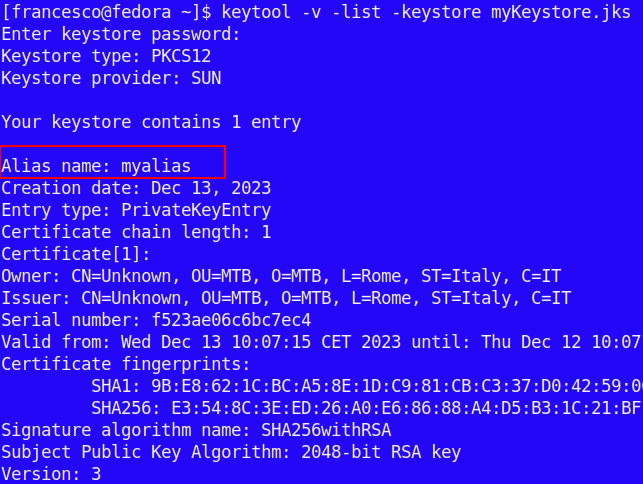
Sample output when listing the contents of a verbose keystore entry:
Option 2: Use the OpenSSL Command Tool
Because PKCS12 is an open PKCS standard (defined by RFC 7292), you can inspect .p12 and .pfx files natively using OpenSSL without requiring a Java runtime environment.
Run the following command to display certificate information without printing private keys:
# Read PKCS12 keystore details using OpenSSL
openssl pkcs12 -in myKeystore.p12 -info -nokeys
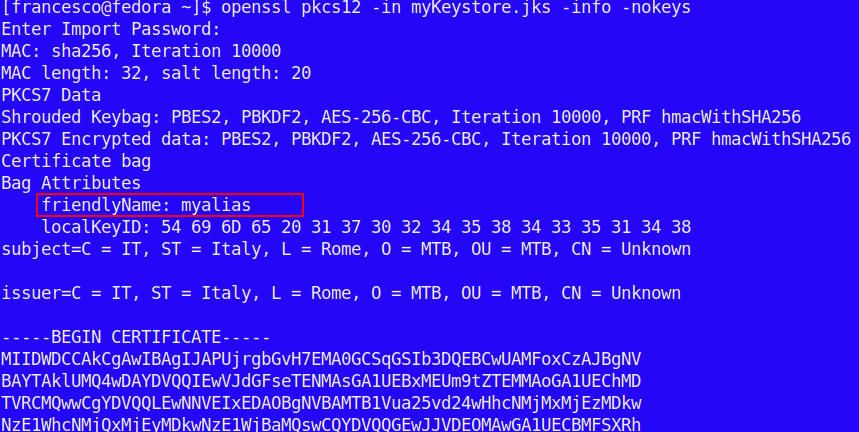
Here is an example output generated by OpenSSL displaying the certificate chain and attributes:
Option 3: Use the java.security API Programmatically
If you need to inspect certificates dynamically inside a Java application (for example, to monitor SSL certificate expiration dates or validate aliases at runtime), you can use the java.security.KeyStore and java.security.cert.X509Certificate classes.
Here is a modern Java code example using try-with-resources to load a PKCS12 keystore and display certificate metadata:
import java.io.FileInputStream;
import java.io.InputStream;
import java.security.KeyStore;
import java.security.cert.X509Certificate;
import java.util.Enumeration;

public class KeystoreChecker {
    public static void main(String[] args) {
        String keystoreFile = "myKeystore.p12";
        char[] keystorePassword = "password".toCharArray();

        try (InputStream is = new FileInputStream(keystoreFile)) {
            // Load the KeyStore (PKCS12 is default in JDK 9+)
            KeyStore keystore = KeyStore.getInstance("PKCS12");
            keystore.load(is, keystorePassword);

            System.out.println("KeyStore Type: " + keystore.getType());
            System.out.println("KeyStore Size: " + keystore.size());

            // Iterate over all aliases in the keystore
            Enumeration<String> aliases = keystore.aliases();
            while (aliases.hasMoreElements()) {
                String alias = aliases.nextElement();
                System.out.println("\n----------------------------------------");
                System.out.println("Alias: " + alias);

                if (keystore.isKeyEntry(alias)) {
                    System.out.println("Entry Type: Private Key Entry");
                } else if (keystore.isCertificateEntry(alias)) {
                    System.out.println("Entry Type: Trusted Certificate Entry");
                }

                // Extract X.509 Certificate details
                if (keystore.getCertificate(alias) instanceof X509Certificate cert) {
                    System.out.println("Subject DN: " + cert.getSubjectX500Principal());
                    System.out.println("Issuer DN: "  + cert.getIssuerX500Principal());
                    System.out.println("Valid From: " + cert.getNotBefore());
                    System.out.println("Valid Until: " + cert.getNotAfter());
                    System.out.println("Serial Number: " + cert.getSerialNumber());
                }
            }
        } catch (Exception e) {
            System.err.println("Error reading keystore: " + e.getMessage());
            e.printStackTrace();
        }
    }
}
Frequently Asked Questions & Troubleshooting
How do I convert a legacy JKS keystore to PKCS12?
If you see the warning "The JKS keystore uses a proprietary format...", migrate your keystore to the standard PKCS12 format using keytool:
keytool -importkeystore -srckeystore myKeystore.jks -destkeystore myKeystore.p12 -deststoretype PKCS12Can I list keystore entries without knowing the password?
For PKCS12 keystores, reading the certificate list generally requires the store password because the integrity of the file structure is protected. However, for public truststores (like cacerts), the default password in Java is usually changeit.
Is there a GUI application to inspect Java KeyStores?
Yes. If you prefer a graphical interface, KeyStore Explorer is an open-source GUI tool for managing, viewing, and converting Java KeyStores, PKCS12 files, and X.509 certificates.
Conclusion
Inspecting Java KeyStores is a routine administrative task for securing application servers and microservices. Whether you use the command-line keytool utility, OpenSSL, or programmatic Java APIs, switching from legacy JKS to the modern PKCS12 format ensures interoperability across enterprise environments.
Recommended Articles
Optimize Your Java Application's Memory Management with JVM Configuration
Enhance your Java application’s memory management with these three JVM configuration parameters to handle OutOfMemoryErrors effectively.
Five Methods to Generate Heap Dumps for Enterprise Java Applications
Discover five methods to generate heap dumps in Java, including jmap command-line tool, jcmd, VisualVM, JConsole, and programmatically using HeapDumper.
Capture Java Thread Dumps Using jstack and Other Methods
Learn how to capture thread dumps in Java applications using jstack and other methods.
Mastering Java Lambda Expressions: JDK 1.8+ and Beyond
Discover how to use JDK 1.8 or higher for Java Lambda expressions, including setting up your IDE and Maven pom.xml. Learn with examples.