Running Arquillian Tests from Eclipse
Have you ever wondered how to run Arquillian Integration tests without leaving your favourite IDE? Then keep reading! For the purpose of this example, we will be using Eclipse, however you can easily adapt it to any other IDE such as Idea or Visual Studio.
An Arquillian Project to Test
Our short demo will be using the Arquillian example discussed in this article: Getting started with Arquillian
As you know, the default Arquillian set up includes two Maven Profiles:
- The Managed Profile: This profile will start a new WildFly / JBoss EAP instance, and execute the test, shutting it down at the end of it.
- The Remote Profile: This profile will connect to a running WildFly / JBoss EAP instance, and execute the test against it.
For the purpose of this demo, we will use the Managed Profile. Therefore, open the arquillian.xml file and set the “managed” container as default, including the location of your application server:
<container qualifier="managed" default="true">
	<configuration>
	    <property name="jbossHome">/home/jboss/wildfly-26.0.1.Final/</property>
	</configuration>
</container>
Next, right-click on your project and select Maven | Maven Profiles:
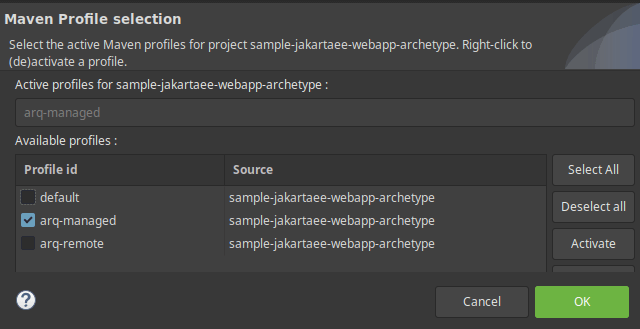
Choose, as in the above picture, the arq-managed profile.
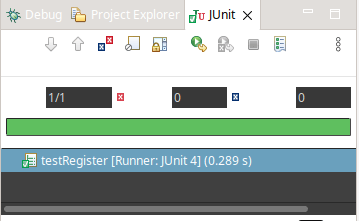
Now, you can simply run your Arquillian Test class by right-clicking on it and choosing Run As | JUnit Test:
Recommended Articles
Eclipse Tutorial: Integrate WildFly 24+ with Eclipse Using JBoss Tools
Learn how to integrate WildFly 24+ with Eclipse using JBoss Tools for seamless application server management.
Enhance Your Web Development with Eclipse and JSF Support - A Comprehensive Guide
Learn how to enable JSF support in Eclipse using the latest Enterprise Java Developer Tools. #Eclipse #JSF #JavaDev #WebDevelopment #CloudNative
How to Run Java Mission Control as Standalone Application or Eclipse Plugin - Updated Guide
Learn how to run Java Mission Control (JMC) as standalone application or Eclipse plugin. Includes updated resources and installation guides.
Create Java Application Using Hibernate ORM, Eclipse, and MySQL Database Tutorial
Learn how to set up and code a Java application using Hibernate ORM, Eclipse, and MySQL in this comprehensive tutorial. #Hibernate #JavaORM #Eclipse #MySQL