Introduction to Maven Daemon (mvnd)
Maven Daemon (mvnd) is a background process that can speed up Maven builds by keeping a daemon process running in the background. This allows Maven to start up faster, as it does not have to initialize the build process from scratch for each build. In this tutorial, we will cover how to install and configure mvnd, as well as how to use it to speed up your Maven builds.
Installing and Configuring Maven Daemon
The GitHup project of Maven Daemon contains the installation instructions: https://github.com/apache/maven-mvnd#how-to-install-mvnd
To install it manually, download the latest ZIP suitable for your platform from https://downloads.apache.org/maven/mvnd/
Once mvnd is installed and configured, you can use it to speed up your Maven builds. To use mvnd, simply run the mvnd command instead of the mvn command when building your project.
For example, to build a Maven project with mvnd, you would run the following command:
mvnd clean installThis will start the mvnd daemon process in the background, and then run the clean and install goals of the Maven build.
By default, mvnd is building your modules in parallel using multiple CPU cores. To check the number of CPUs on your machines, you can use several commands. For example, with lscpu:
lscpu | egrep 'Model name|Socket|Thread|NUMA|CPU\(s\)'
CPU(s):                          12
On-line CPU(s) list:             0-11
Model name:                      Intel(R) Core(TM) i7-10850H CPU @ 2.70GHz
Thread(s) per core:              2
Socket(s):                       1
NUMA node(s):                    1
NUMA node0 CPU(s):               0-11
Benefits of mvnd
One of the key benefits of using mvnd is that it can significantly reduce the time it takes to start up a Maven build. It achieves this by starting a daemon in the background that maintains a cache of the build artifacts and class files, allowing subsequent builds to be faster.
Besides, mvnd is faster than Maven because it is implemented as a native executable built with GraalVM, which allows it to avoid the overhead of starting a new Java Virtual Machine (JVM) for each build.
The speedup achieved by mvnd depends on the size and complexity of the project being built. For small projects with a few modules, mvnd can provide a speedup of 7-10 times or more compared to stock Maven. For larger projects with many modules, mvnd can provide a speedup of 3-5 times or more, due to its ability to build modules in parallel and the optimization provided by the JIT compiler.
Let’s check the performance of mvnd by building a Maven multi-module project which includes a consistent number of sub-projects.
Testing mvnd
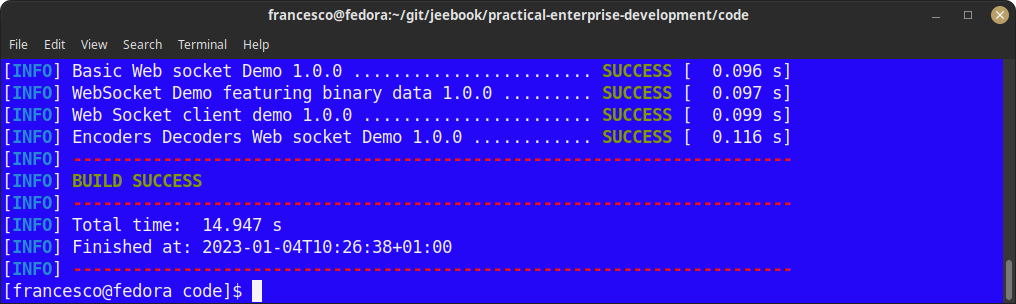
In order to test mvnd, I will run a multi-project build of the Jakarta EE 10 examples from Practical Enterprise Development, which includes 85 Maven projects.
Firstly, let’s check the performance of the standard Maven build:
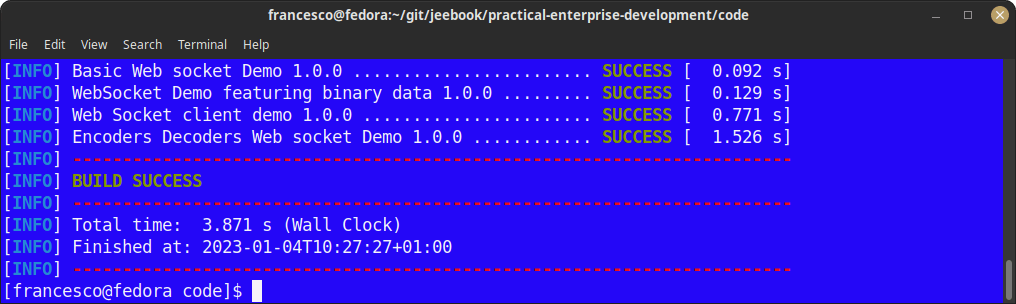
Next, let’s run the build again with mvnd :
Conclusion
For larger projects with many modules, mvnd can provide a speedup of 3-5 times or more, due to its ability to build modules in parallel and the optimization provided by the JIT compiler. Overall, mvnd can save a significant amount of time in the build process, making it a useful tool for developers working with Maven projects
Recommended Articles
Fixing Malformed åçè Encoding Error in Maven Builds
Learn how to fix and prevent 'Malformed \uxxxx encoding' errors in your Maven builds with our comprehensive guide. #Maven #Java #CI/CD #CloudNative
Optimize Java Application Deployment with Maven and WildFly Plugin
Learn how to configure the Maven WildFly plugin for seamless deployment of Java apps. #JavaDev #WildFly #Maven
Create a Powerful Jakarta EE Maven Archetype for Enterprise Applications - Step-by-Step Guide
Master the process of creating a customizable Jakarta EE Maven Archetype to accelerate your development workflow. Learn from our expert guide today!
Speed Up Your Enterprise Java Project Creation with WildFly Maven Archetypes
Learn how to use WildFly Maven archetypes for quick project setup in this tutorial. #WildFly #JavaArchetypes #EnterpriseJava