Spring Boot with JBang: a quick example
JBang is a tool that allows you to run Java applications as easily as scripting languages like Python or Node.js. You don’t need Maven or Gradle setup, just a single .java file with dependency annotations at the top. It’s ideal for:
- Prototyping Java web services
- Teaching Java quickly
- Running demos with zero project setup
- Exploring Spring Boot without boilerplate
Why Use JBang with Spring Boot?
Normally, Spring Boot apps require a pom.xml or build.gradle and a structured project layout. With JBang, you can:
- Write everything in one file
- Add dependencies inline with
//DEPS - Run it directly via the command line
This speeds up early development, sharing examples, and testing new ideas.
🔧 Prerequisites
- Java 17 or later
- JBang installed – Get it from jbang.dev
- Learn more about JBang from this article: JBang: Create Java scripts like a pro
🧪 Use Case: Simple Web Service for Power Calculation
Let’s walk through your single-file Spring Boot app that calculates the square of a number.
📄 MyApp.java (Single-file Spring Boot App)
Here is a single file that that declares JBang dependencies and Java 17 as version:
//usr/bin/env jbang "$0" "$@" ; exit $?
//JAVA 17
//DEPS org.springframework.boot:spring-boot-starter-web:3.4.4

package app;

import org.springframework.boot.SpringApplication;
import org.springframework.boot.autoconfigure.SpringBootApplication;
import org.springframework.web.bind.annotation.*;

@SpringBootApplication
@RestController
public class MyApp {

    public static void main(String[] args) {
        SpringApplication.run(MyApp.class, args);
    }

    @GetMapping("/")
    public String index() {
        return """
        <html>
        <head>
            <title>Power Calculator</title>
            <style>
                body { font-family: sans-serif; margin: 2em; }
                input, button { font-size: 1em; padding: 0.5em; }
                #result { margin-top: 1em; font-weight: bold; }
            </style>
        </head>
        <body>
            <h1>Calculate Power</h1>
            <input type="number" id="value" placeholder="Enter a number" />
            <button onclick="calculate()">Calculate</button>
            <div id="result"></div>
            <script>
                function calculate() {
                    const val = document.getElementById('value').value;
                    fetch('/calc?value=' + val)
                        .then(res => res.text())
                        .then(data => document.getElementById('result').textContent = data)
                        .catch(err => console.error(err));
                }
            </script>
        </body>
        </html>
        """;
    }

    @GetMapping("/calc")
    public String calc(@RequestParam double value) {
        double result = Math.pow(value, 2);
        return "Result: " + result;
    }
}
The application:
- Starts a Spring Boot server
- Serves a small HTML page at
/with a form - Calculates
value²using a REST endpoint at/calc
▶️ Running the App
Save the file as MyApp.java, then run:
jbang MyApp.javaAfter a few seconds, Spring Boot will start on http://localhost:8080.
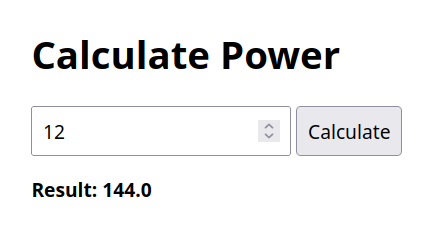
🧠 What This App Does
- When you visit
/, you get a webpage with a number input and button. - When you enter a value and click Calculate, the browser calls
/calc?value=.... - The server responds with the squared value.
✅ When to Use JBang for Spring Boot
- Prototypes: Quickly test a REST endpoint or HTML UI
- Classroom examples: Teach Spring Boot without setup overhead
- Demos and workshops: Share everything in a single Java file
- Scripting with Spring power: Combine the simplicity of scripts with Spring’s capabilities
Conclusion
Using JBang to run a Spring Boot application offers a powerful and streamlined way to prototype, test, or demonstrate Java-based web services—without the need for complex build tools or multi-file projects. This approach is especially useful for developers who want to quickly validate ideas, create shareable demos, or teach Spring concepts in a simplified environment. While it’s not a replacement for full-scale production setups, JBang provides an excellent bridge between simplicity and capability, letting you harness the power of Spring Boot in just a single .java file.
Recommended Articles
Deploying a JPA-Based Spring Boot Application on WildFly 10: A Step-by-Step Guide
Learn how to deploy a Spring Boot application with JPA on WildFly 10, including setup and configuration for a RESTful API.
How to Deploy Spring Boot 4 and 3 Applications on WildFly
Step-by-step guide to deploying Spring Boot 4 and 3 WAR applications on WildFly. Learn pom.xml configuration, SpringBootServletInitializer setup, and log conflict troubleshooting.
Using Spring CXF Descriptors in WildFly 31 for Web Services Development
Learn how to use Spring CXF descriptors with WildFly 31 for building and deploying web services. Discover the benefits of using Spring libraries in a specific module for correct visibility over Spring classes.
Using Spring Retry to Consume REST Services with Java
Learn how to use Spring Retry to automatically retry failed REST service calls and improve application reliability.