How to Run WildFly as a Service
The guide discusses how to configure WildFly as a service on a Linux machine or on a Windows box. We will cover the code settings, common pitfalls, and current best practices for production deployments.
WildFly 41.0.1.Final is the current WildFly 41 maintenance release. Standard WildFly 41 supports Jakarta EE 11 and is recommended for Java SE 25, while Java SE 21 and 17 are also supported. For production systems, use a supported LTS JDK and keep both WildFly and the JDK updated with current security fixes.
Linux: systemd Integration
WildFly 41 includes supported systemd unit files in the bin/systemd directory. This is the preferred approach for running WildFly as a background service on modern Linux distributions such as RHEL, Rocky Linux, AlmaLinux, Fedora, Debian, and Ubuntu.
Firstly, create a dedicated service account. Running WildFly as a non-root user is an important production security practice:
sudo groupadd -r wildfly


sudo useradd -r -g wildfly -d $WILDFLY_HOME -s /sbin/nologin wildfly
sudo chown -R wildfly:wildfly $WILDFLY_HOME
Then, generate the systemd unit file. The WildFly distribution provides the generate_systemd_unit.sh helper for this purpose:
cd $WILDFLY_HOME/bin/systemd


sudo ./generate_systemd_unit.sh standalone wildfly wildfly
The generated files include wildfly-standalone.service and its associated configuration file. If you need to customize the Java installation or additional server options, edit wildfly-standalone.conf before installing the unit:
sudo vi $WILDFLY_HOME/bin/systemd/wildfly-standalone.confFor example, this is a suitable place to define JAVA_HOME when the service must use a specific JDK installation.
Finally, copy the generated service and configuration files to the locations used by systemd and enable the service:
sudo cp $WILDFLY_HOME/bin/systemd/wildfly-standalone.service /etc/systemd/system/


sudo cp $WILDFLY_HOME/bin/systemd/wildfly-standalone.conf /etc/sysconfig/
sudo systemctl daemon-reload
sudo systemctl enable wildfly-standalone
sudo systemctl start wildfly-standalone
Key commands:
sudo systemctl start wildfly-standalone      # Start


sudo systemctl stop wildfly-standalone       # Graceful stop
sudo systemctl restart wildfly-standalone    # Restart
sudo systemctl status wildfly-standalone     # Check status
For production environments, also verify the service logs through journalctl:
sudo journalctl -u wildfly-standalone


sudo journalctl -u wildfly-standalone -f
Production systemd Configuration
The generated unit should be treated as the starting point for your environment rather than as a replacement for proper operational configuration. For example, the [Service] section can include settings such as:
TimeoutStopSec=90


Restart=on-failure
User=wildfly
Group=wildfly
TimeoutStopSec gives WildFly enough time to perform a graceful shutdown before systemd terminates the process. Restart=on-failure can provide basic automatic recovery from unexpected failures. Tune these values according to the workload and your application's shutdown requirements rather than copying them blindly into every production environment.
Pitfall Fixes
- Port conflicts: If ports remain occupied after shutdown, first inspect the WildFly service status and logs. If the server requires more time for graceful shutdown, increase
TimeoutStopSecappropriately. - Silent failures: Use
systemctl statusandjournalctl -u wildfly-standaloneto identify startup and shutdown errors. - Permission errors: Ensure that the dedicated
wildflyaccount owns the WildFly installation and has access to the directories used for configuration, deployments, temporary files, and logs. - Wrong Java version: Verify the JDK used by the service, especially when
JAVA_HOMEdiffers from the Java installation available to your interactive shell.
Windows Service Management
On Windows, WildFly provides the service.bat service scripts under the distribution's docs/contrib/scripts/service directory. Copy the service directory to %WILDFLY_HOME%\bin before installing the service.
Open an elevated Command Prompt and install the service:
cd /D "%WILDFLY_HOME%\bin\service"


service.bat install
Then, here is how you can manage the service on Windows:
service.bat start     # Start


service.bat stop      # Stop
service.bat restart   # Restart
service.bat uninstall # Remove the service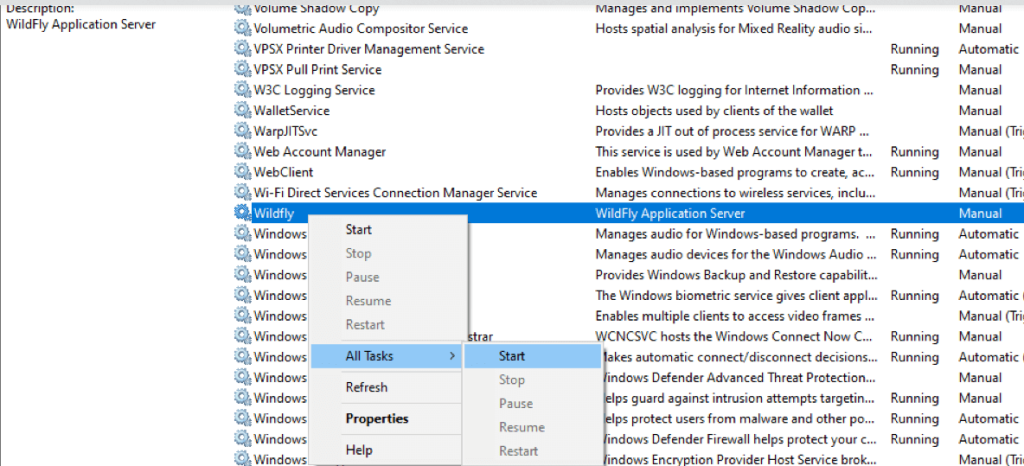
Before installing the Windows service, make sure JAVA_HOME points to a supported JDK and that the command prompt has the permissions required to register a Windows service.
Finally, in Domain mode:
service.bat install /controller=localhost:9990 /host=masterThe management address and host name must match your Domain configuration. If you use a different management port or controller address, adjust the service installation parameters accordingly.
Windows Troubleshooting
- Permission issues: Run the installation command from an elevated Command Prompt.
- Startup failures: Verify
JAVA_HOMEand make sure the selected JDK is supported by your WildFly 41 installation. - Service cannot stop cleanly: Verify that the service can reach the WildFly management interface and that its management address and port match the running configuration.
Standalone vs. Domain Mode
For most single-server deployments, Standalone mode is the simplest choice and the usual starting point for a system service. WildFly also supports Managed Domain deployments, where Host Controllers manage server instances centrally. The WildFly systemd integration provides service support for both standalone and domain configurations.
When running a managed domain as a service, make sure the service configuration reflects the role of the host and the location of the Domain Controller. Avoid exposing the management interface publicly; management traffic should normally be restricted to trusted administrative networks.
Key Improvements vs. Legacy Methods
| Feature | Legacy Approach | WildFly 41 |
|---|---|---|
| Linux Init | Custom init.d scripts | Supported systemd units and generator |
| Windows Service | Legacy custom service wrappers | WildFly service scripts |
| Graceful Shutdown | Manual CLI calls | Managed through the service lifecycle and configurable systemd stop timeout |
| Permission Handling | Manual service-user configuration | Dedicated service account with systemd User/Group directives |
| Observability | Manual process and log inspection | systemd status and journald integration on Linux |
Best Practices for Production
- Use a dedicated service account: Do not run WildFly as
rootor a Windows administrator account during normal operation. - Use a supported JDK: WildFly 41 recommends Java SE 25 for standard WildFly. Java SE 21 and 17 are also supported, but users on older JDKs should plan their migration to a current LTS release.
- Keep WildFly patched: Use the latest WildFly 41 maintenance release available for your environment. Maintenance releases can include important security fixes and component upgrades.
- Protect the management interface: Restrict access to the WildFly management interfaces and avoid exposing management ports such as
9990directly to the public Internet. - Configure logging deliberately: Use journald where appropriate on Linux and monitor
standalone/log/for application and server logs. Production deployments should also centralize logs when required by the organization's observability platform. - Enable controlled recovery:
Restart=on-failurecan improve availability, but automatic restart should be combined with monitoring and alerting so that repeated crashes are investigated rather than hidden. - Test graceful shutdown: Validate shutdown and restart behavior under realistic application load, including active HTTP requests, transactions, messaging, and clustered workloads where applicable.
WildFly 41, Containers, Kubernetes and OpenShift
Running WildFly as a traditional operating-system service is still appropriate for virtual machines and dedicated Linux or Windows servers. For cloud-native deployments, however, WildFly is also designed to run in containers and can be deployed on Kubernetes or OpenShift.
In a Kubernetes or OpenShift environment, the container runtime and the orchestration platform provide the process lifecycle instead of systemd. In that model, avoid installing systemd inside the container simply to reproduce a traditional VM-based deployment. Use container health checks, resource limits, centralized logging, and platform-native restart and rollout mechanisms instead.
WildFly 41 also includes cloud-oriented improvements such as support for cloud-optimized bootable JAR packaging through the WildFly Maven Plugin and the WildFly Cloud Galleon Pack. This can be preferable to maintaining a full application-server installation when building immutable container images.
Security and Reliability Considerations
A service configuration is only one part of a production-ready WildFly deployment. The operating-system account, Java runtime, management interface, network exposure, logging, monitoring, backups, and deployment process all contribute to the overall security and reliability of the application server.
WildFly 41 also deprecates the Undertow AJP listener because of security and protocol limitations. New deployments should prefer HTTP proxying with appropriate TLS and authentication rather than introducing a new dependency on AJP.
⚠️ Critical Note: Always test restarts under load. WildFly's graceful shutdown facilities are designed to allow active work to complete, but the correct timeout and recovery settings depend on the applications and infrastructure running on the server.
Frequently Asked Questions
What is the recommended way to run WildFly 41 as a service on Linux?
Use the supported systemd integration shipped in $WILDFLY_HOME/bin/systemd. Generate the unit with generate_systemd_unit.sh, configure the associated environment file, install the unit, and manage it with systemctl.
Can WildFly 41 run as a Windows service?
Yes. The WildFly distribution includes the Windows service scripts under docs/contrib/scripts/service. Copy the service directory to bin, run service.bat install from an elevated Command Prompt, and manage the resulting service through Windows or the supplied script.
Should I use systemd when running WildFly on Kubernetes or OpenShift?
No. For containerized deployments, let Kubernetes or OpenShift manage the WildFly process lifecycle. Use the platform's restart, health-check, resource-management, logging, and rollout capabilities instead of adding systemd inside the container.
Recommended Articles
Install WildFly Application Server on Linux and Windows with JDK Support
Learn how to install WildFly application server on Linux and Windows. Includes JDK support and environment variables setup.
WildFly Cheatsheet for Linux Administrators
A practical WildFly / JBoss cheatsheet for Linux administrators: CLI, domain mode, JVM tuning, clustering, systemd, containers, logs, networking and backup commands.
Tomcat to WildFly Migration: Common Libraries and Configuration Pitfalls
Learn about common pitfalls in migrating Tomcat applications to WildFly/WildEAP, including library placement. #Java #WildFly #JBossEAP
Install Latest WildFly Application Server on Linux with JDK 17 Support
Learn how to install the latest WildFly application server on a Linux machine. Includes JDK installation options and instructions for RHEL/Fedora and Ubuntu.