Using YAML to manage WildFly deployments
This article will teach you how to use a YAML configuration to manage your WildFly deployments tasks. This will help you to include in a YAML idempotent configuration also applications.
YAML deployment made simple
Firstly, if you are new to configuring WildFly with YAML, we recommend taking a look at this article: How to configure WildFly with YAML files
Therefore, you should be aware that you can boot WildFly with a YAML configuration with the -y ( or --yaml) option as you can see from the helper command line:
--yaml=[<paths>], -y=[<paths>]      The yaml configuration files for
                                        customizing the configuration. Paths
                                        can be absolute, relative to the
                                        current execution directory or relative
                                        to the standalone configuration
                                        directory.
In WildFly 33 you can include deployments as part of your YAML configuration. Let’s see an example:
wildfly-configuration:
    deployment:
        app1.war:
            content:
                -
                    path: app1.war
                    relative-to: jboss.server.base.dir
                    archive: true
            enabled: true
        app2.war:
            content:
                -
                    path: app2.war
                    relative-to: jboss.server.base.dir
                    archive: true
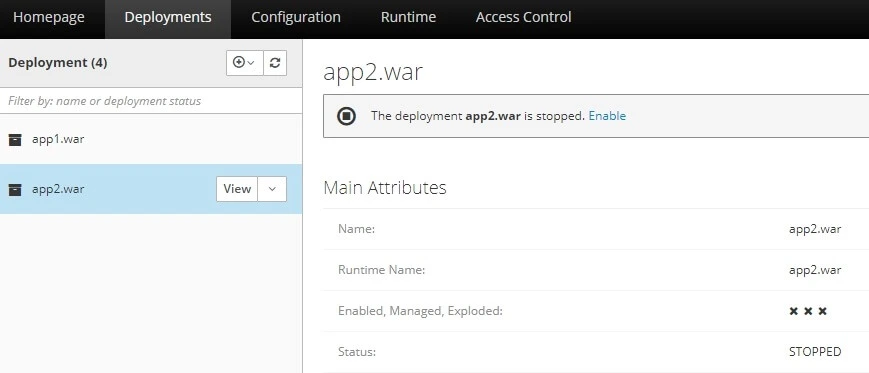
The above configuration will include into the configuration two deployments: app1.war and app2.war. The first deployment (app1.war) is enabled, the second one (app2.war) it’s not.
To run the above configuration, you need to place the two deployments in the jboss.server.base.dir
Then, start WildFly as follows (assuming the YAML file is deploy.yml):
./standalone.sh -y deploy.ymlFrom the Console logs you should see that the application app1.war has been deployed. The app2.war is in the deployment stage but it’s not available:
Conclusion
By following this tutorial, you’ve learned how to configure a WildFly application using YAML files. While WildFly natively uses XML, integrating YAML provides a more readable and flexible way to manage configuration, especially for developers familiar with YAML. This approach is particularly useful in modern cloud-based environments where configuration management often utilizes YAML.
Recommended Articles
Manage Exploded Deployments in WildFly for Efficient Java Enterprise Applications
Learn how to configure and explode deployments in WildFly for efficient Java enterprise applications. Discover the benefits of exploded deployments and get step-by-step guides on configuring and exploding your WildFly deployment.
Deploy Applications Remotely Using WildFly 26 - A Comprehensive Guide
Learn how to deploy applications remotely using WildFly 26, including setup and command line methods.
Add Web Fragment to WildFly Applications for Centralized Configuration
Learn how to create and deploy web fragments in WildFly to centralize application configuration, using deployment overlays.
Deploy Applications to WildFly Using File System Method - An Overview
Learn how to deploy applications using WildFly's file system method in standalone mode. #WildFly #Java #Deployment #CloudNative