HashiCorp Vault Elytron Integration - Step-by-Step Guide
Hardcoding passwords and secrets in your application server configuration is a fast track to a security breach. If you are deploying enterprise Java applications today, externalizing secrets is no longer optional—it is a mandatory architectural baseline.
With the release of WildFly 40 Beta, the ecosystem introduces a streamlined way to decouple secrets from your server configuration using a dedicated feature pack. By combining the robustness of HashiCorp Vault's Key/Value engine with the security framework of Elytron, we can build a clean, centralized, and highly secure credential management pipeline.
Let's dive directly into provisioning and configuring the WildFly HashiCorp Vault Elytron integration.
1. Prerequisites and Baseline Setup
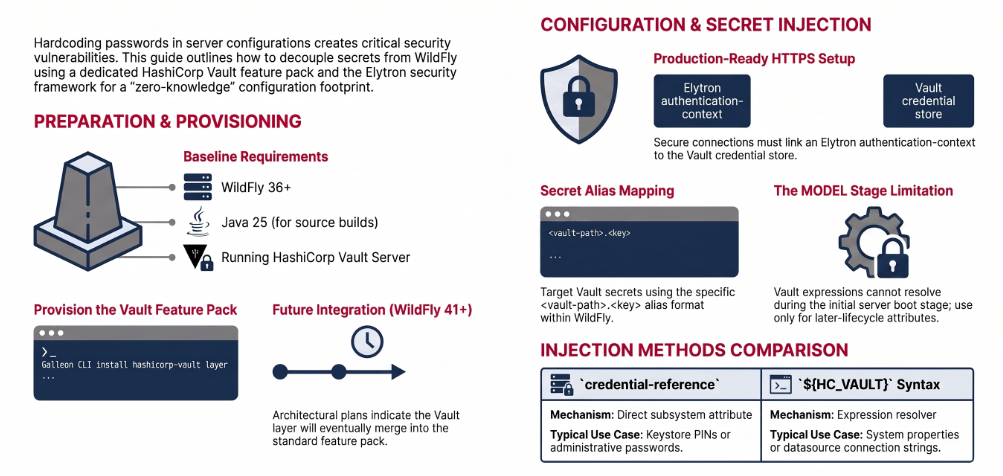
Before touching the server configuration, ensure your environment meets the strict baseline requirements for the Vault feature pack:
- WildFly Server: Version 36.0.1.Final or later (this guide targets WildFly 40 Beta).
- Java Environment: Java 25 is required if you are building the feature pack from source.
- Build Tools: Maven 3.6+.
- Secrets Backend: A running HashiCorp Vault server.
- Testing (Optional): If you are running local tests on Linux, you can use a Podman daemon in the background instead of Docker by configuring your
DOCKER_HOSTenvironment variable.
2. The Architectural Flow
When a WildFly application or subsystem requests a secret (e.g., a database password or keystore PIN), it doesn't read a plaintext string. Instead, the expression resolver or credential store intercepts the request, maps it via Elytron to the hashicorp-vault subsystem, and retrieves the payload from the Vault KV store using a defined alias.
+-----------------------+      +---------------------------+      +-------------------------+
|  WildFly Subsystem    |      |    Elytron Security       |      |   HashiCorp Vault       |
|  (e.g., Datasources)  | ---> |  (hashicorp-vault layer)  | ---> |   (KV Secrets Engine)   |
|  ${HC_VAULT::...}     |      |  Authenticates via TLS    |      |   secret/myapp.pwd      |
+-----------------------+      +---------------------------+      +-------------------------+
3. Provisioning the Vault Feature Pack
In WildFly 40 Beta, the HashiCorp Vault integration is deployed as a standalone Galleon feature pack. You cannot use this integration out-of-the-box without provisioning the hashicorp-vault layer.
Using the Galleon CLI, install the layer on top of your existing WildFly base installation. Replace the variables with your specific versions:
# Provision the hashicorp-vault layer over WildFly 40 Beta
galleon.sh install org.wildfly.security.vault:wildfly-vault-feature-pack:${vault.pack.version} \
  --layers=hashicorp-vault \
  --dir=wildfly
Note: In the upcoming WildFly 41 release, architectural plans indicate this layer will likely be merged directly into the standard wildfly-ee feature pack, simplifying this step.
4. Configuring the HashiCorp Vault Subsystem
Once provisioned, start your server and launch the jboss-cli.sh management console. We need to register the Vault instance as a credential store within the new subsystem.
Option A: Standard HTTP Setup
For a local or internal non-TLS setup, mapping the store is straightforward:
/subsystem=hashicorp-vault/credential-store=my-vault:add( \
    host-address="http://localhost:8200", \
    credential-reference={clear-text="my-vault-token"} \
)
Option B: Production-Ready HTTPS with Elytron
For production, you must use HTTPS. Crucially, TLS trust and client authentication are not configured directly on the Vault credential store attribute. Instead, you must first define an authentication-context inside the Elytron subsystem, and then link it to the Vault store.
# 1. Create the Elytron TLS client rules (assumes trust-managers/ssl-contexts are already configured)
/subsystem=elytron/authentication-context=vault_ac:add(match-rules=[{ssl-context=hcVaultSSC, match-host="${vault_host}"}])

# 2. Add the Vault store linking to the Elytron authentication context
/subsystem=hashicorp-vault/credential-store=secure-vault:add( \
    host-address="https://vault.example.com:8200", \
    authentication-context=vault_ac, \
    credential-reference={clear-text="vault-token"} \
)
(If you are using HashiCorp Vault Enterprise, you can also append a namespace attribute here).
5. Resolving Secrets in WildFly
Vault structures secrets using paths and keys (e.g., the database_password key located under the secret/myapp path). In WildFly, you target these secrets using aliases in the exact format: <vault-path>.<key>.
You have two primary mechanisms for injecting these credentials into your server configuration.
Method 1: Using credential-reference
Any WildFly attribute that supports a credential-reference can seamlessly point to Vault. Instead of supplying a clear-text token, define the store name and the Vault alias.
# Securing an Elytron Keystore with a Vault-backed password
/subsystem=elytron/key-store=exampleKS:add( \
    credential-reference={store="my-vault", alias="secret/myapp.keystore_password"}, \
    path="standalone/configuration/example.keystore", \
    type="JKS" \
)
Method 2: Using ${HC_VAULT} Expressions
For attributes that accept expression resolution (such as system properties or datasource passwords), WildFly provides a custom expression syntax: ${HC_VAULT::storeName:alias}.
# Exposing a secret as a system property using the expression resolver
/system-property=my.app.password:add(value="${HC_VAULT::my-vault:secret/myapp.database_password}")
6. Edge Cases & Architectural Pitfalls
When architecting this integration, keep these caveats in mind to avoid runtime failures:
- MODEL Stage Limitations: The
${HC_VAULT::...}expression resolution relies on the credential store service being actively available. Therefore, it is not supported during the initial MODEL stage of server boot. Only use this syntax for attributes that resolve expressions at a later lifecycle stage. - Order of Operations: If you are configuring TLS via Elytron, you must create the Elytron TLS client resources (like the
authentication-context) before attempting to add the secure credential store in thehashicorp-vaultsubsystem.
Conclusion
By leveraging the wildfly-vault-feature-pack alongside Elytron, Java engineers can achieve a zero-knowledge configuration footprint. The days of shipping keystore passwords in standalone.xml are gone. By moving your secrets to HashiCorp Vault and referencing them dynamically via aliases and custom expressions, you drastically reduce your attack surface while standardizing your infrastructure's security posture.
Frequently Asked Questions (FAQ)
Can I configure WildFly to authenticate to HashiCorp Vault using TLS? Yes. However, the TLS configuration (such as trust stores and SSL contexts) is managed entirely within the elytron subsystem. You create an authentication-context in Elytron and map it to your Vault credential store configuration using the authentication-context attribute.
Do I need a custom feature pack to use Vault with WildFly? Currently, yes. For WildFly 40 Beta and earlier, you must install the org.wildfly.security.vault:wildfly-vault-feature-pack using Galleon. However, the core team plans to include the hashicorp-vault subsystem layer directly into the standard wildfly-ee feature pack starting with WildFly 41.
Why are my ${HC_VAULT} expressions failing to resolve during server startup? The Vault expression resolver cannot resolve values during the server's MODEL stage because the underlying credential store service is not yet fully initialized. You must ensure you are only using Vault expressions for attributes that are resolved during later lifecycle stages.
Does this integration support Vault Enterprise namespaces? Yes. If you are utilizing Vault Enterprise, the credential-store resource in WildFly fully supports specifying an optional namespace attribute for segmented multi-tenant Vault environments.
Recommended Articles
Create a Custom Elytron Realm in WildFly 31: A Step-by-Step Guide
Learn how to create a custom realm in Elytron, a modern replacement for legacy Login Modules, with this comprehensive tutorial. Get started with creating a custom realm using WildFly 31 and configuring it to store user credentials.
Optimize WildFly Authentication Performance with Elytron Caching Realms
Boost your WildFly applications' performance by configuring an Elytron caching realm to cache user credentials from a security realm like LDAP.
PicketBox Security Framework Overview and Migration to Elytron - WildFly
Learn about PicketBox security framework, its deprecation in newer WildFly versions, and how to migrate to the recommended Elytron. #WildFly #JavaSecurity #Elytron
Mastering Common Elytron Commands in Modern WildFly Releases
Discover essential Elytron commands for modern WildFly, including Credential Stores, Key Stores, Trust Stores, SSL/TLS, and more. #WildFly #JavaSecurity #Elytron