How to use OpenShift Templates: The CakePhp example
In this tutorial we will learn how to use Templates on OpenShift, taking as example a simple application which uses the CakePHP framework. This framework consists of a MySQL and PHP set of Images that will deploy a basic Web application.
Step 1: Download the GitHub repository
Firstly, you need a GitHub repository which includes a PHP application. The repository will be used as Source to build the Container image of the CakePHP application.
Head to this repository which contains both OpenShift templates and a sample PHP application: https://github.com/sclorg/cakephp-ex
Fork a copy of the repository locally, so that you can modify the Web application. ( We will cover this point in the second part of this tutorial). For example, in my case, this is the clone of the repository I’m using:
git clone https://github.com/fmarchioni/cakephp-ex.gitThen, before creating resources, make sure you create a namespace for your example:
oc new-project php-demoGreat! now let’s start creating resources.
Step 2: Create an OpenShift application
Firstly, we will deploy the CakePHP-MySQL Template in the current namespace. You can do that with the following command:
$ oc create -f openshift/templates/cakephp-mysql.json
template.template.openshift.io/cakephp-mysql-example created
If you check the above JSON file, you will see that it includes several parameters. One of them is the GitHub Repository of the PHP application:
$ oc describe template cakephp-mysql-example
. . . .
    Name:		SOURCE_REPOSITORY_URL
    Display Name:	Git Repository URL
    Description:	The URL of the repository with your application source code.
    Required:		true
    Value:		https://github.com/sclorg/cakephp-ex.git
As you can see, if we don’t set it, the default Repository will be used instead. To learn how to manage Template parameters, we will create a new application which sets our own Fork Repository.
Create a new OpenShift application as follows:
$ oc new-app --template=cakephp-mysql-example -p SOURCE_REPOSITORY_URL=https://github.com/fmarchioni/cakephp-exThen, wait until all Pods are available. Finally, check the Route to test our application:
$ oc get route
NAME                    HOST/PORT                                         PATH   SERVICES                PORT    TERMINATION   WILDCARD
cakephp-mysql-example   cakephp-mysql-example-php-demo.apps-crc.testing          cakephp-mysql-example
Verify that the application is available at that Route address:
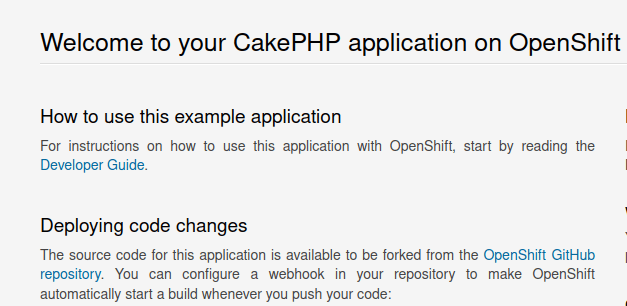
Finally, to clean up the resources from this example you can run the following commands:
# delete all application resources
oc delete all --all

# delete the opaque secret
oc delete secret cakephp-example

# delete the openshift template
oc delete template cakephp-mysql-examp
How to customize the CakePHP Template
In order to modify the OpenShift template of our application we need to edit the file cakephp-mysql.json which contains the Resources for our CakePHP application.
For example, we will add another Template parameter “WELCOME” that our application will use:
{
       "name": "WELCOME",
       "displayName": "Welcome message",
       "description": "The welcome message.",
       "value": "Hello there"
}
Then, we need to provide the above parameter to the DeploymentConfig of the application. Search for the cakephp-mysql-example DeploymentConfig and include the WELCOME environment variable in it:
"spec": {
            "containers": [
              {
                "name": "cakephp-mysql-example",
                "image": " ",
                "ports": [
                  {
                    "containerPort": 8080
                  }
                ],
. . . . .
                },
                "env": [
                 {
                    "name": "WELCOME",
                    "value": "${WELCOME}"
                  },
If you have deleted your Template at the end of the first example, make sure you are creating it again:
oc create -f openshift/templates/cakephp-mysql.jsonThen, our PHP application must be able to read the above Parameter as Environment variable. For example, edit the src/Template/Layout/default.ctp and replace the static H1 Header with the following one:
<hgroup>
           <h1><?=  getenv("WELCOME") ?>  </h1>
</hgroup>
Commit the above change in your GitHub Fork before creating again your application.
Finally, re-create your application including the additional Template parameter “WELCOME”:
oc new-app --template=cakephp-mysql-example -p SOURCE_REPOSITORY_URL=https://github.com/fmarchioni/cakephp-ex -p WELCOME=BuongiornoAs you can see from the new CakePHP Home page, the WELCOME parameter displays in the Header:
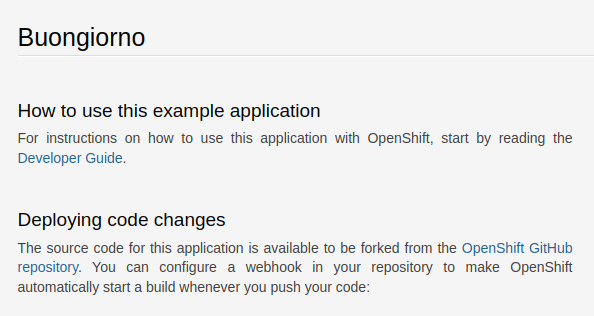
Conclusion
In this tutorial, we have explored how to use OpenShift templates, with a specific focus on the CakePHP template as an example. OpenShift templates provide a powerful and efficient way to define, manage, and deploy complex applications within an OpenShift cluster. By following the steps outlined in this tutorial, you should now have a solid understanding of the key concepts and processes involved in using OpenShift templates with CakePHP or similar applications.
Recommended Articles
Build and Deploy a Jakarta EE Application on OpenShift: A Step-by-Step Guide
Learn how to deploy a Jakarta EE application on OpenShift, including installing Code Ready Containers and setting up the environment.
Deploying Custom Docker Images in OpenShift using Source-to-Image (S2I) - A Step-by-Step Guide
Learn how to build and deploy custom Docker images on OpenShift using S2I. This tutorial covers the process of loading a Docker image from Docker Hub, creating a new Docker image with S2I, and deploying it to OpenShift.
Deploying Enterprise Applications on Openshift using Binary Builds
Learn how to deploy Java EE applications on OpenShift using a binary build, leveraging WildFly 13.0.0.Final. Get started with this step-by-step guide.
Deploying a Java EE Application on WildFly with OpenShift Container Platform
Learn how to deploy a Java EE application on WildFly using OpenShift Container Platform, including creating a project and customizing the database.