What is OpenShift Virtualization?
In this article, we will examine OpenShift Virtualization, the Red Hat OpenShift feature that runs traditional Virtual Machines alongside containers on the same Kubernetes cluster. We will cover its architecture, its core components and the requirements to install it.
Why OpenShift Virtualization?
Not every workload can become a stateless microservice. Monolithic applications, custom kernel requirements and non-Linux guests such as Microsoft Windows still need a Virtual Machine.
As a result, many teams run two separate platforms: a traditional hypervisor for VMs and a Kubernetes cluster for containers. OpenShift Virtualization removes that split by making VMs first-class Kubernetes objects.
In practice, this means you can:
- Manage containers and VMs from the same web console and the same CLI tools:
ocandvirtctl. - Keep legacy VMs running while new containerized services share the same network and hardware.
- Apply the same GitOps workflows, CI/CD pipelines, user workload monitoring and RBAC rules to both kinds of workload.
- Drop the licensing and maintenance cost of a separate hypervisor platform.
Architecture of OpenShift Virtualization
OpenShift Virtualization does not ship a new hypervisor. Instead, it runs proven Linux virtualization tools inside containers and drives them with Kubernetes primitives.
KubeVirt: the upstream project
OpenShift Virtualization is built on KubeVirt, a CNCF incubation project started by Red Hat. KubeVirt extends Kubernetes with Custom Resource Definitions (CRDs) and controllers that orchestrate Virtual Machines.
The hypervisor layer
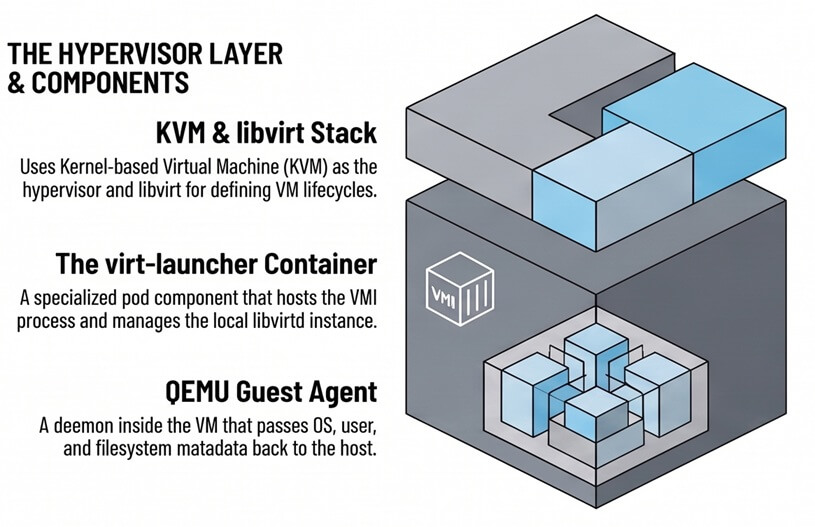
The virtualization stack relies on the following standard components:
- KVM (Kernel-based Virtual Machine): the Linux kernel module that acts as the hypervisor.
- libvirt: the API and library that manages the VM lifecycle.
- QEMU: performs system emulation and works with KVM for hardware acceleration.
- QEMU Guest Agent: a daemon inside the guest OS. It reports runtime data such as user sessions, file systems and secondary network IPs back to the host.
Core components
When you install OpenShift Virtualization, a set of operators and control plane components manages the whole stack:
| Component | Role |
|---|---|
| HyperConverged Operator (HCO) | Top-level operator. It deploys, configures and monitors all the virtualization sub-operators. |
virt-operator |
Manages the compute plane and the core KubeVirt components. |
virt-api |
HTTP REST entry point for virtualization workflows. It handles defaulting, validation and updates of VM-related CRDs. |
virt-controller |
Cluster-level component. It watches VM objects and manages the lifecycle of the Pods that host them. |
virt-handler |
DaemonSet running on every worker node. It tracks node-level VM changes and executes low-level host operations. |
virt-launcher |
Primary container in each VM's Pod. It runs an isolated libvirtd, sets up cgroups and namespaces, and starts the KVM/QEMU process. |
| Containerized Data Importer (CDI) | Provisions storage, uploads disk images and populates Persistent Volume Claims (PVCs) with OS images. |
| Cluster Network Addons Operator (CNAO) | Deploys extra networking such as Multus CNI and Linux bridges, so VMs can attach to secondary physical networks. |
| Scheduling, Scale, and Performance (SSP) Operator | Manages VM templates, common boot sources and performance plugins. |
How a VM request flows through the cluster
Putting the components together, this is the path from a VM definition to a running guest:
- You submit the VM through the OpenShift web console or the CLI.
virt-apivalidates the request and stores the VM object through the Kubernetes API Server.virt-controllerdetects the change and creates avirt-launcherPod on a worker node.- On that node,
virt-handlerdrives thelibvirtdinstance inside thevirt-launcherPod. libvirtdstarts the KVM/QEMU process, which is the actual Virtual Machine.
VirtualMachine vs VirtualMachineInstance
A VM in OpenShift has two objects, much like a Deployment manages a Pod:
VirtualMachine(VM): the declarative configuration. It defines the template, CPU, memory, storage and network settings, whether the VM is stopped or running.VirtualMachineInstance(VMI): the running instance. When you power on a VM, OpenShift creates a VMI and a dedicatedvirt-launcherPod.
Note that stopping the VM deletes the VMI and its Pod. The VirtualMachine definition and its persistent storage remain intact.
Installation requirements
Before installing OpenShift Virtualization, make sure that your cluster meets the following platform, hardware and storage requirements.
Supported platforms
Worker nodes must run Red Hat Enterprise Linux CoreOS (RHCOS). You can install OpenShift Virtualization on:
- On-premise bare-metal servers.
- Bare-metal cloud instances, such as AWS bare-metal or IBM Cloud bare-metal.
- IBM Z or IBM LinuxONE systems running in a logical partition (LPAR).
- Managed and packaged offerings: ROSA (Red Hat OpenShift Service on AWS), OKE (OpenShift Kubernetes Engine) and OVE (OpenShift Virtualization Engine).
- Single-Node OpenShift (SNO) clusters.
Note that Single-Node OpenShift does not support Live Migration, High Availability or Pod Disruption Budgets.
Hardware and CPU
KVM relies on hardware virtualization extensions, so compute nodes must meet these CPU requirements:
- CPUs supported by Red Hat Enterprise Linux 9 or later (Intel 64 or AMD64).
- Intel VT or AMD-V extensions enabled in the BIOS/UEFI.
- The No-Execute (NX) CPU flag enabled in the BIOS.
- Enough CPU and RAM on the worker nodes to exceed the combined requirements of all scheduled VMs.
Storage
- A default cluster StorageClass is required. Alternatively, mark a dedicated StorageClass with
storageclass.kubevirt.io/is-default-virt-class=true. - Live Migration moves a running VM between nodes without downtime. It requires VM disks on shared storage with the ReadWriteMany (RWX) access mode.
- If you run Windows VMs on Red Hat OpenShift Data Foundation (ODF), create a dedicated StorageClass tuned for Windows block storage.
For a refresher on StorageClasses, PVCs and access modes, see Configuring Persistent Storage on OpenShift.
Operator deployment
The Operator Lifecycle Manager (OLM) must be active on the cluster, including restricted or disconnected environments. You install the OpenShift Virtualization Operator from OperatorHub into the recommended openshift-cnv namespace.
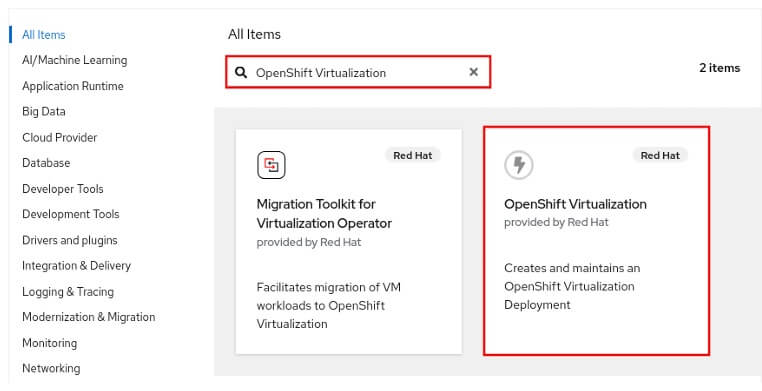
Once the Operator is installed, create a HyperConverged custom resource. This resource instantiates the full virtualization stack.
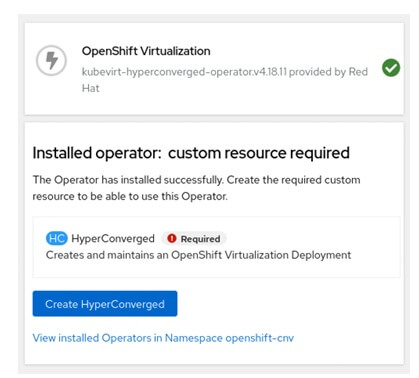
Example of HyperConverged Resource
apiVersion: hco.kubevirt.io/v1beta1
kind: HyperConverged
metadata:
  name: kubevirt-hyperconverged
  namespace: openshift-cnv
spec: {}
For the day-to-day oc commands you will use to inspect these resources, keep our OpenShift cheatsheet at hand.
Conclusion
OpenShift Virtualization runs KVM inside Kubernetes Pods. As a result, you manage VMs with the same declarative workflows, StorageClasses and network models you already use for containers. This lets you keep existing VM workloads running today and containerize them at your own pace.
For further details, check the official Red Hat OpenShift Virtualization documentation.
Recommended Articles
Create and Manage Virtual Machines on OpenShift Virtualization
Learn how to create and manage Virtual Machines on OpenShift Virtualization using templates and instance types. #OpenShiftVirtualization #KubeVirt #Virtualization #Java #Middleware #CloudNative
OpenShift vs Kubernetes: A Comprehensive Comparison for Enterprise Java Development
A deep dive into OpenShift and Kubernetes, ideal for enterprise Java developers. Learn how they compare and which one suits your needs.
Deploy WildFly Application on OpenShift Using Helm Charts - Simplified Kubernetes Management
Simplify your WildFly deployment with Helm Charts. Learn how to deploy a WildFly application on OpenShift using Helm. #WildFly #Kubernetes #HelmCharts
Deploying Enterprise Applications on Openshift using Binary Builds
Learn how to deploy Java EE applications on OpenShift using a binary build, leveraging WildFly 13.0.0.Final. Get started with this step-by-step guide.