How to assert Exceptions in JUnit
Verifying that invalid inputs or system errors throw expected exceptions is critical for building resilient Java applications. JUnit 5 replaces legacy JUnit 4 @Test(expected = ...) annotations with the functional assertThrows() method from org.junit.jupiter.api.Assertions. In this guide, you will learn how to assert thrown exceptions, inspect exception messages, and group exception tests using assertAll().
In order to assert that your JUnit 5 Test throws an Exception, you can rely on the following assertions:
- The assertThrows() method of the Assertions class
- The assertAll() method of the Assertions class with the assertThrows() method
Let’s see with a complete examples all options.
Setting up our Test
Firstly, let’s define a simple Java Class which can potentially throw some Exceptions:
public class Calculator {
    public int divide(int dividend, int divisor) {
        if (divisor == 0) {
            throw new IllegalArgumentException("Divisor cannot be zero");
        }
        return dividend / divisor;
    }

    public int square(int number) {
        if (number < 0) {
            throw new IllegalArgumentException("Number cannot be negative");
        }
        return number * number;
    }
}
Next, let’s add the following Test Class to assert Exception on Tests:
class CalculatorTest {
    private final Calculator calculator = new Calculator();

    @Test
    void testDivideByZero() {
        assertThrows(IllegalArgumentException.class,
                () -> calculator.divide(1, 0));
    }

    @Test
    void testSquareWithNegativeNumber() {
        assertThrows(IllegalArgumentException.class,
                () -> calculator.square(-1));
    }

    @Test
    void testBothMethods() {
        assertAll("exception tests",
                () -> assertThrows(IllegalArgumentException.class,
                        () -> calculator.divide(1, 0)),
                () -> assertThrows(IllegalArgumentException.class,
                        () -> calculator.square(-1))
        );
    }
}
The assertAll() method of the Assertions class allows you to group multiple assertion invocations and to report all failures in one go.
This can be useful when you want to test multiple exception scenarios in one test method.
The assertThrows() method works well in conjunction with other assertion methods to perform additional checks on the exception object, such as asserting the exception message or the cause.
It’s important to note that regardless of the method you choose, JUnit will only consider the test as successful if the exception specified is thrown and if it’s not thrown the test will fail.
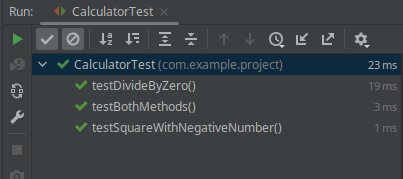
Run the JUnit Test from the IDE from the command line and verify that all assertions are ok:
JUnit 4 Expected Exceptions
If you are using JUnit4 to assert Exceptions, then you have to use the expected attribute of the JUnit 4 @Test annotation. For example:
@Test(expected = Exception.class)
public void test() throws Exception {
    Foo foo = new Foo();
    foo.foo();
}
Conclusion
In this article we have discussed how to assert Exceptions using JUnit Jupiter and JUnit 4 framework with a simple Test example
Source code: https://github.com/fmarchioni/mastertheboss/tree/master/test/junit5-assert-exception
Inspecting Exception Messages and Causes
One major advantage of JUnit 5's assertThrows over legacy JUnit 4 is that it returns the caught exception instance. This allows performing further assertions on the message, cause, or suppressed exceptions:
@Test
void testExceptionDetails() {
    IllegalArgumentException exception = assertThrows(
        IllegalArgumentException.class,
        () -> calculator.divide(10, 0)
    );

    // Validate exact exception message
    assertEquals("Divisor cannot be zero", exception.getMessage());
}
Recommended Articles
How to Assert No Exception Thrown in Java with JUnit 4 and JUnit 5
Learn how to assert no exception thrown in Java tests using JUnit 4 and JUnit 5. #Java #JUnit #Testing #CloudNative
Mastering Mockito for Java Applications: Plugging into JUnit and Quarkus Tests
Learn how to integrate Mockito in JUnit and Quarkus tests for effective unit testing. #Mockito #JavaTesting #JUnit #Quarkus
Unlock JUnit 5 Test Execution in Maven Projects - A Comprehensive Guide
Ensure your JUnit 5 tests run smoothly with this comprehensive guide to resolving common issues.
Maximize Test Efficiency with JUnit AssertTimeout: A Comprehensive Guide
Learn how to implement timeout assertions in JUnit tests to ensure timely test execution and prevent lengthy tests from running indefinitely.