Testing JPA with TestContainers
Testing Jakarta Persistence (JPA) repositories against in-memory H2 databases often conceals dialect-specific SQL errors and transaction behavior present in real production databases. Testcontainers addresses this by spinning up real, disposable MySQL or PostgreSQL containers inside your JUnit 5 integration tests. In this practical tutorial, you will learn how to configure Testcontainers with JPA, Hibernate, and `persistence.xml` for realistic persistence layer testing.
TestContainer and Databases
Firstly, if you are new to TestContainers, we recommend checking this article for a quick overview of it: Getting Started with Testcontainers for Java
Testcontainers enables you to test against real instances of databases (MySQL, PostgreSQL, MongoDB, etc.) or other services (Kafka, Redis, Elasticsearch) rather than using in-memory or mocked versions. This ensures more accurate and realistic testing scenarios.
In order to test an application with TestContainer, make sure you have the Docker service up and running:
service docker startThen, let’s see which are the key dependencies you need to add in a TestContainer application which run Tests against a database:
<!-- MySQL JDBC Driver -->
<dependency>
          <groupId>com.mysql</groupId>
          <artifactId>mysql-connector-j</artifactId>
          <version>8.1.0</version>
          <scope>runtime</scope>
</dependency>
<!-- TestContainer core API -->
<dependency>
          <groupId>org.testcontainers</groupId>
          <artifactId>testcontainers</artifactId>
          <scope>test</scope>
</dependency>
<!-- MySQL TestContainer -->
<dependency>
          <groupId>org.testcontainers</groupId>
          <artifactId>mysql</artifactId>
          <scope>test</scope>
</dependency>
As you can see, the key dependencies are:
- The JDBC Driver which you need for the JPA
- The core TestContainer dependency
- Then, the TestContainer dependency for the Database you are going to Test
Finally, it’s a good idea to provide a BOM for TestContainers in order to avoid setting the individual dependencies in it:
<dependencyManagement>
        <dependencies>
            <dependency>
                <groupId>org.testcontainers</groupId>
                <artifactId>testcontainers-bom</artifactId>
                <version>1.20.0</version>
                <type>pom</type>
                <scope>import</scope>
            </dependency>
        </dependencies>
 </dependencyManagement>
Coding the Test Class
Then, let’s code the real TestContainer Test Class:
@Testcontainers
@TestInstance(TestInstance.Lifecycle.PER_CLASS)
public class TestContainerJPA {

  private EntityManagerFactory emf;

  @Container
  private static final MySQLContainer MYSQL_CONTAINER = (MySQLContainer) new MySQLContainer()
          .withDatabaseName("testdb")
          .withUsername("root")
          .withPassword("password")
          .withReuse(true);

  @BeforeAll
  void setup() {
    System.setProperty("db.port", MYSQL_CONTAINER.getFirstMappedPort().toString());
    emf = Persistence.createEntityManagerFactory("my-persistence");
  }

  @Test
  void testCreateCustomer() {
    EntityManager entityManager = emf.createEntityManager();
    entityManager.getTransaction().begin();
    Customer c = new Customer();
    c.setFirstName("John");
    c.setLastName("Doe");
    c.setEmail("jdoe@gmail.com");
    entityManager.persist(c);
    entityManager.getTransaction().commit();
    entityManager.close();

    // Verify
    EntityManager em = emf.createEntityManager();
    List<Customer> customers = em.createQuery("SELECT c FROM Customer c", Customer.class).getResultList();
    Assertions.assertEquals(1, customers.size());
    Assertions.assertEquals("John", customers.get(0).getFirstName());
    em.close();
  }


  @Test
  void testDeleteCustomer() {
    EntityManager entityManager = emf.createEntityManager();
    entityManager.getTransaction().begin();
    Customer c = new Customer();
    c.setFirstName("Charlie");
    c.setLastName("Black");
    c.setEmail("charlie@gmail.com");
    entityManager.persist(c);
    entityManager.getTransaction().commit();

    // Delete
    entityManager.getTransaction().begin();
    entityManager.remove(entityManager.contains(c) ? c : entityManager.merge(c));
    entityManager.getTransaction().commit();
    entityManager.close();

    // Verify
    EntityManager em = emf.createEntityManager();
    Customer deletedCustomer = em.find(Customer.class, c.getId());
    Assertions.assertNull(deletedCustomer);
    em.close();
  }
}- The
@Testcontainersannotation allows us to integrate Testcontainers with JUnit 5. @TestInstance(TestInstance.Lifecycle.PER_CLASS)ensures that the container is shared across test methods within the class.@Containercreates a Container using the MySQL container instance.- In
setup(), the mapped port of the MySQL container is set as a system property to configure the database connection URL. - Then, the two Test methods verify creating, fetching and deleting a Customer using the
EntityManagerinterface.
Finally, the Model Class which we use to fetch and insert data is the following Entity:
@Entity
public class Customer implements Serializable {

   @Id
  @GeneratedValue(strategy = GenerationType.IDENTITY)
  private Integer id;

  @Column
  private String email;

  @Column
  private String firstName;

  @Column
  private String lastName;

 // getters/setters omitted for brevity
}
Adding the JPA Configuration
Finally, we will add the persistence.xml file to define the Connection settings that JPA will use to create the Entity Manager:
<persistence xmlns="http://xmlns.jcp.org/xml/ns/persistence"
             xmlns:xsi="http://www.w3.org/2001/XMLSchema-instance"
             xsi:schemaLocation="http://xmlns.jcp.org/xml/ns/persistence http://xmlns.jcp.org/xml/ns/persistence/persistence_2_1.xsd"
             version="2.1">
  <persistence-unit name="my-persistence">
    <provider>org.hibernate.jpa.HibernatePersistenceProvider</provider>

    <properties>
      <property name="jakarta.persistence.jdbc.driver" value="com.mysql.cj.jdbc.Driver"/>
      <property name="jakarta.persistence.jdbc.url" value="jdbc:mysql://localhost:${db.port}/testdb?createDatabaseIfNotExist=true"/>
      <property name="jakarta.persistence.jdbc.user" value="root"/>
      <property name="jakarta.persistence.jdbc.password" value="password"/>
      <property name ="hibernate.show_sql" value = "true" />
      <property name="jakarta.persistence.schema-generation.database.action" value="drop-and-create"/>

    </properties>

  </persistence-unit>
</persistence>
Notice that we need to use the same Database settings that we declare in the TestContainer Class.
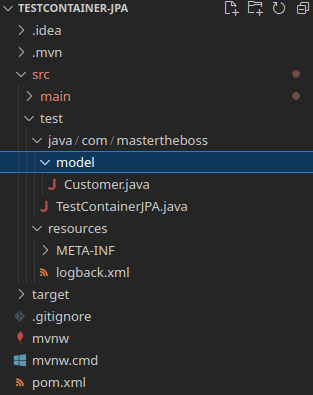
Here is the Project view which shows where you need to place each file:
Testing our application
To Test our TestContainer Class simply run the Maven install goal and verify that the Customer Entity displays on the Console:
Hibernate: create table Customer (id integer not null auto_increment, email varchar(255), firstName varchar(255), lastName varchar(255), primary key (id)) engine=InnoDB
2024-08-04_16:05:28.587 INFO  org.hibernate.orm.connections.access - HHH10001501: Connection obtained from JdbcConnectionAccess [org.hibernate.engine.jdbc.env.internal.JdbcEnvironmentInitiator$ConnectionProviderJdbcConnectionAccess@54387873] for (non-JTA) DDL execution was not in auto-commit mode; the Connection 'local transaction' will be committed and the Connection will be set into auto-commit mode.
Hibernate: insert into Customer (email,firstName,lastName) values (?,?,?)
Hibernate: select c1_0.id,c1_0.email,c1_0.firstName,c1_0.lastName from Customer c1_0
Hibernate: insert into Customer (email,firstName,lastName) values (?,?,?)
Hibernate: delete from Customer where id=?
Hibernate: select c1_0.id,c1_0.email,c1_0.firstName,c1_0.lastName from Customer c1_0 where c1_0.id=?
Customizing the Database settings
This example uses the default Database settings which can be customized in many ways. For example:
- Setting Initialization Scripts: Run custom SQL scripts on container startup to set up the database schema or insert initial data.
- Custom Configuration: Pass custom MySQL configuration parameters to the container.
- Exposing Additional Ports: Expose more ports if your application needs to interact with MySQL through different ports.
- Setting Environment Variables: Configure environment variables to customize MySQL’s behavior.
- Changing MySQL Version: Specify the version of MySQL you want to use.
- Network Configuration: Connect the MySQL container to a custom network if your tests involve multiple containers.
For example, you can customize some of these options during the creation of the container as in this example:
@Container
    private static final MySQLContainer MYSQL_CONTAINER = new MySQLContainer("mysql:8.0.28")
            .withDatabaseName("testdb")
            .withUsername("root")
            .withPassword("password")
            .withInitScript("init_mysql.sql")  // Custom initialization script
            .withEnv("MYSQL_ROOT_HOST", "%")  // Allow root access from any host
            .withExposedPorts(3306, 33060)  // Expose additional ports
            .withCommand("--character-set-server=utf8mb4 --collation-server=utf8mb4_unicode_ci");  // Custom MySQL configuration
}
Place the init_mysql.sql file in the src/test/resources directory. Here’s an example init_mysql.sql file:
CREATE TABLE Customer (
    id INT AUTO_INCREMENT PRIMARY KEY,
    first_name VARCHAR(50),
    last_name VARCHAR(50),
    email VARCHAR(100)
);

INSERT INTO Customer (first_name, last_name, email) VALUES ('Initial', 'User', 'initial.user@example.com');
Conclusion
Using Testcontainers with JPA enables integration testing against a containerized database, ensuring your JPA entities, repositories, and database interactions work correctly.
Feel free to expand these tests to cover more scenarios, such as testing different CRUD operations, relationships between entities, and transactional behavior.
Source code: https://github.com/fmarchioni/mastertheboss/tree/master/test/testcontainer-jpa
Common Problems & Solutions
Problem: JPA EntityManagerFactory fails to connect to Testcontainers database on startup.
Cause: Hibernate attempts to establish database connections before the container finishes its startup sequence and port binding.
Solution: Ensure your @BeforeAll setup method calls container.start() explicitly and binds container.getFirstMappedPort() or JDBC URL to system properties before creating EntityManagerFactory.
Problem: High test execution time caused by starting a new database container for every test method.
Cause: Declaring container instances without static modifiers or static lifecycle scope.
Solution: Use static final container declarations combined with @Testcontainers or reuse single container instances across test suites.
Recommended Articles
Enhance Your Java Tests with TestContainers: Set Up PostgreSQL and Generic Containers
Learn how to use TestContainers for robust database testing in Java applications. Includes setup guide and benefits of using Testcontainers.
Execute Tests on Container Images with JBang, TestContainers, and Java
Learn how to run tests on container images using JBang, TestContainers, and Java. Simplify testing with TestContainers.
Enhance EJB Testing with Hibernate for Enterprise Java Applications
Boost your enterprise java applications by easily unit testing EJB components using Hibernate. Learn how to set up an out-of-container persistence model in this tutorial.
Optimizing JBoss Modular Service Container Configuration for Efficient Java Applications
Learn how to optimize JBoss MSC configuration for efficient Java applications with tips on thread pool size and system properties.