How to Enable and Customize Access Logs in WildFly & JBoss EAP (2026 Guide)
Monitoring incoming HTTP requests is a critical task for production web applications, security auditing, and performance tuning. In WildFly (powered by the high-performance Undertow web engine), access logging can be configured in seconds via JBoss CLI. This hands-on guide covers how to enable access logs, customize pattern formats, set up log rotation, and emit logs in JSON format for log aggregators like Elasticsearch, Grafana Loki, and Splunk.
1. Quick Start: Enabling Access Logs via JBoss CLI
By default, WildFly does not write HTTP access logs to disk. To enable access logging on your default virtual host using the standard Apache/Nginx pattern format, execute the following CLI command:
/subsystem=undertow/server=default-server/host=default-host/setting=access-log:add(pattern="%h %l %u %t \"%r\" %s %b \"%{i,Referer}\" \"%{i,User-Agent}\" Cookie: \"%{i,COOKIE}\" Set-Cookie: \"%{o,SET-COOKIE}\" SessionID: %S Thread: \"%I\" TimeTaken: %T")To accurately measure response latency, enable the record-request-start-time attribute on your HTTP listener:
/subsystem=undertow/server=default-server/http-listener=default:write-attribute(name=record-request-start-time, value=true)This CLI execution generates the following XML snippet inside your standalone.xml or domain.xml under the Undertow subsystem:
<host name="default-host" alias="localhost">
<location name="/" handler="welcome-content"/>
<access-log pattern="%h %l %u %t "%r" %s %b "%{i,Referer}" "%{i,User-Agent}" Cookie: "%{i,COOKIE}" Set-Cookie: "%{o,SET-COOKIE}" SessionID: %S Thread: "%I" TimeTaken: %T"/>
<http-invoker security-realm="ApplicationRealm"/>
</host>Once enabled, logs are written immediately to standalone/log/access_log.log.
2. Undertow Access Log Pattern Tokens (Cheat Sheet)
You can customize the pattern string to include specific metrics. Here are the most commonly used tokens in Undertow:
| Token | Description | Example Output |
|---|---|---|
%h |
Remote client IP address or hostname | 192.168.1.50 |
%r |
First line of the HTTP request (Method + URI + Protocol) | GET /api/v1/users HTTP/1.1 |
%s |
HTTP response status code | 200, 404, 500 |
%b |
Bytes sent (excluding HTTP headers) | 1024 |
%T |
Time taken to process the request (in seconds) | 0.045 |
%D |
Time taken to process the request (in microseconds) | 45000 |
%{i,HEADER_NAME} |
Incoming HTTP Request Header (e.g., User-Agent) |
Mozilla/5.0... |
3. How to Configure Access Log Rotation
Out of the box, Undertow's native access-log handler appends endlessly to access_log.log without size or time rotation. On high-traffic production nodes, this can quickly fill up your disk space.
The recommended best practice is to delegate access log management to the main Logging Subsystem using use-server-log="true". This allows you to apply PeriodicSizeRotatingFileHandler policies.
Run these commands to configure automatic rotation (e.g., rotate every 100MB, retaining up to 5 backups):
/subsystem=undertow/server=default-server/host=default-host/setting=access-log:write-attribute(name="use-server-log", value="true")
/subsystem=logging/pattern-formatter=ACCESS_LOG_FORMATTER:add(pattern="%s%n")
/subsystem=logging/periodic-size-rotating-file-handler=ACCESS_LOG:add(autoflush=true, append=true, named-formatter=ACCESS_LOG_FORMATTER, file={relative-to="jboss.server.log.dir", path="access_log.log"}, rotate-size=100m, suffix=".yyyy-MM-dd", max-backup-index=5)
/subsystem=logging/logger=io.undertow.accesslog:add(handlers=[ACCESS_LOG], use-parent-handlers=false)
4. Emitting Access Logs in JSON Format (for ELK & Splunk)
Modern cloud architectures demand structured logging. You can format Undertow access logs as raw JSON and output them directly to a dedicated access.json file for seamless ingestion by Fluentd, Logstash, or Vector.
1. Ensure Undertow routes access logging through the server logging manager:
/subsystem=undertow/server=default-server/host=default-host/setting=access-log:write-attribute(name="use-server-log", value="true")2. Add a JSON formatter and file handler to the logging subsystem:
/subsystem=logging/json-formatter=json:add
/subsystem=logging/file-handler=access-json:add(autoflush=true, named-formatter=json, append=true, file={relative-to=jboss.server.log.dir, path=access.json})
/subsystem=logging/logger=io.undertow.accesslog:add(use-parent-handlers=false, handlers=[access-json])
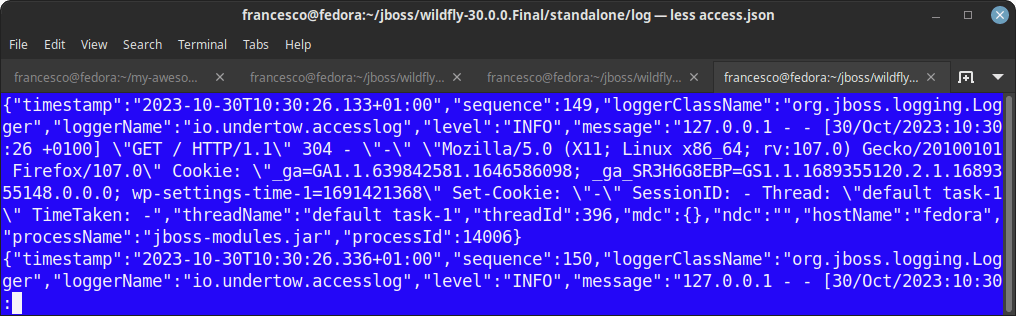
Your WildFly instance will now generate structured log events like this:
5. Advanced Debugging: Enabling HTTP Request Dumper
If you need deep diagnostic tracing during development (such as dumping raw request headers and payload attributes), Undertow provides a custom filter called RequestDumpingHandler.
/subsystem=undertow/configuration=filter/custom-filter=http-dumper:add(class-name="io.undertow.server.handlers.RequestDumpingHandler", module="io.undertow.core")
/subsystem=undertow/server=default-server/host=default-host/filter-ref=http-dumper:add
Performance Warning: The http-dumper filter creates extremely verbose logs for every inbound packet. Never enable this filter in production environments, as it will introduce severe I/O overhead.
6. Legacy JBoss AS 7 / JBoss EAP 6 Setup
If you are maintaining legacy JBoss installations that use Apache Tomcat/Catalina instead of Undertow, access logging is configured via an Access Log Valve in deploy/jbossweb-tomcat55.sar/server.xml:
<Valve className="org.apache.catalina.valves.FastCommonAccessLogValve"
       prefix="localhost_access_log."
       suffix=".log"
       pattern="common"
       directory="${jboss.server.home.dir}/log"
       resolveHosts="false" />
7. Troubleshooting Common Issues
| Issue | Cause | Fix / Solution |
|---|---|---|
access_log.log is not created |
No incoming HTTP traffic or incorrect virtual host name. | Send a GET request to the host or verify that default-host matches your deployment configuration. |
Time taken (%T) returns 0.000 |
record-request-start-time is disabled. |
Run /subsystem=undertow/server=default-server/http-listener=default:write-attribute(name=record-request-start-time, value=true). |
| Log file grows indefinitely | Native Undertow logging is used without rotation. | Set use-server-log=true and bind the logger to a periodic-size-rotating-file-handler. |
8. Frequently Asked Questions (FAQ)
Where are WildFly access logs stored by default?
By default, access logs are stored in $JBOSS_HOME/standalone/log/access_log.log (for standalone mode) or inside the respective server directory under $JBOSS_HOME/domain/servers/<server-name>/log/ (for domain mode).
Does enabling access logging impact WildFly performance?
Standard access logging with Undertow has negligible CPU and memory overhead. However, ensuring asynchronous disk writes or delegating rotation to the logging subsystem helps prevent I/O blocking under high load.
Can I log specific HTTP response headers like X-Forwarded-For?
Yes. You can capture any custom HTTP header using the syntax %{i,X-Forwarded-For} in your access log pattern configuration.
Conclusion
Configuring access logs in WildFly and JBoss EAP is straightforward using Undertow CLI commands. By integrating Undertow with WildFly's unified logging subsystem, you gain full control over log rotation and structured JSON output, making your application server production-ready for modern cloud monitoring stacks.
Recommended Articles
Advanced Configuration of jboss-deployment-structure.xml for Enhanced Java Applications on WildFly
Learn how to configure jboss-deployment-structure.xml for fine-tuning module dependencies in WildFly applications. #WildFly #Java #Middleware #CloudNative
Configure Firewall Rules for WildFly on Linux
Learn how to configure firewall rules for running WildFly on a Linux machine. Includes steps for allowing incoming connections on port 8080 and managing the management port (9990). #WildFly #LinuxFirewall #Java #Middleware #CloudNative
Run Java EE 7 Batch API on JBoss EAP 6 with a Simple Patch
Learn how to enable Java EE 7 Batch API on JBoss EAP 6 by downloading a backport and modifying the configuration.
Enhance Your Enterprise Java Applications with JBoss EAP/WildFly Classloading Strategies
Optimize your enterprise applications with JBoss EAP/WildFly's advanced classloading strategies for seamless utility library management and versioning.