Configure jBPM to send mail
This is an updated tutorial which discusses how to send a Mail from within a jBPM Process.
If you are running jBPM 6 / 7, the simplest way to send a Mail from your BPM process is to use the org.jbpm.process.workitem.email.EmailWorkItemHandler..
Here is a sample global/Email.wid :
[
        [
            "name" : "Email",
            "displayName" : "Email",
            "category" : "jbpm-workitems-email",
            "description" : "",
            "defaultHandler" : "mvel: new org.jbpm.process.workitem.email.EmailWorkItemHandler()",
            "documentation" : "jbpm-workitems-email/index.html",

            "parameters" : [
                                "Reply-To" : new StringDataType()
                ,"Cc" : new StringDataType()
                ,"Bcc" : new StringDataType()
                ,"From" : new StringDataType()
                ,"To" : new StringDataType()
                ,"Body" : new StringDataType()
                ,"Attachments" : new StringDataType()
                ,"Subject" : new StringDataType()
                ,"Debug" : new StringDataType()
                ,"Template" : new StringDataType()

            ],
            "mavenDependencies" : [
                                 "org.jbpm:jbpm-workitems-email:7.57.0.Final"

            ],
            "icon" : "defaultemailicon.png"

        ]

]
Then define the EmailWorkItemHandler within your src/main/resources/META-INF/kie-deployment-descriptor.xml where you need to specify the SMTP host, the Port and the Username / Password:
<work-item-handlers>
    <work-item-handler>
        <resolver>mvel</resolver>
        <identifier>new org.jbpm.process.workitem.email.EmailWorkItemHandler("smtp.gmail.com", "587", "email.user", "email.password", "true")</identifier>
        <parameters/>
        <name>Email</name>
    </work-item-handler>
</work-item-handlers>
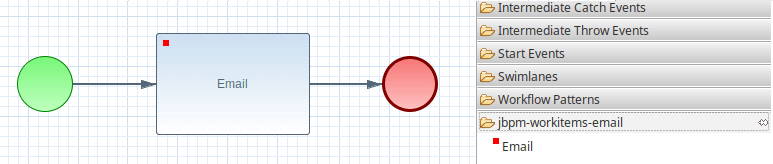
With this configuration in place, you should be able to see the Mail Task in your Process Palette:
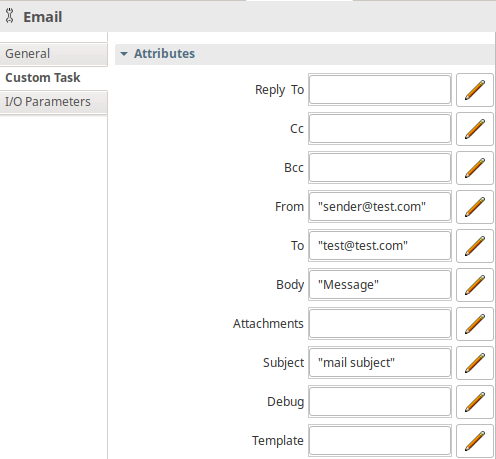
Within the properties of your Email Task define the attributes required to send the mail using either an expression or a Data Item:
Coding the Email Task using the Business Central
The above process can be much simplified by designing your assets using the Business Central.
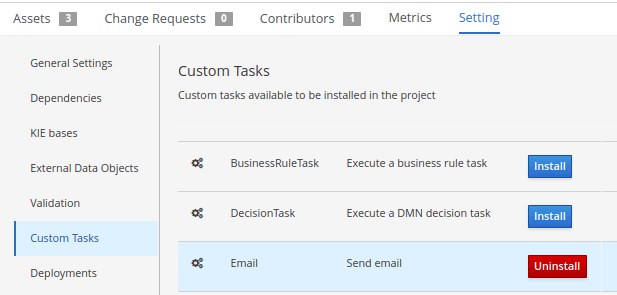
Once that you have created your project, make sure that, within its settings, you have enabled the EMail Custom Task:
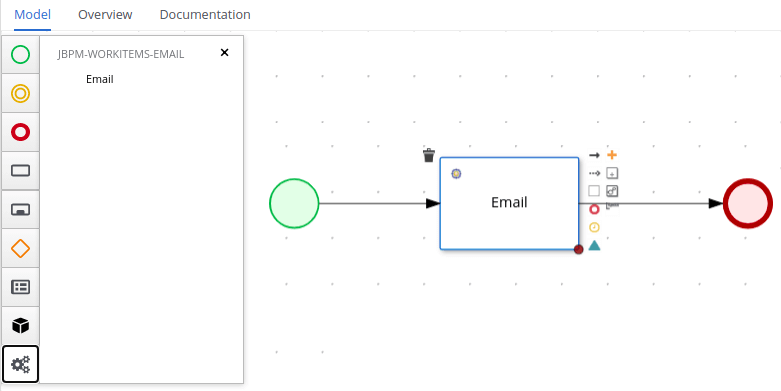
Once that you have enabled the Email Custom Task, you will be able to add Email Tasks from the Web Designer, as you can see from this snapshot:
If you want to check the source code of the EmailWorkItemHandler, you will find it on GitHub:
https://github.com/kiegroup/jbpm/blob/main/jbpm-workitems/jbpm-workitems-email/src/main/java/org/jbpm/process/workitem/email/EmailWorkItemHandler.java
Recommended Articles
Create a Web Application Using jBPM 7: A Step-by-Step Guide
Learn how to create a web application using jBPM 7 with step-by-step instructions and code examples. #jBPM #Java #WebDevelopment
How to Use a REST WorkItem Handler in jBPM | Master the Boss
Learn how to use the REST WorkItem Handler in jBPM to execute tasks during a process and send POST callbacks to your web application.
Configure jBPM to use MySQL as Database | Enterprise Java Tutorials
Learn how to configure jBPM to use MySQL as database for storing process data. A step-by-step guide on setting up jBPM with MySQL.
Bootstrap Three jBPM Projects with Spring Boot Using jBPM Maven Archetype
Learn how to bootstrap three jBPM projects using Spring Boot and the jBPM Maven archetype. #jBPM #SpringBoot #MavenArchetypes