Step-by-Step Guide: Architecting the Fix for WFLYJCA0041: Failed to load module for driver
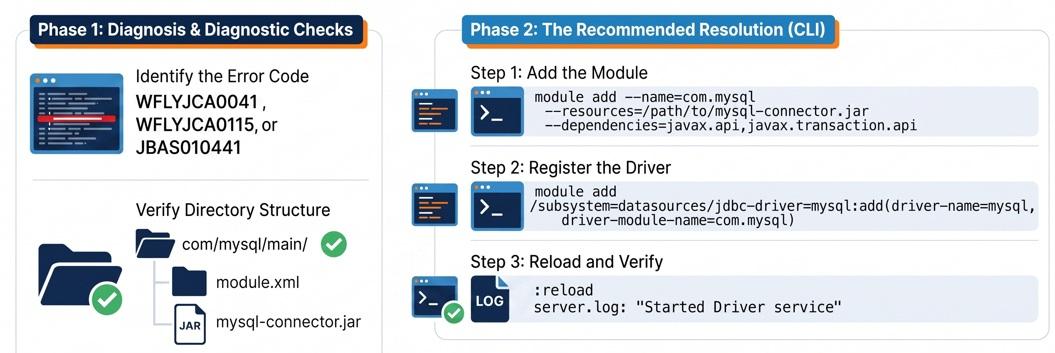
If you are provisioning a new datasource in WildFly or JBoss EAP, you might execute a CLI command to register your JDBC driver and immediately be met with WFLYJCA0041: Failed to load module for driver [module_name].
This is not a database connection issue; this is a classloading issue. WildFly’s JCA (Java Connector Architecture) subsystem is attempting to instantiate the JDBC driver class, but the underlying JBoss Module Loader cannot locate the physical JAR or the module descriptor.
Stop repeatedly restarting your server. This guide will walk you through the precise architectural flow of WildFly module resolution and how to guarantee your driver is loaded correctly every time.
Prerequisites
- A running instance of WildFly (or JBoss EAP).
- The JDBC driver JAR for your database (e.g.,
ojdbc8.jar,mysql-connector-java.jar). - Basic familiarity with the JBoss CLI and Linux/Windows file systems.
Architectural Flow: The Module Resolution Handshake
WildFly relies on a highly concurrent, modular classloading architecture. When you declare a driver in the datasources subsystem, WildFly does not scan a monolithic /lib directory. It queries the Module Loader.
[Datasource Subsystem]
         │ (1. Request driver by module name)
         ▼
[JBoss Module Loader]
         │ (2. Scan /modules/system/layers/base/...)
         ├── X MISSING FOLDER PATH? ──> WFLYJCA0041
         ├── X MISSING module.xml?  ──> WFLYJCA0041
         ├── X INVALID XML SYNTAX?  ──> WFLYJCA0041
         ▼
[JDBC Driver JAR instantiated]
If the Module Loader fails at any point in step 2, it throws the WFLYJCA0041 exception. Here is how to build your module correctly from the ground up.
Step-by-Step Implementation
Step 1: Aligning the Directory Structure
The physical directory structure on your file system must strictly mirror the logical module name. If your driver module is named com.oracle, the directory path must exactly match this hierarchy, ending with a main directory.
Navigate to your WildFly home directory and create the path:
# Example for an Oracle driver module named "com.oracle"
mkdir -p $JBOSS_HOME/modules/system/layers/base/com/oracle/main
Copy your JDBC driver JAR (e.g., ojdbc11.jar) directly into this main directory.
Step 2: Crafting a Bulletproof module.xml
Inside the main directory, you must create a file named exactly module.xml (not modules.xml). This descriptor tells the classloader how to handle your JAR.
Create the file with the following production-ready configuration:
<?xml version="1.0" encoding="UTF-8"?>
<!-- The module name MUST match the driver-module-name used in your CLI command -->
<module xmlns="urn:jboss:module:1.9" name="com.oracle">
    <resources>
        <!-- The path MUST include the exact filename and .jar extension -->
        <resource-root path="ojdbc11.jar"/>
    </resources>
    <dependencies>
        <!-- Required Java EE dependencies for JDBC drivers -->
        <module name="javax.api"/>
        <module name="javax.transaction.api"/>
    </dependencies>
</module>
Critical Checks:
- Ensure the
pathattribute matches your JAR filename exactly, including the.jarextension. - Verify the
xmlnsnamespace is spelled correctly (a typo here, likeurn:joss:module, will silently fail to parse).
Step 3: Registering the Driver via CLI
Once the physical files are perfectly aligned, you must register the driver with the JCA subsystem. Using the JBoss CLI prevents typographical errors in the standalone.xml file.
Connect to the CLI and execute the following command:
/subsystem=datasources/jdbc-driver=oracle:add(driver-name=oracle, driver-module-name=com.oracle, driver-class-name=oracle.jdbc.driver.OracleDriver)
Note: Ensure the driver-module-name parameter perfectly matches the name attribute declared in your module.xml.
Edge Cases / Pitfalls
Even experienced middleware engineers get caught by these hidden traps when dealing with WFLYJCA0041:
- The CLI
--dependenciesBracket Bug: If you try to create the module using themodule addCLI command instead of manually building the folder, do not use JSON brackets or spaces for the dependencies. Using--dependencies=[javax.api, javax.transaction.api]will silently generate an invalidmodule.xmlon some OS environments. Use comma-separated values with no spaces:--dependencies=javax.api,javax.transaction.api. - The Mismatched Subsystem Name: If you copy-paste configuration snippets from older forums, ensure your
driver-nameis identical to what is referenced in your datasource XML. The attributedriver-namecannot differ from the driver resource name. - Corrupted JAR Files: If the path and XML are completely correct and you still get a
Failed to load moduleor instantiation error, your JAR file may be corrupted or partially downloaded. Usejar tvf your-driver.jarto verify archive integrity.
Frequently Asked Questions
Why does WildFly use modules instead of just dropping JARs in a /lib folder? JBoss Modules provide strict classloading isolation. By forcing JDBC drivers into modules, WildFly ensures that different applications can run different versions of database drivers simultaneously without classpath conflicts or "dependency hell."
Can I deploy a JDBC driver without creating a module? Yes. If your driver is JDBC 4-compliant, you can deploy it as a standard JAR deployment by placing it in the standalone/deployments directory. However, defining it as a core module is the recommended best practice for production, especially in Managed Domain mode where deployments must be orchestrated across multiple host controllers.
What is the difference between WFLYJCA0041 and WFLYJCA0047? WFLYJCA0041 is a classloading error indicating WildFly cannot find the driver software on the disk. WFLYJCA0047 is a network/authentication error indicating the driver loaded successfully, but the physical connection to the database was rejected due to bad credentials, invalid URLs, or SSL mismatches.
Conclusion Resolving the WFLYJCA0041 error requires stepping away from the management console and verifying your filesystem footprint. By strictly matching your folder path to your module name, double-checking your module.xml for minor syntax errors, and ensuring your dependencies are present, you guarantee that the JBoss Module Loader can serve your JDBC driver flawlessly to the JCA subsystem.
Recommended Articles
Step-by-Step Guide: Architecting the Fix for WFLYJCA0042: failed to match pool
Resolve WFLYJCA0042: failed to match pool in WildFly with this hands-on guide. Learn how to debug JNDI mappings, fix driver mismatches, and test connections.
Install WildFly Module Using Command Line Interface: A Step-by-Step Guide
Learn how to install a module on WildFly / JBoss EAP using the CLI for efficient and secure application server management.
WildFly Modules Slot Installation Guide: Managing Multiple Versions of a Module
Learn how to install multiple versions of a module in WildFly using slots for better management and flexibility.
JBoss Network Management Interface Resolution: A Step-by-Step Guide
Solve the 'jboss.network.management: failed to resolve interface management' issue in JBoss AS with this tutorial.