Step-by-Step Guide: Architecting the Fix for WFLYJCA0042: failed to match pool
When you execute a :test-connection-in-pool operation against a newly minted WildFly or JBoss EAP datasource, you might be instantly blocked by a WFLYJCA0040: failed to invoke operation exception, immediately followed by the core error: WFLYJCA0042: failed to match pool. Check JndiName: java:/your_jndi.
This is not a database networking issue. Instead, this error indicates a fundamental mismatch within the JCA (Java Connector Architecture) subsystem. WildFly cannot start or locate the connection pool because the JNDI name provided in the configuration does not properly map to a running pool, or the underlying driver configuration is broken.
This guide tears down the JCA pool binding mechanics and gives you a production-ready roadmap to fix it.
Architectural Flow: Datasource Pool Matching
To eliminate the WFLYJCA0042 error, you must understand how WildFly correlates your management request to physical connection pools.
[Management Request: test-connection-in-pool]
                 │
                 ▼
[WildFly JCA Subsystem]
                 │ (Attempts to map the JNDI Name to an active pool)
                 ├── X Missing/Invalid JNDI prefix? ──> WFLYJCA0042
                 ├── X Driver mismatch/unregistered?──> WFLYJCA0042
                 ├── X Manual XML edit desync?      ──> WFLYJCA0042
                 ▼
[Connection Pool Successfully Initialized]
If the JCA subsystem fails to find a fully qualified and valid pool definition associated with the JNDI name you requested, the pool match fails and the operation aborts.
Prerequisites
Before modifying the configuration, ensure you have:
- A running instance of WildFly or JBoss EAP.
- The JBoss CLI (
jboss-cli.shorjboss-cli.bat) open and connected to your server. - Verification that your JDBC driver is actually installed (either as a module or deployed JAR).
Step-by-Step Implementation: Resolving the Pool Mismatch
Step 1: Validate and Enforce JNDI Namespace Standards
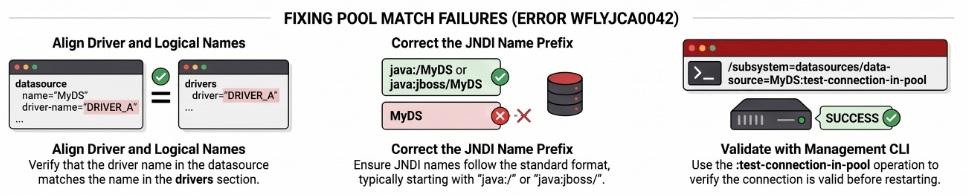
The most frequent cause of a pool match failure is an improperly formatted JNDI name. The JCA subsystem mandates strict adherence to JNDI naming prefixes for datasources.
The Fix: Ensure your JNDI name explicitly starts with either java:/ or java:jboss/. Developers often accidentally omit the prefix or use custom formats that the JCA container refuses to bind into the global namespace. For example, in modern WildFly setups, java:/ is highly recommended for standard datasources.
<!-- WRONG: Will trigger WFLYJCA0042 because it lacks a standard prefix -->
<datasource jndi-name="jdbc/MyDS" pool-name="MyDS">

<!-- CORRECT: Properly prefixed for the JCA subsystem -->
<datasource jndi-name="java:/jdbc/MyDS" pool-name="MyDS" enabled="true">
Step 2: Align the JDBC Driver Declaration
If the JNDI name is perfectly valid, the next culprit is a disjointed driver definition. If the driver-name specified in your datasource block does not perfectly match an actively registered JDBC driver, the pool cannot be built, leading to the failed to match pool exception.
The Fix: Using the JBoss CLI, verify exactly how the driver is registered in the server's runtime.
# Read the list of actually installed drivers
/subsystem=datasources:installed-drivers-list
Review the JSON output and locate your driver. Note the exact string returned under "driver-name". If you deployed the driver as a JAR, the generated driver name is often a long string combining the JAR name, class name, and versions (e.g., mysql-connector-java-5.1.36-bin.jar_com.mysql.cj.jdbc.Driver_5_1).
Ensure the driver-name attribute in your datasource exactly matches this output. Alternatively, if defining the driver as a JBoss Module, ensure the module path defined in the driver configuration matches the physical module.xml path (e.g., com.oracle.main).
Step 3: Eliminate Unsynchronized Manual Edits
A major pitfall causing WFLYJCA0042 is manually editing the standalone.xml or domain.xml files while the WildFly JVM is actively running. When you edit the XML behind the server's back, the in-memory JCA management model becomes unsynchronized with the disk configuration, resulting in orphaned pools.
The Fix: Never modify the XML files directly on a live system. Instead, commit your changes using the JBoss CLI, or gracefully reload the server to force the model to sync.
# If you suspect a desync, gracefully reload the server configuration
reload
After the server reloads, the JCA subsystem will parse the XML, properly register the JNDI name, and attach it to the driver pool.
Testing the Resolution
Once you have verified the JNDI prefix, aligned the driver names, and ensured the server model is synced, test the pool connection via the CLI to confirm the fix:
# Test the connection in the pool to ensure WFLYJCA0042 is resolved
/subsystem=datasources/data-source=MyDS:test-connection-in-pool
If the configuration is aligned, the operation will return {"outcome" => "success"}.
Edge Cases & Pitfalls
- Mixed Deployment Strategies: Do not mix module-based driver definitions with standalone JAR deployments in your XML. If you try to declare a
<driver>block for a JDBC driver that you simply dropped into the/deploymentsfolder, the JCA pool matcher will fail. - Disabled Datasource Status: Ensure that your datasource definition actually contains the
enabled="true"attribute. Testing a disabled pool will immediately fail.
Frequently Asked Questions
Why do I see WFLYJCA0040: failed to invoke operation right before WFLYJCA0042? The WFLYJCA0040 message is a generic management exception indicating that your requested CLI or Web Console operation (like testing the connection) failed to invoke. The subsequent WFLYJCA0042 message is the actual root cause explaining why the invocation aborted—because the targeted JNDI pool could not be matched.
What are the required JNDI prefixes for a valid connection pool? To be successfully matched by the JCA subsystem, your datasource JNDI name must begin with either java:/ or java:jboss/.
Can I fix a pool matching error without restarting the server? If the error was caused by a simple typographical error in the CLI definition, you can correct the attribute dynamically. However, if the error was caused by manual edits to the standalone.xml file while the server was running, you must execute a reload command via the CLI to align the in-memory pool references.
Conclusion Resolving the WFLYJCA0042: failed to match pool exception requires strict adherence to WildFly's JNDI naming specifications and driver mapping logic. By ensuring your datasources leverage the java:/ or java:jboss/ prefixes, strictly mapping the driver-name to an installed JBoss Module, and utilizing the CLI rather than manual XML edits, you guarantee that the JCA container can successfully match your management requests to physical, production-ready connection pools.
Recommended Articles
Step-by-Step Guide: Architecting the Fix for WFLYJCA0041: Failed to load module for driver
Resolve WFLYJCA0041: Failed to load module for driver in WildFly. A hands-on guide for developers to debug JBoss module configurations, paths, and XML syntax.
Resolve WFLYJCA0047 Error in WildFly: A Step-by-Step Troubleshooting Guide
Troubleshoot and fix the WFLYJCA0047 error in WildFly. Learn how to resolve JDBC, SSL, and pool configurations issues.
Fix "WildFly Fails to Start": Top Causes, Logs & Solutions
Is your WildFly application server failing to boot? Learn how to fix port conflicts, JVM version mismatches, unresolvable interfaces, and XML corruption.
JBoss Network Management Interface Resolution: A Step-by-Step Guide
Solve the 'jboss.network.management: failed to resolve interface management' issue in JBoss AS with this tutorial.