Resolve the WFLYJCA0047: Connection is not valid error in WildFly. A hands-on troubleshooting guide for developers fixing JDBC, SSL, and pool configurations.
Step-by-Step Guide: Troubleshooting and Solving WFLYJCA0047: Connection is not valid
When you configure a new datasource in WildFly and attempt to test the connection in the pool, you might immediately hit a brick wall. The management console throws a WFLYJCA0040: failed to invoke operation error, followed by the dreaded WFLYJCA0047: Connection is not valid.
This error is WildFly's JCA (Java Connector Architecture) subsystem telling you that it cannot establish a physical JDBC connection to the target database. As a middleware engineer, you know that generic connection errors are just wrappers. The actual problem lies deeper in the configuration.
This guide breaks down the architectural flow of WildFly datasource connections and provides a pragmatic, production-ready approach to diagnosing and resolving this issue.
Prerequisites
Before diving into the configuration files, ensure you have:
- A running instance of WildFly.
- Access to the JBoss CLI (
jboss-cli.shorjboss-cli.bat). - Tail access to your
server.logfile. - The correct JDBC driver JAR for your target database.
Architectural Flow: The JDBC Connection Handshake
To fix the issue, you must understand the sequence of events when WildFly attempts a connection.
[WildFly JCA Subsystem]
       │
       ▼ (1. Driver Lookup)
[JDBC Driver Module]
       │
       ▼ (2. Credential & URL parsing)
[Network Layer]
       │
       ▼ (3. TLS/SSL Handshake)
[Target Database]
A failure at any of these three junctions will result in the WFLYJCA0047 exception.
Diagnosing the Root Cause
The most important rule of debugging JCA issues: do not stop at the management console output. The WFLYJCA0047 message is a high-level symptom; the actual underlying cause is logged in your server.log.
Open your server logs and locate the exception stack trace that appears immediately following the WFLYJCA0047 warning. This stack trace will point you to one of the following root causes:
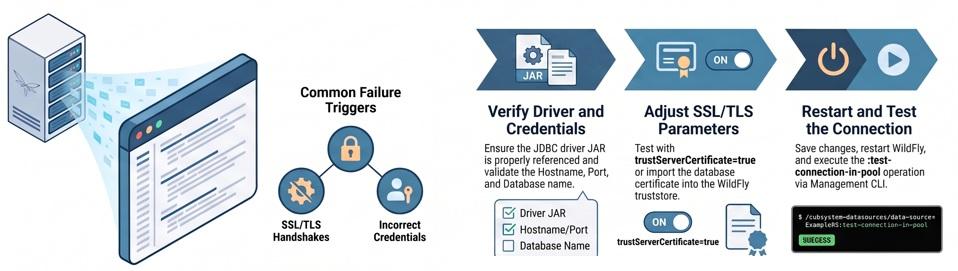
- SSL/TLS handshake failures.
- Invalid database credentials or an incorrect JDBC URL.
- A missing or incorrectly installed JDBC driver.
- Misconfigured datasource connection pool settings.
Step-by-Step Implementation: Fixing the Connection
Based on what you find in the server.log, proceed with the corresponding remediation steps.
Step 1: Validating the JDBC Driver and URL Credentials
If the driver cannot be loaded or the database rejects the connection, the pool will never initialize.
- Verify JDBC Driver Installation: Ensure the correct JDBC driver JAR is properly installed as a WildFly module and correctly referenced within your datasource configuration block.
- Validate the Connection String: Carefully check the JDBC URL for typos. You must verify the Hostname, Port, and Database name.
- Check Authentication: Verify that the Username and Password are strictly correct and have the necessary grants on the target database.
Step 2: Resolving SSL/TLS Handshake Failures
If your target database enforces SSL/TLS (which is standard for modern production environments), an untrusted database certificate will immediately block the connection.
To quickly isolate if SSL is the culprit, you can append bypass parameters to your JDBC URL:
jdbc:mysql://db.example.com:3306/mydb?useSSL=false
-- OR --
jdbc:sqlserver://db.example.com:1433;databaseName=mydb;trustServerCertificate=true
Note: Using trustServerCertificate=true or useSSL=false is strictly for testing.
The Production Fix: If the test succeeds with the bypass parameters, you must import the database's SSL certificate directly into the WildFly JVM truststore to establish a trusted handshake.
Step 3: Tuning the Datasource Pool Configuration
Sometimes the connection is valid, but the JCA pool fails to initialize due to aggressive or incorrect sizing limits. Review your pool configurations and ensure they make architectural sense. Pay close attention to:
min-pool-sizeandmax-pool-sizeblocking timeoutidle timeout
Restart and Re-test
Once you have implemented the necessary fixes in your datasource XML or via CLI, you must validate the changes.
- Save the configuration.
- Restart WildFly to ensure all driver modules and SSL contexts are cleanly reloaded.
- Execute the test command using the JBoss CLI:
# Connect to the CLI and run the connection test against your specific pool
/subsystem=datasources/data-source=MyDS:test-connection-in-pool
Edge Cases & Pitfalls
- Security Caveat: Never deploy
useSSL=falseto a production environment. Always take the time to properly install trusted SSL certificates. - Logging Pitfall: If the
server.logdoes not provide enough granularity to solve a complex network timeout, enable JCA debug logging during your troubleshooting phase to expose deeper pooling behaviors.
Frequently Asked Questions
Why do I see WFLYJCA0040 and WFLYJCA0047 at the same time? WFLYJCA0040 simply indicates that the management operation (the connection test) failed to invoke. WFLYJCA0047 is the specific reason why it failed—because the physical connection is not valid.
Where exactly do I find the real cause of the WFLYJCA0047 error? The generic error is just a wrapper. You must review the WildFly server.log and locate the specific Java exception immediately following the WFLYJCA0047 entry to see the actual cause.
How can I prevent this error in future infrastructure rollouts? To prevent connection validation failures proactively, always keep your JDBC drivers up to date, enforce the use of trusted SSL certificates from the start, and configure sensible connection and idle timeouts for your pools.
Conclusion Fixing WFLYJCA0047 is rarely about modifying the WildFly JCA subsystem itself, but rather about ensuring the environmental variables—drivers, credentials, and SSL trust chains—are properly aligned. By systematically checking the server.log, verifying credentials, addressing TLS requirements, and utilizing the JBoss CLI for testing, you can stabilize your connection pools and get back to writing code.
Recommended Articles
Step-by-Step Guide: Architecting the Fix for WFLYJCA0042: failed to match pool
Resolve WFLYJCA0042: failed to match pool in WildFly with this hands-on guide. Learn how to debug JNDI mappings, fix driver mismatches, and test connections.
Troubleshooting mod_cluster with WildFly 31 | JBoss Middleware & Cloud-Native Tutorials
Expert advice on common mod_cluster troubleshooting issues with WildFly 31 and Apache. Learn how to resolve problems with clustering, firewall configuration, and more.
Solve WildFly Unable to Accept Remote Connections | Java Application Server Tutorial
Learn how to resolve WildFly server issues and make it accept remote connections securely. Follow our step-by-step guide for troubleshooting and configuration tips.
Solving 'java.net.BindException: Address already in use' Error for JBoss/WildFly Applications
Effortlessly resolve the 'Address already in use' error with JBoss and WildFly. Learn how to clean up old instances and ensure smooth application startup.