Architecting MapStruct with CDI and Quarkus: Getting componentModel Right for Jakarta EE
In high-performance cloud-native Java development, combining Quarkus with MapStruct is an elite architectural decision. Quarkus optimizes your application for Kubernetes by utilizing Ahead-Of-Time (AOT) compilation to produce lightweight, GraalVM native binaries with near-zero startup times. However, this native compilation model has a strict constraint: runtime reflection is an expensive anti-pattern that bloats binary size and degrades startup speed.
Because MapStruct relies entirely on JSR 269 compile-time annotation processing to generate standard Java getter/setter code, it is naturally reflection-free. When integrated correctly with Quarkus’s build-time Dependency Injection container (ArC, which implements Jakarta Contexts and Dependency Injection), MapStruct mappers compile down to highly optimized, native-ready CDI beans.
The critical point of failure in this architecture is the componentModel configuration. If configured incorrectly, your application will fall back to runtime reflection or fail to compile altogether under modern Jakarta EE environments. This hands-on guide details how to configure and architect MapStruct mappers using CDI in Quarkus 3+ and Jakarta EE setups.
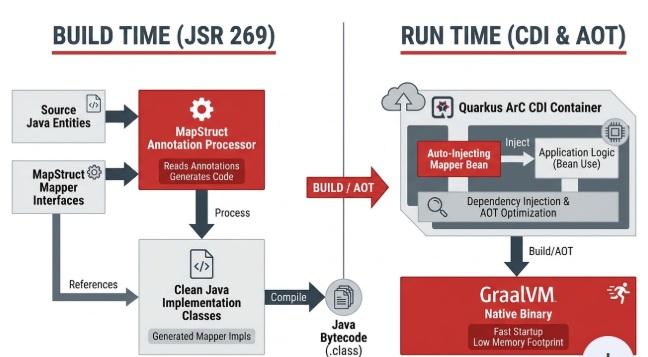
Architectural Flow: Build-Time Compilation to Native Binary
Quarkus shifts framework initialization from runtime to build-time. MapStruct aligns perfectly with this paradigm by generating the mapping implementation before packaging.
  [Build Phase]
  Java Code (DTO/Entity) + MapStruct Interface
       │
       ▼ (Maven Compiler / JSR 269 Processor)
  Generated ObjectMapperImpl.class (Annotated with @ApplicationScoped)
       │
       ▼ (Quarkus Build Steps / ArC Indexing)
  Optimized Bytecode (Registered as CDI Bean)
       │
       ▼ (GraalVM Ahead-Of-Time Compilation)
  Reflection-Free Native Binary (0.006s Startup)
Prerequisites
To implement the configurations in this guide, ensure your environment meets the following baseline:
- Java Development Kit (JDK): Version 17 or 21 (Quarkus 3.x baseline)
- Build Tool: Apache Maven 3.9.x+
- Quarkus Framework: Version 3.x (Jakarta EE 10 baseline)
- MapStruct: Version 1.6.3 or higher
Step-by-Step Implementation
Step 1: Configure the Maven pom.xml
Under Jakarta EE 10, all legacy javax enterprise namespaces are replaced by jakarta. We must configure the dependencies and the maven-compiler-plugin to ensure that the compiler coordinates annotation processors cleanly.
<properties>
    <maven.compiler.source>17</maven.compiler.source>
    <maven.compiler.target>17</maven.compiler.target>
    <quarkus.platform.version>3.12.0</quarkus.platform.version>
    <org.mapstruct.version>1.6.3</org.mapstruct.version>
</properties>

<dependencyManagement>
    <dependencies>
        <dependency>
            <groupId>io.quarkus.platform</groupId>
            <artifactId>quarkus-bom</artifactId>
            <version>${quarkus.platform.version}</version>
            <type>pom</type>
            <scope>import</scope>
        </dependency>
    </dependencies>
</dependencyManagement>

<dependencies>
    <!-- Quarkus RESTEasy Reactive for JSON REST endpoints -->
    <dependency>
        <groupId>io.quarkus</groupId>
        <artifactId>quarkus-resteasy-reactive-jackson</artifactId>
    </dependency>
    <!-- MapStruct Core Annotations -->
    <dependency>
        <groupId>org.mapstruct</groupId>
        <artifactId>mapstruct</artifactId>
        <version>${org.mapstruct.version}</version>
    </dependency>
</dependencies>

<build>
    <plugins>
        <plugin>
            <groupId>io.quarkus</groupId>
            <artifactId>quarkus-maven-plugin</artifactId>
            <version>${quarkus.platform.version}</version>
            <executions>
                <execution>
                    <goals>
                        <goal>build</goal>
                    </goals>
                </execution>
            </executions>
        </plugin>
        <plugin>
            <groupId>org.apache.maven.plugins</groupId>
            <artifactId>maven-compiler-plugin</artifactId>
            <version>3.13.0</version>
            <configuration>
                <annotationProcessorPaths>
                    <!-- MapStruct Processor must run during compile -->
                    <path>
                        <groupId>org.mapstruct</groupId>
                        <artifactId>mapstruct-processor</artifactId>
                        <version>${org.mapstruct.version}</version>
                    </path>
                </annotationProcessorPaths>
            </configuration>
        </plugin>
    </plugins>
</build>
Step 2: Define Domain Models and DTOs
Let's define a nested domain entity representation of a Merchant and its corresponding client-facing flattened DTO.
package com.architect.model;

public class Merchant {
    private Long id;
    private String legalName;
    private Location location;

    // Standard getters, setters, and constructors
    public Long getId() { return id; }
    public void setId(Long id) { this.id = id; }
    public String getLegalName() { return legalName; }
    public void setLegalName(String legalName) { this.legalName = legalName; }
    public Location getLocation() { return location; }
    public void setLocation(Location location) { this.location = location; }
}
package com.architect.model;

public class Location {
    private String city;
    private String countryCode;

    public String getCity() { return city; }
    public void setCity(String city) { this.city = city; }
    public String getCountryCode() { return countryCode; }
    public void setCountryCode(String countryCode) { this.countryCode = countryCode; }
}
Now, define our destination DTO:
package com.architect.dto;

public class MerchantDto {
    private Long merchantId;
    private String businessName;
    private String operatingCity;
    private String country;

    // Standard getters and setters
    public Long getMerchantId() { return merchantId; }
    public void setMerchantId(Long merchantId) { this.merchantId = merchantId; }
    public String getBusinessName() { return businessName; }
    public void setBusinessName(String businessName) { this.businessName = businessName; }
    public String getOperatingCity() { return operatingCity; }
    public void setOperatingCity(String operatingCity) { this.operatingCity = operatingCity; }
    public String getCountry() { return country; }
    public void setCountry(String country) { this.country = country; }
}
Step 3: Centralize Your CDI Configuration
Instead of declaring the CDI component model parameters on every single mapper interface, you should define a global MapperConfig. This ensures consistency across your entire microservice.
package com.architect.config;

import org.mapstruct.MapperConfig;
import org.mapstruct.MappingConstants;
import org.mapstruct.ReportingPolicy;

@MapperConfig(
    // Force generation of Jakarta CDI beans (@ApplicationScoped)
    componentModel = MappingConstants.ComponentModel.JAKARTA_CDI,
    // Throw compilation errors on unmapped target properties to secure boundaries
    unmappedTargetPolicy = ReportingPolicy.ERROR
)
public interface QuarkusMappingConfig {
}
Step 4: Define the CDI-Integrated Mapper Interface
We decorate our mapper interface with @Mapper, referencing our global configuration class. MapStruct automatically detects the jakarta-cdi model, registers the generated implementation as a CDI bean, and applies the nested path parameters.
package com.architect.mapper;

import com.architect.config.QuarkusMappingConfig;
import com.architect.dto.MerchantDto;
import com.architect.model.Merchant;
import org.mapstruct.Mapper;
import org.mapstruct.Mapping;

@Mapper(config = QuarkusMappingConfig.class)
public interface MerchantMapper {

    @Mapping(source = "id", target = "merchantId")
    @Mapping(source = "legalName", target = "businessName")
    @Mapping(source = "location.city", target = "operatingCity")
    @Mapping(source = "location.countryCode", target = "country")
    MerchantDto toDto(Merchant entity);
}
Step 5: Inject and Execute within Quarkus REST Resource
Because the generated mapper implementation is compiled with CDI support, you inject the mapper instance cleanly using standard Jakarta @Inject annotations.
package com.architect.resource;

import com.architect.dto.MerchantDto;
import com.architect.mapper.MerchantMapper;
import com.architect.model.Location;
import com.architect.model.Merchant;
import jakarta.inject.Inject;
import jakarta.ws.rs.GET;
import jakarta.ws.rs.Path;
import jakarta.ws.rs.Produces;
import jakarta.ws.rs.core.MediaType;

@Path("/api/merchants")
public class MerchantResource {

    // Mapper is injected dynamically as a compile-time validated CDI bean
    @Inject
    protected MerchantMapper merchantMapper;

    @GET
    @Produces(MediaType.APPLICATION_JSON)
    public MerchantDto getSampleMerchant() {
        Merchant merchant = new Merchant();
        merchant.setId(9921L);
        merchant.setLegalName("Acme Global Corp");

        Location loc = new Location();
        loc.setCity("Zurich");
        loc.setCountryCode("CH");
        merchant.setLocation(loc);

        // Map reflection-free and return
        return merchantMapper.toDto(merchant);
    }
}
Edge Cases and Pitfalls
1. The cdi vs. jakarta-cdi Namespace Trap
- The Issue: Your application builds, but Quarkus throws a deployment exception stating that the Mapper bean cannot be found during runtime injection.
- The Cause: In MapStruct, the legacy component model value
cditargets the oldjavax.enterprise.contextnamespace first. If you run a modern Jakarta EE 10 / Quarkus 3+ environment, compiling with thecdivalue can result in annotations referencing non-existent legacy classes. - The Mitigation: Always explicitly use the
jakarta-cdicomponent model (or the Java constantMappingConstants.ComponentModel.JAKARTA_CDI) to ensure the processor generates correctjakarta.enterprise.context.ApplicationScopedannotations.
2. The Dev Mode Hot-Reload Desync
- The Issue: You update a DTO or Entity structure in Quarkus Dev Mode, but changes do not propagate to the Mapper implementation, leading to runtime type mismatches.
- The Cause: Quarkus's hot-reload compiler does not always trigger JSR 269 annotation processor loops if the
@Mapperinterface itself remains unmodified. - The Mitigation: Execute a direct clean compilation via your terminal to wipe the build targets and regenerate the mapper classes:
mvn clean compile
3. CDI Decorators in Quarkus (ArC)
- The Issue: Standard CDI decorators (
@DecoratedWith) configured on your MapStruct interfaces might fail to bind or generate compilation errors. - The Mitigation: Build-time CDI implementations like ArC have strict decorator constraints. If you require custom pre/post-mapping logic, use MapStruct's native, CDI-compatible life-cycle hooks (
@BeforeMappingand@AfterMapping) directly inside abstract classes rather than writing heavy enterprise CDI decorators.
Conclusion
By matching MapStruct's compile-time code generation with Quarkus’s build-time CDI implementation, you eliminate runtime reflection completely. Centralizing your configuration to leverage jakarta-cdi ensures compliance with modern Jakarta EE standards, giving you deterministic, type-safe bean mappings that initialize in milliseconds and scale flawlessly inside native environments.
Recommended Articles
Managing Quarkus Application Lifecycle with CDI Events
Learn how to leverage CDI events in Quarkus applications to manage the lifecycle of your application, from startup to shutdown.
Introduction to CDI: Modern Dependency Injection for WildFly and Quarkus - Mastertheboss
A comprehensive introduction to Jakarta CDI (Contexts and Dependency Injection) with practical code examples for modern WildFly (Weld) and Quarkus (ArC).
Building Quarkus Native Applications with Mandrel | Enterprise Java Tutorials
Learn how to create native builds for Quarkus applications using Mandrel, a downstream open source distribution of GraalVM edition.
Integrate PrimeFaces in Quarkus Applications with Jakarta EE 10
Learn how to integrate PrimeFaces library into Quarkus applications for Jakarta EE 10 environments.