PrimeFaces on Quarkus made simple
PrimeFaces is a renowned open-source UI component library for JSF-based web applications. It provides an extensive set of rich, customizable UI components that simplify the process of building feature-rich and visually appealing user interfaces. In this article we will learn how to integrate its library in Quarkus applications.
This is the second round of article about runing PrimeFaces in the context of Jakarta EE applications. In the first article, we have showed how to deploy PrimeFaces on WildFly application Server: PrimeFaces with Jakarta EE 10 made simple
In terms of source code, we will not need to modify any aspect of our application. On the other hand, we will show the configuration changes required to run the application on a Quarkus 3 environment.
Configuring Quarkus for PrimeFaces
Firstly, we need to include PrimeFaces extension in our Quarkus project. This extension belongs to the Quarkiverse extensions, which contains experimental libraries which are not still part of the core Quarkus IO extensions:
<dependency>
      <groupId>io.quarkiverse.primefaces</groupId>
      <artifactId>quarkus-primefaces</artifactId>
      <version>3.13.3</version>
</dependency>
Behind the hoods the above extension will fetch MyFaces as Jakarta Faces implementation:
[INFO] +- io.quarkiverse.primefaces:quarkus-primefaces:jar:3.13.3:compile
[INFO] |  +- org.apache.myfaces.core.extensions.quarkus:myfaces-quarkus:jar:4.0.1:compile
[INFO] |  |  +- org.apache.myfaces.core:myfaces-api:jar:4.0.1:compile
[INFO] |  |  +- org.apache.myfaces.core:myfaces-impl:jar:4.0.1:compile
The second focus point is the location of Web Content. Quarkus provides Web Content (static or dynamic) from the resources/META-INF/resources folder. Therefore, we will move our XHTML pages in that folder:
src
├── main
│   ├── docker
│   │   └── Dockerfile.native
│   ├── java
│   │   └── com
│   │       └── sample
│   │           ├── bean
│   │           │   └── ItemView.java
│   │           ├── model
│   │           │   └── Item.java
│   │           └── service
│   │               └── ItemService.java
│   └── resources
│       ├── application.properties
│       ├── import.sql
│       └── META-INF
│           ├── resources  <----------- Root Folder for Web Content
│           │   ├── accessibility.xhtml
│           │   ├── error.xhtml
│           │   ├── favicon.ico
│           │   ├── index.xhtml
│           │   ├── template
│           │   │   └── template.xhtml
│           │   └── viewExpired.xhtml
│           └── web.xml
Finally, you should be aware that Quarkus has no concept of handling multiple Web Applications and Contexts as an application server does. Therefore, your application will be available, by default, on the root Web Context (“/”). If you want to change the HTTP Root Path you can use the following setting:
quarkus.http.root-path=/primeRunning the Quarkus PrimeFaces application
That being said, let’s run our first Quarkus application with PrimeFaces. For this purpose, you can download the application from here, which includes all the configuration changes: https://github.com/fmarchioni/mastertheboss/tree/master/quarkus/primefaces-demo
Now run the application with:
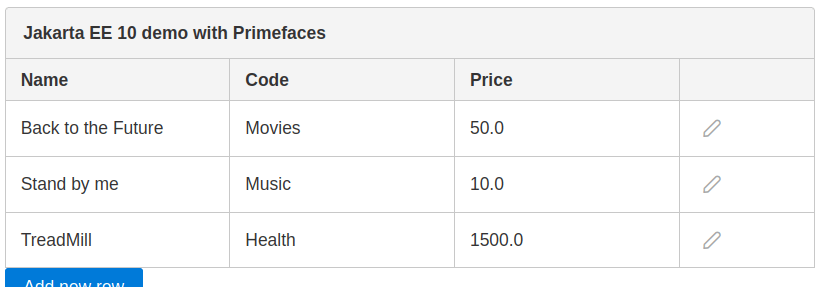
mvn install quarkus:devHere is our PrimeFaces application which has turned into a Quarkus one:
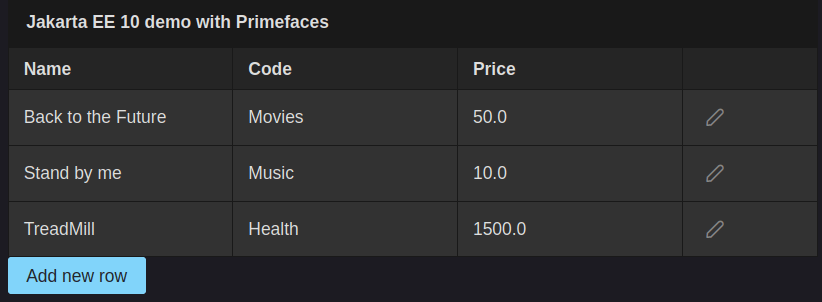
Since our application is running in Quarkus Dev Mode, you can apply any change to it and see it on the User Interface without restarting it. For example, you could try changing the UI theme as follows:
<context-param>
        <param-name>primefaces.THEME</param-name>
        <param-value>luna-blue</param-value>
</context-param>
Then, if you save the web.xml page and hit refresh you will see the UI theme to change instantly:
Conclusion
The combination of PrimeFaces and Quarkus presents a compelling solution for developers seeking to build modern web applications that excel in both user experience and performance. By mixing PrimeFaces’ rich UI components with Quarkus’ cloud-native and optimized capabilities, developers can create responsive, scalable, and efficient web interfaces that cater to today’s demanding user expectations.
Recommended Articles
Connect Your Quarkus App to Infinispan with Ease
Learn how to integrate Infinispan into your Quarkus application for a scalable and high-performance data grid solution.
Quarkus and Langchain4j Tutorial: Integrate AI Models into Java Applications
Learn how to use Langchain4j with Ollama's Llama model in a Quarkus project. Explore configuration, setup, and integration steps.
A Comprehensive Comparison of WildFly Application Server and Quarkus Framework in Enterprise Java
Explore the features and use cases of WildFly and Quarkus for robust Java applications. #WildFly #Quarkus #EnterpriseJava
Create Standalone Quarkus Applications and Powerful Scripts Using JBang & Quarkus Command Mode
Learn how to develop standalone Quarkus applications with JBang and powerful scripts using Quarkus Command Mode. #Quarkus #Java #Microservices #CloudNative