How to change the default Web Service deployment Port ?
To change the port published in your JAX-WS/SOAP WSDLs on WildFly 41.0.1.Final (Jakarta EE 11):
- Use JBoss CLI to write the
wsdl-port(HTTP) orwsdl-secure-port(HTTPS) attributes. - Ensure the physical Undertow subsystem listener matches your designated port.
- Always secure SOAP services in production using TLS/HTTPS over the secure port instead of plain text HTTP.
SOAP Web services running on WildFly 41.0.1.Final or JBoss EAP 8 can customize the deployment port of the Web service by setting the wsdl-port or wsdl-secure-port of the webservices subsystem. This ensures that the generated WSDL correctly advertises the public endpoints, especially when operating behind reverse proxies, load balancers, or custom network setups.
SOAP vs REST in Modern Enterprise Architectures
While RESTful APIs (via Jakarta RESTful Web Services / JAX-RS) have become dominant for web and mobile integrations, SOAP (via Jakarta XML Web Services / JAX-WS) remains a critical standard in enterprise integration. SOAP offers robust contract-first development with WSDL, built-in WS-Security (message-level encryption and signing), and formal transactional capabilities (WS-Coordination). When these advanced enterprise features are required, JAX-WS combined with the powerful JBossWS-CXF stack on WildFly 41 provides a high-performance, industry-standard solution.
Changing the Port via JBoss CLI
To modify the standard HTTP port reflected in your WSDLs, use the WildFly CLI to edit the wsdl-port attribute:
/subsystem=webservices:write-attribute(name=wsdl-port,value=8090)For production and secure environments, never expose credentials or sensitive payloads over unencrypted HTTP. To configure message-level or transport-level security via TLS, configure the WSDL Secure Port (HTTPS) instead:
/subsystem=webservices:write-attribute(name=wsdl-secure-port,value=8453)Now deploy a sample Jakarta EE 11 Web service (compiled using jakarta.xml.ws.* and jakarta.jws.*) and check the runtime Web Service WSDL URL:
/deployment=jaxws-pojo-service.war/subsystem=webservices/endpoint=jaxws-pojo-endpoint%3Aorg.jboss.quickstarts.ws.jaxws.samples.jsr181pojo.JSEBean:read-resource(include-runtime=true)
{
    "outcome" => "success",
    "result" => {
        "average-processing-time" => 0L,
        "class" => "org.jboss.quickstarts.ws.jaxws.samples.jsr181pojo.JSEBean",
        "context" => "jaxws-pojo-endpoint",
        "fault-count" => 0L,
        "max-processing-time" => 0L,
        "min-processing-time" => 0L,
        "name" => "org.jboss.quickstarts.ws.jaxws.samples.jsr181pojo.JSEBean",
        "request-count" => 0L,
        "response-count" => 0L,
        "total-processing-time" => 0L,
        "type" => "JAXWS_JSE",
        "wsdl-url" => "http://localhost:8090/jaxws-pojo-endpoint/JSEBean?wsdl"
    }
}
As you can see, the WSDL URL has been configured to run on Port 8090. Here is the updated XML subsystem configuration from standalone.xml (using the modern urn:jboss:domain:webservices:5.0 schema for WildFly 41) for your reference:
<subsystem xmlns="urn:jboss:domain:webservices:5.0" statistics-enabled="${wildfly.webservices.statistics-enabled:${wildfly.statistics-enabled:false}}">
    <wsdl-host>${jboss.bind.address:127.0.0.1}</wsdl-host>
    <wsdl-port>8090</wsdl-port>
    <wsdl-secure-port>8453</wsdl-secure-port>
    <endpoint-config name="Standard-Endpoint-Config"/>
    <endpoint-config name="Recording-Endpoint-Config">
        <pre-handler-chain name="recording-handlers" protocol-bindings="##SOAP11_HTTP ##SOAP11_HTTP_MTOM ##SOAP12_HTTP ##SOAP12_HTTP_MTOM">
            <handler name="RecordingHandler" class="org.jboss.ws.common.invocation.RecordingServerHandler"/>
        </pre-handler-chain>
    </endpoint-config>
    <client-config name="Standard-Client-Config"/>
</subsystem>
Critical Step: Aligning Undertow with your SOAP Port
Please note: changing the wsdl-port or wsdl-secure-port only updates the URL metadata published *inside* the generated WSDL document. It does *not* automatically spin up a new physical socket listener in WildFly.
If you want to run a single HTTP listener in your Undertow web server, it is sufficient to change the socket binding of the default Undertow http listener to "8090":
/socket-binding-group=standard-sockets/socket-binding=http:write-attribute(name=port, value=8090)On the other hand, if you want to use multiple HTTP listeners (for example, keeping port 8080 for standard web apps and dedicating port 8090 to your SOAP WSDL Port), we recommend checking this tutorial: How to run multiple HTTP Ports in JBoss / Wildfly
Changing Web Services Port using the Web Console
Another option is to use the WildFly Web Admin Console. Connect to it (default address is http://localhost:9990) and select Web Services under the Configuration > Subsystems menu.
From there, click on View and Edit the Configuration:
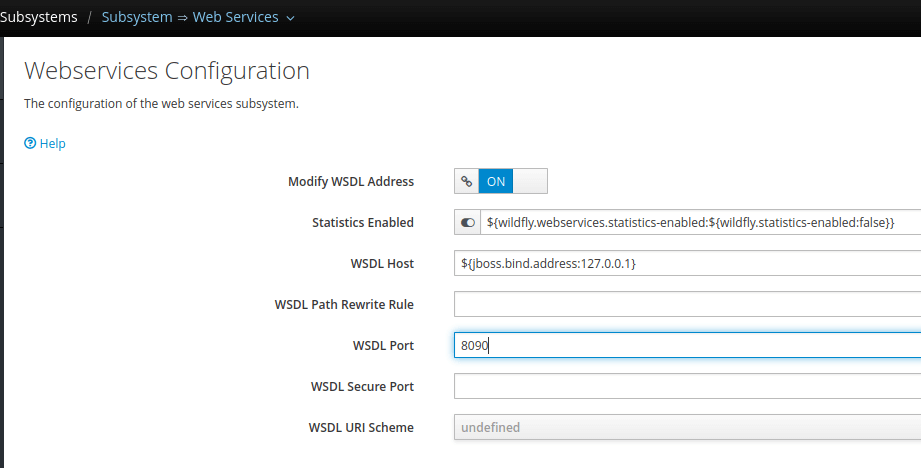
From here, you can visually update the WSDL Port or the WSDL Secure Port attributes and reload the server to apply the changes.
Archived Legacy Content (JBoss AS 4 and 5)
The following instructions apply only to highly legacy systems using obsolete versions of JBoss AS. If you are running WildFly 41, please ignore this section.
If you are running an older legacy version of JBoss (4.x or 5.x), you will need to change port information manually in 3 XML configuration files:
First, modify server.xml (located in JBoss 4.2.X under deploy/jboss-web.deployer):
<Connector port="8080" address="${jboss.bind.address}"
maxThreads="250" maxHttpHeaderSize="8192"
emptySessionPath="true" protocol="HTTP/1.1"
enableLookups="false" redirectPort="8443" acceptCount="100"
connectionTimeout="20000" disableUploadTimeout="true" />
Next, modify jboss-service.xml (under deploy/http-invoker.sar/META-INF/jboss-service.xml). Update all attributes named “InvokerURLSuffix”:
<attribute name="InvokerURLSuffix">:8080/invoker/EJBInvokerServlet</attribute>
<attribute name="InvokerURLSuffix">:8080/invoker/JMXInvokerServlet</attribute>
<attribute name="InvokerURLSuffix">:8080/invoker/readonly/JMXInvokerServlet</attribute>
Finally, check and modify the jboss-beans.xml file (located under deploy/jbossws.sar/jbossws.beans/META-INF):
<property name="webServicePort">8080</property>Conclusion
Configuring the default Web Service deployment port is a crucial task for developers deploying JAX-WS endpoints on WildFly 41 or JBoss EAP 8. By customizing the wsdl-port and wsdl-secure-port attributes of the modern webservices subsystem, you ensure your clients consume the correct contract addresses. Make sure to align these metadata attributes with your physical Undertow socket bindings to ensure a seamless runtime experience.
Frequently Asked Questions (FAQs)
1. Why does changing the wsdl-port value not change the port WildFly listens on?
The wsdl-port attribute in the webservices subsystem only controls the port string that is generated and published inside the WSDL document metadata. To change the actual physical port WildFly listens on, you must configure the corresponding HTTP/HTTPS socket bindings within the Undertow subsystem.
2. How can I enforce HTTPS/TLS on WildFly 41 for my SOAP endpoints?
To enforce TLS, you should configure the wsdl-secure-port in the webservices subsystem, establish a secure HTTPS listener in the Undertow subsystem using a Keystore/Truststore, and configure your Jakarta XML Web Services endpoints to require secure transport constraints using WS-Security or standard Jakarta web deployment descriptor security constraints.
3. What is the difference between JAX-WS handlers and Apache CXF interceptors?
JAX-WS handlers (such as jakarta.xml.ws.handler.soap.SOAPHandler) are part of the standard Jakarta EE specification and are fully portable across different application servers. Apache CXF interceptors are implementation-specific components unique to JBossWS-CXF. CXF interceptors are more powerful, offering fine-grained access to the message processing phases with significantly higher performance, but they bind your application code to the CXF runtime libraries.
Recommended Articles
Discover SOAP Web Service WSDL URL with JBoss EAP/WildFly: An In-Depth Guide
Learn how to find and test your SOAP Web Service using JBoss EAP or WildFly. Includes CLI and console methods.
Developing SOAP Web Services on WildFly 41 (Jakarta EE 11) with Apache CXF
Learn how to develop, deploy, and secure Jakarta XML Web Services (SOAP) on WildFly 41.0.1.Final and Jakarta EE 11 using Apache CXF, WS-Security, and modern testing tools.
Creating SOAP Messages Programmatically with Jakarta EE 11 and WildFly 41
Master programmatic SOAP message creation and parsing using SAAJ (Jakarta SOAP with Attachments 3.0) on WildFly 41.0.1.Final and Jakarta EE 11. Complete code examples included.
Deploying SOAP Web Services in Jakarta EE Applications: A Step-by-Step Guide
Learn how to build and deploy SOAP-based web services in Jakarta EE applications, including guidance on the changes in Java SE that removed the JAX-WS API.