How to debug Web Service request and response
Using a System Property to Debug SOAP Messages
<system-properties>
        <property name="org.apache.cxf.logging.enabled" value="true"/>
</system-properties>
To include this property in the configuration from the CLI:
/system-property=org.apache.cxf.logging.enabled:add(value=true)Once that this property has been set to true, you will see in your server logs the SOAP Messages. As an example, here is the incoming SOAP Request:
Address: http://localhost:8090/jaxws-pojo-endpoint/JSEBean
    HttpMethod: POST
    Content-Type: text/xml;charset=UTF-8
    ExchangeId: a6f15ee8-df14-4f1e-9942-36f0475e7bb6
    ServiceName: JSEBeanService
    PortName: JSEBeanPort
    PortTypeName: JSEBean
    Headers: {SOAPAction="", User-Agent=Apache-HttpClient/4.1.1 (java 1.5), connection=Keep-Alive, content-type=text/xml;charset=UTF-8, Host=localhost:8090, Content-Length=287, accept-encoding=gzip,deflate}
    Payload: <soapenv:Envelope xmlns:soapenv="http://schemas.xmlsoap.org/soap/envelope/" xmlns:jsr="http://jsr181pojo.samples.jaxws.ws.quickstarts.jboss.org/">
   <soapenv:Header/>
   <soapenv:Body>
      <jsr:echo>
         <arg0>Hello</arg0>
      </jsr:echo>
   </soapenv:Body>
</soapenv:Envelope>
And here is the SOAP Response:
INFO  [org.apache.cxf.services.JSEBean.RESP_OUT] (default task-1) RESP_OUT
    Address: http://localhost:8090/jaxws-pojo-endpoint/JSEBean
    Content-Type: text/xml
    ResponseCode: 200
    ExchangeId: a6f15ee8-df14-4f1e-9942-36f0475e7bb6
    ServiceName: JSEBeanService
    PortName: JSEBeanPort
    PortTypeName: JSEBean
    Headers: {}
    Payload: <soap:Envelope xmlns:soap="http://schemas.xmlsoap.org/soap/envelope/"><soap:Body><ns1:echoResponse xmlns:ns1="http://jsr181pojo.samples.jaxws.ws.quickstarts.jboss.org/"><return>JSEBean pojo: Hello</return></ns1:echoResponse></soap:Body></soap:Envelope>
IMPORTANT: This property is read at server start up. Therefore, you need to restart WildFly to see the effect of this change.
Adding Logging Feature
Features in CXF works like decorators. It can be applied to server and client bus components. In a nutshell it extends the functionality of the server, client or the bus. CXF provides some of the built-in Feature implementations and one of them is LoggingFeature feature class. The LoggingFeature class performs logging of SOAP messages. You can simply add the LoggingFeature to your endpoint as follows:
@org.apache.cxf.feature.Features(features={"org.apache.cxf.feature.LoggingFeature"})Please note that you can add Features using JaxWsServerFactoryBean as shown in the following code:
HelloWorldImpl implementor = new HelloWorldImpl();
JaxWsServerFactoryBean svrFactory = new JaxWsServerFactoryBean();
svrFactory.setServiceClass(HelloWorld.class);
svrFactory.setAddress("http://localhost:9000/helloWorld");
svrFactory.setServiceBean(implementor);
svrFactory.getFeatures().add(new LoggingFeature());
svrFactory.create();
Using a Proxy to capture SOAP Messages
Another option is to use a proxy which prints the incoming and outgoing SOAP Messages. There are plenty of options available like netcat, For example, here is how to set up a proxy on port 8082 which forwards tcp messages on port 8080, printing them:
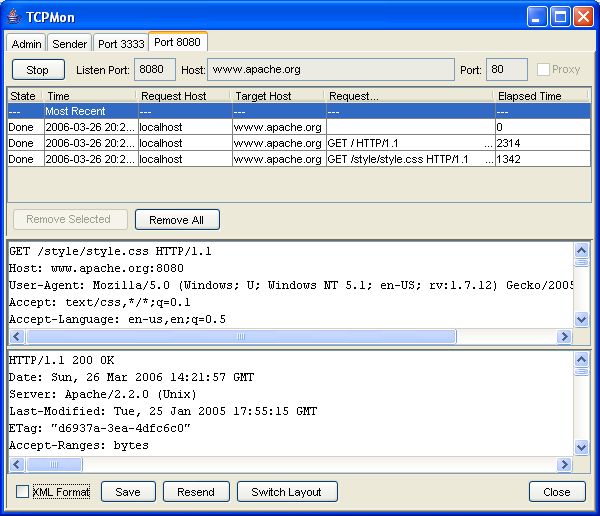
ncat -lkv localhost 8082 -c 'tee /dev/stderr | ncat -v localhost 8080 | tee /dev/stderr'If you prefer using a graphical tool for setting up a proxy, then you can use Apache TCPMon which is a valuable tool for monitoring your network applications.
In the Admin tab select a Listening port for Apache TCPMon and a target port which corresponds to JBoss AS listening port. For example:

Now modify your Web Services client so that they point to the Apache TCPMon Port instead of JBoss. For example:
public static void main(String args[]) throws Exception {
 String endpointURI ="http://127.0.0.1:8888/ejb/HelloWorld?wsdl";
 String helloWorld = "Hello world!";

 Object retObj = getPort(endpointURI).echo(helloWorld);
 System.out.println(retObj);
} 
https://ws.apache.org/tcpmon/tcpmontutorial.html
Recommended Articles
How to develop CXF Web services with JBoss / WildFly
Learn how to develop, deploy, and secure SOAP Web Services on WildFly 41.0.1.Final using Jakarta EE 11 and Apache CXF. Master JAX-WS handlers, CXF interceptors, and robust cloud configurations.
Developing SOAP Web Services on WildFly 41 (Jakarta EE 11) with Apache CXF
Learn how to develop, deploy, and secure Jakarta XML Web Services (SOAP) on WildFly 41.0.1.Final and Jakarta EE 11 using Apache CXF, WS-Security, and modern testing tools.
Using Axis Web Services with JBoss: Migration to modern JAX-WS with WildFly 41
Learn how to migrate legacy Apache Axis SOAP web services from JBoss to modern Jakarta EE 11 and JAX-WS on WildFly 41.0.1.Final using Apache CXF with secure HTTPS configurations and debugging.
Apache CXF Interceptors on WildFly 41 and Jakarta EE 11
Learn how to write, configure, and customize Apache CXF Interceptors on WildFly 41.0.1.Final and Jakarta EE 11. Upgrade from legacy configuration to modern Jakarta XML Web Services.