10 Web services Performance Tuning Tips
TL;DR: SOAP Performance in the Jakarta EE 11 Era
Optimizing SOAP endpoints on modern application servers like WildFly 41.0.1.Final requires a shift to the jakarta.* namespace, efficient XML bindings via Jakarta XML Binding, and proactive client-side caching. Learn how to tune the Apache CXF stack, optimize transport payloads over HTTPS, and use async execution models to eliminate throughput bottlenecks.
This tutorial focuses on design guidelines and techniques to improve the performance of your SOAP Web services. Modern enterprise architectures demand highly scalable, low-latency APIs. Let's see how we can optimize your Jakarta XML Web Services (formerly JAX-WS) stack on WildFly 41 using Apache CXF!
#1 Use coarse grained Web Services
One of the biggest mistakes that many developers make when approaching web services is defining operations and messages that are too fine-grained. You should try to reduce the requests by using a few coarse grained (highly functional) APIs, rather than several simple APIs. At the same time, make sure your message reflects your business use case rather than your programmer’s framework.
Since modern production web services must run over secure channels (HTTPS/TLS), every single request carries the overhead of encryption and handshakes. Minimizing round-trips is one of the easiest ways to boost overall throughput.
The reason why top-down Web services are the pure web services is really this: you define at first the business and then the programming interface.
Don’t define a web service operation for every Java method you want to expose. Rather, you should define an operation for each action you need to expose.
public void checkInventory(long itemId) {
 InventoryDAO.checkInventory(itemId);
}
public void checkAccount(long itemId) {
 CustomerDAO.checkAccount(clientId);
}
public void saveOrder(long itemId, long clientId) {
 OrderDAO.persisteOrder(itemId,clientId);
}
And here is the modern, coarse-grained web service we expose under Jakarta EE 11:
package com.mastertheboss.jaxws;

import jakarta.jws.WebMethod;
import jakarta.jws.WebService;
import jakarta.inject.Inject;

@WebService(serviceName = "OrderService")
public class OrderWebServiceImpl {

    @Inject
    private InventoryService inventoryService;

    @Inject
    private CustomerService customerService;

    @Inject
    private OrderRepository orderRepository;

    @WebMethod
    public void makeOrder(long itemId, long clientId) {
        inventoryService.checkInventory(itemId);
        customerService.checkAccount(clientId);
        orderRepository.persistOrder(itemId, clientId);
    }
}
For the sake of simplicity, we haven't added database transaction commit/rollback logic. However, the first fine-grained approach is a poor design practice. It yields terrible performance because of three sequential round trips to the server, each carrying heavy SOAP envelopes.
#2: Use primitive types, String or simple POJO as parameters and return type
You can design Web services from the ground up to be interoperable components. That is, you can return both primitive types and Objects. How does a C# client retrieve a Java type from a Web Service or vice versa? That is possible because the objects moving to and from the web services are marshalled into XML format.
The size of the Object acting as a parameter or return type has a massive impact on serialization CPU cycles and network latency. Be careful with complex object graphs containing large collections. If you have fields or collections that are not useful in your response, mark them as transient using the Jakarta XML Binding API:
package com.mastertheboss.model;

import jakarta.xml.bind.annotation.XmlElement;
import jakarta.xml.bind.annotation.XmlRootElement;
import jakarta.xml.bind.annotation.XmlTransient;
import java.util.List;

@XmlRootElement
public class Customer {

    private String password;
    private List<String> phoneNumbers;

    @XmlTransient
    public String getPassword() {
        return password;
    }

    public void setPassword(String password) {
        this.password = password;
    }

    @XmlElement(name = "phone-number")
    public List<String> getPhoneNumbers() {
        return phoneNumbers;
    }

    public void setPhoneNumbers(List<String> phoneNumbers) {
        this.phoneNumbers = phoneNumbers;
    }
}
#3: Evaluate carefully how much data you need to return
Consider returning only subsets of data if database queries are fast but the serialization of the object graph is complex. Pagination is an excellent strategy here. Let's look at how we write this using modern Jakarta Persistence:
package com.mastertheboss.service;

import jakarta.persistence.EntityManager;
import jakarta.persistence.PersistenceContext;
import jakarta.persistence.TypedQuery;
import jakarta.jws.WebMethod;
import jakarta.jws.WebParam;
import jakarta.jws.WebService;
import java.util.List;
import com.mastertheboss.model.Task;

@WebService
public class TaskService {

    @PersistenceContext(unitName = "persistenceUnit")
    private EntityManager em;

    @WebMethod
    public List<Task> readTaskListByPage(
        @WebParam(name = "start") int start,
        @WebParam(name = "stop") int stop) {

        TypedQuery<Task> dbQuery = em.createQuery("SELECT t FROM Task t ORDER BY t.id", Task.class);

        List<Task> listObjects = dbQuery.setFirstResult(start)
                                        .setMaxResults(stop - start)
                                        .getResultList();

        return listObjects;
    }
}
Check this tutorial to learn how to paginate your Entity objects: How to paginate your Entity data
On the other hand, if your bottleneck is database connectivity rather than serialization, reduce the round trips to the service and try to return larger blocks of cohesive data in a single request.
#4: Inspect your SOAP packet
This tip is the logical continuation of the previous one. When dealing with complex custom types, always check what is actually moving across the wire. Analyzing raw XML envelopes can expose serialization inefficiencies, duplicate namespaces, or unexpectedly nested structures.
With JBossWS-CXF on WildFly 41, you don't need external heavy sniffer programs. You can activate Apache CXF's native logging interceptors via the WildFly CLI. For example, to enable logging for all web service interactions, run the following administrative CLI command:
/subsystem=webservices:write-attribute(name=modify-wsdl-address, value=true)
/subsystem=logging/logger=org.apache.cxf:add(level=DEBUG)
The following tutorial covers all tips and hints to debug SOAP Web Services: How to debug Web Service request and response
#5: Cache on the Client when possible
If your client application requests static or slowly-changing business metadata from the server repeatedly, client-side caching is crucial for latency reduction and server offloading.
This approach requires synchronization strategy: how do we ensure cached client data is consistent with the backend? You can configure active invalidation or time-to-live policies. When utilizing enterprise middleware like WildFly 41, the server acts as an intermediary database client. Check if integrating a second-level cache is the right solution for your enterprise application: Using Hibernate second level cache with JBoss AS and WildFly
#6: Evaluate using async messaging model
Some SOAP requests require heavy processing, stream I/O, or calling secondary slow web services. Blocking client threads while waiting for long-running responses ruins performance at scale. In this scenario, consider an asynchronous messaging model.
Jakarta XML Web Services natively supports polling and callback styles. The asynchronous callback handler processes the response on a dedicated client-side worker pool when it becomes available, freeing the main thread to handle other tasks.
Check this tutorial to learn more about using Async Web Services: JAX-WS asynchronous Web Services made simple
#7: Override the default Binding Rules
Consider the following domain Object:
public class Person {
  private String name;
  private String surname;
  private String address;

  // Getter/Setter methods
}
By default, the Java to XML Mapping (JAXB) creates nested XML elements for every field. This creates a verbose payload:
<?xml version="1.0" encoding="UTF-8"?>
<soap:Envelope xmlns:soap="http://schemas.xmlsoap.org/soap/envelope/">
   <soap:Body>
      <ns1:echoResponse xmlns:ns1="http://jsr181pojo.samples.jaxws.ws.quickstarts.jboss.org/">
         <return>
            <address>1260 W Edgewood Cir</address>
            <name>John</name>
            <surname>Smith</surname>
         </return>
      </ns1:echoResponse>
   </soap:Body>
</soap:Envelope>
We can significantly reduce the payload envelope by rewriting our object properties as XML attributes instead of child elements:
package com.mastertheboss.model;

import jakarta.xml.bind.annotation.XmlAccessType;
import jakarta.xml.bind.annotation.XmlAccessorType;
import jakarta.xml.bind.annotation.XmlAttribute;
import jakarta.xml.bind.annotation.XmlRootElement;

@XmlRootElement
@XmlAccessorType(XmlAccessType.FIELD)
public class Person {

    @XmlAttribute
    private String name;

    @XmlAttribute
    private String surname;

    @XmlAttribute
    private String address;
}
Using these mappings, the SOAP Body transmitted across the network is much more compact:
<?xml version="1.0" encoding="UTF-8"?>
<soap:Envelope xmlns:soap="http://schemas.xmlsoap.org/soap/envelope/">
   <soap:Body>
      <ns1:echoResponse xmlns:ns1="http://jsr181pojo.samples.jaxws.ws.quickstarts.jboss.org/">
         <return xmlns:ns2="http://jsr181pojo.samples.jaxws.ws.quickstarts.jboss.org/" name="John" surname="Smith" address="1260 W Edgewood Cir" />
      </ns1:echoResponse>
   </soap:Body>
</soap:Envelope>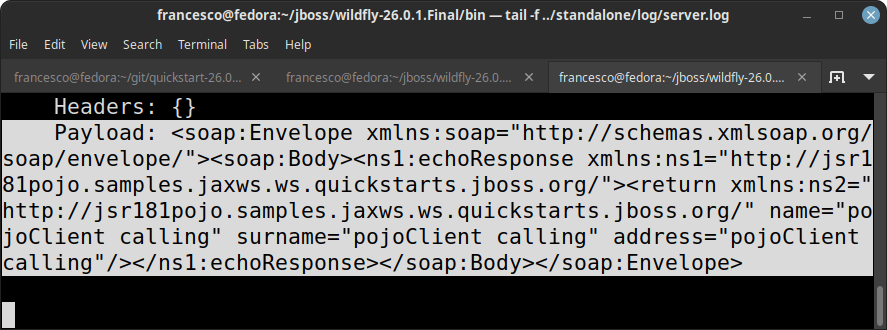
The serialization overhead drops when elements are simplified to attributes. On large enterprise datasets containing thousands of objects, this small metadata adjustment can slash network traffic and XML parsing overhead by up to 40%.
#8: Are you using the right type of Web Service?
When choosing between SOAP (Jakarta XML Web Services) and REST (Jakarta RESTful Web Services), it is essential to analyze your integration requirements. REST does not mandate a formal envelope, which reduces overhead and makes it highly compatible with modern web standard caching proxies.
However, SOAP is not outdated; it remains critical for specific enterprise scenarios:
- SOAP / Jakarta XML Web Services are appropriate when you require a formal, strongly-typed contract (WSDL) that describes operations, schema, and bindings. They are invaluable for complex transaction coordination, reliable messaging (WS-RM), and enterprise security standards (WS-Security).
- REST Web Services are ideal for public-facing consumer APIs, stateless resource actions, and lightweight clients like mobile or IoT interfaces that struggle with heavy XML parsing.
#9: Cache The Service Port
Acquiring a JAX-WS client port proxy is a very resource-intensive initialization task. It requires parsing the remote WSDL document, constructing the internal CXF runtime pipes, and binding interceptor chains. **Never retrieve the port proxy on every request.**
Instead, cache the service instance and reuse the port proxy across invocations. Because JAX-WS standard port proxies are not thread-safe, access must be managed correctly:
// Thread-safe caching approach using ThreadLocal
private static final ThreadLocal<MyServicePort> portHolder = ThreadLocal.withInitial(() -> {
    try {
        URL wsdlURL = new URL("https://secure.example.com/ws/OrderService?wsdl");
        QName serviceName = new QName("http://jaxws.mastertheboss.com/", "OrderService");
        jakarta.xml.ws.Service service = jakarta.xml.ws.Service.create(wsdlURL, serviceName);
        return service.getPort(MyServicePort.class);
    } catch (Exception e) {
        throw new RuntimeException("Error initializing SOAP client port", e);
    }
});
#10: Use Literal Message Encoding for Parameter Formatting
Using SOAP RPC/encoded formatting is an outdated, non-interoperable approach that forces runtime type-encoding metadata inline. It slows down processing and bloats network payload size:
<soap:envelope>
  <soap:body>
     <helloWorld>
       <a xsi:type="xsd:string">George</a>
       <b xsi:type="xsd:string">Michael</b>
     </helloWorld>
  </soap:body>
</soap:envelope>
Under modern Jakarta EE standards, Apache CXF defaults to Document/Literal Wrapped style. This produces clean XML containing only the payload data without overhead:
<soap:envelope>
  <soap:body>
    <helloWorld>
      <a>George</a>
      <b>Michael</b>
    </helloWorld>
  </soap:body>
</soap:envelope>
Conclusion
Optimizing SOAP Web Services performance on WildFly 41 is a multi-step process. By utilizing modern Jakarta EE 11 annotations, caching heavy proxy resources, configuring efficient binding rules, and enabling transport compression, you can ensure your legacy SOAP system matches modern API speed benchmarks.
Frequently Asked Questions (FAQs)
1. How do I configure HTTP connection and read timeouts for JBossWS-CXF clients?
In modern WildFly versions, timeouts should be set directly on the JAX-WS client request context using CXF-specific properties to prevent lingering connections from hanging the thread pool:
import jakarta.xml.ws.BindingProvider;
import java.util.Map;

BindingProvider provider = (BindingProvider) port;
Map<String, Object> requestContext = provider.getRequestContext();

// Configure timeouts in milliseconds
requestContext.put("jakarta.xml.ws.client.connectionTimeout", 5000); // Connection Timeout
requestContext.put("jakarta.xml.ws.client.receiveTimeout", 15000);    // Receive/Read Timeout
2. What is the performance difference between JAX-WS Handlers and Apache CXF Interceptors?
Standard JAX-WS Handlers (such as SOAPHandler) force the SOAP engine to convert raw XML streams into memory-heavy SAAJ DOM trees, significantly increasing latency and memory consumption. In contrast, Apache CXF Interceptors operate on raw stream buffers (using StAX parser streams), making them much faster and highly recommended for logging, security, or payload manipulation.
3. Why should I use MTOM instead of inline Base64 binary processing?
Encoding binary files (like PDFs or images) directly inside XML using Base64 increases payload size by approximately 33% and places heavy deserialization workloads on the CPU. By enabling MTOM (Message Transmission Optimization Mechanism), WildFly transmits binaries as optimized MIME parts outside the XML envelope, resulting in faster parsing and lower network usage.
Recommended Articles
Developing SOAP Web Services on WildFly 41 (Jakarta EE 11) with Apache CXF
Learn how to develop, deploy, and secure Jakarta XML Web Services (SOAP) on WildFly 41.0.1.Final and Jakarta EE 11 using Apache CXF, WS-Security, and modern testing tools.
How to develop CXF Web services with JBoss / WildFly
Learn how to develop, deploy, and secure SOAP Web Services on WildFly 41.0.1.Final using Jakarta EE 11 and Apache CXF. Master JAX-WS handlers, CXF interceptors, and robust cloud configurations.
Deploying SOAP Web Services in Jakarta EE Applications: A Step-by-Step Guide
Learn how to build and deploy SOAP-based web services in Jakarta EE applications, including guidance on the changes in Java SE that removed the JAX-WS API.
Disable JAX-WS SOAP Web Services on WildFly Application Server - Comprehensive Guide
Learn how to disable JAX-WS SOAP Web Services at both application and subsystem levels in WildFly. #WildFly #Java #Middleware