Converting JSON to Java Map using Jackson
This tutorial demonstrates how to convert a JSON string into a Java Map using Jackson’s ObjectMapper. We will show a basic Java main Class to convert a sample JSON String. Then, we will simplify the classpath set up using JBang.
Prerequisites
- Basic understanding of Java programming.
- Jackson library added to your project’s dependencies.
Steps:
1. Include Jackson Dependency
Make sure to include the Jackson dependencies in your project. If you’re using Maven, add the following to your pom.xml file:
<dependency>
    <groupId>com.fasterxml.jackson.core</groupId>
    <artifactId>jackson-databind</artifactId>
    <version>2.16.0</version> <!-- Replace with the latest version -->
</dependency>
Create a Java Class
Create a Java class where you’ll perform the conversion from JSON to a Java Map. Let’s name the class JSONToMap.
import com.fasterxml.jackson.core.JsonProcessingException;
import com.fasterxml.jackson.databind.ObjectMapper;
import java.util.HashMap;
import java.util.Map;

public class JSONToMap {
    public static void main(String[] args) {
        // Sample JSON String
        String jsonString = "{\"name\":\"John Doe\",\"age\":30,\"city\":\"New York\"}";

        // Initialize ObjectMapper
        ObjectMapper objectMapper = new ObjectMapper();

        // Convert JSON to Map
        try {
            // Read JSON string and map it to a Java Map
            Map<String, Object> resultMap = objectMapper.readValue(jsonString, HashMap.class);

            // Print the generated Map
            System.out.println("Generated Map: ");
            for (Map.Entry<String, Object> entry : resultMap.entrySet()) {
                System.out.println(entry.getKey() + " : " + entry.getValue());
            }
        } catch (JsonProcessingException e) {
            e.printStackTrace();
        }
    }
}
3. Run the Code
Replace the jsonString variable with your actual JSON content. Execute the code, and it will convert the JSON string into a Java Map using Jackson’s ObjectMapper.
Run the example with JBang
Finally, if you want to run the above example as a Java script command, we recommend using JBang. For more info about JBang check this article: JBang: Create Java scripts like a pro
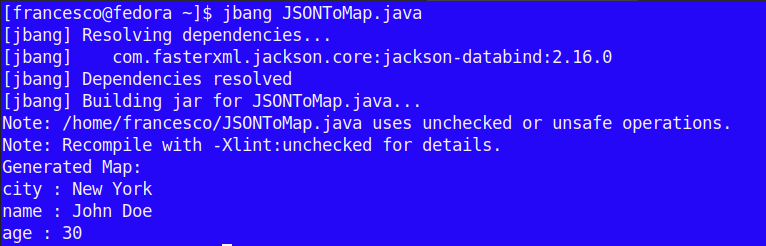
By using JBang, you can skip the project creation and just include the dependency on top of the Java Class:
//usr/bin/env jbang "$0" "$@" ; exit $?
//DEPS com.fasterxml.jackson.core:jackson-databind:2.16.0
Then, run it as follows:
Conclusion
In this tutorial, you’ve learned how to utilize Jackson’s ObjectMapper to convert a JSON string into a Java Map. This capability is beneficial for parsing JSON data into a format that’s easily manipulable within Java applications.
Recommended Articles
Convert Map to JSON Object Using Jackson in Java - A Step-by-Step Guide
Learn how to convert a map to a JSON object with Jackson in Java. Prerequisites and example included.
A Comprehensive Guide: Understanding Jackson vs JSON-B for Java JSON Parsing
Learn the differences between Jackson and JSON-B for parsing JSON in Java. #Jackson #JSONB #JavaParsing
Mastering JSON-B for Java Object Parsing and Conversion
Learn how to use JSON-B to convert Java objects to/from JSON with this comprehensive guide. Discover the benefits of using JSON-B and get started with a practical example.
Advanced JSON Mapping with Jackson and JSONPath for Enterprise Java Applications
Learn how to use JSONPath with Jackson to map complex JSON structures to Java objects, improving data extraction in enterprise applications. #EnterpriseJava #Middleware #CloudNative