ActiveMQ Artemis CheatSheet
This is my Apache ActiveMQ Artemis Cheatsheet, updated for Artemis 2.53.0, which includes command-line shortcuts you can use to manage your broker, produce and consume messages, and check their status.
Introduction
Firstly, if you are new to Artemis MQ, we recommend checking this article for an introduction to the messaging broker and details on how to install an instance on your machine: Getting started with ActiveMQ Artemis
Besides, to complement this article we also recommend checking this excellent resource from Roman Martin: My own ActiveMQ Artemis Cheat Sheet – Roman's Blog (jromanmartin.io)
Running Artemis in Docker? The install path changed.
If you're following an older tutorial (or your own older notes) for the official Artemis Docker images, note that recent Artemis releases moved the installation directory inside the container from /opt/activemq-artemis to /opt/artemis. Update any scripts, volume mounts, or docker exec commands that hardcode the old path.
Base Artemis Commands
Creating a Broker Instance:
./artemis create myartemis --user admin --password admin --queues queueDemo --require-loginThis command creates a new Artemis broker instance "myartemis". It sets the username and password for admin access to "admin". It creates a queue "queueDemo" within the broker. The --require-login flag enforces authentication for accessing the broker.
Checking Queue Status:
./artemis queue stat --user admin --password admin --url=tcp://localhost:61616 --maxRows 100- This command retrieves statistics about queues in the broker.
- It connects to the broker running on localhost port 61616.
- It uses credentials "admin" and "admin" to authenticate.
--maxRows 100specifies displaying a maximum of 100 rows of data (optional).
./artemis queue stat --user admin --password admin --queueName "SampleQueue" --url=tcp://localhost:61616This command retrieves specific statistics for the queue named "SampleQueue".
Verifying Queue Existence:
./artemis check queue --user admin --password admin --name "SampleQueue" --url=tcp://localhost:61616- This command checks if a specific queue exists and is not paused.
Getting the Artemis Version:
./artemis version- This command displays the installed version of Apache ActiveMQ Artemis — you should see 2.53.0 (or newer) on a current installation.
Browsing, Sending and Consuming Messages
Browsing Messages:
./artemis browser --destination "SampleQueue" --user admin --password admin --url tcp://localhost:61616 --message-count 10- This command allows you to browse messages in a queue.
- It specifies "SampleQueue" as the destination.
- It uses credentials for authentication.
--message-count 10retrieves and displays up to 10 messages (optional).
Consuming Messages:
./artemis consumer --url tcp://localhost:61616 --user admin --password admin --destination "SampleQueue" --verbose- This command defines a message consumer that listens for and processes messages from "SampleQueue".
- The
--verboseflag provides more details about received messages (optional).
Producing Messages:
./artemis producer --url tcp://localhost:61616 --user admin --password admin --destination "SampleQueue" --message "Sample Message" --message-count 1- This command creates a message producer that sends a single message with the text "Sample Message" to "SampleQueue".
Sending Messages to a Specific Group:
./artemis producer --url tcp://localhost:61616 --user admin --password admin --destination "SampleQueue" --message-count 1 --group mygroup- Finally, this command sends a message similar to the previous one, but assigns it a group identifier "mygroup". This might be used for message routing within the broker.
User Management
- These commands allow you to create, reset, and delete users with specific roles within the broker. They all require admin credentials and specify the broker URL.
# add user user1 with password user1-password1 and role role1
./artemis user add --url tcp://localhost:61616 --user admin --password admin --user-command-user user1 --user-command-password user1-password1 --role role1

# reset user1, changing the password
./artemis user reset --url tcp://localhost:61616 --user admin --password admin --user-command-user user1 --user-command-password user1-password2 --role role1

# delete user1
./artemis user rm --url tcp://localhost:61616 --user admin --password admin --user-command-user user1
Operations / Attributes
Reading Attributes and Running Operations on a Queue
The Artemis MQ Web Console is an excellent tool to read queue attributes and perform operations on them. On the other hand, you can automate some of these tasks using the Jolokia API, which you can use with any HTTP tool like curl.
For example, supposing you want to read the MessageCount attribute for a queue:
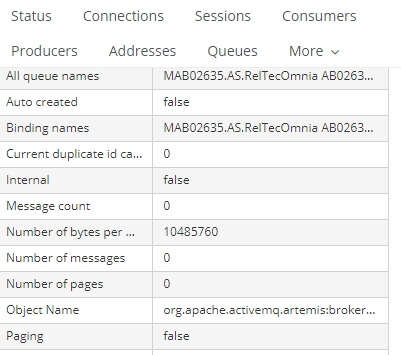
You can achieve the same result with the following command:
curl -v -u admin:admin -H Origin:http://artemis-hostname \
artemis-hostname:8161/console/jolokia/read/org.apache.activemq.artemis:broker=\"broker_name\",component=addresses,address=\"MyQueueAddress\",subcomponent=queues,routing-type=\"anycast\",queue=\"SampleQueue\"/MessageCount- This command uses
curlto access the broker's JMX interface (management) and retrieve the message count for "SampleQueue". Replaceartemis-hostnamewith the actual Artemis MQ hostname. Also replaceadmin:adminwith the current administration credentials. Finally, set the address and queue name, replacingMyQueueAddressandSampleQueue.
Protocol Support at a Glance
A quick reminder of what current Artemis speaks out of the box, since it comes up often when deciding whether to use Artemis over the older ActiveMQ "Classic" broker: Artemis supports Core, AMQP, MQTT, STOMP, and OpenWire, plus Jakarta Messaging (JMS) 2.0 and partial Jakarta Messaging 3.1 support for Java client applications — no separate JMS client library or bridge needed for typical Jakarta EE / Spring Boot consumers and producers.
Conclusion
This Artemis MQ cheatsheet provides a foundational overview of essential command-line tools for managing your message broker. From creating and configuring your broker to producing, consuming, and browsing messages, you now have a solid grasp of the basics for current Artemis releases.
Frequently Asked Questions
What is the latest version of Apache ActiveMQ Artemis?
2.53.0 (March 2026) is the current supported release. Artemis doesn't maintain a long-term-support branch — only the latest minor release receives updates — so plan to upgrade regularly rather than pinning to an old version indefinitely.
Why can't I find files under /opt/activemq-artemis in the Docker image anymore?
Recent Artemis Docker images moved the installation directory to /opt/artemis. Update any scripts or volume mounts referencing the old path.
How do I check if a queue exists without browsing its full contents?
Use ./artemis check queue --user admin --password admin --name "SampleQueue" --url=tcp://localhost:61616 — it verifies existence and that the queue isn't paused, without pulling any messages.
Can I manage Artemis without using the CLI at all?
Yes — the Artemis Web Console (bundled with the broker) covers most queue inspection and management tasks through a browser UI, and the Jolokia API (shown in this article) lets you automate the same operations via plain HTTP/curl calls, useful for scripting or integrating with external monitoring.
Does Artemis support JMS 2.0?
Yes, along with partial Jakarta Messaging 3.1 support — current Artemis works natively as a JMS/Jakarta Messaging provider for Java client applications without needing a separate bridge.
Is Apache ActiveMQ "Classic" the same as Artemis?
No — they're two different broker implementations under the same Apache ActiveMQ umbrella. Artemis is the newer, Netty-based, non-blocking broker (originally derived from HornetQ) and is the one this cheatsheet covers; "Classic" is the older 5.x/6.x line with a different internal architecture.
Recommended Articles
Apache ActiveMQ Artemis Tutorial: Mastering Message Groups and Their Applications
Learn how Apache ActiveMQ Artemis' message groups ensure serial processing in multi-consumer environments. #Java #Artemis #MessageGroups
Setting Up ActiveMQ Artemis: A Step-by-Step Guide
Learn how to install and start ActiveMQ Artemis, a message broker that retains compatibility with HornetQ while adding many interesting features.
Secure WildFly Connection to Remote Artemis MQ Broker with SSL
Learn how to connect WildFly to a remote Artemis MQ broker using SSL for secure communication. Get step-by-step guide and configuration details.
Apache ActiveMQ Artemis vs RabbitMQ: A Comprehensive Comparison
Discover how Apache ActiveMQ Artemis and RabbitMQ differ, ideal for developers looking to choose the right messaging broker. #ActiveMQArtemis #RabbitMQ #MessagingBrokers