How to map Date and Time fields in REST applications
This article will teach you the simplest way to map Date and Time fields in an Entity when the request/response is from a REST Endpoint.
Defaults for Date / Time in REST Application
When your REST Endpoint exposes some Data and Time fields in JSON Format, you can mainly use two formats:
- A java.sql.Date format, which by default uses the format yyyy-mm-dd
- A javasql.Timestamp format, which by default uses the format yyyy-mm-ddThh:mm:ss
Here is a sample Entity which uses both Date and Time formats:
@Entity
public class Car {
	@Id
	@GeneratedValue(strategy = GenerationType.UUID)
	private UUID id;

	private java.sql.Date dateProd;
	private java.sql.Timestamp timeProd;

}
Then, you can let JSONB handle the automatic mapping between Java and JSON by exposing an Endpoint which Consumes and Produces JSON data:
@POST
@Consumes(MediaType.APPLICATION_JSON)
@Produces(MediaType.APPLICATION_JSON)
public Response createCar(Car car) {

	Response.ResponseBuilder builder = null;

	try {
		ejb.save(car);
		builder = Response.ok("Saved!");

	} catch (Exception e) {
		// Handle generic exceptions
		Map<String, String> responseObj = new HashMap<>();
		responseObj.put("error", e.getMessage());
		builder = Response.status(Response.Status.BAD_REQUEST).entity(responseObj);
	}

	return builder.build();
}
Then, you can insert both Date and Time as text Strings using the default formats. For example, using Postman:
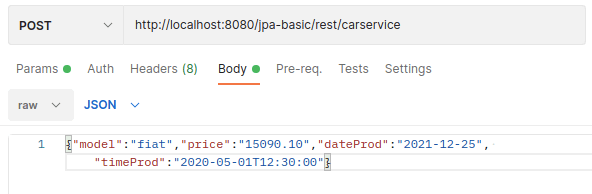
Otherwise, using plain cURL:
curl -X POST http://localhost:8080/jpa-basic/rest/carservice -H 'Content-Type: application/json' -d ' {"model":"fiat","price":"15090.10","dateProd":"2021-12-25", "timeProd":"2020-05-01T12:30:00"}'Using a custom JSONBDateFormat
When your REST data uses a custom format for Date or Time then you can use the @jakarta.json.bind.annotation.JsonbDateFormat annotation to map your in/out fields. For example:
@JsonbDateFormat(value = "MM/dd/yyyy")
private Date dateProd;

@JsonbDateFormat("dd-MM-yyyy'T'HH:mm:ss")
private Timestamp timeProd;
With the above mapping, you will be able to issue the following Request for your REST Endpoint:
curl -X POST http://localhost:8080/jpa-basic/rest/carservice -H 'Content-Type: application/json' -d ' {"model":"fiat","price":"15090.10","dateProd":"2021-12-25", "timeProd":"2020-05-01T12:30:00"}'Besides, you can also include the optional locale attribute to set the Locale for your date:
@JsonbDateFormat(value = "MM/dd/yyyy", locale = "Locale.ENGLISH"))
private Date dateProd;

@JsonbDateFormat("dd-MM-yyyy'T'HH:mm:ss", locale = "Locale.ENGLISH"))
private Timestamp timeProd;
Recommended Articles
Discover WildFly REST Endpoints with Ease: Three Simple Strategies
Learn three effective methods to discover and map WildFly REST endpoints. #WildFly #REST #JavaDev
Create a Simple JAX-RS Application for WildFly Using Maven and Command Line
Learn how to create a basic JAX-RS application with WildFly using Maven and CLI. Includes prerequisites, project setup, REST endpoints, and deployment.
Jakarta EE REST Endpoint Parameter Validation Walkthrough
Learn how to validate REST endpoint parameters using Jakarta EE. Includes Bean and Entity validation examples.
Fixing Error 'RESTEASY003215: Could Not Find Writer for Content-Type Application/JSON' in Java and Cloud-Native Applications
Learn how to resolve the error when deploying REST Web services that handle JSON content types. Includes correct dependencies, example code, and testing.