Swagger with Jakarta REST & WildFly Quickstart
In today’s API-driven enterprise landscape, clear and interactive documentation is essential for developing and maintaining RESTful web services. Swagger UI and the OpenAPI 3.0 Specification simplify API design and exploration by automatically rendering user-friendly documentation directly from your source code.
This tutorial guides you through integrating Swagger UI into a Jakarta REST (JAX-RS) web application deployed on WildFly or JBoss EAP. We will configure Swagger Core annotations and static web assets to serve interactive API docs.
Are you developing with Spring Boot? If you are looking for Spring Boot OpenApi/Swagger integration, please refer to our dedicated guide: Spring Boot Swagger UI Tutorial.
We will build upon our sample CRUD application: Jakarta REST CRUD Application with JPA & RESTEasy.
Step 1: Include Swagger UI Web Assets
The static distribution files for Swagger UI are hosted in the official GitHub repository: https://github.com/swagger-api/swagger-ui.
Download the latest release archive, extract it, and copy the contents of the dist/ folder into your web application directory at src/main/webapp/swagger/. Your Maven project structure will look like this:
├───src
│   └───main
│       ├───java
│       │   └───com
│       │       └───mastertheboss
│       │           └───jaxrs
│       │                   Customer.java
│       │                   CustomerEndpoint.java
│       │                   CustomerException.java
│       │                   CustomerRepository.java
│       │                   JaxRsActivator.java
│       │
│       ├───resources
│       │   │   import.sql
│       │   │
│       │   └───META-INF
│       │           persistence.xml
│       │
│       └───webapp
│           │   index.html
│           │
│           ├───swagger
│           │   └───dist
│           │           favicon-16x16.png
│           │           favicon-32x32.png
│           │           index.css
│           │           index.html
│           │           oauth2-redirect.html
│           │           swagger-initializer.js
│           │           swagger-ui.css
│           │           swagger-ui.js
│           │
│           └───WEB-INF
│                   beans.xml
│                   web.xml
Next, edit src/main/webapp/swagger/swagger-initializer.js and configure the default url pointing to your OpenAPI JSON definition endpoint:
window.ui = SwaggerUIBundle({
    url: "http://localhost:8080/jaxrs-demo/openapi.json",
    dom_id: '#swagger-ui',
    deepLinking: true,
    presets: [
      SwaggerUIBundle.presets.apis,
      SwaggerUIStandalonePreset
    ],
    plugins: [
      SwaggerUIBundle.plugins.DownloadUrl
    ],
    layout: "StandaloneLayout"
});
Step 2: Add Swagger Core Maven Dependencies
For Jakarta EE 10 / Jakarta REST 3.1 applications, include the swagger-jaxrs2-jakarta libraries in your pom.xml file:
<dependency>
    <groupId>io.swagger.core.v3</groupId>
    <artifactId>swagger-annotations-jakarta</artifactId>
    <version>2.2.28</version>
</dependency>
<dependency>
    <groupId>io.swagger.core.v3</groupId>
    <artifactId>swagger-jaxrs2-jakarta</artifactId>
    <version>2.2.28</version>
</dependency>
<dependency>
    <groupId>io.swagger.core.v3</groupId>
    <artifactId>swagger-jaxrs2-servlet-initializer-jakarta</artifactId>
    <version>2.2.28</version>
</dependency>
Next, configure the OpenApiServlet inside src/main/webapp/WEB-INF/web.xml to scan your REST packages and generate the OpenAPI metadata dynamically:
<servlet>
    <servlet-name>OpenApi</servlet-name>
    <servlet-class>io.swagger.v3.jaxrs2.integration.OpenApiServlet</servlet-class>
    <init-param>
        <param-name>openApi.configuration.resourcePackages</param-name>
        <param-value>com.mastertheboss.jaxrs</param-value>
    </init-param>
</servlet>

<servlet-mapping>
    <servlet-name>OpenApi</servlet-name>
    <url-pattern>/openapi/*</url-pattern>
</servlet-mapping>
Step 3: Annotating Jakarta REST Endpoints
Use OpenAPI 3 annotations on your REST endpoints to enrich the generated documentation with operation summaries, tags, and response schemas:
package com.mastertheboss.jaxrs;

import io.swagger.v3.oas.annotations.Operation;
import io.swagger.v3.oas.annotations.media.Content;
import io.swagger.v3.oas.annotations.media.Schema;
import io.swagger.v3.oas.annotations.responses.ApiResponse;
import io.swagger.v3.oas.annotations.responses.ApiResponses;
import io.swagger.v3.oas.annotations.tags.Tag;

import jakarta.enterprise.context.ApplicationScoped;
import jakarta.inject.Inject;
import jakarta.ws.rs.*;
import jakarta.ws.rs.core.MediaType;
import jakarta.ws.rs.core.Response;
import java.util.List;

@Path("customers")
@ApplicationScoped
@Produces(MediaType.APPLICATION_JSON)
@Consumes(MediaType.APPLICATION_JSON)
@Tag(name = "Customer API", description = "Operations for managing customer entities")
public class CustomerEndpoint {

    @Inject
    CustomerRepository customerRepository;

    @GET
    @Operation(summary = "List all customers", description = "Retrieves a complete list of registered customers.")
    @ApiResponses(value = {
            @ApiResponse(responseCode = "200", description = "Customers retrieved successfully",
                    content = @Content(mediaType = MediaType.APPLICATION_JSON,
                            schema = @Schema(implementation = Customer.class))),
            @ApiResponse(responseCode = "500", description = "Internal server error")
    })
    public List<Customer> getAllCustomers() {
        return customerRepository.findAll();
    }
}
Annotation Overview:
@Tag: Groups related REST endpoints into logical categories within the Swagger UI documentation.@Operation: Provides a high-level summary and detailed description for a specific HTTP method.@ApiResponses/@ApiResponse: Documents expected HTTP status codes, error conditions, and return schemas.
Step 4: Testing Your API with Swagger UI
Build and deploy your WAR package to WildFly or JBoss EAP. Access the Swagger UI page in your browser by appending /swagger/ to your web context root:
http://localhost:8080/jaxrs-demo/swagger/
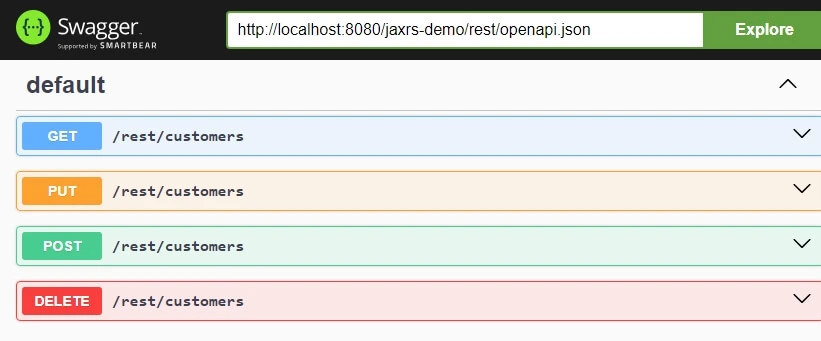
The interactive console allows you to execute HTTP requests (GET, POST, PUT, DELETE) directly against your live endpoints and inspect JSON response payloads.
Alternative: Native MicroProfile OpenAPI in WildFly
If you are deploying on WildFly or JBoss EAP 8+, the application server includes native support for Eclipse MicroProfile OpenAPI via the SmallRye subsystem. You can generate OpenAPI documentation without bundling extra Swagger servlets:
- WildFly automatically generates OpenAPI definitions at:
http://localhost:8080/openapior/mp-openapi. - Standard MicroProfile annotations (
org.eclipse.microprofile.openapi.annotations.*) can be used directly without additional third-party dependencies.
Frequently Asked Questions & Troubleshooting
Why am I getting a 404 error when opening /swagger/?
Verify that your static files are copied inside src/main/webapp/swagger/ and that your web.xml does not have restrictive URL mapping rules blocking static resources.
How do I handle CORS when Swagger UI is hosted on a different domain?
If Swagger UI executes on a different host or port than your WildFly server, configure CORS filters in RESTEasy or add response headers (Access-Control-Allow-Origin: *) to your Jakarta REST endpoints.
Conclusion
Integrating Swagger UI with Jakarta REST on WildFly gives developers an interactive dashboard to test endpoints, document API specifications, and streamline collaboration across frontend and backend teams.
Source code repository: GitHub Jakarta REST CRUD Repository.
Recommended Articles
Create a JAX-RS CRUD Application with WildFly and JPA - An In-depth Tutorial
Learn how to build a RESTful CRUD application using JAX-RS on WildFly with JPA. Includes Maven setup, Model creation, Repository usage, and Endpoint implementation.
Enhance Jakarta EE Rest Service Debugging with Filters and CDI Annotations
Learn how to debug Jakarta EE Rest Services using ContainerRequestFilter and ContainerResponseFilter for robust logging.
Build a JAX-RS CRUD Application with Vue.js and RESTEasy using WildFly 31
Learn how to create a JAX-RS CRUD application using Vue.js, Axios, and WildFly 31 in this tutorial. Get started with building a REST service for managing customers.
Jakarta RESTful Web Services 3.1 Core Features Explained
Discover new features in Jakarta EE 10's Jakarta Restful Web Services 3.1 with examples and Java SE Bootstrap API support.