Using REST Services to upload and download files
This REST Service tutorial is a quick, practical guide for handling file upload and download using REST Services in Java. We will build a Rest Service to upload and download files using the JAX-RS (Jakarta REST) API, fix a classic security bug that most tutorials online get wrong, add a modern JavaScript front-end with an upload progress bar, and finally test everything with a JUnit 5 test using the RESTEasy Client API.
- Requirements: Know about JAX-RS. To get started we recommend this tutorial: RESTEasy tutorial
1. The REST Endpoint: upload, download and list files
To manage file upload and download we will use the core Jakarta REST (JAX-RS) API with the RESTEasy implementation, along with the IOUtils class from Apache Commons IO. Compared to older versions of this tutorial, this endpoint uses the jakarta.* namespace (Jakarta EE 10, WildFly 27+) — if you are on an older WildFly / EAP version, just replace jakarta.ws.rs and jakarta.servlet with the equivalent javax.* packages.
Important: the version of this snippet that has circulated online for years (including in previous versions of this article) had a serious flaw: it built the file path on disk directly from the filename supplied by the client, without any validation. That means a request like ?file=../../../../etc/passwd could read — or worse, write — files completely outside the intended uploads folder. This is known as a Path Traversal (or Zip Slip, for archives) vulnerability, and it's one of the most common mistakes in file-handling REST APIs. The version below fixes it.
@Path("/file")
public class RestFilesDemo {

    @Context
    private ServletContext context;

    @POST
    @Path("/upload")
    @Consumes(MediaType.MULTIPART_FORM_DATA)
    public Response uploadFile(MultipartFormDataInput input) throws IOException {

        Map<String, List<InputPart>> uploadForm = input.getFormDataMap();
        List<InputPart> inputParts = uploadForm.get("attachment");

        if (inputParts == null || inputParts.isEmpty()) {
            return Response.status(Response.Status.BAD_REQUEST)
                    .entity("No file part named 'attachment' found")
                    .build();
        }

        List<String> savedFiles = new ArrayList<>();

        for (InputPart inputPart : inputParts) {
            MultivaluedMap<String, String> header = inputPart.getHeaders();
            String fileName = sanitizeFileName(getFileName(header));

            try (InputStream inputStream = inputPart.getBody(InputStream.class, null)) {
                byte[] bytes = IOUtils.toByteArray(inputStream);
                Path target = resolveSafePath(fileName);
                Files.write(target, bytes);
                savedFiles.add(fileName);
            } catch (IOException e) {
                return Response.status(Response.Status.INTERNAL_SERVER_ERROR)
                        .entity("Could not save file " + fileName)
                        .build();
            }
        }

        return Response.ok("Uploaded files: " + savedFiles).build();
    }

    @GET
    @Path("/download")
    @Produces(MediaType.APPLICATION_OCTET_STREAM)
    public Response downloadFile(@QueryParam("file") String file) throws IOException {

        Path target = resolveSafePath(file);

        if (!Files.exists(target)) {
            return Response.status(Response.Status.NOT_FOUND).build();
        }

        // Stream the file instead of loading it entirely into memory:
        // this matters as soon as files are more than a few MB.
        StreamingOutput stream = output -> Files.copy(target, output);

        return Response.ok(stream)
                .header("Content-Disposition", "attachment;filename=" + target.getFileName())
                .header("Content-Length", Files.size(target))
                .build();
    }

    @GET
    @Path("/list")
    @Produces(MediaType.APPLICATION_JSON)
    public List<String> listFiles() throws IOException {

        try (Stream<Path> files = Files.list(Paths.get(Config.UPLOAD_FOLDER))) {
            return files.filter(Files::isRegularFile)
                    .map(p -> p.getFileName().toString())
                    .collect(Collectors.toList());
        }
    }

    // --- Security: never trust a filename coming from the client ---
    private String sanitizeFileName(String fileName) {
        // Strip any directory component, keep only the plain file name
        String clean = Paths.get(fileName).getFileName().toString();
        // Optional but recommended: whitelist allowed characters
        return clean.replaceAll("[^a-zA-Z0-9._-]", "_");
    }

    private Path resolveSafePath(String fileName) throws IOException {
        Path uploadDir = Paths.get(Config.UPLOAD_FOLDER).toAbsolutePath().normalize();
        Path target = uploadDir.resolve(sanitizeFileName(fileName)).normalize();

        // Defense in depth: reject anything that would still escape the uploads folder
        if (!target.startsWith(uploadDir)) {
            throw new IOException("Invalid file path");
        }
        return target;
    }

    private String getFileName(MultivaluedMap<String, String> header) {
        String[] contentDisposition = header.getFirst("Content-Disposition").split(";");
        for (String filename : contentDisposition) {
            if (filename.trim().startsWith("filename")) {
                String[] name = filename.split("=");
                return name[1].trim().replaceAll("\"", "");
            }
        }
        return "unknown";
    }
}
What changed compared to the classic version of this endpoint, and why:
- sanitizeFileName / resolveSafePath: every filename coming from the client is stripped down to its plain name and re-resolved against the upload folder, then checked that it still lives inside it. This closes the path traversal hole.
- Single GET /download endpoint: the old sample had two nearly-identical download methods (GET and POST), one of which used a different, inconsistent folder (
user.homeinstead ofConfig.UPLOAD_FOLDER) — a real bug that would silently fail in production. One consistent endpoint is easier to secure and maintain. - StreamingOutput: instead of loading the whole file into a byte array, the file is streamed directly to the response. This keeps memory usage flat regardless of file size.
- listFiles: rewritten with
java.nio.file, which handles edge cases (e.g. an empty or missing folder) more gracefully than a rawFile[]array. - uploadFile: now supports uploading more than one file in the same multipart request — just repeat the
attachmentpart in the form, and every uploaded file will be listed in the response.
Next, to ensure the "uploads" folder exists, the following Context Listener creates it as soon as the application is deployed:
@WebListener
public class WebContextListener implements ServletContextListener {
    @Override
    public void contextInitialized(ServletContextEvent sce) {
        try {
            Files.createDirectories(Paths.get(Config.UPLOAD_FOLDER));
        } catch (IOException e) {
            throw new IllegalStateException("Could not create upload folder", e);
        }
    }

    @Override
    public void contextDestroyed(ServletContextEvent sce) {
        // no-op
    }
}
2. Coding the Front End for the REST upload/download service
There are several ways to exercise our REST uploader. We'll cover the fastest way to test it (Postman), then a modern, dependency-free JavaScript front-end with a real upload progress bar, and finally a legacy JSP page for those still maintaining older applications.
2.1 Using Postman to upload files
If you are using Postman to test your REST Services, all you need to do is create a New | HTTP request.
From the HTTP Request UI:
- Enter the URL of the REST Service (e.g. http://localhost:8080/rest-file-manager/rest/file/upload)
- Select POST as method
- Select form-data in the Body
- Enter as key "attachment" and choose File as type
- Click on Value to select the file to upload
For example:
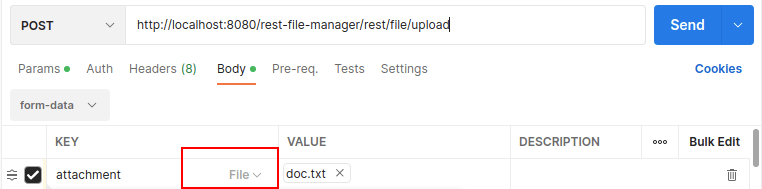
Finally, click Send to upload the file from Postman.
2.2 A modern JavaScript front-end (with upload progress bar)
AngularJS reached end-of-life in January 2022 and no longer receives updates, so we replaced the old AngularJS example with a small, dependency-free front-end using the native fetch and XMLHttpRequest APIs. This version also adds something the original never had: a real upload progress bar, which is one of the most requested features for file-upload UIs.
<!DOCTYPE html>
<html>
<head>
  <meta charset="UTF-8">
  <title>REST Upload/Download demo</title>
</head>
<body>

  <h2>Upload file</h2>
  <input type="file" id="fileInput" multiple />
  <button onclick="uploadFiles()">Upload</button>
  <progress id="progressBar" value="0" max="100" style="width: 300px; display:none;"></progress>

  <h2>Available files</h2>
  <ul id="fileList"></ul>

  <script>
    const BASE_URL = "/rest-file-manager/rest/file";

    function uploadFiles() {
      const input = document.getElementById("fileInput");
      if (!input.files.length) return;

      const formData = new FormData();
      for (const file of input.files) {
        formData.append("attachment", file);
      }

      const progressBar = document.getElementById("progressBar");
      progressBar.style.display = "inline-block";
      progressBar.value = 0;

      const xhr = new XMLHttpRequest();
      xhr.open("POST", `${BASE_URL}/upload`);

      // This is why we use XHR instead of fetch: native upload progress events
      xhr.upload.addEventListener("progress", (event) => {
        if (event.lengthComputable) {
          progressBar.value = (event.loaded / event.total) * 100;
        }
      });

      xhr.onload = () => {
        progressBar.style.display = "none";
        if (xhr.status === 200) {
          loadFileList();
        } else {
          alert("Upload failed: " + xhr.responseText);
        }
      };

      xhr.send(formData);
    }

    async function loadFileList() {
      const response = await fetch(`${BASE_URL}/list`);
      const files = await response.json();

      const list = document.getElementById("fileList");
      list.innerHTML = "";

      files.forEach((fileName) => {
        const li = document.createElement("li");
        li.textContent = fileName + " ";

        const downloadLink = document.createElement("a");
        downloadLink.href = "#";
        downloadLink.textContent = "Download";
        downloadLink.onclick = (e) => {
          e.preventDefault();
          downloadFile(fileName);
        };

        li.appendChild(downloadLink);
        list.appendChild(li);
      });
    }

    async function downloadFile(fileName) {
      const response = await fetch(`${BASE_URL}/download?file=${encodeURIComponent(fileName)}`);
      const blob = await response.blob();

      const url = window.URL.createObjectURL(blob);
      const link = document.createElement("a");
      link.href = url;
      link.download = fileName;
      link.click();
      window.URL.revokeObjectURL(url);
    }

    loadFileList();
  </script>
</body>
</html>
A few things worth noting about this version:
- It supports multiple file selection out of the box, matching the multi-file upload we added to the REST endpoint.
- It uses
encodeURIComponenton the filename before building the download URL — a small habit that avoids broken requests with spaces or special characters in file names. - It has zero external dependencies: no AngularJS, no jQuery, nothing to load from a CDN.
Deploy the example application with:
mvn clean install wildfly:deploy
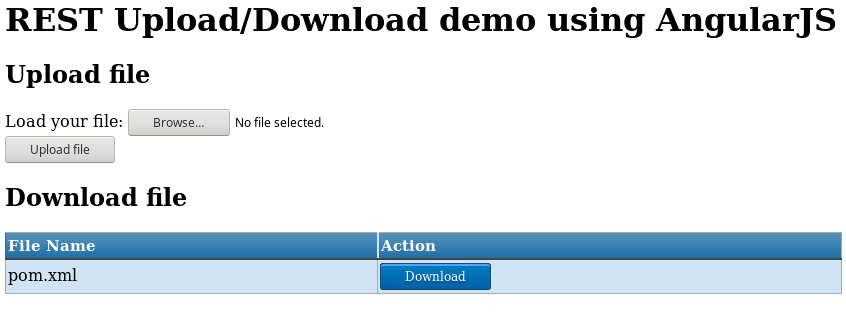
Here is the endpoint in action after uploading a sample file:
2.3 A minimal JSP file manager (legacy approach)
If you are maintaining an older application and can't move away from JSP just yet, here is a minimal JSP page that lists and manages files without any client-side JavaScript. It relies on the same secured endpoints shown above.
<%@page import="java.io.*, java.nio.file.*, com.mastertheboss.rest.Config" %>
<%@page import="java.util.*" %>
<html>
<head>
<title>REST File Manager (JSP)</title>
<meta http-equiv="Content-Type" content="text/html; charset=UTF-8">
</head>
<body>
    <h2>Upload file</h2>
    <form method="post" action="rest/file/upload" enctype="multipart/form-data">
        <input type="file" name="attachment" />
        <input type="submit" value="Upload file" />
    </form>

    <h2>Files in <%= Config.UPLOAD_FOLDER %></h2>
    <ul>
    <%
        try (Stream<Path> files = Files.list(Paths.get(Config.UPLOAD_FOLDER))) {
            for (Path p : files.filter(Files::isRegularFile).toList()) {
                out.println("<li>" + p.getFileName() + " - "
                    + "<a href='rest/file/download?file=" + p.getFileName() + "'>Download</a></li>");
            }
        }
    %>
    </ul>
</body>
</html>
Here is this simple front-end in action:

3. Adding a JUnit 5 test class to test the REST upload
Required: Know about JUnit. Check this tutorial to learn more: Getting started with JUnit 5
We include a JUnit 5 Jupiter Test class which shows the trickiest part of it: sending a MultiPart request to upload a file using the RESTEasy Client API.
public class UploadTest {

    private static final String FILENAME = "test-file.txt";

    @Test
    public void sendFile() throws Exception {

        Client client = ClientBuilder.newClient();
        WebTarget target = client.target("http://localhost:8080/rest-file-manager/rest/file/upload");

        createFile();
        File filePath = new File(FILENAME);
        assertTrue(filePath.exists());

        try (MultipartFormDataOutput mdo = new MultipartFormDataOutput()) {
            mdo.addFormData("attachment", new FileInputStream(filePath),
                    MediaType.APPLICATION_OCTET_STREAM_TYPE, filePath.getName());

            GenericEntity<MultipartFormDataOutput> entity =
                    new GenericEntity<MultipartFormDataOutput>(mdo) {};

            Response r = target.request()
                    .post(Entity.entity(entity, MediaType.MULTIPART_FORM_DATA_TYPE));

            assertEquals(200, r.getStatus());
        }
    }

    private void createFile() throws IOException {
        try (PrintWriter writer = new PrintWriter(FILENAME, "UTF-8")) {
            writer.println("Some text");
        }
    }
}
Run it from the IDE, or from the command line with:
mvn testTesting the REST service with cURL
You can also test file uploading with cURL. Assuming a file /tmp/file.txt exists, upload it as follows:
curl -F "attachment=@/tmp/file.txt" http://localhost:8080/rest-file-manager/rest/file/uploadTo upload two files in the same request (now supported by our updated endpoint):
curl -F "attachment=@/tmp/file1.txt" -F "attachment=@/tmp/file2.txt" http://localhost:8080/rest-file-manager/rest/file/uploadThen download the file with:
curl -o file.txt http://localhost:8080/rest-file-manager/rest/file/download?file=file.txt4. Deploying to production: what changes
A couple of things that don't show up in a local demo but matter as soon as this goes to production:
Increase the maximum upload size
By default, WildFly's Undertow subsystem limits the size of a request body. If large uploads fail with an HTTP 413 or a connection reset, raise the max-post-size on the HTTP listener
This article shows how to do it:
/subsystem=undertow/server=default-server/http-listener=default:write-attribute(name=max-post-size,value=1073741824)Running on OpenShift / Kubernetes
If you containerize this application, remember that the uploads folder is local to the pod's filesystem — it will be lost on every restart or rescheduling. For anything beyond a demo, mount a PersistentVolumeClaim at the path configured in Config.UPLOAD_FOLDER, or replace local storage entirely with an object store (e.g. S3-compatible storage) behind the same REST interface.
FAQ
Why do I get a 404 when calling /rest/file/upload?
Check that your JAX-RS Application class (or web.xml) maps the REST path correctly, and that the URL includes both the application path and the resource path — e.g. /rest-file-manager/rest/file/upload, not just /file/upload.
How do I prevent path traversal in a file download endpoint?
Never build a File or Path directly from a client-supplied filename. Strip any directory component, resolve the result against your upload folder, normalize it, and verify the final path still starts with the upload folder — exactly as shown in the resolveSafePath method above.
Can I upload multiple files in a single request?
Yes — repeat the attachment field in your multipart form (or in your curl -F call) once per file. The updated endpoint in this tutorial iterates over every matching part.
Why does my upload silently fail for large files?
This is almost always the Undertow max-post-size limit described above, or a reverse proxy (nginx, HAProxy) in front of WildFly with its own body size limit.
Source code of this REST service tutorial
You can find the source code for this tutorial here: https://github.com/fmarchioni/mastertheboss/tree/master/javaee/rest-file-manager.
Spring Boot users? Check this tutorial to learn how to manage file upload and download using Spring Boot.
Recommended Articles
Master JAX-RS Client API for Testing WildFly REST Services - A Comprehensive Guide
Learn how to code a JAX-RS client using WildFly EAP 7 and test public REST services. #WildFly #JAX-RS #RESTClientAPI
Mastering Exception Handling in RESTful Web Services with JAX-RS, RESTEasy, and Quarkus
Learn how to handle exceptions properly in RESTful web services using JAX-RS API. Explore advanced options available with RESTEasy and Quarkus runtime.
Mastering Parameters in JAX-RS for Java API RESTful Services
Learn how to use parameters in JAX-RS for passing data and receiving data from server-side REST services. #JAXRS #RESTEasy #WildFly
Mastering REST Assured for Testing JAX-RS Web Services - Beginners & Experts
Learn how to use REST Assured for testing JAX-RS web services with this comprehensive guide, perfect for both beginners and experienced users.