Spring JDBC application on WildFly
This tutorial demonstrates how to develop a Web application using PrimeFaces for the User Interfaces, Spring JDBC for handling persistence and CDI as glue between these technologies.
Although there are many technologies in this tutorial, you will see that mixing them is not complicated at all. You need a basic Web project as startup; for example the webapp-javaee7 can fit this purpose:
$ mvn -DarchetypeGroupId=org.codehaus.mojo.archetypes \
-DarchetypeArtifactId=webapp-javaee7 \
-DarchetypeRepository=https://nexus.codehaus.org/content/repositories/snapshots \
-DgroupId=mastertheboss \
-DartifactId=springjdbc \
-Dversion=1.0 \
-Dpackage=mastertheboss \
-Darchetype.interactive=false --batch-mode --update-snapshots archetype:generate
The first class that we will add is a CDI Bean which is in charge to produce and dispose the ConfigurableApplicationContext:
@ApplicationScoped
public class SpringProducer {
     @Produces
        public ConfigurableApplicationContext create() {
            return new ClassPathXmlApplicationContext("applicationContext.xml");
        }

        public void close(@Disposes final ConfigurableApplicationContext ctx) {
            ctx.close();
        }
}
The ConfigurableApplicationContext is a provider interface which is used to provide an application context to Spring application, by loading beans definition into the file applicationContext.xml
Here is the applicationContext.xml file which defines a Spring Bean named jdbcCustomerDAO and a datasource that is retrieved from the JNDI at “java:jboss/datasources/ExampleDS” (This is the default H2 database included in JBoss/WildFly distribution):
<beans xmlns="http://www.springframework.org/schema/beans"
    xmlns:xsi="http://www.w3.org/2001/XMLSchema-instance" xmlns:p="http://www.springframework.org/schema/p"
    xmlns:aop="http://www.springframework.org/schema/aop" xmlns:context="http://www.springframework.org/schema/context"
    xmlns:jee="http://www.springframework.org/schema/jee" xmlns:tx="http://www.springframework.org/schema/tx"
    xmlns:task="http://www.springframework.org/schema/task"
    xsi:schemaLocation="http://www.springframework.org/schema/aop

http://www.springframework.org/schema/aop/spring-aop-3.2.xsdhttp://www.springframework.org/schema/beanshttp://www.springframework.org/schema/beans/spring-beans-3.2.xsdhttp://www.springframework.org/schema/contexthttp://www.springframework.org/schema/context/spring-context-3.2.xsdhttp://www.springframework.org/schema/jeehttp://www.springframework.org/schema/jee/spring-jee-3.2.xsdhttp://www.springframework.org/schema/txhttp://www.springframework.org/schema/tx/spring-tx-3.2.xsdhttp://www.springframework.org/schema/taskhttp://www.springframework.org/schema/task/spring-task-3.2.xsd">

    <bean id="jdbcCustomerDAO" class="mastertheboss.dao.JDBCCustomerDAOImpl">
        <property name="dataSource" ref="dataSource" />
    </bean>

    <jee:jndi-lookup id="dataSource" jndi-name="java:jboss/datasources/ExampleDS"/>

</beans>
Let’s see the definition of the class JDBCCustomerDAOImpl:
public class JDBCCustomerDAOImpl implements JDBCCustomerDAO {
    private DataSource dataSource;
    private JdbcTemplate jdbcTemplate;

    public void setDataSource(DataSource dataSource) {
        this.dataSource = dataSource;
    }

    public void createTable() {
        jdbcTemplate = new JdbcTemplate(dataSource);
        jdbcTemplate
                .execute("create table customer (name varchar, surname varchar, age integer)");
    }

    public void dropTable() {
        jdbcTemplate = new JdbcTemplate(dataSource);
        jdbcTemplate.execute("drop table customer");
    }

    public void insert(Customer customer) {

        String sql = "INSERT INTO CUSTOMER "
                + "(NAME,SURNAME, AGE) VALUES (?, ?, ?)";

        jdbcTemplate = new JdbcTemplate(dataSource);

        jdbcTemplate.update(sql,
                new Object[] { customer.getName(), customer.getSurname(),
                        customer.getAge() });
    }

    @SuppressWarnings("rawtypes")
    public List<Customer> findAll() {

        jdbcTemplate = new JdbcTemplate(dataSource);
        String sql = "SELECT * FROM CUSTOMER";

        List<Customer> customers = new ArrayList<Customer>();

        List<Map<String, Object>> rows = jdbcTemplate.queryForList(sql);
        for (Map row : rows) {
            Customer customer = new Customer();
            customer.setSurname((String) row.get("SURNAME"));
            customer.setName((String) row.get("NAME"));
            customer.setAge(Integer.parseInt(String.valueOf(row.get("AGE"))));
            customers.add(customer);
        }

        return customers;
    }

}
As you can see, this class uses Spring JDBC template API for handling database persistence, which is an alternative to plain JDBC (where you have to code by yourself all the JDBC creation/disposal layer) and to JPA/Hibernate where Database table and fields are represented as Java types.
When using Spring JDBCTemplate, the mapping is handled by implementing the RowMapper interface and the mapRow method, which receives as input the single record as a ResultSet and returns a generic Object type:
public class CustomerRowMapper implements RowMapper    {
        public Object mapRow(ResultSet rs, int rowNum) throws SQLException {
            Customer customer = new Customer();
            customer.setSurname(rs.getString("SURNAME"));
            customer.setName(rs.getString("NAME"));
            customer.setAge(rs.getInt("AGE"));
            return customer;
        }
}
The Customer class which is referenced, contains the fields that are arriving from the UI and uses the DAO class for inserting and retrieving the list of Customers:
@Model
public class Customer {
    @Inject
    ConfigurableApplicationContext context;

    private String name;
    private String surname;
    private int age;

    public Customer() { }

    public Customer(String name, String surname, int age) {
        this.name = name;
        this.surname = surname;
        this.age = age;
    }

    public String getSurname() {
        return surname;
    }

    public void setSurname(String surname) {
        this.surname = surname;
    }

    public String getName() {
        return name;
    }

    public void setName(String name) {
        this.name = name;
    }

    public int getAge() {
        return age;
    }

    public void setAge(int age) {
        this.age = age;
    }

    public void insertCustomer() {
        JDBCCustomerDAO dao = (JDBCCustomerDAO) context
                .getBean("jdbcCustomerDAO");
        Customer emplNew = new Customer(name, surname, age);
        dao.insert(emplNew);

    }

    List<Customer> customerList;

    public void setCustomerList(List<Customer> customerList) {
        this.customerList = customerList;
    }

    public List<Customer> getCustomerList() {
        JDBCCustomerDAO jdbcEmployeeDAO = (JDBCCustomerDAO) context
                .getBean("jdbcCustomerDAO");

        this.customerList = jdbcEmployeeDAO.findAll();
        return customerList;
    }
}
That’s all! easy-peasy! The last class I’ve included is a ContextListener that is used for creating and dropping the table used after each deployment (I do accept suggestions and tips to improve this approach):
@WebListener
public class MyContextListener implements ServletContextListener {
    @Inject
    ConfigurableApplicationContext context;

    @Override
    public void contextInitialized(ServletContextEvent sce) {
        JDBCCustomerDAO dao = (JDBCCustomerDAO) context
                .getBean("jdbcCustomerDAO");

        dao.createTable();

    }

    @Override
    public void contextDestroyed(ServletContextEvent sce) {
        JDBCCustomerDAO dao = (JDBCCustomerDAO) context
                .getBean("jdbcCustomerDAO");

        dao.dropTable();

    }
}
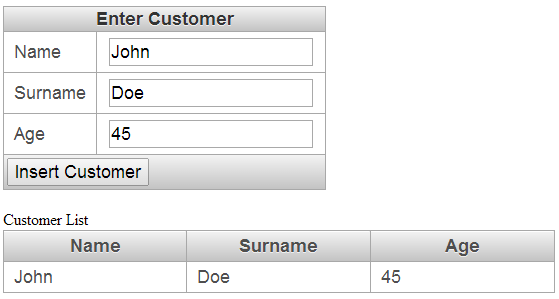
This application has a Primefaces front-end that contains an upper panel for inserting a Customer and a tabular list of data in the lower panel:
<!DOCTYPE html>
<html xmlns="http://www.w3c.org/1999/xhtml"
    xmlns:h="http://xmlns.jcp.org/jsf/html"
    xmlns:f="http://java.sun.com/jsf/core"
    xmlns:p="http://primefaces.org/ui">
<h:head></h:head>

<h:body>

    <h:form id="jsfexample">
        <p:panelGrid columns="2">
            <f:facet name="header">Enter Customer</f:facet>
            <h:outputText value="Name" />
            <h:inputText value="#{customer.name}" />

            <h:outputText value="Surname" />
            <h:inputText value="#{customer.surname}" />

            <h:outputText value="Age" />
            <h:inputText value="#{customer.age}" />
            <f:facet name="footer">
                <h:commandButton actionListener="#{customer.insertCustomer}"
                    styleClass="buttons" value="Insert Customer" />

            </f:facet>
        </p:panelGrid>
    </h:form>
    <br />
    <h:outputText value="Customer List" />
    <br />
    <p:dataTable var="c" value="#{customer.customerList}">


        <p:column headerText="Name">
            <h:outputText value="#{c.name}" />
        </p:column>

        <p:column headerText="Surname">
            <h:outputText value="#{c.surname}" />
        </p:column>
        <p:column headerText="Age">
            <h:outputText value="#{c.age}" />
        </p:column>

    </p:dataTable>

</h:body>
</html>
Here is how the application looks like when running:
That’s all. Do you want some more Spring stuff ? check Spring Boot Tutorials !
Recommended Articles
Using Spring CXF Descriptors in WildFly 31 for Web Services Development
Learn how to use Spring CXF descriptors with WildFly 31 for building and deploying web services. Discover the benefits of using Spring libraries in a specific module for correct visibility over Spring classes.
Deploying a JPA-Based Spring Boot Application on WildFly 10: A Step-by-Step Guide
Learn how to deploy a Spring Boot application with JPA on WildFly 10, including setup and configuration for a RESTful API.
Configuring JBoss Transaction Manager in a Spring Application for XA Support
Learn how to use JBoss Transaction Manager with Spring for XA support and robust database transactions. A step-by-step guide on configuring JBoss Transaction Manager for a sample application.
How to Deploy Spring Boot 4 and 3 Applications on WildFly
Step-by-step guide to deploying Spring Boot 4 and 3 WAR applications on WildFly. Learn pom.xml configuration, SpringBootServletInitializer setup, and log conflict troubleshooting.