halOP: running the next-gen WildFly console side by side with HAL
halOP (HAL On Premise) is the console that will eventually replace the HAL management console you know from http://localhost:9990/console. With release 0.5.0 the project reached a point where it is worth installing on a test server: most of the management model is now rendered automatically, and the console can be shipped in four different ways. This article does not repeat the release notes. Instead, it shows how halOP is actually wired into WildFly, how to provision it with Galleon, how to run it as a standalone console against existing servers, and how to troubleshoot the connection when the browser refuses to talk to the management interface.
All the examples below were built against halOP 0.5.0, whose feature pack is compiled against WildFly 41.0.0.Final (WildFly Core 33) and requires Java 21. Keep in mind that halOP is published with the experimental stability level: do not put it on a production server.
Quick start: try halOP in three steps
If you only want to see the new console in action, you don't need to provision anything. Any recent WildFly installation and JBang are enough.
1. Start WildFly. Create a management user (if you haven't one already) and start the server in standalone mode:
$JBOSS_HOME/bin/add-user.sh -u admin -p 'Adm1n!Passw0rd' --silent
$JBOSS_HOME/bin/standalone.sh
Since halOP runs in the browser on a different origin, allow it on the management interface (more about this in the standalone section):
$JBOSS_HOME/bin/jboss-cli.sh -c --command="/core-service=management/management-interface=http-interface:list-add(name=allowed-origins,value=http://localhost:9090)"2. Launch halOP with JBang. The standalone console is resolved from Maven Central and starts on port 9090. The --java 21 option makes JBang use (or download) a Java 21 runtime, which halOP requires, regardless of your default JDK:
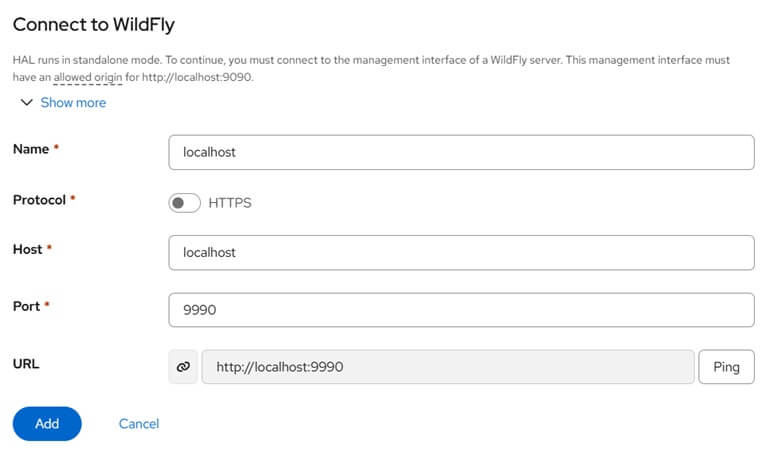
jbang --java 21 org.jboss.hal:hal-op-standalone:0.5.0:runner3. Add the management endpoint. Open http://localhost:9090. halOP shows the endpoint selection dialog: add a new endpoint, give it a name and set the URL of the WildFly management interface, http://localhost:9990. Then select it and connect, entering the credentials of the management user:
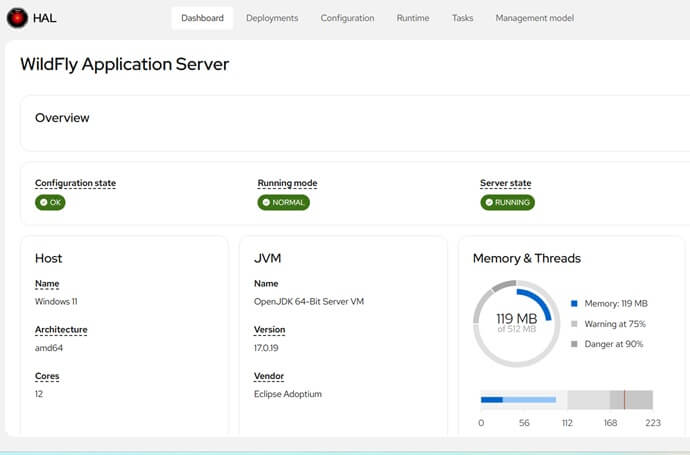
That's it: you are now managing your WildFly server with halOP:
The rest of this article explains what happens under the hood and covers the other ways to install the console.
What changes compared to HAL
If you have used the HAL console (see Supercharge WildFly management console with Hal.next console), the main difference is not visible in the screens but in the way they are built:
- Technology stack: halOP is written in Java 21 and compiled to JavaScript with J2CL (GWT is gone). The UI uses PatternFly through PatternFly Java and Elemento.
- Model-driven UI: rather than one hand-written view per subsystem, halOP builds forms and tables from the resource descriptions returned by
read-resource-description. According to the 0.5.0 announcement, the attribute pipeline now covers about 93% of the 5,800+ attributes in the WildFly model, including maps,credential-referencecomposites, time-unit composites and path attributes. - Extension SPI: when the generic rendering is not enough, CDI beans implementing
ResourceTabsProviderorResourceHeaderProvideradd tabs or headers to a resource (for example, an alias tab for a credential store or a status header for an XA datasource).
From an operations point of view, the practical consequence is that a new attribute added to a subsystem in a future WildFly release shows up in halOP without waiting for a console release. This is also why the project can target WildFly 42 to 44 for the replacement of the current console.
How halOP is plugged into the management interface
The bundled edition of halOP is not a web application deployed on Undertow. It is a regular WildFly subsystem named halop, provided by the org.jboss.hal.op extension. Looking at the 0.5.0 sources, the subsystem has no attributes at all (its schema, urn:jboss:domain:halop:1.0, declares an empty subsystem element). Its only job is to require the org.wildfly.management.http.extensible capability and register a static context named /halop on the management HTTP interface, serving the compiled console from the org.jboss.hal.op.console module.
This has two consequences worth knowing:
- halOP listens on the same socket as the management API (
management-http, 9990, ormanagement-https, 9993). It inherits the authentication of thehttp-interface, so whatever you configured for the classic console (Elytron realm, HTTPS, Keycloak) also protects/halop. Network and TLS hardening is covered in WildFly Admin Console: Fix 401 Errors & Secure Access. - The extension declares
Stability.EXPERIMENTAL. WildFly will not load it unless the server runs with--stability=experimental.
Provisioning WildFly with the halOP feature pack
The feature pack org.jboss.hal:hal-op-feature-pack is available on Maven Central and contributes a Galleon layer named halop (category Management). The following provisioning file starts from the full WildFly configuration and adds the layer to standalone.xml. Since the default configurations of the WildFly feature pack are inherited, the classic HAL console at /console keeps working, and you can compare both consoles on the same server.
<?xml version="1.0" encoding="UTF-8"?>
<installation xmlns="urn:jboss:galleon:provisioning:3.0">
    <feature-pack location="org.wildfly:wildfly-galleon-pack:41.0.0.Final">
        <default-configs inherit="true"/>
        <packages inherit="true"/>
    </feature-pack>
    <feature-pack location="org.jboss.hal:hal-op-feature-pack:0.5.0">
        <default-configs inherit="false"/>
        <packages inherit="true"/>
    </feature-pack>
    <config model="standalone" name="standalone.xml">
        <layers>
            <include name="halop"/>
        </layers>
    </config>
    <options>
        <option name="optional-packages" value="passive+"/>
        <option name="jboss-fork-embedded" value="true"/>
        <option name="stability-level" value="experimental"/>
    </options>
</installation>
Save it as provisioning.xml and run the Galleon CLI (a recent Galleon 6.x distribution, which supports stability levels) to create the server:
galleon.sh provision provisioning.xml \
    --dir=/opt/wildfly-halop \
    --stability-level=experimental
The stability-level option is required twice for a reason: the provisioning option lets Galleon include the experimental halop layer and its feature spec, while the start-up flag below allows the running server to load the extension.
Next, create a management user and start the server with the experimental stability level:
cd /opt/wildfly-halop
bin/add-user.sh -u admin -p 'Adm1n!Passw0rd' --silent
bin/standalone.sh --stability=experimental
When the subsystem starts, it logs the context it registered. This is the quickest check that the layer made it into the configuration:
grep "HAL on premise console" standalone/log/server.logThe message to look for is HAL on premise console available at /halop. Then open http://localhost:9990/halop and log in with the user you created.
Verifying the configuration from the CLI
From jboss-cli.sh you can check the stability level of the running server and confirm that the subsystem is present:
bin/jboss-cli.sh -c --commands="/core-service=server-environment:read-attribute(name=stability),/subsystem=halop:read-resource"The resulting XML in standalone.xml is minimal, as you would expect from a subsystem without attributes:
<extensions>
    ...
    <extension module="org.jboss.hal.op"/>
</extensions>
...
<subsystem xmlns="urn:jboss:domain:halop:1.0"/>
To take halOP off a provisioned server without reprovisioning, remove the subsystem and the extension in a batch and reload. The /halop context is unregistered when the service stops, while the classic console is not affected:
batch
/subsystem=halop:remove
/extension=org.jboss.hal.op:remove
run-batch
reload
If you need to switch off the classic console instead, see How to disable WildFly admin console.
Running halOP as a standalone console
The other three editions do not touch the server at all: the console is served by a small Quarkus application on port 9090 and connects to any WildFly management interface you point it to. This is the option to choose when you want to try halOP against servers you cannot reprovision, or against several servers from a single console.
Pick the variant that fits your environment:
# JVM uber-jar, resolved from Maven Central by JBang
jbang --java 21 org.jboss.hal:hal-op-standalone:0.5.0:runner

# Plain Java 21, no JBang
mvn dependency:copy -Dartifact=org.jboss.hal:hal-op-standalone:0.5.0:jar:runner -DoutputDirectory=.
java -Dquarkus.http.port=9191 -jar hal-op-standalone-0.5.0-runner.jar

# Container image
podman run -it --rm -p 9090:9090 quay.io/halconsole/hal-op
Native binaries for Linux, macOS and Windows are attached to the GitHub release as hal-op-*. On macOS, clear the quarantine flag before running them:
chmod +x hal-op-*
xattr -d com.apple.quarantine hal-op-*
The browser connects to WildFly, not the Quarkus process
This is the point that causes most of the failed first attempts. The standalone Quarkus application only serves static files: its configuration is limited to quarkus.http.port=9090, and it does not proxy management requests. The compiled console runs in your browser and calls the WildFly /management endpoint directly, with a CORS request (mode: cors, credentials: include).
As a result:
- The WildFly URL you enter must be reachable from the browser. With the container edition,
http://localhost:9990means the WildFly on your workstation, not a service inside the container network. - The management interface must allow the origin the console was loaded from. Otherwise the browser blocks the response, even though the HTTP request reached WildFly.
Add the console origin to the allowed-origins list of the http-interface on every server you want to manage. If you start the uber-jar on another port, as in the example above, add that origin as well:
batch
/core-service=management/management-interface=http-interface:list-add(name=allowed-origins,value=http://localhost:9090)
/core-service=management/management-interface=http-interface:list-add(name=allowed-origins,value=http://localhost:9191)
run-batch
The resulting XML:
<management-interfaces>
    <http-interface http-authentication-factory="management-http-authentication"
                    allowed-origins="http://localhost:9090 http://localhost:9191">
        <http-upgrade enabled="true" sasl-authentication-factory="management-sasl-authentication"/>
        <socket-binding http="management-http"/>
    </http-interface>
</management-interfaces>
Origins are matched as scheme, host and port. http://127.0.0.1:9090 and http://localhost:9090 are two different origins, so add the one that appears in your browser address bar.
Selecting the server with the connect parameter
At boot, halOP first pings its own origin. If that is not a WildFly management interface (which is always the case for the standalone editions), it opens the endpoint selection dialog. Endpoints you register are kept in the browser's localStorage, so they survive restarts of the console but do not follow you to another browser or machine.
You can skip the dialog with the connect query parameter, which accepts either a full URL or the name of an endpoint already registered:
# Connect to an explicit management URL (registered automatically, named after host:port)
http://localhost:9090/?connect=http://localhost:9990

# Connect to an endpoint previously saved as "staging"
http://localhost:9090/?connect=staging
This is handy for bookmarks or for links in a runbook, one per environment.
Troubleshooting the endpoint check
Before it connects, halOP validates the endpoint with a GET on <url>/management. It accepts the endpoint only if the response is 200 and the body contains management-major-version. When the console reports that the URL is not a valid management interface, reproduce both checks with curl so you can tell an authentication problem from a CORS problem.
First, the management endpoint itself, with the same Digest credentials the browser uses:
curl -s --digest -u admin:'Adm1n!Passw0rd' http://localhost:9990/management \
  | grep -o '"management-major-version"[^,]*'
If this command prints nothing, the problem is on the server side (wrong user, realm or interface binding), and the 401 analysis in the admin console access guide applies to halOP too.
Next, the CORS part. Send the same request with the console origin and inspect the response headers:
curl -s -o /dev/null -D - --digest -u admin:'Adm1n!Passw0rd' \
  -H "Origin: http://localhost:9090" \
  http://localhost:9990/management | grep -i '^access-control'
When the origin is allowed, WildFly echoes it back:
Access-Control-Allow-Origin: http://localhost:9090
Access-Control-Allow-Credentials: true
No Access-Control-Allow-Origin header means the origin is missing from allowed-origins (or it is spelled with a different host or port). Because the console sends credentials, a wildcard is not an option here: the browser needs the exact origin.
Finally, keep the schemes consistent. A console loaded over https cannot call a management interface on plain http://...:9990, as the browser blocks it as mixed content. If you put the halOP container behind a TLS proxy, point it at the management-https port (9993) and register the https:// origin.
halOP and Kubernetes: a quick test setup
Since the browser makes the management calls, the easiest way to inspect a WildFly pod with halOP is to forward the management port to your workstation and keep everything on localhost. The management interface stays private to the cluster:
kubectl port-forward pod/wildfly-0 9990:9990 &
podman run -d --rm --name halop -p 9090:9090 quay.io/halconsole/hal-op
xdg-open "http://localhost:9090/?connect=http://localhost:9990"
The pod still needs http://localhost:9090 in allowed-origins and a management user. With the official WildFly image, you can apply both at build time with a CLI script, rather than exposing the management port through a Service or Route.
Which edition to use
| Edition | Changes the server? | Requirements | Use it for |
|---|---|---|---|
Feature pack (/halop) |
Yes: extension, subsystem, modules | Galleon provisioning, --stability=experimental |
Evaluating halOP next to /console on the same test server |
| JBang / uber-jar | Only allowed-origins |
Java 21 | Developers who want the console on their workstation |
| Native binary | Only allowed-origins |
None | Admin workstations without a JDK |
| Container image | Only allowed-origins |
Podman or Docker | Throw-away sessions, port-forwarded pods |
Where the project is going
The roadmap published with 0.5.0 targets WildFly 42 to 44 (possibly 45) for halOP to take over from the current console. The items that matter most to administrators are a dashboard with independently loading cards, a task framework for cross-subsystem workflows (SSL, datasources and logging setup are planned), a "Jump to" keyboard navigation overlay, the display of the stability level of each resource, and an integration with the WildFly Model Graph Tools to search and compare the management model across versions. An OpenShift edition, halOS, already has its module structure in place but no implementation yet.
The project moves quickly: release 0.6.0 of both the feature pack and the standalone console reached Maven Central on 20 October 2026. The commands in this article apply to it as well once you change the version, but check its release notes for the WildFly baseline before reusing the provisioning file. Issues and feedback go to github.com/hal/foundation/issues.
References: