How to customize WildFly using Env variables
In this article, we will learn how to leverage environment variables to modify and optimize WildFly configurations. We will explore first how to pass environment variables to a basic WildFly configuration. Then, in the next article we will show a common use case for this feature which is Cloud provisioning of WildFly.
Passing environment variables to WildFly
Firstly, it is worth mentioning that you can easily plug in environment variables, in places where the WildFly Model allows it, by using the env expression. For example, to use the environment variable “jbossport” as primary reference for the http port:
<socket-binding name="http" port="${env.jbossport:8080}"/>This article covers more in details the process: How to use environment variables in WildFly configuration
On the other hand, it is also possible to export environment variables in your configuration without actually changing it. This is especially useful in the following scenarios:
- Extended Attribute Control: You can use possible to alter WildFly model attributes lacking defined expressions.
- Dynamic Configurations for External Services: Certain attributes like databases might not work well with predefined values or they might be unsuitable for direct configuration storage. Leveraging environment variables allows deferring configuration of such attributes completely outside of WildFly configuration.
Translating Environment Variables into Properties
In order to use plain environment variables into WildFly configuration we must answer a basic question: how do you translate environment variables into a Model attribute ? there is a procedure which drives the translation:
- Identify the Attribute: Determine the path of the resource and attribute you intend to change. For instance, altering the
default-timeout attribute for the/subsystem=transactions. - Create Environment Variable Mapping: To create an environment variable for overriding this attribute:
- Remove the initial slash (/) from the resource address.
- Append
__followed by the attribute name. - Replace non-alphanumeric characters with underscores (_) and convert the entire line to uppercase. For example,
/subsystem=transactions:write-attribute(default-timeout)becomesSUBSYSTEM_TRANSACTIONS__DEFAULT_TIMEOUT.
- Set the Environment Value: Assign the desired value to the environment variable. For instance,
SUBSYSTEM_TRANSACTIONS__DEFAULT_TIMEOUT=450
Let’s see another more complex example taken from the docs:
/subsystem=undertow/server=default-server/http-listener=default:write-attribute(proxy-address-forwarding)becomes:
SUBSYSTEM_UNDERTOW_SERVER_DEFAULT_SERVER_HTTP_LISTENER_DEFAULT__PROXY_ADDRESS_FORWARDING.Before trying the variable injection, you must be aware that this procedure is enabled by default only in the OpenShift cloud profile. If you are running a bare metal WildFly, you need to set the WILDFLY_OVERRIDING_ENV_VARS environment variable to any value.
For example:
export WILDFLY_OVERRIDING_ENV_VARS=1.Besides, keep in mind that that management attributes with types LIST, OBJECT, or PROPERTY cannot be overridden using this method.
Testing environment variables injection
In order to test the expression resolver, before starting WildFly we will set the following properties:
$ export WILDFLY_OVERRIDING_ENV_VARS=1
$ export SUBSYSTEM_TRANSACTIONS__DEFAULT_TIMEOUT=450
Then, start WildFly with any configuration:
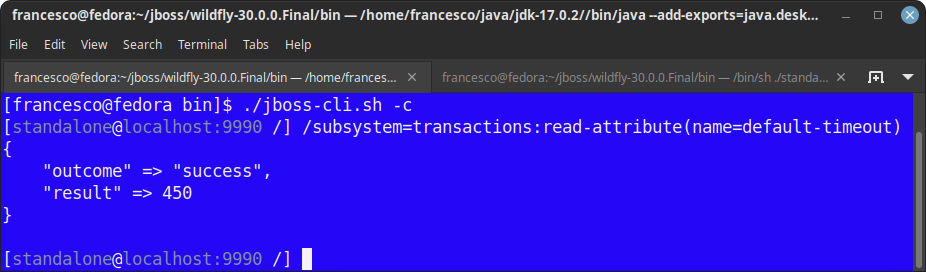
./ standalone.shAs you can see, by querying the transaction timeout attribute the value is now available in the server configuration:
Conclusion
This article was a walkthrough of how you can translate environment variables into WildFly configuration without manual changes in it. In the next tutorial of this series we will show how to apply this pattern in the most common use case which is Cloud provisioning of WIldFly
Recommended Articles
Mastering Environment Variables in WildFly 25 for Dynamic Application Configuration
Learn how to leverage environment variables in WildFly 25 to dynamically configure your application server based on runtime environments.
Enhance Your GitHub Actions with Secure Environment Variable Management
Learn how to manage environment variables in GitHub Actions for secure configuration and data passing.
How to Install WildFly Application Server on Fedora with Java SE and JDK
Learn how to install WildFly application server on Fedora, including Oracle Java SE and OpenJDK. Get step-by-step instructions for setting up the JDK and environment variables.
Getting Started with Galleon for WildFly Installation, Provisioning, and Management
Learn how to install, provision, and manage your WildFly server using Galleon, the latest tool from the WildFly community.