JBoss Port Configuration Made Simple
This tutorial discusses how to configure the default ports for WildFly and JBoss EAP through the various server releases — from a classic standalone install, to a Bootable JAR, to Docker and Kubernetes/OpenShift. We will learn how to change a single port definition, such as the default 8080 port, how to shift all ports using a port offset, and why that same offset trick is usually the wrong tool once you're running in a container.
WildFly / JBoss EAP Default Ports
JBoss EAP and WildFly use Socket Binding groups to configure the network ports which are actively listening for incoming connections. In Standalone mode, there is a single Socket Binding Group which defines all port settings:
<socket-binding-group name="standard-sockets" default-interface="public" port-offset="${jboss.socket.binding.port-offset:0}">
    <socket-binding name="management-http" interface="management" port="${jboss.management.http.port:9990}"/>
    <socket-binding name="management-https" interface="management" port="${jboss.management.https.port:9993}"/>
    <socket-binding name="ajp" port="${jboss.ajp.port:8009}"/>
    <socket-binding name="http" port="${jboss.http.port:8080}"/>
    <socket-binding name="https" port="${jboss.https.port:8443}"/>
    <socket-binding name="txn-recovery-environment" port="4712"/>
    <socket-binding name="txn-status-manager" port="4713"/>
    <outbound-socket-binding name="mail-smtp">
        <remote-destination host="localhost" port="25"/>
    </outbound-socket-binding>
</socket-binding-group>
For example, if you want to change the default 8080 port for the HTTP Server, you can pass the jboss.http.port attribute as a System Property:
$ ./standalone.sh -Djboss.http.port=8090Most of the time, it is preferable to define an offset for all ports. You can do that through the jboss.socket.binding.port-offset attribute, which shifts every port definition by a fixed number. For example, to declare an offset of 100, start the application server as follows:
$ ./standalone.sh -Djboss.socket.binding.port-offset=100The corresponding interfaces used to bind the ports are defined by the default-interface attribute. Here are the default interfaces available:
<interfaces>
    <interface name="management">
        <inet-address value="${jboss.bind.address.management:127.0.0.1}"/>
    </interface>
    <interface name="public">
        <inet-address value="${jboss.bind.address:127.0.0.1}"/>
    </interface>
</interfaces>
When you are running in Domain mode, there are multiple Socket Binding Groups, which you can assign to a Server Group:
<server-group name="main-server-group" profile="full-ha">
    <socket-binding-group ref="full-ha-sockets"/>
</server-group>
In the above example, the main-server-group uses the full-ha-sockets configuration:
<socket-binding-group name="full-ha-sockets" default-interface="public">
    <socket-binding name="ajp" port="${jboss.ajp.port:8009}"/>
    <socket-binding name="http" port="${jboss.http.port:8080}"/>
    <socket-binding name="https" port="${jboss.https.port:8443}"/>
    <socket-binding name="iiop" interface="unsecure" port="3528"/>
    <socket-binding name="iiop-ssl" interface="unsecure" port="3529"/>
    <socket-binding name="jgroups-mping" interface="private" port="0" multicast-address="${jboss.default.multicast.address:230.0.0.4}" multicast-port="45700"/>
    <socket-binding name="jgroups-tcp" interface="private" port="7600"/>
    <socket-binding name="jgroups-tcp-fd" interface="private" port="57600"/>
    <socket-binding name="jgroups-udp" interface="private" port="55200" multicast-address="${jboss.default.multicast.address:230.0.0.4}" multicast-port="45688"/>
    <socket-binding name="jgroups-udp-fd" interface="private" port="54200"/>
    <socket-binding name="modcluster" port="0" multicast-address="224.0.1.105" multicast-port="23364"/>
    <socket-binding name="txn-recovery-environment" port="4712"/>
    <socket-binding name="txn-status-manager" port="4713"/>
    <outbound-socket-binding name="mail-smtp">
        <remote-destination host="localhost" port="25"/>
    </outbound-socket-binding>
</socket-binding-group>
Please note that current WildFly and JBoss EAP releases use port 9990 for all management interfaces (Web console and CLI alike). This unified port has been the standard for a long time now; only the very old EAP 6 / AS 7 generation used a separate native port 9999 for CLI traffic, which you'll only encounter today on legacy, unsupported installations.
How to Find the Port a Running JBoss/WildFly Instance Is Using
If you cannot access the server configuration, a simple way to find which port the application server is using is the netstat command (or its more modern replacement, ss, which is what many current Linux distributions ship by default now that net-tools is no longer installed out of the box).
Firstly, check which is the PID of the application server:
ps -ef | grep jbossThen, use netstat or ss with the equivalent set of options:
netstat -tulpn | grep <pid>
# or, on distributions where netstat isn't installed:
ss -tulpn | grep <pid>
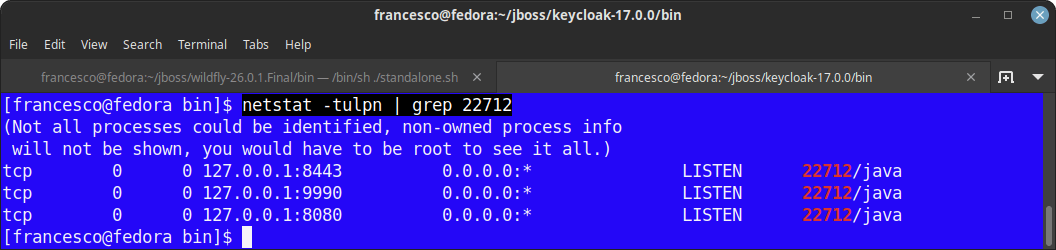
In this example, the application server is using the ports 8080, 9990 and 8443:
Changing Ports on a WildFly Bootable JAR
If you're running your application as a WildFly Bootable JAR rather than a full server distribution, the good news is that port configuration works exactly the same way: the same jboss.http.port and jboss.socket.binding.port-offset system properties apply, since under the hood it's the same runtime, just packaged as a single executable JAR:
java -Djboss.socket.binding.port-offset=100 -jar myapp-bootable.jarThis makes it straightforward to run several Bootable JAR instances side by side on the same host for local testing — just give each one a different offset — without needing separate server distributions at all.
WildFly Ports in Docker and Kubernetes/OpenShift
Once you move to containers, port configuration follows a genuinely different mental model — and the classic port-offset trick, while it still works, usually isn't the tool you actually want anymore.
Docker: Map Ports Instead of Offsetting Them
Each Docker container gets its own network namespace, so two containers can both bind to port 8080 internally without ever conflicting with each other — the collision that port-offset was designed to avoid on a shared host simply doesn't happen inside containers. What you need instead is port mapping, exposing the container's internal port on a host port of your choice:
docker run -p 8180:8080 -p 9990:9990 quay.io/wildfly/wildflyHere WildFly still listens on its default 8080/9990 inside the container; Docker takes care of mapping host port 8180 to it. If you need to run several WildFly containers on the same host, give each one a different host-side port in the -p mapping — there's no need to touch jboss.socket.binding.port-offset at all in that scenario.
One setting you do still need in a container: bind WildFly's interfaces to 0.0.0.0 rather than the loopback-only defaults shown above, or nothing outside the container will be able to reach it, even with the port correctly mapped:
-Djboss.bind.address=0.0.0.0 -Djboss.bind.address.management=0.0.0.0Kubernetes/OpenShift: Services, Not Offsets
On Kubernetes/OpenShift, port collisions between pods aren't a concern either — every pod gets its own IP — so port-offset stays out of the picture here too. What you configure instead is a Service that fronts your pods:
apiVersion: v1
kind: Service
metadata:
  name: wildfly-app
spec:
  selector:
    app: wildfly-app
  ports:
    - name: http
      port: 8080
      targetPort: 8080
    - name: management
      port: 9990
      targetPort: 9990
  type: ClusterIP
A few practical points specific to WildFly/JBoss EAP on Kubernetes/OpenShift:
- Don't expose the management port (9990) externally. Keep it
ClusterIP-only (as above) rather than aNodePort/LoadBalancerService or an OpenShift Route, and reach it viakubectl port-forwardwhen you genuinely need it. See our guide on accessing the WildFly Admin Console for the full reasoning. - Readiness/liveness probes typically target the HTTP port (8080) rather than the management port — a common early mistake is wiring a probe to 9990 and then having to expose it more broadly than necessary just to satisfy the probe.
- Clustering ports (JGroups) need a different discovery mechanism. The
jgroups-udp/jgroups-mpingmulticast-based bindings shown in the full-ha socket-binding group above generally do not work in typical Kubernetes/OpenShift networking, since most CNI plugins don't route multicast traffic between pods by default. For clustering on Kubernetes/OpenShift, switch WildFly's JGroups stack to a Kubernetes-aware discovery protocol such as KUBE_PING (or DNS-based discovery), which finds cluster members via the Kubernetes API instead of UDP multicast. - OpenShift Routes add HTTP(S) edge routing in front of a Service; you typically expose only the HTTP(S) Service (never the management one) through a Route, with TLS termination configured at the Route level unless you specifically need end-to-end encryption through to the pod.
Legacy: JBoss AS 5/6 Port Configuration (Historical Reference)
The sections below describe the port configuration model used by JBoss Application Server 5 and 6 — both long past end-of-life and unsupported for well over a decade now. We keep this reference for teams still maintaining a legacy AS 5/6 instance; if you're starting something new, everything above (WildFly/JBoss EAP) is what applies to you.
The JBoss AS 5 port configuration file is located at conf/bindingservice.beans/META-INF/bindings-jboss-beans.xml. This file gathers port configuration information about both AS services and the Web server services.
The Community version JBoss AS 6.x provided a richer abstraction by moving port definitions out of the Web server configuration file (server.xml) as well, which then referenced application server properties instead:
<Connector protocol="HTTP/1.1" port="${jboss.web.http.port}" address="${jboss.bind.address}"
    redirectPort="${jboss.web.https.port}" />

<Connector protocol="AJP/1.3" port="${jboss.web.ajp.port}" address="${jboss.bind.address}"
    redirectPort="${jboss.web.https.port}" />
The single service ports are properties of the StandardBindings Bean:
<bean name="StandardBindings" class="java.util.HashSet">
    <constructor>
        <parameter class="java.util.Collection">
            <set elementClass="org.jboss.services.binding.ServiceBindingMetadata">

                <!-- Naming Service -->
                <bean class="org.jboss.services.binding.ServiceBindingMetadata">
                    <property name="serviceName">jboss:service=Naming</property>
                    <property name="bindingName">Port</property>
                    <property name="port">1099</property>
                    <property name="description">The listening socket for the Naming service</property>
                </bean>

                <!-- ... additional service bindings ... -->

            </set>
        </parameter>
    </constructor>
</bean>
Supposing we have bound JBoss AS to the IP address 10.2.20.156, here's the list of ports engaged by the application server:
Port       Description
-------------------------------------------------
1090       RMI/JRMP for Remote JMX
1091       RMI server socket
1098       Naming Service - RMI requests from client proxies
1099       Naming Service - Main port
3873       EJB3 Remoting Connector
4446       JBoss Remoting Connector - Unified Invoker
4712       JBossTS Recovery Manager
4713       JBossTS Transaction Status Manager
4714       JBossTS - used to create a unique process id
5445       HornetQ
5455       Socket for HornetQ throughput connection factory
5500       Non-SSL Remoting
5501       SSL Remoting
8009       AJP Port
8080       HTTP Port
8083       Dynamic class and resource loading
Clustered servers additionally open the following ports:
1100  HA JNDI Service
1101  HA JNDI Service
3528  Corba IIOP Service
The Service Binding Manager
The Service Binding Manager coordinates which ports the JBoss AS instance listens on at startup, and the Administration Console provides a way to configure this service and change which ports get used — without editing the single service ports directly.
Out of the box, JBoss AS 5 ships with four port sets:
* ports-default: the standard ports, e.g. HTTP on 8080
* ports-01: standard ports + 100, e.g. HTTP on 8180
* ports-02: standard ports + 200, e.g. HTTP on 8280
* ports-03: standard ports + 300, e.g. HTTP on 8380
To change the port set, edit bindings-jboss-beans.xml and set, for example, ports-01:
<parameter>${jboss.service.binding.set:ports-01}</parameter>You can also change the Service Binding ports from the application server's startup script, for example:
run -Djboss.service.binding.set=ports-01This was particularly useful for running multiple JBoss AS instances as a cluster on the same host without maintaining a separate full copy of the server folder for each one.
You could also change the port binding via the JBoss AS admin console, through the path:
<machine> : JBossAS Servers : JBoss AS 6 (default) : Service Binding ManagerFrom there, the Configuration tab let you set the Active Binding Set Name property to the port set you wanted, then save:

New resources could be added from the Service Binding Sets folder in the same console. Once the configuration was updated, the JBoss AS instance had to be restarted for the changes to take effect.
Solving Port Conflicts
See the following article for more details about the error "java.net.BindException: Address already in use: JVM_Bind": Solving java.net.BindException: Address already in use: JVM_Bind
Frequently Asked Questions
What is the default HTTP port for WildFly?
Port 8080 for HTTP and 8443 for HTTPS, defined in the standard-sockets socket-binding group. The management interface (Web console and CLI) uses port 9990.
Should I use port-offset inside a Docker container?
Generally no. Port-offset solves the problem of multiple instances competing for the same port on a shared host — a problem containers already solve via network namespaces. Inside a container, keep WildFly on its default ports and use Docker's -p flag (or a Kubernetes Service) to map/expose it however you need on the outside.
Why can't I reach WildFly running in a container even though I mapped the port correctly?
The most common cause is WildFly still binding to 127.0.0.1 (the loopback-only default), which is unreachable from outside the container regardless of port mapping. Start it with -Djboss.bind.address=0.0.0.0 (and -Djboss.bind.address.management=0.0.0.0 if you also need external access to the management interface).
Why doesn't WildFly clustering work on Kubernetes/OpenShift out of the box?
The default JGroups stack relies on UDP multicast (jgroups-udp/jgroups-mping), which most Kubernetes/OpenShift CNI networking doesn't route between pods. Switch to the KUBE_PING discovery protocol (or DNS-based discovery) so cluster members are found via the Kubernetes API instead of multicast.
Does port configuration work differently on a WildFly Bootable JAR?
No — the same jboss.http.port and jboss.socket.binding.port-offset system properties work identically, since a Bootable JAR runs the same WildFly runtime, just packaged as a single executable JAR instead of a full server distribution.
Is JBoss AS 5/6's Service Binding Manager still relevant today?
Only if you're maintaining a legacy JBoss AS 5/6 installation — both reached end-of-life many years ago and receive no updates. Any current project should use WildFly or JBoss EAP's socket-binding groups, described at the top of this article, instead.
Should I expose WildFly's management port (9990) in Kubernetes?
No, not publicly. Keep the management port's Service type as ClusterIP and access it via kubectl port-forward when needed, rather than a NodePort, LoadBalancer, or an OpenShift Route — the same principle covered in our WildFly Admin Console guide applies equally in a containerized environment.
Recommended Articles
How to Change Default Ports and Apply Port Offset in WildFly Application Server
Learn how to change default ports and apply port offset for efficient vertical clustering with WildFly. #WildFly #JavaServer #CloudNative
Configure Multiple HTTP Ports on WildFly Application Server for Enhanced Security and Scalability
Learn how to configure multiple HTTP ports on WildFly, restrict them to specific applications, and secure your Java-based infrastructure. #WildFly #Java #Middleware #CloudNative
Discovering Default JBoss Password in WildFly Application Server
Learn about the default JBoss password available in WildFly installation. Discover how to add a user and enable the admin user.
Automate Your JBoss EAP/WildFly Domain Management with CLI - Server List
Learn how to fetch JBoss EAP or WildFly Domain server list using CLI for automation. #Java #WildFly #EAP #CLI #ServerList