How to get WildFly Server list using the CLI
In this short article, we will learn how to fetch the list of Servers in JBoss EAP or WildFly Domain using the Command Line Interface. This will let you automate your tasks by looping over your Server List.
Getting the Server List from the CLI
Firstly, connect to JBoss EAP or WildFly CLI:
./jboss-cli.sh -cThen, execute the following command:
/host=primary:read-children-names(child-type=server)
{
    "outcome" => "success",
    "result" => [
        "server-one",
        "server-three",
        "server-two"
    ]
}
Replace the name of the Host with the actual Host name. Another option, which is especially useful if you want to execute this command as part of the script, is the following:
[domain@localhost:9990 host=primary] cd /host=primary
[domain@localhost:9990 host=primary] ls server
server-one    server-three  server-two
As you can see, by navigating on the target host, you can execute the ls command to fetch the server list, with no JSON characters in it. Therefore, it is simple to extract this information as part of a script. This article shows how to use this information to loop through all servers in a Domain to start/stop them: How to Start, Stop and Restart WildFly
Conclusion
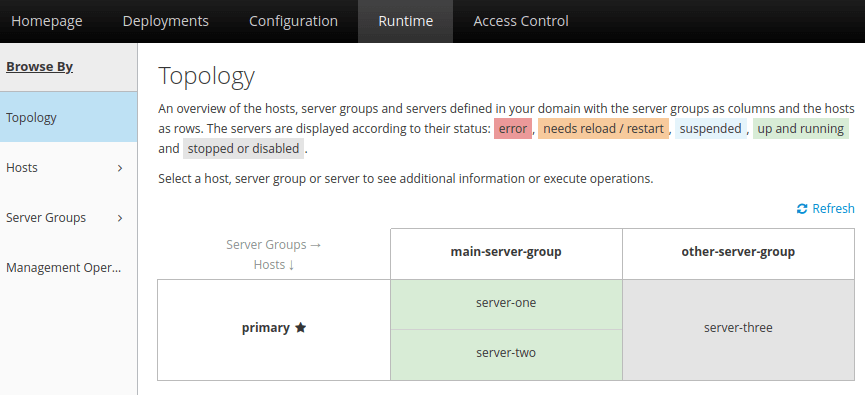
This article was a walk through the CLI commands you can use to get the server list of a JBoss / WildFly Domain. It is worth mentioning that you can also fetch the server list easily from the Web Console. Select the Runtime Tab and then, from the left menu, choose Topology:
Recommended Articles
Mastering JBoss CLI Scripts for Domain Mode Operations
Learn how to configure resources, reach server nodes, and manage server groups with JBoss CLI scripts in domain mode.
Discover Where JBoss EAP/WildFly Logs Are Located: Standalone vs Domain Mode
Learn where to find and view logs in JBoss EAP/WildFly, whether running in standalone or domain mode.
Create Advanced CLI Scripts Programmatically with Java - WildFly 8/9
Learn how to create advanced CLI scripts programmatically from Java using WildFly 8 or newer, including Domain resources like Hosts and Servers. #Java #WildFly #CLI #Middleware
Configure JVM Settings in WildFly/JBoss EAP Domain for Optimal Performance
Learn how to configure JVM settings in a WildFly/JBoss EAP domain for optimal performance and scalability. Get expert tips on configuring heap size, max-size, Garbage Collection Algorithms, and more.