WildFly Domain Management made simple
This article provides an overview of how to manage your WildFly Domain in a simple and effective way using just the Web Console and the Topolgy view of your Domain.
Domain Mode Management
Before diving into the management console, it’s crucial to understand what WildFly Domain Mode is. In this mode, multiple WildFly instances (servers) are managed by a central controller, allowing for centralized configuration, deployment, and monitoring. This setup is ideal for large-scale, high-availability environments.
If you are new to Domain mode, we recommend checking this article: How to configure WildFly in Domain mode
Then, let’s move to the Management Console using the Management Host Address and Port. For example: http://localhost:9990
Select Runtime and, on the left Panel Topology:
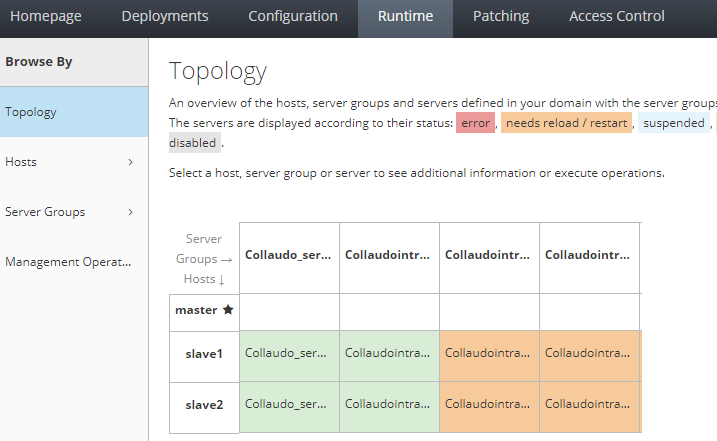
As you can see, you have a view of the Server running in each Host/Server groups along with their Status.
Here is the list of things you can do from this view.
Manage the Single Servers
By clicking with the Left Button on a Server, you can perform management actions such as: Reload/Restart/Suspend/Kill/Stop
This is an useful shortcut to manage quickly each server. Besides, you can see if any of your Servers is displaying errors or needs reload because you have applied configuration changes
Gather the URL of Each Server
By clicking on your Servers, you can collect the actual IP Address of the Server. For example:
URL http://192.168.10.62:8088This is a simple shortcut to test some applications running on that note, without the need to calculate the Port offset of that Server.
Conclusion
By utilizing the Web Console Topology view, you can efficiently manage the JBoss/WildFly domain from a centralized location, gaining comprehensive insights into the status of each server.
Recommended Articles
Discover Where JBoss EAP/WildFly Logs Are Located: Standalone vs Domain Mode
Learn where to find and view logs in JBoss EAP/WildFly, whether running in standalone or domain mode.
Retrieve JVM Arguments for WildFly Servers Using CLI and Web Console - An Essential Guide
Discover various methods to retrieve JVM arguments for WildFly servers including CLI, Domain mode, and Management Console. #WildFly #Java #JVMArguments
Mastering Domain Mode Configuration for WildFly Application Server: From Elytron to Legacy
Discover how to configure WildFly's Domain mode with Elytron, including key components and steps. Learn about Host Controllers, Server Groups, and the latest configuration.
Mastering JBoss CLI Scripts for Domain Mode Operations
Learn how to configure resources, reach server nodes, and manage server groups with JBoss CLI scripts in domain mode.