How to Compress Logs in WildFly
This article shows how to enable logs compression in WildFly by setting the appropriate suffix in your Periodic Rotating File Handler. In the second part of this tutorial we will learn how to compress logs using Log4j2 instead — the current, actively maintained Log4j generation.
Compressing Logs Natively with WildFly
Logs are an essential part of any software application, as they help us monitor and debug the system. However, logs can quickly become large and unwieldy, taking up valuable disk space and slowing down the system. That's why compressing logs is a common practice in the industry.
Since WildFly 18 there is a straightforward way to enable logs compression by setting a suffix ending with .gz or .zip. This still works exactly the same way on current WildFly releases (including the 40.x line). For example, here is how to enable a daily log compression of the Periodic Rotating File Handler:
<periodic-rotating-file-handler name="FILE" autoflush="true">
    <formatter>
        <named-formatter name="PATTERN"/>
    </formatter>
    <file relative-to="jboss.server.log.dir" path="server.log"/>
    <suffix value=".yyyy-MM-dd.zip"/>
    <append value="true"/>
</periodic-rotating-file-handler>
Clearly, the suffix determines the frequency of Logs compression. For example, to enable an hourly compression and rotation of logs you can use the following CLI command:
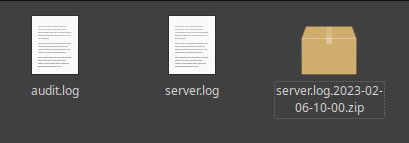
/subsystem=logging/periodic-rotating-file-handler=FILE:write-attribute(name=suffix,value=".yyyy-MM-dd-HH.zip")You can check in your logs folder to see that now, after rotation, logs are compressed:
Compressing Logs with Log4j2
⚠️ Log4j 1.x is end-of-life — use Log4j2
Log4j 1.x (the org.apache.log4j.* package, including the RollingFileAppender/SizeAndTimeBasedRollingPolicy classes from the old apache-log4j-extras module) reached end-of-life in August 2015 and no longer receives security fixes. This is a separate issue from the well-known Log4Shell vulnerability (CVE-2021-44228), which affected Log4j2 versions 2.0–2.14.1 and was fixed starting with 2.15.0/2.17.1 — current Log4j2 releases (2.26.0 as of mid-2026) are unaffected by Log4Shell. If you are still on Log4j 1.x, migrate to Log4j2, or at minimum to the community-maintained Reload4j fork if a full migration isn't immediately possible.
To compress logs with Log4j2, we add a RollingFileAppender to our log4j2.xml configuration file, combining a time-based and a size-based triggering policy so logs rotate (and compress) both on a schedule and when they get too big. Here is an updated example:
<Configuration status="WARN">
    <Appenders>
        <RollingFile name="FileAppender"
                     fileName="logs/application.log"
                     filePattern="logs/application-%d{yyyy-MM-dd}-%i.log.gz">
            <PatternLayout pattern="%d{yyyy-MM-dd HH:mm:ss} %-5p %c{1}:%L - %m%n"/>
            <Policies>
                <!-- Rotate at midnight and whenever the log reaches 50 MB -->
                <TimeBasedTriggeringPolicy interval="1" modulate="true"/>
                <SizeBasedTriggeringPolicy size="50MB"/>
            </Policies>
            <!-- Keep up to 10 rotated, compressed files -->
            <DefaultRolloverStrategy max="10"/>
        </RollingFile>
    </Appenders>
    <Loggers>
        <Root level="info">
            <AppenderRef ref="FileAppender"/>
        </Root>
    </Loggers>
</Configuration>
Just like with the WildFly native handler, Log4j2 determines the compression format from the filePattern file extension: use .gz for gzip (as above) or .zip for a zip archive — no extra configuration is required to trigger the compression itself.
For reference, this is what the equivalent, now-legacy Log4j 1.x configuration looked like, in case you're maintaining an older codebase or migrating away from it:
<!-- Legacy Log4j 1.x syntax — end-of-life, shown for migration reference only -->
<appender name="file" class="org.apache.log4j.rolling.RollingFileAppender">
    <rollingPolicy class="org.apache.log4j.rolling.SizeAndTimeBasedRollingPolicy">
        <!-- Compress logs once they reach 50 MB and keep up to 10 logs -->
        <param name="FileNamePattern" value="logs/application-%d{yyyy-MM-dd}-%i.log.gz"/>
        <param name="MaxFileSize" value="50MB"/>
        <param name="MaxBackupIndex" value="10"/>
    </rollingPolicy>
    <layout class="org.apache.log4j.PatternLayout">
        <param name="ConversionPattern" value="%d{yyyy-MM-dd HH:mm:ss} %-5p %c{1}:%L - %m%n"/>
    </layout>
</appender>
As you can see, the effect is the same — logs are compressed once they reach 50 MB and up to 10 rotated logs are kept, with a .gz file extension and the date encoded in the file name — but the Log4j2 syntax and package names (org.apache.logging.log4j.core.appender.rolling.* under the hood) replace the deprecated Log4j 1.x classes.
To learn more about configuring Log4j2 with WildFly, check this article: How to use Log4j2 in your WildFly applications
Log Compression and Rotation in Containers and Kubernetes/OpenShift
The file-based compression strategies above assume WildFly is writing logs to a persistent local disk, which is the common case for VM or bare-metal deployments. In containerized environments a few things change:
- Prefer stdout/stderr over on-disk files. The standard cloud-native pattern is to have WildFly log to the console (
CONSOLEhandler) and let the container runtime and a log-shipping agent (Fluent Bit, Fluentd, Vector, or the OpenShift/Kubernetes native logging stack) handle collection, rotation, and long-term storage — typically into Elasticsearch/OpenSearch, Loki, or a cloud logging service. - If you must write to disk in a container, mount a persistent volume (PVC) for the log directory; without one, rotated/compressed logs are lost the moment the pod is rescheduled, since container filesystems are ephemeral by default.
- Let the node/runtime handle rotation for stdout logs. Kubernetes' own log rotation (via the container runtime, kubelet's
--container-log-max-size/--container-log-max-files, or a node-level log rotation daemon) already manages size-based rotation for console output, so duplicating that logic inside WildFly's own handlers is usually unnecessary and can conflict with the platform's own limits. - Compression still matters for shipped logs: most log-shipping agents and backends (Loki, Elasticsearch/OpenSearch, cloud logging services) already compress data at rest and in transit, so the WildFly-side compression covered in this article is mainly relevant when you specifically need compressed, on-disk artifacts — for example for audit retention or offline archival — rather than for day-to-day container log collection.
Conclusion
Compressing logs is an essential practice in software development, as it helps us manage disk space and optimize system performance. WildFly's native Periodic Rotating File Handler makes this a one-line configuration change, and Log4j2 provides an equally easy and flexible way to compress logs for applications that rely on it — making either option an excellent choice for Java-based applications, whether running on bare metal or, with the container caveats above in mind, in Kubernetes/OpenShift.
Frequently Asked Questions
How do I enable log compression in WildFly without changing application code?
Set the suffix attribute of your periodic-rotating-file-handler to end with .gz or .zip (for example .yyyy-MM-dd.zip), either directly in standalone.xml or via the CLI write-attribute command shown in this article. No application redeployment is required — a configuration reload is enough.
Is Log4j 1.x still safe to use in 2026?
No. Log4j 1.x reached end-of-life in August 2015 and no longer receives security patches. If migrating fully to Log4j2 isn't immediately feasible, the community-maintained Reload4j fork provides a drop-in replacement with ongoing security fixes; otherwise, plan a migration to Log4j2.
Is Log4j2 affected by the Log4Shell vulnerability?
Current Log4j2 releases are not. Log4Shell (CVE-2021-44228) affected Log4j2 versions 2.0 through 2.14.1 and was fixed in 2.15.0, with a follow-up fix in 2.17.1 for a related issue. As long as you're running a current Log4j2 version (2.17.1 or later — ideally the latest stable release), you are not exposed to Log4Shell.
Does .zip or .gz give better compression for WildFly logs?
Both are supported by the same suffix/filePattern mechanism, and in practice the compression ratio is similar for typical text log content. .gz is generally preferred for log files since it's a single-stream format that's slightly cheaper to produce and is the most common convention in the Java logging ecosystem; .zip is useful mainly if you need a container format that also holds multiple files.
Should I compress logs at all if I'm shipping them to a centralized logging backend?
Usually the shipping agent and backend (Fluent Bit, Loki, Elasticsearch/OpenSearch, or a cloud logging service) already compress data in transit and at rest, so on-disk compression inside WildFly mainly matters for local retention, audit requirements, or offline archival rather than for the centralized pipeline itself.
What happens to compressed log files if my WildFly pod restarts in Kubernetes?
If the log directory lives on the container's ephemeral filesystem, both raw and compressed rotated logs are lost when the pod is rescheduled. Mount a PersistentVolumeClaim for the log directory if you need on-disk logs to survive pod restarts, or rely on a log-shipping agent that reads and forwards logs before they're lost.
Can I combine size-based and time-based rotation in Log4j2 like the old SizeAndTimeBasedRollingPolicy did?
Yes — as shown in the updated example, Log4j2's RollingFile appender accepts multiple entries inside <Policies> (for example both TimeBasedTriggeringPolicy and SizeBasedTriggeringPolicy); a rollover is triggered as soon as either condition is met, which replicates the behavior of the legacy Log4j 1.x SizeAndTimeBasedRollingPolicy.
Recommended Articles
Configure WildFly's Periodic File Handler with Advanced Settings and Rotations
Learn how to configure the Periodic File Handler in WildFly for efficient log management. #WildFly #JavaLogging #CloudNative
Configure JBoss Logging Handler for Separate Package Log File
Learn how to configure a JBoss logging handler to write logs for a specific package to a separate log file, allowing you to add verbosity without mixing with application server logs.
Inspection and Management of WildFly Logs via Command Line Interface - A Comprehensive Guide
Learn how to inspect WildFly logs using CLI with detailed examples and parameters for efficient log management.
Enable Logging in WildFly and Log4j for JSON Format - A Comprehensive Guide
Learn how to configure logging in JSON format in WildFly. Includes native configuration and using Log4j custom settings.