How to Use Log4j2 in Your WildFly Applications
Log4j2 is the current major generation of the popular Apache Logging Framework — the actively maintained successor to the end-of-life Log4j 1.x. In this tutorial we will learn how to include a Log4j2 configuration file and use it in your deployments running on WildFly.
Overview of Log4j2
Log4j2 is a powerful logging library, developed by Apache, that provides advanced features such as:
- Asynchronous Logging: Log4j2 allows for logging to occur asynchronously, which can greatly improve the performance of your application. This feature can be especially beneficial for applications that generate a large number of log statements.
- Filtering: Log4j2 provides the ability to filter log statements based on specific criteria, such as log level, logger name, or message content.
- Custom Plugins: Log4j2 provides a plugin-oriented architecture, which allows for the easy addition of custom appenders, filters, and other components. This allows for greater flexibility in configuring your logging system.
- Improved Performance: Log4j2 has better performance than the end-of-life Log4j 1.x; it can use the LMAX Disruptor library, a high-performance inter-thread messaging library, for fully asynchronous logging.
- Improved configuration: Log4j2 allows for configuration of loggers, appenders, and other components through a variety of means, including XML, JSON, YAML, and property files. This allows for greater flexibility in configuring your logging system to meet the specific needs of your application.
After this brief overview, let's see how to configure Log4j2 in the WildFly application server.
Configuring Log4j2 in WildFly
Firstly, WildFly allows using the Apache Log4j2 API to send application logging messages using the JBoss LogManager implementation. Here is an example of WildFly's Log4j2 module structure:
.
├── log4j2
│   └── main
│       ├── log4j2-jboss-logmanager-{version}.jar
│       └── module.xml
└── main
    ├── jboss-logmanager-{version}.jar
    └── module.xml
The exact jar version numbers depend on the WildFly release you're running — always check the actual module.xml under modules/system/layers/base/org/jboss/logmanager in your installation rather than assuming a fixed version across upgrades. One thing worth knowing when you do upgrade: as of log4j2-jboss-logmanager version 2.0.0.Final, a minimum of Apache Log4j2 2.23 is required, so very old, pinned Log4j2 dependency versions in your application may stop working correctly after a WildFly upgrade.
However, in order to provide a custom Log4j2 configuration to WildFly, we need to exclude the default Logging subsystem from your application. You can do that through a jboss-deployment-structure.xml. In a Web application, you can place it under the WEB-INF folder of your application:
<jboss-deployment-structure xmlns="urn:jboss:deployment-structure:1.2">
    <deployment>
        <exclude-subsystems>
            <subsystem name="logging" />
        </exclude-subsystems>
    </deployment>
</jboss-deployment-structure>
On the other hand, if your application is inside an EAR file, you should exclude the subsystem for the sub-deployment. For example:
<jboss-deployment-structure xmlns="urn:jboss:deployment-structure:1.2">
    <sub-deployment name="myapp.war">
        <exclude-subsystems>
            <subsystem name="logging" />
        </exclude-subsystems>
    </sub-deployment>
</jboss-deployment-structure>
With this premise, we will now build a sample Web application which uses a custom Log4j2 configuration file.
A Sample Web Application to Test Log4j2
Next, we will deploy a sample Web application which prints some messages using Log4j2. For example, let's add the following Servlet:
@WebServlet(name = "hello", urlPatterns = { "/hello" })
public class HelloWorldServlet extends HttpServlet {

    Logger logger = LogManager.getLogger(HelloWorldServlet.class);

    protected void doGet(HttpServletRequest request,
            HttpServletResponse response) throws ServletException, IOException {

        response.setContentType("text/html");
        PrintWriter writer = response.getWriter();
        writer.println("<h1>Hello World Servlet on WildFly</h1>");
        logger.warn("Hello world Log4j2 on WildFly");
        logger.warn("Request URI {} - Session Id {}.", request.getRequestURI(), request.getSession().getId());

        writer.close();
    }

}
Next, we will add a log4j2.xml configuration file in the resources folder of our Web application.
<?xml version="1.0" encoding="UTF-8"?>
<Configuration status="WARN">
    <Appenders>
        <Console name="Console" target="SYSTEM_OUT">
            <PatternLayout pattern="[Log4j]%d{HH:mm:ss.SSS} %-5level - %msg%n"/>
        </Console>
    </Appenders>
    <Loggers>
        <Root level="info">
            <AppenderRef ref="Console"/>
        </Root>
    </Loggers>
</Configuration>
As you can see, this log4j2.xml configuration file contains a custom PatternLayout so that we can check at first sight if our configuration is in place.
Finally, add the dependencies to build the application:
<dependency>
    <groupId>org.apache.logging.log4j</groupId>
    <artifactId>log4j-api</artifactId>
    <version>2.26.0</version>
</dependency>

<dependency>
    <groupId>org.apache.logging.log4j</groupId>
    <artifactId>log4j-core</artifactId>
    <version>2.26.0</version>
</dependency>
If using Gradle, the equivalent configuration is:
implementation 'org.apache.logging.log4j:log4j-api:2.26.0'
implementation 'org.apache.logging.log4j:log4j-core:2.26.0'
Note: the compile configuration used in older Gradle examples was deprecated in Gradle 5 and fully removed in Gradle 7+. Use implementation (or api if the dependency must be exposed to consumers of your module) instead.
That's all. You should have a project tree that resembles the following one:
src
└── main
    ├── java
    │   └── com
    │       └── mastertheboss
    │           └── servlet
    │               └── HelloWorldServlet.java
    ├── resources
    │   └── log4j2.xml
    └── webapp
        └── WEB-INF
            ├── beans.xml
            └── jboss-deployment-structure.xml
Next, deploy the application on WildFly and verify that the log output matches the Log4j2 configuration. For example:
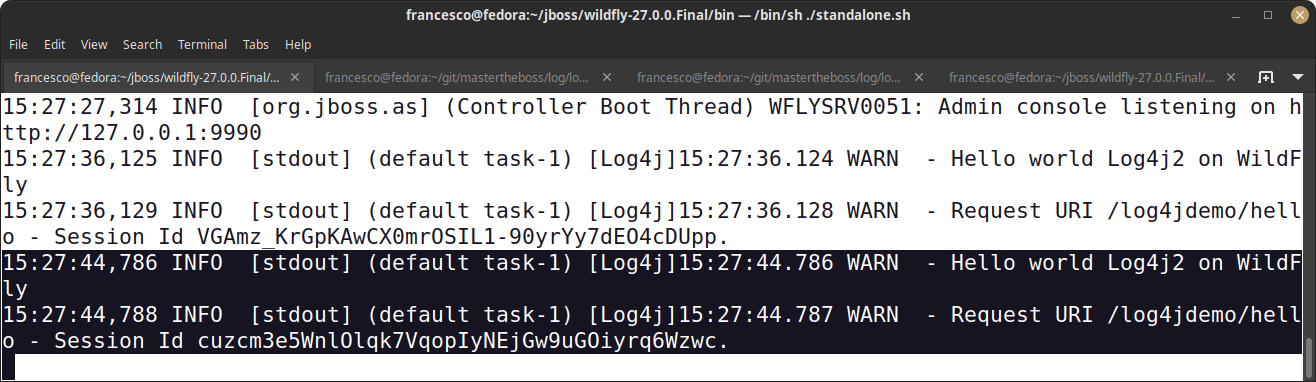
Source code: You can find the source code for this example application on Github: https://github.com/fmarchioni/mastertheboss/tree/master/log/log4j2
Using an External Log4j2 Configuration File
You can instruct WildFly to use a configuration file which is in an external location of your File System. For example, let's copy the log4j2.xml file into the $JBOSS_HOME/standalone/configuration:
cp log4j2.xml $JBOSS_HOME/standalone/configurationThen, we will instruct WildFly to pick up the log4j2 configuration file in its "standalone/configuration" folder:
/system-property=log4j.configurationFile:add(value=${env.JBOSS_HOME}/standalone/configuration/log4j2.xml)Keeping Your Log4j2 Libs in Sync
To simplify your project maintenance, you can include a Bill of Materials to keep your Log4j2 libraries in sync:
<dependencyManagement>
    <dependencies>
        <dependency>
            <groupId>org.apache.logging.log4j</groupId>
            <artifactId>log4j-bom</artifactId>
            <version>2.26.0</version>
            <scope>import</scope>
            <type>pom</type>
        </dependency>
    </dependencies>
</dependencyManagement>
With that in place, you don't need to specify the version of the single Log4j artifacts:
<dependency>
    <groupId>org.apache.logging.log4j</groupId>
    <artifactId>log4j-api</artifactId>
</dependency>
<dependency>
    <groupId>org.apache.logging.log4j</groupId>
    <artifactId>log4j-core</artifactId>
</dependency>
Using a Logging Facade for Log4j2
In many cases, you could prefer using an agnostic approach to write your application logs. For example, you can use the SLF4J API to produce your logs. Then, you can add Log4j2 as the Logging Provider. This approach is more flexible and allows you to change the Logging provider very easily.
To learn more, we recommend checking this article: How to configure SLF4J in WildFly applications
Security: Log4Shell and Log4j 1.x End-of-Life
Where things stand in 2026
The Log4Shell vulnerability (CVE-2021-44228), disclosed in December 2021, affected Log4j2 versions 2.0 through 2.14.1 and was fixed starting with 2.15.0, with a follow-up fix in 2.17.1 for a related issue. Any current Log4j2 release (2.26.0 as of mid-2026) is well past those fixes and is not affected by Log4Shell. This is a completely separate matter from the fact that Log4j 1.x (the older, pre-Log4j2 generation) reached end-of-life in 2015 and receives no security patches at all — if you're still running Log4j 1.x for any reason, plan a migration to Log4j2 regardless of Log4Shell.
Read more here: How to handle CVE-2021-44228 in Java applications
"No Appenders Could Be Found for Logger" and Other Configuration Issues
The classic message "log4j:WARN No appenders could be found for logger" is actually the diagnostic format used by the legacy, end-of-life Log4j 1.x, and typically shows up when the Log4j configuration file isn't on the application classpath, so the framework falls back to a default (or no) configuration. If you're seeing this exact message, you're most likely dealing with an old Log4j 1.x dependency somewhere in your application or a transitive dependency — worth investigating as a migration opportunity rather than just silencing it.
Log4j2 reports configuration problems differently: instead of that exact line, you'll typically see StatusLogger messages such as ERROR StatusLogger Reconfiguration failed or a notice that Log4j2 could not locate a configuration file, falling back to its default configuration (which logs at ERROR level to the console only). To troubleshoot this in Log4j2:
- Make sure
log4j2.xml(or .json/.yaml/.properties) is actually packaged on the classpath — typically undersrc/main/resourcesin a Maven/Gradle project, ending up inWEB-INF/classesof the deployed WAR. - Temporarily add the system property
-Dlog4j2.debug=true(or-Dorg.apache.logging.log4j.simplelog.StatusLogger.level=TRACE) when starting WildFly to see exactly which configuration file, if any, Log4j2 is picking up. - Double-check that the jboss-deployment-structure.xml shown earlier is correctly excluding the WildFly
loggingsubsystem — without it, WildFly's own JBoss LogManager configuration takes over and yourlog4j2.xmlsettings are effectively ignored.
To solve the classic Log4j 1.x version of this issue, make sure you are placing the Log4j configuration file in the correct folder so the application classpath is able to find it. A possible workaround, if you are not able to place the Log4j configuration file, is to configure Log4j programmatically. For historical reference, here is how that looked with the legacy Log4j 1.x API:
// Legacy Log4j 1.x API — end-of-life, shown for migration reference only
Logger root = Logger.getRootLogger();
root.addAppender(new ConsoleAppender(new PatternLayout("%r [%t] %p %c %x - %m%n")));
Logger.getRootLogger() gets a reference to the root logger in the Log4j hierarchy. The root logger is the top-level logger that all other loggers inherit from. Therefore, any log statements made in your application code will be processed by the Log4j Root Logger. Log messages will then be formatted according to the specified pattern layout and printed to the console.
The equivalent, current Log4j2 approach uses a ConfigurationBuilder instead of directly instantiating appenders:
ConfigurationBuilder<BuiltConfiguration> builder = ConfigurationBuilderFactory.newConfigurationBuilder();

AppenderComponentBuilder console = builder.newAppender("Console", "CONSOLE")
        .addAttribute("target", "SYSTEM_OUT");
console.add(builder.newLayout("PatternLayout")
        .addAttribute("pattern", "%d{HH:mm:ss.SSS} %-5level %logger{36} - %msg%n"));
builder.add(console);

builder.add(builder.newRootLogger(Level.INFO)
        .add(builder.newAppenderRef("Console")));

Configurator.initialize(builder.build());
Log4j2 on Kubernetes and OpenShift
When your WildFly application moves from a VM/bare-metal deployment to Kubernetes or OpenShift, a few Log4j2-specific adjustments help it fit the cloud-native logging model:
- Log to the console, not to files. Keep (or add) a
Consoleappender as the primary target so container runtimes and log-shipping agents (Fluent Bit, Fluentd, Vector) can collect stdout/stderr directly, rather than relying on Log4j2's own file-based rolling appenders inside an ephemeral container filesystem. - Consider a JSON layout (Log4j2's built-in
JsonTemplateLayoutorJsonLayout) instead of a plainPatternLayoutfor console output, so centralized logging backends like Elasticsearch/OpenSearch or Loki can parse fields (level, logger, thread, MDC context) without brittle regex parsing. - Externalize the configuration file via a ConfigMap rather than baking a fixed
log4j2.xmlinto the container image, so you can tune log levels per environment (dev/staging/production) without rebuilding the image — mount it and pointlog4j.configurationFileat the mounted path, the same mechanism shown earlier for an external configuration file. - Use Log4j2's async appenders/loggers carefully in containers with tight CPU limits: the LMAX Disruptor's default ring buffer can add memory overhead that's easy to overlook when sizing container memory requests/limits, so profile under your actual container resource constraints rather than assuming defaults are free.
Conclusion
In summary, configuring Log4j2 in WildFly is an essential task for any developer or administrator working with Jakarta EE applications. With the right configuration and troubleshooting techniques in place, you can gain better control over your application's logging, making it easier to monitor and troubleshoot issues, ultimately leading to more reliable and robust deployments on the WildFly application server — whether that's a single bare-metal instance or a fleet of pods on Kubernetes/OpenShift.
We also covered the "no appenders found" family of errors and clarified how it differs between the end-of-life Log4j 1.x and current Log4j2, since understanding the hierarchical nature of loggers and which generation of Log4j you're actually troubleshooting can save a lot of time when diagnosing this issue.
Frequently Asked Questions
Does WildFly support Log4j2 out of the box?
WildFly ships a Log4j2 API module that bridges to the JBoss LogManager, but it does not use the actual Log4j2 log4j-core implementation or honor a log4j2.xml configuration by default. To use your own Log4j2 configuration, you must exclude WildFly's logging subsystem for your deployment via jboss-deployment-structure.xml, as shown in this article.
What's the current stable version of Log4j2?
As of mid-2026, the latest stable release is Log4j2 2.26.0. Always check the official Apache Log4j2 downloads/release notes page for the current version before pinning a dependency version in a new project.
Is Log4j2 still affected by the Log4Shell vulnerability?
No. Log4Shell (CVE-2021-44228) affected Log4j2 versions 2.0 through 2.14.1 and was fixed in 2.15.0, with a follow-up fix in 2.17.1. Any current Log4j2 release is unaffected; make sure you're not still pinned to a pre-2.17.1 version anywhere in your dependency tree.
Why do I get "log4j:WARN No appenders could be found for logger" instead of a Log4j2-style error?
That exact message format comes from the legacy, end-of-life Log4j 1.x, not from Log4j2. If you see it, check for an old Log4j 1.x jar pulled in transitively by a dependency — Log4j2 reports missing configuration differently, typically via StatusLogger messages rather than this classic line.
Do I need to exclude WildFly's logging subsystem for every application?
Only if you want your application to use its own log4j2.xml (or SLF4J/Logback/etc.) configuration instead of WildFly's centralized logging configuration. If you're happy routing everything through WildFly's own logging subsystem and standalone.xml/domain.xml handlers, you don't need jboss-deployment-structure.xml at all.
Can I use Log4j2's asynchronous logging in WildFly?
Yes — configure AsyncAppender, async loggers, or set Log4jContextSelector to the async selector in your log4j2.xml, exactly as you would in a standalone Log4j2 application. Just be mindful of the LMAX Disruptor's memory footprint when sizing container resource limits on Kubernetes/OpenShift.
Should I use a BOM (Bill of Materials) for Log4j2 dependencies?
Yes, it's recommended for any project using more than one Log4j2 artifact (typically log4j-api and log4j-core, plus optional bridges). Importing log4j-bom in dependencyManagement keeps every Log4j2 artifact on the same version automatically, which avoids subtle classpath mismatches after a partial upgrade.
Is the old Gradle "compile" configuration still valid for adding Log4j2?
No. The compile configuration was deprecated in Gradle 5 and removed entirely in Gradle 7+. Use implementation (or api if you need the dependency to be visible to consumers of your Gradle module) instead.
Recommended Articles
How to Configure Log4j2 with JBoss/WildFly and Avoid ClassLoader Issues
Learn how to configure Log4j2 in WildFly applications, avoiding common errors like ClassCastException.
Securing Your Java Applications from Log4j2 Vulnerabilities - CVE-2021-44228 and Beyond
Learn how to check for and mitigate Log4j2 vulnerabilities in your applications. Upgrade to version 2.17 or remove JMSAppender.
Migrate JBoss Applications from Log4j1 to Log4j2: A Step-by-Step Guide
Learn how to migrate your Java applications running with Log4j 1.x to Log4j 2.x with WildFly/JBoss EAP. Get expert guidance on migration options and best practices.
How to configure SLF4J in WildFly applications
Learn how to configure SLF4J 2.x in WildFly applications: exclude the built-in logging subsystem, wire up Log4j2 or Logback, and use the new Fluent Logging API.