How to Start, Stop, and Restart WildFly and JBoss EAP
Managing the lifecycle of your application server is a fundamental operational task for Java developers and system administrators. This comprehensive guide covers all practical methods to start, stop, reload, and restart WildFly (and JBoss EAP) across both Standalone and Managed Domain modes[cite: 13]. By the end of this tutorial, you will be able to manage your runtime lifecycle efficiently and troubleshoot common startup/shutdown issues[cite: 13].
WildFly can be executed in two primary operational modes: Standalone mode (single server instance) and Domain mode (centralized management of multiple server instances across hosts)[cite: 13].
1. Booting and Stopping WildFly in Standalone Mode
To launch WildFly in Standalone mode, navigate to the bin folder of your installation directory and execute the boot script[cite: 13]:
$ cd $WILDFLY_HOME/bin
$ ./standalone.sh
This command launches WildFly using the default configuration file (standalone.xml)[cite: 13]. To specify an alternative configuration profile (e.g., full EE profile or HA cluster configuration), pass the -c parameter[cite: 13]:
$ ./standalone.sh -c standalone-full.xmlGraceful Shutdown and Restart via JBoss CLI
The recommended and safest way to stop or restart WildFly is through its interactive Management CLI (jboss-cli.sh)[cite: 13]:
$ ./jboss-cli.sh --connectOnce connected to the CLI prompt, execute the appropriate command[cite: 13]:
# Graceful shutdown of the server
[standalone@localhost:9990 /] shutdown

# Restart the application server process
[standalone@localhost:9990 /] shutdown --restart=true

# Graceful shutdown with a specific timeout (in seconds)
[standalone@localhost:9990 /] shutdown --timeout=10
If no timeout is specified, WildFly will wait indefinitely for active transactions and user sessions to complete before shutting down[cite: 13].
Non-Interactive CLI Commands and Server Reload
For automation scripts or CI/CD pipelines, you can issue non-interactive CLI commands without opening an interactive shell session[cite: 13]:
# Non-interactive shutdown
$ ./jboss-cli.sh -c --commands=":shutdown"

# Non-interactive reload (applies configuration changes without killing the JVM)
$ ./jboss-cli.sh -c --commands=":reload"
2. Managing WildFly Lifecycle in Domain Mode
In a Managed Domain topology, lifecycle operations can be applied at the host level, server-group level, or individual server level[cite: 13].
To boot the Host Controller and managed servers, execute[cite: 13]:
$ cd $WILDFLY_HOME/bin
$ ./domain.sh
Connect to the central Domain Controller using the CLI[cite: 13]:
$ ./jboss-cli.sh --connectUse the following commands to manage lifecycle operations across the domain[cite: 13]:
# Stop all servers on a specific Host Controller
/host=master:stop

# Restart all servers on a specific Host Controller
/host=master:stop(restart=true)

# Stop an individual server instance on a Host
/host=master/server-config=server-one:stop

# Restart an individual server instance on a Host
/host=master/server-config=server-one:stop(restart=true)
To learn more about domain architecture and host controller setup, check our guide on WildFly / JBoss Domain Configuration[cite: 13].
3. Managing Lifecycle via the Admin Web Console
If the CLI is unavailable or you prefer a graphical interface, you can manage server states directly through the Web Management Console available at http://localhost:9990[cite: 13].
In Standalone mode, navigate to the Runtime tab, select your server instance, and click the drop-down menu to Reload, Restart, or Suspend the server[cite: 13]:

In Domain mode, the Management Console allows you to execute the same operations across Server Groups, Host Controllers, or individual server nodes[cite: 13]:

4. Systemd Integration on Linux (RHEL / Ubuntu)
For production deployments on Linux (RHEL, CentOS, Debian, Ubuntu), WildFly should be configured as a background system service managed by systemd[cite: 13].
WildFly includes a helper script to generate official systemd unit files[cite: 13]:
cd $WILDFLY_HOME/bin/systemd
./generate_systemd_unit.sh standalone wildfly wildfly
Once installed, manage the service using standard systemctl commands[cite: 13]:
# Start the WildFly service
systemctl start wildfly-standalone

# Gracefully restart the service
systemctl restart wildfly-standalone

# Stop the service
systemctl stop wildfly-standalone
Critical Tuning: Ensure TimeoutStopSec=90 is set in your unit file to give active transactions enough time to complete before systemd forcibly terminates the process[cite: 13]. For a step-by-step setup, see How to Run WildFly as a Linux Service[cite: 13].
5. Automated Rolling Restarts in Domain Mode
In production clusters, executing a simultaneous restart across all nodes causes temporary downtime. To maintain high availability, execute a rolling restart across your server group[cite: 13]:
/server-group=main-server-group:restart-servers(rollout={main-server-group={rolling-to-servers=true}})Setting rolling-to-servers=true instructs WildFly to restart servers sequentially one by one[cite: 13]. If omitted, servers in the group will restart concurrently[cite: 13].
Automated Shell Script for Sequential Restarts
For custom logging, health checks, or automated maintenance via cron, use this bash script to iterate over host controllers and restart nodes sequentially[cite: 13]:
#!/bin/bash
CLI="/opt/wildfly/bin/jboss-cli.sh"
HOSTS=$($CLI -c --commands="cd /host, ls")

read -r -a host_array <<< "$HOSTS"

# Loop through Host Controllers
for hostcontroller in "${host_array[@]}"; do
  echo "Processing Host: $hostcontroller"
  SERVERS=$($CLI -c --commands="cd /host=$hostcontroller, ls server")
  read -r -a host_servers <<< "$SERVERS"

  # Loop through individual server instances
  for jbossnode in "${host_servers[@]}"; do
    echo "├── Stopping $jbossnode..."
    $CLI -c --commands="/host=$hostcontroller/server-config=$jbossnode:stop(blocking=true)"

    if [[ $? -eq 0 ]]; then
       echo "  ✅ $jbossnode stopped successfully"
    else
       echo "  ❌ Error stopping $jbossnode"
    fi

    sleep 5

    echo "├── Starting $jbossnode..."
    $CLI -c --commands="/host=$hostcontroller/server-config=$jbossnode:start(blocking=true)"

    if [[ $? -eq 0 ]]; then
       echo "  ✅ $jbossnode started successfully"
    else
       echo "  ❌ Error starting $jbossnode"
    fi
  done
done
6. Programmatic Lifecycle Management via JMX API
You can also trigger lifecycle operations programmatically over JMX using standard Java management APIs[cite: 13]. Connect to the jboss.as:management-root=server MBean using JConsole or custom Java code[cite: 13]:
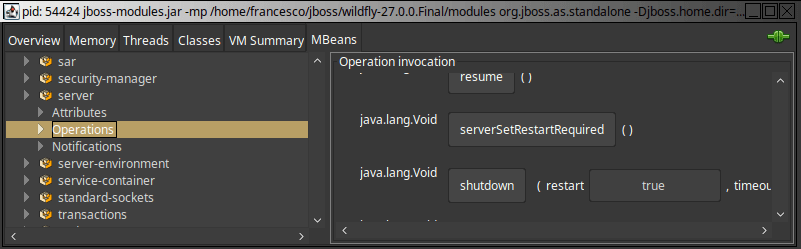
Java code snippet to invoke a remote server shutdown[cite: 13]:
import javax.management.MBeanServerConnection;
import javax.management.ObjectName;
import javax.management.remote.JMXConnector;
import javax.management.remote.JMXConnectorFactory;
import javax.management.remote.JMXServiceURL;
import java.util.HashMap;
import java.util.Map;

public class WildFlyLifecycleManager {
    public static void shutdownServer() throws Exception {
        String host = "localhost";
        int port = 9990; // management-http port
        String urlString = "service:jmx:remote+http://" + host + ":" + port;

        JMXServiceURL serviceURL = new JMXServiceURL(urlString);

        Map map = new HashMap<>();
        String[] credentials = new String[] { "admin", "adminPassword" };
        map.put("jmx.remote.credentials", credentials);

        try (JMXConnector jmxConnector = JMXConnectorFactory.connect(serviceURL, map)) {
            MBeanServerConnection connection = jmxConnector.getMBeanServerConnection();
            ObjectName mbeanName = new ObjectName("jboss.as:management-root=server");

            // Invoke the shutdown operation
            connection.invoke(mbeanName, "shutdown", null, null);
            System.out.println("Shutdown command successfully sent to WildFly.");
        }
    }
}
Frequently Asked Questions & Troubleshooting
What is the difference between :reload and :shutdown in WildFly?
Executing :reload re-initializes the server configuration and restarts internal subsystems without killing the underlying Java Virtual Machine (JVM) process. Executing :shutdown completely terminates the JVM process.
How do I fix "Address already in use: bind" (Port 9990/8080) on restart?
This error occurs when a previous WildFly instance failed to terminate completely and is still holding the management or HTTP port. On Linux, find and terminate the stuck process using:
# Find the PID using port 9990 or 8080
$ netstat -tlpn | grep 9990
# Kill the stuck process
$ kill -9
How can I force-kill a unresponsive WildFly instance?
If CLI or JMX commands fail to respond, terminate the process gracefully via process signal, or forcefully if necessary:
# Graceful SIGTERM
$ pkill -15 -f wildfly

# Forceful SIGKILL
$ pkill -9 -f wildfly
Conclusion
Whether you manage standalone development servers or large-scale enterprise domain clusters, understanding how to control WildFly's lifecycle using the CLI, Management Console, Systemd, or JMX ensures seamless operations and minimal downtime[cite: 13].
Recommended Articles
Discover Where JBoss EAP/WildFly Logs Are Located: Standalone vs Domain Mode
Learn where to find and view logs in JBoss EAP/WildFly, whether running in standalone or domain mode.
Automate Your JBoss EAP/WildFly Domain Management with CLI - Server List
Learn how to fetch JBoss EAP or WildFly Domain server list using CLI for automation. #Java #WildFly #EAP #CLI #ServerList
Effortlessly Manage WildFly Server Groups with Command Line Interface
Quick tip for managing WildFly server groups. Learn how to start/stop all or single servers using CLI.
Top 5 Useful Loggers for WildFly and JBoss EAP - Enhance Your Java Applications
Discover 5 essential loggers for WildFly and JBoss EAP. Learn how to troubleshoot common issues with remote EJB connections and messaging broker core package.