How to get the list of MBeans in WildFly
This article shows how to fetch the list of MBeans which are available in WildFly application server and check their properties
Getting started with the JMXConnector
As per JMX Specification, client applications can obtain MBeans through an MBean server connection, accessed by means of a JMX connector. In this article we will show how to open the MBean server connection towards a WildFly application server.
Firstly, you need to create a Management User to access the remote JBoss / WildFly Server. (f.e. “admin”,”admin” in our example).
./add-user.sh -m -u admin -p adminNext, let’s code the following example Class:
import javax.management.*;
import javax.management.remote.JMXConnector;
import javax.management.remote.JMXConnectorFactory;
import javax.management.remote.JMXServiceURL;
import java.util.HashMap;
import java.util.Iterator;
import java.util.Map;
import java.util.Set;
import javax.management.ObjectName;

public class JMXListMBeans {

    public static void main(String[] args) {

        printMBeans();

    }

    private static void printMBeans() {

        try {
            String host = "localhost";
            int port = 9990;  // management-http port
            String urlString = "service:jmx:remote+http://" + host + ":" + port;
            JMXServiceURL serviceURL = new JMXServiceURL(urlString);

            Map map = new HashMap();
            String[] credentials = new String[] { "admin", "admin" };
            map.put(JMXConnector.CREDENTIALS, credentials);

            JMXConnector jmxConnector = JMXConnectorFactory.connect(serviceURL, map);

            MBeanServerConnection connection = jmxConnector.getMBeanServerConnection();
            Set mySet = connection.queryNames(new ObjectName("*:*"), null);
            Iterator it = mySet.iterator();

            while (it.hasNext()) {

                ObjectName myName = (ObjectName) it.next();

                try {
                    System.out.println("--> " + myName.getCanonicalName());

                    // get all attributes

                    MBeanAttributeInfo[] atribs = connection.getMBeanInfo(myName).getAttributes();

                    for (int i = 0; i < atribs.length; i++)  {

                        System.out.println("         Attribute: " + atribs[i].getName() +
                                "   of Type : " + atribs[i].getType());

                    }

                    // get all operations

                    MBeanOperationInfo[] operations =
                            connection.getMBeanInfo(myName).getOperations();

                    for (int i = 0; i < operations.length; i++)  {
                        System.out.print("         Operation: " +
                                operations[i].getReturnType() + "  " +
                                operations[i].getName() + "(");


                        for (int j = 0; j < operations[i].getSignature().length;j++)
                            System.out.print(operations[i].getSignature()[j].
                                    getName() + ":" +
                                    operations[i].getSignature()[j].
                                    getType() + "  ");

                        System.out.println(")");

                    }

                } catch (Exception ex) {

                    ex.printStackTrace();

                }

            }

            jmxConnector.close();

        }

        catch (Exception ex) {

            ex.printStackTrace();

        }

    }

}
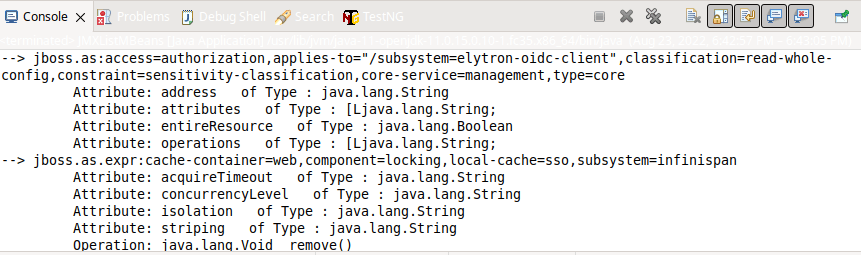
By running the above Class, you will see in the console the list of Attributes and Operations available for every MBean running on WildFly:
On the other hand, if you want the read the value of an Attribute, cast the Object with the Attribute in a javax.management.openmbean.CompositeData. For example:
Object o = jmxConnector.getMBeanServerConnection().getAttribute(new ObjectName("java.lang:type=Memory"), "HeapMemoryUsage");
CompositeData cd = (CompositeData) o;
System.out.println(cd.get("committed"));
In the above example, we are fetching the value of the Attribute committed for the ObjectName “java.lang:type=Memory” “HeapMemoryUsage”.
Finally, please note that you need to include in your application’s classpath the jboss-client JAR files in order to be able to use the remote+http protocol:
<dependency>
  <groupId>org.wildfly</groupId>
  <artifactId>wildfly-client-all</artifactId>
  <version>20.0.0.Final</version>
</dependency>
Other programmatic approaches
The above example shows how to use the JMX API to call an MBean via MBeanServer can be tedious: it involves a reflection-like syntax and a complex exception handling. If you want to use a simpler paradigm you can switch to the Jolokia Client API.
Check this article for more details: Monitor JBoss AS with Jolokia
Recommended Articles
Deploy and Access JMX MBeans with Jolokia on JBoss AS 7 - A Comprehensive Tutorial
Learn how to deploy and access JMX MBeans using Jolokia on JBoss AS 7. Deploy the WAR Agent, test connectivity, and explore more complex requests.
Connecting VisualVM to WildFly with Java 21: A Step-by-Step Guide
Learn how to monitor and profile your WildFly application server using VisualVM, a free tool for Java applications.
Monitor WildFly/JBoss EAP 7 Server Resources Using EJB 3 Timers and JBoss DMR API
Learn how to monitor WildFly/EAP 7 server resources using EJB 3 Timers and the JBoss DMR API. Access Management resources via CLI or programmatically.
Monitor Your Java Application Server with Hawtio: A Step-by-Step Guide
Learn how to use Hawtio as an open-source monitoring solution for JVM middleware like JBoss Enterprise Application Server and WildFly, with a single point of management across multiple middleware.