Keycloak: How to add a new User
Keycloak provides a powerful command-line interface (kcadm.sh) that allows you to interact with the Keycloak server and perform various administrative tasks. In this tutorial, we’ll guide you through the process of adding a new user to your Keycloak realm using the kcadm.sh script.
There are several options to add a new User in Keycloak. If you want to use the Web Admin Console, the following article will guide you through all the steps: Keycloak tutorial for beginners
On the other hand, if you want to use the Command Line, the following article will show how to add an user using Keycloak CLI. The command line is different depending on the version of Keycloak you are using. Let’s see both options.
Adding an User with Keycloak powered by Quarkus
To add a new User in the Quarkus Keycloak distribution you need to use the command-line interface (kcadm.sh) .
Firstly, log in with your Admin credentials:
bin/kcadm.sh config credentials --server http://localhost:8080 --realm master --user admin --password adminThen, add a new User by passing the create users command line option:
bin/kcadm.sh create users --realm=master -s username=test -s enabled=true -s email=test@gmail.com -s emailVerified=true --server http://localhost:8080Finally, set the user password:
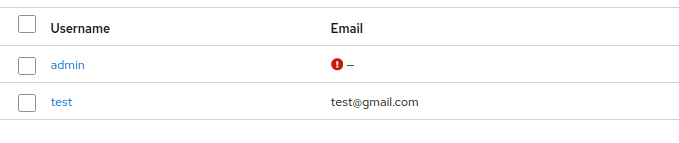
bin/kcadm.sh set-password --realm=master --username test --new-password password --server http://localhost:8080Then, verify that the user “test” is available in your Realm:
Adding an User with Keycloak legacy
The legacy distribution of Keycloak contains the command line add-user-keycloak.sh to add a new User. For example, here is how to add two users using Keycloak legacy distribution:
./add-user-keycloak.sh -r master -u admin -p password
./add-user-keycloak.sh -r oauth2-sample -u user1 -p password
Conclusion
This tutorial was a step-by-step guide to show you how to add a new User in Keycloak both in the Quarkus and Legacy distribution. By using the command line tools (kcadm.sh or add-user-keycloak.sh) you can easily automate the creation of new Users in Keycloak
Recommended Articles
Retrieve User Metadata and Custom Attributes in Latest Keycloak Using Quarkus - Tutorial
Learn how to retrieve user metadata and custom attributes from latest Keycloak using Quarkus. Includes creating a Realm, Admin user, and setting up basic configurations.
Create a Quickstart Java EE Application Secured with Keycloak Using kcadm CLI
Learn how to secure your Java EE application with Keycloak using its command line interface (kcadm). #JavaEE #Keycloak #WildFly #Security
Mastering Keycloak's Embedded H2 Database: Deleting an User
Learn how to access and manage Keycloak's embedded H2 database for common tasks like deleting a user. #Keycloak #H2Database #Java #CloudNative
Automatically Create an Admin User in Keycloak Using Environment Variables and Web Console
How to add an admin user in Keycloak 26.7: the Web Console, KC_BOOTSTRAP_ADMIN_USERNAME/PASSWORD, the kc.sh bootstrap-admin command for setup and password recovery, and Kubernetes Secret best practices.