Helm Chart vs Custom Operator: When Writing a Java Operator Pays Off
Sooner or later, every team that runs Java middleware on Kubernetes or OpenShift asks the same question: should we package our application as a Helm chart or write our own Operator? Most comparisons answer with a feature table. In this article we take a different route: we pick a real operational task, rotating the database password of a WildFly datasource, and implement it both ways. First with a Helm 4 chart, then with a custom operator written in Java with the Quarkus Operator SDK. The code is complete and was built against the versions listed below, and the WildFly behaviour described was verified on a WildFly 41.0.0.Final server.
| Component | Version used |
|---|---|
| Helm | 4.3.1 |
| Quarkus platform | 3.40.1.1 |
| Quarkus Operator SDK / Java Operator SDK | 7.8.0 / 5.5.0 |
| Fabric8 Kubernetes Client | 7.8.0 |
| WildFly / WildFly Core | 41.0.0.Final / 33.0.0.Final |

Render once vs. reconcile forever
The difference between the two tools is not the packaging format. It's when they act:
- Helm renders templates into manifests when you run
helm installorhelm upgrade, applies them and exits. After that, Helm is not running anywhere in the cluster: it doesn't know if a pod crashed, if someone edited a ConfigMap by hand or if an external system changed a Secret. - An Operator is a process that runs in the cluster, watches resources and executes a reconcile loop every time something relevant changes. It compares the desired state (a Custom Resource) with the actual state and acts to close the gap, including calling systems that are not Kubernetes objects.
So the real question is: does managing your application require logic after the deployment? If everything you need can be expressed as manifests that change only when your pipeline runs, a chart is enough, and that's true for most in-house applications. If your runbook contains steps a human performs in response to events, you are a candidate for an operator.
The use case: rotating a WildFly datasource password
A WildFly datasource reads its password from an Elytron credential store through a credential-reference. Your security team rotates the database password, the new value lands in a Kubernetes Secret (manually, or through Vault and External Secrets), and the running WildFly pods must start using it.
Before writing any Kubernetes code, let's check what WildFly actually needs. Here is the test, run on WildFly 41.0.0.Final against an H2 TCP server. First, the datasource:
/subsystem=elytron/credential-store=dbstore:add(location=dbstore.cs, relative-to=jboss.server.data.dir, create=true, credential-reference={clear-text=StorePass1})
/subsystem=elytron/credential-store=dbstore:add-alias(alias=dbpass, secret-value=OldPass1)
data-source add --name=RotDS --jndi-name=java:/jdbc/RotDS --driver-name=h2 \
  --connection-url=jdbc:h2:tcp://localhost:9092/rotdb --user-name=sa \
  --credential-reference={store=dbstore,alias=dbpass} --min-pool-size=2 --max-pool-size=5
Then we change the password on the database side and update the alias in the credential store:
/subsystem=elytron/credential-store=dbstore:set-secret(alias=dbpass, secret-value=NewPass2)
{
    "outcome" => "success",
    "response-headers" => {"warnings" => [{
        "warning" => "Reload dependent services which might already have cached the secret value",
        "level" => "WARNING",
        ...
    }]}
}
The warning is the key point. Even after flushing the pool, new connections still use the old cached value:
/subsystem=datasources/data-source=RotDS:flush-all-connection-in-pool
/subsystem=datasources/data-source=RotDS:test-connection-in-pool
{
    "outcome" => "failed",
    "failure-description" => "WFLYJCA0040: failed to invoke operation: java.lang.IllegalStateException: WFLYJCA0047: Connection is not valid
      Caused by: jakarta.resource.ResourceException: IJ031084: Unable to create connection
      Caused by: org.h2.jdbc.JdbcSQLInvalidAuthorizationSpecException: Wrong user name or password [28000-240]
The management console reports the same failure when you run Test Connection on the datasource, although the credential store already holds the new password:
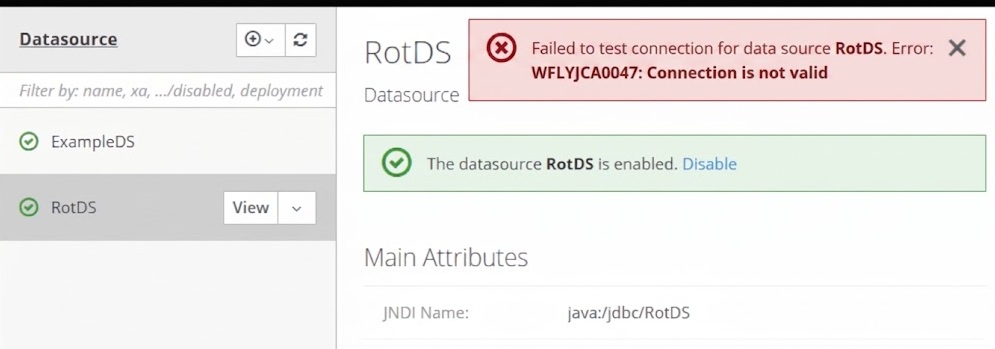
The credential-reference attribute of a datasource is flagged restart-required => all-services, and the old disable/enable trick is deprecated in WildFly 41 and leaves the server in reload-required anyway. What works is a server :reload: after it, test-connection-in-pool returns [true]. On my laptop the reload completed in 5.5 seconds, compared to about 24 seconds for a cold boot of the same configuration.
So the correct procedure for each server is: update the alias, reload, verify the connection. Let's see how the two approaches deal with it. If you hit WFLYJCA0047 in other circumstances, see Troubleshooting WFLYJCA0047: Connection is not valid.
Approach 1: a Helm chart
Start with the chart skeleton:
helm create wildfly-appHelm 4.3.1 generates the following files:
| File | Purpose |
|---|---|
Chart.yaml |
Chart metadata: apiVersion: v2, name, chart version, appVersion |
values.yaml |
Default values: image, replicas, service, ingress, httpRoute, probes, resources |
templates/deployment.yaml, service.yaml, serviceaccount.yaml |
The core workload |
templates/ingress.yaml, templates/httproute.yaml |
Exposure through Ingress or, new in the Helm 4 scaffold, the Gateway API (disabled by default) |
templates/hpa.yaml |
Optional HorizontalPodAutoscaler |
templates/_helpers.tpl, NOTES.txt, tests/test-connection.yaml |
Named templates, post-install notes, helm test hook |
For the basics of running WildFly from the official chart, see How to run WildFly with Helm Charts. Here we focus on the rotation.
The checksum annotation pattern
Helm has no way to "reload" a running server. The standard pattern is to put a hash of the Secret in the pod template, so that a changed Secret produces a changed pod template and the Deployment performs a rolling restart. Add the Secret to the chart, templates/db-secret.yaml:
apiVersion: v1
kind: Secret
metadata:
  name: {{ include "wildfly-app.fullname" . }}-db
type: Opaque
stringData:
  password: {{ .Values.db.password | quote }}
Then reference its checksum in templates/deployment.yaml:
  template:
    metadata:
      annotations:
        checksum/db-secret: {{ include (print $.Template.BasePath "/db-secret.yaml") . | sha256sum }}
        {{- with .Values.podAnnotations }}
        {{- toYaml . | nindent 8 }}
        {{- end }}
Rendering the chart twice with two different passwords proves the pod template changes:
$ helm template demo . | grep checksum/db-secret
        checksum/db-secret: 97ffff2a54d0bce8fe9e5a2b9f0f1ae3ad24122f1301a5a3ec36411f531ef7da
$ helm template demo . --set db.password=NewPass2 | grep checksum/db-secret
        checksum/db-secret: 44e897346e7e70434ff556446f5c59ca157b0b9982db93bf8020e901de4c9d43
This works, and for many teams it's the right answer. But look at its limits for our use case:
- It only acts on
helm upgrade. The rotation is driven by your pipeline, not by the change itself. If Vault or External Secrets updates the Secret, nothing happens. - The
lookupworkaround breaks with GitOps. When the Secret is not part of the chart, you can hash it with(lookup "v1" "Secret" .Release.Namespace "db-credentials").data | toJson | sha256sum. Howeverlookupreturns an empty result when the chart is rendered without cluster access, which is whathelm templatedoes and what Argo CD runs. The annotation then becomes the hash of the stringnull(74234e98afe7…b90b) forever, and the rotation never triggers a restart. - It replaces every pod. A cold boot instead of a reload, new pods scheduled, image pulled again if the node doesn't have it.
- It verifies nothing that your readiness probe doesn't check. If the probe doesn't test the datasource, pods with a wrong password become Ready and the rollout completes.
Approach 2: a custom operator in Java
Now the operator. The goal: a Custom Resource DatasourceCredential describes which Secret feeds which datasource on which pods. The operator watches the Secret and, when it changes, rotates the pods one at a time: set-secret, :reload, test-connection-in-pool, and stops at the first failure while the remaining pods keep serving traffic.
Project skeleton
Create the project with the Quarkus Maven plugin, which works on any OS with Maven and a JDK 17+, adding the Quarkus Operator SDK extension:
mvn io.quarkus.platform:quarkus-maven-plugin:3.40.1:create \
    -DprojectGroupId=com.mastertheboss \
    -DprojectArtifactId=wildfly-ds-operator \
    -Dextensions="io.quarkiverse.operatorsdk:quarkus-operator-sdk" \
    -DnoCode
The generated pom.xml imports quarkus-operator-sdk-bom from the Quarkus platform, which resolves Quarkus Operator SDK 7.8.0 and Java Operator SDK 5.5.0. Add three dependencies: the annotations module (for RBAC rules, see below), the WildFly management client and quarkus-helm, which we'll use to package the operator itself:
<dependency>
    <groupId>io.quarkiverse.operatorsdk</groupId>
    <artifactId>quarkus-operator-sdk-annotations</artifactId>
</dependency>
<dependency>
    <groupId>org.wildfly.core</groupId>
    <artifactId>wildfly-controller-client</artifactId>
    <version>33.0.0.Final</version>
</dependency>
<dependency>
    <groupId>io.quarkiverse.helm</groupId>
    <artifactId>quarkus-helm</artifactId>
    <version>1.4.3</version>
</dependency>
The project needs four classes:
| Class | Role |
|---|---|
DatasourceCredential |
The Custom Resource; the CRD is generated from it at build time |
DatasourceCredentialSpec / DatasourceCredentialStatus |
Desired state written by the user, observed state written by the operator |
DatasourceCredentialReconciler |
The reconcile loop and the event sources that trigger it |
WildFlyManagement |
Calls the WildFly management API of a single pod |
The Custom Resource
@Group("mastertheboss.com")
@Version("v1alpha1")
@ShortNames("dscred")
public class DatasourceCredential extends CustomResource<DatasourceCredentialSpec, DatasourceCredentialStatus>
        implements Namespaced {
}
The spec is a plain POJO (getters and setters omitted):
public class DatasourceCredentialSpec {

    // Secret holding the database password (key: password)
    private String secretName;
    // Labels of the WildFly pods using the datasource
    private Map<String, String> podSelector;
    // Secret holding the management user (keys: username, password)
    private String managementSecret;
    private String credentialStore;
    private String alias;
    private String datasource;
}
The status records which Secret version has been applied, and which pods have already been rotated, so that a retry resumes from where it stopped instead of reloading every pod again:
public class DatasourceCredentialStatus {

    // resourceVersion of the Secret applied to all pods
    private String observedSecretVersion;
    // Pods already rotated for the Secret version in progress
    private List<String> rotatedPods = new ArrayList<>();
    private String phase;
    private String message;
}
The Reconciler
By default, a JOSDK reconciler is triggered only by changes to its own Custom Resource. To react to the Secret, we register an InformerEventSource for Secrets, with a mapper that finds the DatasourceCredential referencing each Secret. The label selector keeps the informer from caching every Secret in the cluster:
@ControllerConfiguration
@RBACRule(apiGroups = "", resources = { "secrets", "pods" }, verbs = { "get", "list", "watch" })
public class DatasourceCredentialReconciler implements Reconciler<DatasourceCredential> {

    static final String ROTATE_LABEL = "mastertheboss.com/rotate=true";

    @Override
    public List<EventSource<?, DatasourceCredential>> prepareEventSources(
            EventSourceContext<DatasourceCredential> context) {
        // Watch only labelled Secrets and map each one to the DatasourceCredential that references it
        var config = InformerEventSourceConfiguration.from(Secret.class, DatasourceCredential.class)
                .withLabelSelector(ROTATE_LABEL)
                .withSecondaryToPrimaryMapper(secret -> context.getPrimaryCache()
                        .list(dc -> secret.getMetadata().getName().equals(dc.getSpec().getSecretName())
                                && secret.getMetadata().getNamespace().equals(dc.getMetadata().getNamespace()))
                        .map(ResourceID::fromResource)
                        .collect(Collectors.toSet()))
                .build();
        return List.of(new InformerEventSource<>(config, context));
    }

    @Override
    public UpdateControl<DatasourceCredential> reconcile(DatasourceCredential dc, Context<DatasourceCredential> ctx) {
        var spec = dc.getSpec();
        var ns = dc.getMetadata().getNamespace();
        var client = ctx.getClient();
        var status = dc.getStatus() != null ? dc.getStatus() : new DatasourceCredentialStatus();
        dc.setStatus(status);

        Secret dbSecret = client.secrets().inNamespace(ns).withName(spec.getSecretName()).get();
        Secret mgmtSecret = client.secrets().inNamespace(ns).withName(spec.getManagementSecret()).get();
        if (dbSecret == null || mgmtSecret == null) {
            return failed(dc, "Secret not found");
        }
        String version = dbSecret.getMetadata().getResourceVersion();
        if (version.equals(status.getObservedSecretVersion())) {
            return UpdateControl.noUpdate();
        }

        String newPassword = decode(dbSecret, "password");
        List<Pod> pods = client.pods().inNamespace(ns).withLabels(spec.getPodSelector()).list().getItems()
                .stream()
                .filter(p -> p.getStatus().getPodIP() != null)
                .sorted(Comparator.comparing(p -> p.getMetadata().getName()))
                .toList();

        // One pod at a time: stop at the first failure, the remaining pods keep serving
        for (Pod pod : pods) {
            String name = pod.getMetadata().getName();
            if (status.getRotatedPods().contains(name)) {
                continue;
            }
            var mgmt = new WildFlyManagement(pod.getStatus().getPodIP(),
                    decode(mgmtSecret, "username"), decode(mgmtSecret, "password"));
            try {
                mgmt.setSecret(spec.getCredentialStore(), spec.getAlias(), newPassword);
                mgmt.reloadAndWait(Duration.ofMinutes(2));
                mgmt.testConnection(spec.getDatasource());
            } catch (Exception e) {
                return failed(dc, name + ": " + e.getMessage());
            }
            status.getRotatedPods().add(name);
        }

        status.setObservedSecretVersion(version);
        status.getRotatedPods().clear();
        status.setPhase("Ready");
        status.setMessage("Rotated " + pods.size() + " pod(s)");
        return UpdateControl.patchStatus(dc);
    }

    private UpdateControl<DatasourceCredential> failed(DatasourceCredential dc, String message) {
        dc.getStatus().setPhase("Failed");
        dc.getStatus().setMessage(message);
        return UpdateControl.patchStatus(dc).rescheduleAfter(Duration.ofMinutes(1));
    }

    private static String decode(Secret secret, String key) {
        return new String(Base64.getDecoder().decode(secret.getData().get(key)), StandardCharsets.UTF_8);
    }
}
A few design choices worth highlighting:
- The Secret's
resourceVersionis the idempotency key. Reconciliations triggered by unrelated events (a status patch, an operator restart) end innoUpdate(). - On failure the operator patches the status and reschedules itself after one minute, rather than throwing: the reason is visible to anyone running
kubectl get dscred -o yaml, and the pods not yet rotated are left untouched. - Pods are processed sequentially inside a single reconciliation. JOSDK never runs two reconciliations of the same resource concurrently, so two rotations of the same datasource can't overlap.
Calling the WildFly management API
WildFly's HTTP management interface uses DIGEST authentication by default, which java.net.http.HttpClient doesn't support. The native ModelControllerClient from wildfly-controller-client handles it, and the Operations helper builds the same operations you run in jboss-cli.sh:
class WildFlyManagement {

    // constructor storing host, user and password omitted

    void setSecret(String store, String alias, String secret) throws IOException {
        ModelNode op = Operations.createOperation("set-secret",
                Operations.createAddress("subsystem", "elytron", "credential-store", store));
        op.get("alias").set(alias);
        op.get("secret-value").set(secret);
        execute(op);
    }

    // The datasource caches the secret: a reload is needed to pick up the new value
    void reloadAndWait(Duration timeout) throws IOException, InterruptedException {
        execute(Operations.createOperation("reload"));
        Instant deadline = Instant.now().plus(timeout);
        while (Instant.now().isBefore(deadline)) {
            Thread.sleep(1000);
            try {
                ModelNode result = execute(Operations.createReadAttributeOperation(new ModelNode().setEmptyList(),
                        "server-state"));
                if ("running".equals(Operations.readResult(result).asString())) {
                    return;
                }
            } catch (IOException e) {
                // management interface not available yet
            }
        }
        throw new IOException("Server " + host + " not running after " + timeout);
    }

    void testConnection(String datasource) throws IOException {
        execute(Operations.createOperation("test-connection-in-pool",
                Operations.createAddress("subsystem", "datasources", "data-source", datasource)));
    }

    private ModelNode execute(ModelNode op) throws IOException {
        try (ModelControllerClient client = ModelControllerClient.Factory.create("remote+http", host, 9990,
                callbacks -> {
                    for (var callback : callbacks) {
                        if (callback instanceof NameCallback nc) {
                            nc.setName(user);
                        } else if (callback instanceof PasswordCallback pc) {
                            pc.setPassword(password);
                        } else if (callback instanceof RealmCallback rc) {
                            rc.setText(rc.getDefaultText());
                        } else {
                            throw new UnsupportedCallbackException(callback);
                        }
                    }
                })) {
            ModelNode result = client.execute(op);
            if (!Operations.isSuccessfulOutcome(result)) {
                throw new IOException(Operations.getFailureDescription(result).asString());
            }
            return result;
        }
    }
}
A new client is opened for each operation on purpose: :reload drops the management connection, so reusing the same client while polling server-state would fail.
What the build generates
Run mvn package. Quarkus generates the CRD from the Java classes in target/kubernetes/datasourcecredentials.mastertheboss.com-v1.yml:
apiVersion: "apiextensions.k8s.io/v1"
kind: "CustomResourceDefinition"
metadata:
  name: "datasourcecredentials.mastertheboss.com"
spec:
  group: "mastertheboss.com"
  names:
    kind: "DatasourceCredential"
    plural: "datasourcecredentials"
    shortNames:
    - "dscred"
    singular: "datasourcecredential"
  scope: "Namespaced"
  versions:
  - name: "v1alpha1"
    schema:
      openAPIV3Schema:
        properties:
          spec:
            properties:
              alias:
                type: "string"
              credentialStore:
                type: "string"
              datasource:
                type: "string"
              managementSecret:
                type: "string"
              podSelector:
                additionalProperties:
                  type: "string"
                type: "object"
              secretName:
                type: "string"
            type: "object"
          status:
            ...
    served: true
    storage: true
    subresources:
      status: {}
Pay attention to RBAC. The generated ClusterRole covers only datasourcecredentials, its /status and /finalizers. Quarkus Operator SDK does not infer permissions for resources you read through the client, so without the @RBACRule annotation the API server rejects the operator's list and watch requests on Secrets and Pods with 403 Forbidden. With the annotation (it lives in quarkus-operator-sdk-annotations, which is not on the compile classpath by default), the role gets the extra rule:
  - apiGroups:
      - ""
    resources:
      - secrets
      - pods
    verbs:
      - get
      - list
      - watch
Since quarkus-helm is on the classpath, the build also produces a Helm chart for the operator in target/helm/kubernetes/wildfly-ds-operator. It contains the CRD in crds/, the ServiceAccount, the cluster roles and bindings, and the Deployment. helm lint passes, and values.yaml exposes the namespaces to watch:
app:
  envs:
    QUARKUS_OPERATOR_SDK_CONTROLLERS_DATASOURCECREDENTIALRECONCILER_NAMESPACES: JOSDK_ALL_NAMESPACES
Set it to your application namespace before installing: watching all namespaces is a cluster-wide permission on Secrets you probably don't want to grant.
This is the important takeaway of the whole comparison: Helm and operators are not alternatives. The common production layout uses Helm to install the operator and the static resources, and the operator to handle what happens after the installation.
Using the operator
Label the database Secret so that the informer sees it, and create the Custom Resource next to your WildFly Deployment:
apiVersion: v1
kind: Secret
metadata:
  name: orders-db-credentials
  labels:
    mastertheboss.com/rotate: "true"
type: Opaque
stringData:
  password: OldPass1
---
apiVersion: mastertheboss.com/v1alpha1
kind: DatasourceCredential
metadata:
  name: orders-db
spec:
  secretName: orders-db-credentials
  managementSecret: wildfly-mgmt
  podSelector:
    app: orders
  credentialStore: dbstore
  alias: dbpass
  datasource: OrdersDS
From now on, whoever updates orders-db-credentials (a person, a pipeline or External Secrets) triggers the rotation, and the progress is visible in the resource status:
kubectl patch secret orders-db-credentials -p '{"stringData":{"password":"NewPass2"}}'
kubectl get dscred orders-db -o jsonpath='{.status.phase}{" "}{.status.message}{"\n"}'
What the WildFly pods must provide
The operator relies on a few things in the WildFly image, and they deserve the same attention as the Java code:
- A management interface reachable on the pod IP (
-bmanagement 0.0.0.0). Don't expose it with a Service or Route: restrict it with a NetworkPolicy that allows port 9990 only from the operator pod. The hardening of the management interface is discussed in WildFly Admin Console: Fix 401 Errors & Secure Access. - A writable credential store populated at boot. The operator updates running pods only. Pods created later (scale-up, rescheduling) must read the current password from the Secret at startup, for example by mounting it as an environment variable and running
set-secretfrom a startup CLI script before the datasource is used. - A dedicated management user stored in the
wildfly-mgmtSecret, rather than the administrator account. - Awareness that
:reloadinterrupts in-flight requests on that pod. If that matters, drain the pod first with the serversuspendoperation.
Next step: publishing the operator on OperatorHub
Installing the operator with the generated Helm chart is fine for your own clusters. To share it with other teams, and to make it installable from the OpenShift web console, the natural destination is OperatorHub, where operators are distributed as OLM bundles and installed and upgraded by the Operator Lifecycle Manager. This is how the operator could look in the catalog:
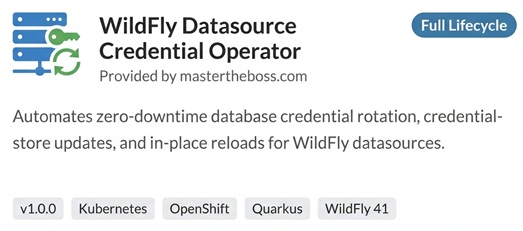
Quarkus Operator SDK already does most of the packaging work. Add the bundle generator to the project:
<dependency>
    <groupId>io.quarkiverse.operatorsdk</groupId>
    <artifactId>quarkus-operator-sdk-bundle-generator</artifactId>
</dependency>
The catalog entry is described by the ClusterServiceVersion (CSV), and you fill it from Java with the @CSVMetadata annotation on the reconciler:
@ControllerConfiguration
@CSVMetadata(displayName = "WildFly Datasource Credential Operator",
        description = "Rotates WildFly datasource passwords stored in Elytron credential stores",
        version = "1.0.0",
        provider = @CSVMetadata.Provider(name = "mastertheboss.com", url = "https://www.mastertheboss.com"),
        keywords = { "wildfly", "datasource", "credentials" },
        annotations = @CSVMetadata.Annotations(capabilities = "Full Lifecycle", categories = "Security"))
@RBACRule(apiGroups = "", resources = { "secrets", "pods" }, verbs = { "get", "list", "watch" })
public class DatasourceCredentialReconciler implements Reconciler<DatasourceCredential> {
With this in place, mvn package writes the bundle to target/bundle/wildfly-ds-operator:
| File | Content |
|---|---|
manifests/wildfly-ds-operator.clusterserviceversion.yaml |
The CSV: display name, description, provider, capabilities and categories annotations, the owned CRD, the cluster permissions (including the @RBACRule on Secrets and Pods) and the operator Deployment |
manifests/datasourcecredentials.mastertheboss.com-v1.crd.yml |
The CRD generated from the Java classes |
metadata/annotations.yaml |
Package name and channels (alpha by default) |
bundle.Dockerfile |
Builds the bundle image that OLM pulls |
Two things to fix before a real release. First, the CSV name follows the Maven version, so the build above produces wildfly-ds-operator.v1.0.0-snapshot: release from a non-SNAPSHOT version. Second, the capability level is declared by you in the CSV, so pick the one the operator actually supports. The remaining steps are building and pushing the operator and bundle images, validating the bundle with operator-sdk bundle validate, and opening a pull request against the community catalogs: k8s-operatorhub/community-operators for OperatorHub.io and redhat-openshift-ecosystem/community-operators-prod for the OpenShift console. We will cover this release process in a follow-up article.
The cost of writing your own operator
The operator above is less than 200 lines of Java, and it's software you now own:
- Permissions: the operator reads Secrets. A bug or a compromised image in the operator has a wider blast radius than a chart.
- API evolution: once a
v1alpha1CRD is in use, changing its schema means versioning it and, eventually, conversion webhooks. - Its own lifecycle: the operator must be built, tested (JOSDK ships testing support for running reconcilers against a real or mocked API server), upgraded and monitored, including when it's down and rotations queue up.
- Edge cases: pods restarting in the middle of a rotation, a Secret changed twice while pods are being reloaded, a cluster with dozens of replicas where a sequential rotation takes several minutes.
None of this applies to the chart. That's why the decision should be driven by the operational need, not by the appeal of the technology.
Choosing between the two
| If your situation is... | Choose |
|---|---|
| Configuration changes only through CI/CD or GitOps, and a rolling restart is an acceptable reaction | Helm chart |
| The application must react to changes made outside your pipeline (rotated Secrets, certificates, external systems) | Operator |
| The operation needs ordering, verification and a stop on failure (reload, test, then the next pod) | Operator |
| You manage resources that are not Kubernetes objects: DB schemas, Keycloak clients, Artemis queues | Operator |
| You are writing Helm hooks, Jobs with shell scripts or CronJobs that poll the cluster | Operator: you are already writing one, without the reconcile loop |
| You need the operator itself, CRDs and RBAC installed consistently | Helm chart, generated by quarkus-helm |
For the WildFly datasource rotation, the chart gives you a full restart on the next helm upgrade. The operator gives you an in-place reload, triggered by the change itself, verified on each pod and reported in the resource status. If that difference matters for your service, the operator is worth its maintenance cost. If it doesn't, stick to the chart.
Recommended Articles
Deploy WildFly Application on OpenShift Using Helm Charts - Simplified Kubernetes Management
Simplify your WildFly deployment with Helm Charts. Learn how to deploy a WildFly application on OpenShift using Helm. #WildFly #Kubernetes #HelmCharts
Run WildFly Applications on OpenShift Using Helm Charts and S2I Images
Learn how to deploy WildFly applications on OpenShift using the latest recommended approach with Helm Charts. Explore both options: Helm Charts for newer versions and legacy S2I images for older WildFly.
Deploy WildFly in Kubernetes with Helm Charts and Custom Settings - Step-by-Step Guide
Learn how to deploy WildFly in a Kubernetes environment using Helm Charts and customize settings for effective cloud deployment. #WildFly #Kubernetes #HelmCharts #CloudNative #Java
How to Deploy Docker Images with Root User in OpenShift Using Security Context Constraints
Learn how to deploy Docker images like tomcat:latest in OpenShift when they run as root user and how to relax security constraints.