How to build GraphQL applications with Quarkus
Quarkus 3.x simplifies building GraphQL APIs and clients with full Jakarta EE 10 support and seamless RESTEasy Reactive integration. This guide demonstrates how to build type-safe GraphQL APIs using SmallRye GraphQL, migrate legacy javax.* dependencies to jakarta.*, use Mutiny for reactive execution, and interact with services using both Typesafe and Dynamic GraphQL clients.
GraphQL is an open-source query and data manipulation language for APIs. This article shows how to create and deploy a sample application using a Quarkus 3.x runtime with updated Jakarta EE standards and reactive endpoints.
What is GraphQL?
GraphQL is a query language for reading and mutating data in APIs. As a back-end developer, GraphQL provides a type system where you can describe a schema for your data. This, in turn, gives front-end consumers of the API the power to explore and request the exact data they need. Traditionally, web developers use REST to request and add data by hitting endpoints and fixed data sets.
Even though this approach has some clear advantages, there are also potential drawbacks:
- REST Services can cause overfetching of data, by getting more information than you need. Besides, with every change that is made to the REST Client UI, there is a risk that there is more (or less) data required than before.
- REST Services do not offer type-safety out of the box. GraphQL uses a strongly typed system to define the capabilities of an API using the GraphQL Schema Definition Language (SDL) and/or a code-first approach.
If your product architecture requires attention to the above points, then GraphQL might be the perfect choice.
In this article, we discuss running GraphQL on top of WildFly application server: Getting started with GraphQL using Java applications . In this article, we will learn how to run a GraphQL API in a modern Quarkus 3 runtime and how to code a GraphQL Client to query for the data.
How to bootstrap GraphQL with Quarkus 3
In order to bootstrap our Quarkus application, we will need the following dependencies:
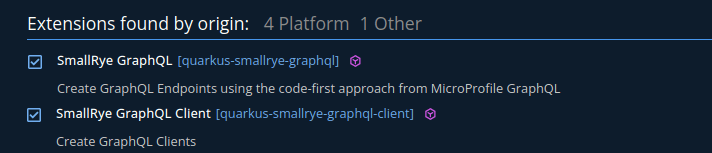
- The first one, quarkus-smallrye-graphql, is what you need to build server-side applications using the GraphQL API.
- The second one, quarkus-smallrye-graphql-client, lets you use the @GraphQLClientApi to access your services from Java clients.
In Quarkus 3.x, all Jakarta EE dependencies (such as CDI and REST components) use the jakarta.* namespace instead of the older javax.* namespace. Looking at the pom.xml, this is the list of core dependencies added:
<dependency>
    <groupId>io.quarkus</groupId>
    <artifactId>quarkus-smallrye-graphql</artifactId>
</dependency>
<dependency>
    <groupId>io.quarkus</groupId>
    <artifactId>quarkus-smallrye-graphql-client</artifactId>
</dependency>
<dependency>
    <groupId>io.quarkus</groupId>
    <artifactId>quarkus-resteasy-reactive</artifactId>
</dependency>
Coding the GraphQL application
Firstly, let’s import the project into your IDE. Then, we can start adding classes. Our domain model consists of the following Classes:
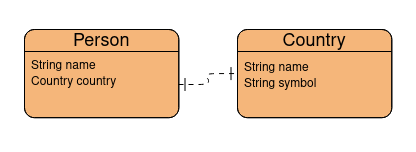
Here is the Country class:
public class Country {
    private String name;
    private String symbol;

    public Country() {
    }

    public Country(String name, String symbol) {
        this.name = name;
        this.symbol = symbol;
    }

    // Getters and Setters
    public String getName() { return name; }
    public void setName(String name) { this.name = name; }
    public String getSymbol() { return symbol; }
    public void setSymbol(String symbol) { this.symbol = symbol; }
}
This is the Person class:
public class Person {
    private String name;
    private Country country;

    public Person() {
    }

    public Person(String name, Country country) {
        this.name = name;
        this.country = country;
    }

    // Getters and Setters
    public String getName() { return name; }
    public void setName(String name) { this.name = name; }
    public Country getCountry() { return country; }
    public void setCountry(Country country) { this.country = country; }
}
Then, in order to perform the CRUD operations on our Model classes, we will add the PersonService Class using Jakarta CDI annotations (jakarta.enterprise.context.ApplicationScoped):
package com.mastertheboss.service;

import com.mastertheboss.model.Country;
import com.mastertheboss.model.Person;
import jakarta.enterprise.context.ApplicationScoped;

import java.util.ArrayList;
import java.util.List;
import java.util.stream.Collectors;

@ApplicationScoped
public class PersonService {

    private List<Person> persons = new ArrayList<>();
    private List<Country> countries = new ArrayList<>();

    public PersonService() {
        Country c1 = new Country("United States", "US");
        Country c2 = new Country("Italy", "IT");

        Person p1 = new Person("Benjamin Franklin", c1);
        Person p2 = new Person("Leonardo da Vinci", c2);

        persons.add(p1);
        persons.add(p2);

        countries.add(c1);
        countries.add(c2);
    }

    public List<Country> getAllCountries() {
        return countries;
    }

    public Country getCountry(int id) {
        return countries.get(id);
    }

    public List<Person> getAllPersons() {
        return persons;
    }

    public Person getPerson(int id) {
        return persons.get(id);
    }

    public List<Person> getPersonByCity(Country country) {
        return persons.stream()
                .filter(person -> person.getCountry().equals(country))
                .collect(Collectors.toList());
    }

    public void addPerson(Person person) {
        persons.add(person);
        countries.add(person.getCountry());
    }

    public Person deletePerson(int id) {
        return persons.remove(id);
    }

    public List<Person> getPersonByName(String name) {
        return persons.stream()
                .filter(person -> person.getName().equals(name))
                .collect(Collectors.toList());
    }
}
Next, we will add the GraphQLService class annotated with @GraphQLApi which is able to execute GraphQL Queries and Mutations. Notice the injection uses jakarta.inject.Inject:
package com.mastertheboss.graphql;

import com.mastertheboss.model.Country;
import com.mastertheboss.model.Person;
import com.mastertheboss.service.PersonService;
import jakarta.inject.Inject;
import org.eclipse.microprofile.graphql.Description;
import org.eclipse.microprofile.graphql.GraphQLApi;
import org.eclipse.microprofile.graphql.Mutation;
import org.eclipse.microprofile.graphql.Name;
import org.eclipse.microprofile.graphql.Query;
import org.eclipse.microprofile.graphql.Source;

import java.util.List;

@GraphQLApi
public class GraphQLService {

    @Inject
    PersonService personService;

    @Query("allCountries")
    @Description("Get all countries.")
    public List<Country> getAllCountries() {
        return personService.getAllCountries();
    }

    @Query
    @Description("Get a Country.")
    public Country getCountry(@Name("countryId") int id) {
        return personService.getCountry(id);
    }

    @Query("allPersons")
    @Description("Get all persons.")
    public List<Person> getAllPersons() {
        return personService.getAllPersons();
    }

    @Query
    @Description("Get a Person")
    public Person getPerson(@Name("personId") int id) {
        return personService.getPerson(id);
    }

    public List<Person> persons(@Source Country country) {
        return personService.getPersonByCity(country);
    }

    @Mutation
    public Person createPerson(@Name("person") Person person) {
        personService.addPerson(person);
        return person;
    }
}
In GraphQL, there are two main types of operations you can perform: Queries and Mutations.
You can use a Query to fetch data. On the other hand, you will use a Mutation to modify server-side data.
You can think of a Query as equivalent to GET calls in REST. In much the same way, a mutation represents state-changing methods in REST (such as POST, DELETE, PUT, etc.). SmallRye GraphQL in Quarkus 3 also supports non-blocking reactive responses returning SmallRye Mutiny types such as Uni<T> or Multi<T> directly from query methods.
Testing the application with the UI
At first, we will test the application using the built-in GraphQL UI (GraphQL-UI) that ships with the quarkus-smallrye-graphql extension. The UI is available in dev mode at the following URL: http://localhost:8080/q/graphql-ui/
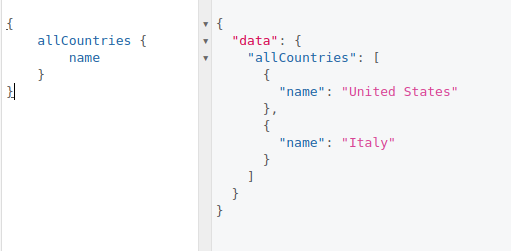
Within the UI, we will test the Query allCountries including the name attribute in the response. Enter the following query in GraphiQL and press the play button:
{
    allCountries {
        name
    }
}
Here is your Query in action:
Besides, you can also test the following Queries which are available in this project:
{
    allPersons {
        name
    }
}

query getPerson {
    person(personId: 0) {
        name
    }
}

query getCountry {
    country(countryId: 0) {
        name
        symbol
        persons {
            name
        }
    }
}
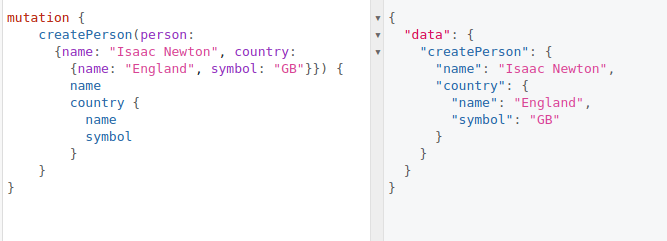
Finally, in the UI you can also test a Mutation. For example, let’s add a new Person which, in turn, also includes a new Country object:
mutation {
    createPerson(person: {name: "Isaac Newton", country: {name: "England", symbol: "GB"}}) {
        name
        country {
          name
          symbol
        }
    }
}
Here is the result from the UI:
Testing the application with Java clients
The built-in UI is an awesome shortcut for rapid testing of your GraphQL operations. On the other hand, there is a variety of clients to test GraphQL programmatically. Here we will show how to use the SmallRye MicroProfile Client API for GraphQL.
To get started with this API, we will use a typesafe Java client interface that wraps the server methods with an interface contract. Add the @GraphQLClientApi annotation to your interface with a reference to the GraphQLEndpoint:
package com.mastertheboss.client;

import com.mastertheboss.model.Country;
import com.mastertheboss.model.Person;
import io.smallrye.graphql.client.typesafe.api.GraphQLClientApi;
import org.eclipse.microprofile.graphql.Name;

import java.util.List;

@GraphQLClientApi(endpoint = "http://localhost:8080/graphql")
public interface PersonClientApi {

    public List<Country> getAllCountries();
    public List<Person> getAllPersons();
    public Country getCountry(@Name("countryId") int id);
    public Person getPerson(@Name("personId") int id);
}
Having your PersonClientApi interface available, you can inject it directly using jakarta.inject.Inject to invoke server methods. In Quarkus 3, RESTEasy Reactive is the standard REST engine. When calling synchronous client operations from reactive REST endpoints, use the @Blocking annotation (from io.smallrye.common.annotation.Blocking):
package com.mastertheboss.resource;

import com.mastertheboss.client.PersonClientApi;
import com.mastertheboss.model.Country;
import com.mastertheboss.model.Person;
import io.smallrye.common.annotation.Blocking;
import jakarta.inject.Inject;
import jakarta.ws.rs.GET;
import jakarta.ws.rs.Path;
import jakarta.ws.rs.PathParam;

import java.util.List;

@Path("/client")
public class ClientResource {

    @Inject
    PersonClientApi typesafeClient;

    @GET
    @Path("/persons")
    @Blocking
    public List<Person> getAllPersons() {
        return typesafeClient.getAllPersons();
    }

    @GET
    @Path("/person/{id}")
    @Blocking
    public Person getPerson(@PathParam("id") int id) {
        return typesafeClient.getPerson(id);
    }

    @GET
    @Path("/country/{id}")
    @Blocking
    public Country getCountry(@PathParam("id") int id) {
        return typesafeClient.getCountry(id);
    }

    @GET
    @Path("/countries")
    @Blocking
    public List<Country> getAllCountries() {
        return typesafeClient.getAllCountries();
    }
}
For example, let’s fetch one Person from the list as follows:
curl -s http://localhost:8080/client/person/0 | jq
{
  "country": {
    "name": "United States",
    "symbol": "US"
  },
  "name": "Benjamin Franklin"
}
Finally, we will show how to use a Dynamic Client which lets you build queries dynamically at runtime. In this example, we fetch the Person name from the allPersons Query:
package com.mastertheboss.resource;

import com.mastertheboss.model.Person;
import io.smallrye.common.annotation.Blocking;
import io.smallrye.graphql.client.GraphQLClient;
import io.smallrye.graphql.client.Response;
import io.smallrye.graphql.client.dynamic.api.DynamicGraphQLClient;
import jakarta.inject.Inject;
import jakarta.ws.rs.GET;
import jakarta.ws.rs.Path;

import java.util.List;

import static io.smallrye.graphql.client.core.Document.document;
import static io.smallrye.graphql.client.core.Field.field;
import static io.smallrye.graphql.client.core.Operation.operation;

@Path("/client-dynamic")
public class DynamicClientResource {

    @Inject
    @GraphQLClient("query-dynamic")
    DynamicGraphQLClient dynamicClient;

    @GET
    @Path("/persons")
    @Blocking
    public List<Person> getAllPersonsUsingDynamicClient() throws Exception {
        var document = document(
            operation(field("allPersons",
                field("name"))));

        Response response = dynamicClient.executeSync(document);
        List<Person> persons = response.getList(Person.class, "allPersons");
        return persons;
    }
}
Please notice that a dynamic query requires configuration for the remote endpoint URL. We can either specify it directly or configure it in application.properties using the modern configuration prefix:
quarkus.smallrye-graphql-client.query-dynamic.url=http://localhost:8080/graphqlTesting the dynamic query endpoint:
curl -s http://localhost:8080/client-dynamic/persons | jq
[
  {
    "name": "Benjamin Franklin"
  },
  {
    "name": "Leonardo da Vinci"
  }
]
Frequently Asked Questions (FAQs)
Frequently Asked Questions (FAQs)
Q1: What are the primary differences when upgrading GraphQL applications to Quarkus 3.x?
The main change is migrating package imports from Java EE (javax.enterprise.context.*, javax.inject.*, javax.ws.rs.*) to Jakarta EE 10 (jakarta.enterprise.context.*, jakarta.inject.*, jakarta.ws.rs.*). Additionally, Quarkus 3 relies on RESTEasy Reactive by default, requiring @Blocking annotations when performing blocking synchronous client calls on reactive threads.
Q2: Can I return Mutiny reactive types (Uni/Multi) from Quarkus GraphQL resolvers?
Yes! SmallRye GraphQL in Quarkus natively supports SmallRye Mutiny types. You can return Uni<T> for single items or Multi<T> for collections directly from your @Query or @Mutation methods to execute non-blocking operations asynchronously.
Q3: When should I use Typesafe GraphQL Client versus Dynamic GraphQL Client?
The Typesafe Client (using @GraphQLClientApi) is ideal when you have shared domain models and want clean, type-safe Java interfaces. The Dynamic Client is useful when fields or query structures are determined dynamically at runtime or when you prefer building documents using fluent Java builders without strict compile-time interface bindings.
Conclusion
This article was a walkthrough of the design and configuration of a MicroProfile GraphQL application using Quarkus 3.x as a Runtime. You can find the source code for this project here: https://github.com/fmarchioni/mastertheboss/tree/master/quarkus/graphql-demo
Recommended Articles
A Comprehensive Comparison of WildFly Application Server and Quarkus Framework in Enterprise Java
Explore the features and use cases of WildFly and Quarkus for robust Java applications. #WildFly #Quarkus #EnterpriseJava
Create Standalone Quarkus Applications and Powerful Scripts Using JBang & Quarkus Command Mode
Learn how to develop standalone Quarkus applications with JBang and powerful scripts using Quarkus Command Mode. #Quarkus #Java #Microservices #CloudNative
Enhance Your Quarkus APIs with Minimal Effort Using Swagger UI
Discover how to integrate and customize Swagger UI in a Quarkus application for seamless API documentation. #Quarkus #SwaggerUI #APIDocumentation
Optimizing Your Quarkus Application with Custom Undertow Server Settings
Learn how to customize your Quarkus application's embedded Undertow server settings. #Quarkus #Java #Middleware #CloudNative