Quarkus CRUD Example with Panache Data
Learn how to build high-performance RESTful CRUD APIs in Quarkus 3.x using Hibernate ORM with Panache, RESTEasy Reactive, and Jakarta EE standards (`jakarta.*`). This guide demonstrates both manual endpoint mapping with injected Panache repositories and zero-boilerplate automatic API generation using REST Data Panache.
In this tutorial we will learn how to create a REST CRUD application in Quarkus 3.x, starting from a Hibernate Panache Entity. We will show two different approaches: in the first one we will create a REST Resource to map the CRUD methods using RESTEasy Reactive and Jakarta EE (`jakarta.*`) annotations. Then, we will show how to use REST Data Panache to generate automatically a REST Endpoint for an Entity with zero boilerplate.
Firstly, if you are new to Panache, we recommend checking this tutorial for some background on Hibernate Panache: Managing Data Persistence with Quarkus and Hibernate Panache
Setting up the Quarkus project
The first step is obviously to create a new Project with your favourite tool. If you are using the Quarkus CLI with Quarkus 3.x, then you can initialize a project “crud-demo” as follows:
quarkus create app crud-demoThen, enter the project crud-demo and add the following extensions:
quarkus ext add hibernate-orm-panache jdbc-postgresql resteasy-reactive-jacksonNote that in Quarkus 3.x, RESTEasy Reactive is the default REST engine, delivering optimal performance on top of Mutiny and Vert.x while maintaining compatibility with imperative Jakarta REST annotations.
Coding the Basic Crud Application
We will be using the Panache Repository Pattern for our application. In Quarkus 3.x, all standard persistence annotations have migrated from Java EE (javax.persistence.*) to Jakarta EE (jakarta.persistence.*). Therefore, our Model will be a plain and simple Entity with just the field definitions in it:
package com.mastertheboss.demo;

import jakarta.persistence.Column;
import jakarta.persistence.Entity;
import jakarta.persistence.GeneratedValue;
import jakarta.persistence.Id;

@Entity
public class Ticket  {

    @Id
    @GeneratedValue
    public Long id;

    @Column(length = 20)
    public String name;

    @Column(length = 3)
    public String seat;

}
Our Repository Class will implement the PanacheRepository interface, annotated with CDI's jakarta.enterprise.context.ApplicationScoped:
package com.mastertheboss.demo;

import io.quarkus.hibernate.orm.panache.PanacheRepository;
import jakarta.enterprise.context.ApplicationScoped;

@ApplicationScoped
public class TicketRepository implements PanacheRepository<Ticket> {
}
Finally, the TicketResource is the REST Endpoint that wraps the standard GET, POST, PUT and DELETE methods with the corresponding TicketRepository methods using RESTEasy Reactive and Jakarta EE annotations (jakarta.ws.rs.* and jakarta.transaction.Transactional):
package com.mastertheboss.demo;

import io.quarkus.panache.common.Sort;
import jakarta.enterprise.context.ApplicationScoped;
import jakarta.inject.Inject;
import jakarta.transaction.Transactional;
import jakarta.ws.rs.*;
import jakarta.ws.rs.core.Response;
import jakarta.ws.rs.core.Response.Status;
import java.util.List;

@Path("crud/ticket")
@ApplicationScoped
@Produces("application/json")
@Consumes("application/json")
public class TicketResource {

    @Inject
    TicketRepository repository;

    @GET
    public List<Ticket> get() {
        return repository.listAll(Sort.by("name"));
    }

    @GET
    @Path("{id}")
    public Response getTicketById(@PathParam("id") Long id) {
        return repository
                .findByIdOptional(id)
                .map(d -> Response.ok(d).build())
                .orElse(Response.status(204).build());
    }

    @POST
    @Transactional
    public Response create(Ticket ticket) {
        if (ticket.id != null) {
            throw new WebApplicationException("Id was invalidly set on request.", 422);
        }

        repository.persist(ticket);
        return Response.ok(ticket).status(201).build();
    }

    @PUT
    @Path("{id}")
    @Transactional
    public Response update(@PathParam("id") Long id, Ticket ticket) {

        return repository
                .findByIdOptional(id)
                .map(
                        t -> {
                            t.name = ticket.name;
                            t.seat = ticket.seat;
                            return Response.status(204).build();
                        })
                .orElse(Response.status(Status.NOT_FOUND).build());
    }

    @DELETE
    @Path("{id}")
    @Transactional
    public Response delete(@PathParam("id") Long id) {
        repository.delete("id", id);
        return Response.status(204).build();
    }

}
Testing the CRUD Endpoint
To test our TicketResource you can use any tool such as curl or Postman. Since our application also includes an import.sql file to have some initial Tickets, we can test the HTTP GET method as follows:

Then, checkout the JSON Response:
[
    {
        "name": "Chorus Line",
        "seat": "5B"
    },
    {
        "name": "Mamma mia",
        "seat": "21A"
    },
    {
        "name": "Phantom of the Opera",
        "seat": "11A"
    }
]
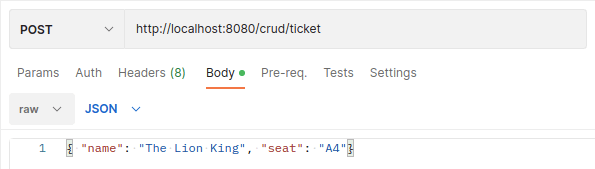
Then, try to insert some new data with the HTTP POST method:
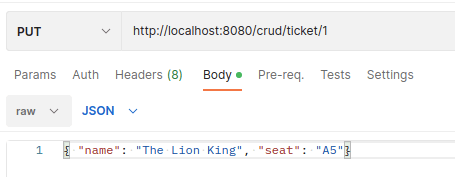
Then, by including the Ticket id in the Path, we can update an existing Ticket via the HTTP PUT Method:
Finally, the HTTP DELETE method will delete a Ticket by including the id in the Path:

Generating Rest Endpoints with Panache
REST Data with Panache automatically creates REST resources based on the interfaces available in your application. To do that, you just need to provide a Resource Interface for each Entity and Repository Class of your domain.
Firstly, let’s add the quarkus-hibernate-orm-rest-data-panache extension to the initial project:
quarkus ext add hibernate-orm-rest-data-panache smallrye-openapiWe also have added smallrye-openapi to view all REST Endpoints available when we enable Panache REST Data in Quarkus 3.x.
Next, just add an Interface which extends PanacheRepositoryResource:
package com.mastertheboss.demo;

import io.quarkus.hibernate.orm.rest.data.panache.PanacheRepositoryResource;

public interface TicketResourcePanache extends PanacheRepositoryResource<TicketRepository, Ticket, Long> {
}
The above interface will automatically create a REST Endpoint which maps the TicketRepository methods without requiring manual endpoint implementations.
If you head to the Swagger UI (http://localhost:8080/q/swagger-ui/) you will see that your application now includes two REST Endpoints:
- The /crud/ticket Endpoint which maps the classic TicketResource Endpoint
- The /ticket-resource-panache which maps the Endpoint automatically generated by Panache REST:
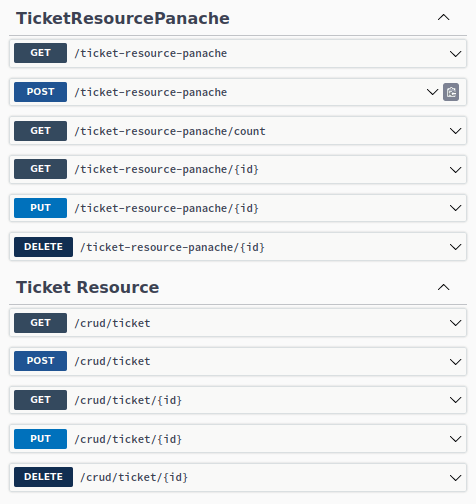
You can test the above methods with the Postman script available in the tutorial’s source code. (See bottom of the article).
Frequently Asked Questions (FAQs)
What are the primary changes in Quarkus 3.x for Panache applications?
Quarkus 3.x transitions completely from Java EE namespaces (javax.*) to Jakarta EE 10 (jakarta.*). You need to update imports for persistence (jakarta.persistence.*), CDI (jakarta.enterprise.context.*), injection (jakarta.inject.*), transactions (jakarta.transaction.*), and REST annotations (jakarta.ws.rs.*).
How does RESTEasy Reactive work with Hibernate Panache in Quarkus 3.x?
RESTEasy Reactive is the standard REST stack in Quarkus 3.x. When returning Panache entity instances or generic collections directly from a resource method, RESTEasy Reactive handles serialization non-blockingly while executing blocking database calls on worker threads transparently unless Mutiny-based Hibernate Reactive is configured.
When should I use REST Data Panache vs standard REST Controllers?
REST Data Panache is ideal for rapidly exposing auto-generated CRUD APIs directly mapped to repository operations with minimal configuration. However, if your application requires custom query logic, complex domain validations, custom security rules, or tailored HTTP payload transformations, implementing custom RESTEasy Reactive endpoints is recommended.
Conclusion
This article was a walk through the creation of REST CRUD Endpoints to map a Panache Repository of Data in Quarkus 3.x. In the first part of the article we have discussed how to create a standard REST CRUD Endpoint by injecting the Panache Repository using Jakarta EE annotations and RESTEasy Reactive. In the second part of the article we have discussed how to generate automatically the REST Endpoint by adding a PanacheRepositoryResource which maps your Repository.
Source code: https://github.com/fmarchioni/mastertheboss/tree/master/quarkus/panache-rest-demo
Recommended Articles
Simplify Data Persistence with Quarkus and Hibernate ORM Panache
Learn how to streamline data persistence in Quarkus projects using Hibernate ORM Panache for Java developers.
Build a REST Application with MongoDB and Quarkus: A Step-by-Step Guide
Learn how to create a REST application with MongoDB NoSQL Database and Quarkus. Get started with MongoDB, explore the MongoDB Java Client and Hibernate Panache approaches, and build a sample application.
Quarkus REST Client API Tutorial: MicroProfile REST Client Implementation
Learn how to develop Quarkus REST Client using MicroProfile REST Client with a basic example and configuration.
Query Quarkus REST Service with Ajax and jQuery
Learn how to create an Ajax front-end to a Quarkus REST application using jQuery and query a sample REST service running on Quarkus 0.16.1