How to manage Transactions in Quarkus
This article launches you on a tour of Transaction Management in Quarkus applications by focusing on the standard declarative approach and the new programmatic transaction API. The examples target current Quarkus 3 LTS and are fully compatible with Java 21+.
Quarkus narayana extension
Quarkus, just like other Enterprise applications, uses a Transaction Manager to coordinate and expose transactions to your applications. At its core, Quarkus uses Narayana Transaction Manager, which should be familiar to you if you have experience with WildFly or JBoss Enterprise Application Platform.
Narayana is a transactions toolkit which provides support for a broad range of transaction protocol such as JTA. Narayana Transaction Manager is automatically added to your dependencies if you include Hibernate ORM in your application. As a proof of concept, check the dependency tree of an Hibernate ORM application:
mvn dependency:tree
. . . . .
[INFO] +- io.quarkus:quarkus-hibernate-orm:jar:2.8.0.Final:compile
[INFO] |  |  +- org.jboss.narayana.jta:narayana-jta:jar:5.12.4.Final:compile
[INFO] |  |  |  +- org.jboss:jboss-transaction-spi:jar:7.6.0.Final:compile
[INFO] |  |  |  \- org.jboss.spec.javax.resource:jboss-connector-api_1.7_spec:jar:1.0.0.Final:compile
[INFO] |  |  +- org.jboss.narayana.jts:narayana-jts-integration:jar:5.12.4.Final:compile
Note: the artifact versions above reflect the Quarkus release used when this article was originally written. On current Quarkus 3.33 LTS, running the same command will show newer Narayana/Quarkus coordinates pulled in by your Quarkus BOM — the exact numbers depend on the platform version you use, so always trust your own mvn dependency:tree output rather than the versions shown here.
If you don’t include Hibernate as a dependency, you will have to add manually the Narayana extension to your application:
<dependency>
    <groupId>io.quarkus</groupId>
    <artifactId>quarkus-narayana-jta</artifactId>
</dependency>
A key setting of every Transactional Application is the Transaction Timeout. The default value of it is 60 seconds. However, you can change it in your configuration through the property quarkus.transaction-manager.default-transaction-timeout :
quarkus.transaction-manager.default-transaction-timeout=120In the following example, we will show how to set the Transaction Timeout in a more granular way, on single application methods.
Building a sample Transactional Application
To demonstrate how you can manage Transactions with Quarkus we will build a simple REST application. Firstly, we will add the Model which we will persist on the Database:
@NamedQuery(name = "Ticket.findAll", query = "SELECT t FROM Ticket t")
@Entity
public class Ticket  {

	@Id
	@GeneratedValue(strategy = GenerationType.IDENTITY)
	private Long id;

	@Column
	public String name;

	@Column
	public String seat;

       // getter/setters omitted for brevity

}
Next, let’s code the TicketService Class which persists and fetches items from the Database:
@RequestScoped
public class TicketService {

	@Inject
	EntityManager em;

	@Transactional
	@TransactionConfiguration(timeout = 1000)
	public void buyTicket(Ticket ticket) {
		em.persist(ticket);
		System.out.println("Ticket created");
	}


	public Ticket buyTicketProgrammaticTransaction(Ticket ticket) {
		QuarkusTransaction.begin();
		em.persist(ticket);

		if (!ticket.getName().equals("scam")) {
			QuarkusTransaction.commit();
			System.out.println("Commit!");
			return ticket;
		}
		else {
			QuarkusTransaction.rollback();
			System.out.println("Rollback!");
			return null;
		}

	}
	public List<Ticket> listTickets() {
		return em.createNamedQuery("Ticket.findAll", Ticket.class)
				.getResultList();
	}
}
As you can see, the above class shows two approaches for managing Transactions:
Managing Transactions Declaratively
This is the standard way to handle Transactions in CDI applications. The @Transactional annotation provides the application the ability to declaratively control transaction boundaries on CDI Beans. You can apply it both at class and method level. Method level annotations override those at the class level. To learn more about CDI and Transactions check this article: Using Transactions in CDI Beans
Next, please note we have included the @io.quarkus.narayana.jta.runtime.TransactionConfiguration annotation to specify the Transaction Timeout for the method buyTicket.
Finally, to specify how to Transaction Manager manages a new Transaction you can specify an attribute in the @Transactional annotation. The default value is REQUIRED which starts a transaction if none was active. It uses the existing one otherwise.
@Transactional(SUPPORTS)Managing Transactions Programmatically
The method buyTicketProgrammaticTransaction shows how to use the new io.quarkus.narayana.jta.QuarkusTransaction API to handle transactions programmatically.
Please note, this feature requires Quarkus 2.8.0 or newer.
The io.quarkus.narayana.jta.QuarkusTransaction can use a set of static methods to demarcate the boundaries of transactions:
- QuarkusTransaction.begin(): demarcates the beginning of a JTA Transaction.
- QuarkusTransaction.commit(): commits a Transaction
- QuarkusTransaction.rollback(): marks the Transaction for Rollback
In our method buyTicketProgrammaticTransaction we are using the content of a field name to determine if the Transaction should commit or rollback.
Exposing the Transaction Service
Next, to complete our example, we will add a REST Endpoint which maps the two methods to buy a Ticket and one to fetch the existing Tickets:
@Path("/tickets")
public class TicketResource {
	@Inject
	TicketService service;

	@POST
	@Path("/buy1")
	public Response buyTicket1(Ticket ticket) {
		service.buyTicket(ticket);
		return Response.ok(ticket).status(201).build();
	}

	@POST
	@Path("/buy2")
	public Response buyTicket2(Ticket ticket) {
		ticket = service.buyTicketProgrammaticTransaction(ticket);
		System.out.println(ticket);
		if (ticket == null) {
			 throw new WebApplicationException("Ticket invalid", 500);
		}
		 return Response.ok(ticket).status(201).build();
	}

	@GET
	public List<Ticket> ListTickets() {
		return service.listTickets();
	}
}
Finally, with the application up and running, you can start testing it:
curl -X POST http://localhost:8080/tickets/buy1 -H 'Content-Type: application/json' -d '{"name":"john","seat":"abc"}'

curl -X POST http://localhost:8080/tickets/buy2 -H 'Content-Type: application/json' -d '{"name":"frank","seat":"def"}'

curl -X POST http://localhost:8080/tickets/buy2 -H 'Content-Type: application/json' -d '{"name":"scam","seat":"def"}'
As you can see from the Console, the last POST will cause the TransactionManager to rollback the Transaction:
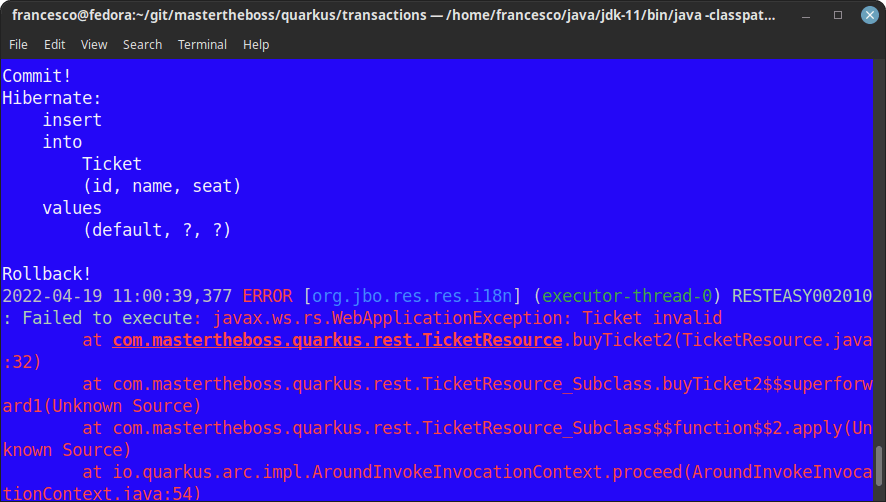
Running transactional endpoints on Virtual Threads
Both buyTicket and buyTicketProgrammaticTransaction perform blocking I/O: they call Hibernate ORM, which in turn talks to the JDBC driver. On the default I/O-thread execution model, blocking calls like these tie up one of the limited event-loop threads. Since Java 21, Quarkus lets you run this kind of code on a virtual thread instead, which is cheap to block and scales far better under load:
@POST
@Path("/buy1")
@RunOnVirtualThread
public Response buyTicket1(Ticket ticket) {
	service.buyTicket(ticket);
	return Response.ok(ticket).status(201).build();
}
Annotating the endpoint with @RunOnVirtualThread (io.smallrye.common.annotation.RunOnVirtualThread) moves its execution to a virtual thread, so the blocking Hibernate ORM call no longer occupies an I/O thread. Prefer this over rewriting the method with reactive/Mutiny APIs when the logic is inherently blocking, as is the case for JTA-managed transactions.
Handling Transaction Exceptions
You might have noticed that our TicketService Class does not use any try/catch semantic to handle the Transaction outcome (commit/rollback). As a matter of fact, when using the io.quarkus.narayana.jta.QuarkusTransaction API, it is up to you to throw or handle Exceptions in response to Transaction outcomes if your application needs it.
Also, keep in mind that all transactions are bound to the CDI Context. Therefore, all active transactions will be automatically be rolled back when the CDI Context is destroyed. For example with @RequestScoped Beans when the Request is over.
Within the Product documentation, you can check how to use Lambda Scoped Transactions to handle exceptions and transaction semantics using Lambda Expressions and io.quarkus.narayana.jta.QuarkusTransaction API,.
Finally, If you prefer the legacy approach, you can still inject the UserTransaction object in your Quarkus applications:
@Inject UserTransaction transaction;
public Ticket buyTicketLegacyTransaction(Ticket ticket) throws Exception {
    try {
        transaction.begin();
        em.persist(ticket);
        transaction.commit();
    }
    catch(Exception e) {
        // do something on Tx failure
        transaction.rollback();
    }
	return ticket;
As you can see, when using the legacy UserTransaction object you have to handle or throw any Exception thrown by the UserTransaction API.
Common errors when handling Transactions in Quarkus
- Calling QuarkusTransaction.begin() inside an already active transaction: if the calling method is itself running within a container-managed transaction (e.g. it was invoked from a @Transactional method), starting a new one programmatically throws an exception. Keep declarative and programmatic transaction demarcation in separate call paths.
- Forgetting @Transactional on a method that calls em.persist()/em.merge(): without an active transaction, Hibernate ORM throws a TransactionRequiredException as soon as it tries to flush changes to the Database.
- Relying on the default 60s transaction timeout for long-running batch operations: a slow report or bulk import can silently roll back once the timeout elapses. Use @TransactionConfiguration(timeout = ...) or the quarkus.transaction-manager.default-transaction-timeout property to size the timeout to the actual workload.
- Mixing the legacy UserTransaction API with @Transactional on the same call path: this leads to confusing nested-transaction errors. Pick one style — declarative or programmatic — per call path.
FAQ
Does QuarkusTransaction replace UserTransaction?
Not entirely — UserTransaction still works and is injectable, but QuarkusTransaction is the recommended, more concise API for programmatic transaction control in Quarkus applications.
What happens if I don’t call commit() or rollback() explicitly with QuarkusTransaction?
If the method returns normally without an explicit commit, the transaction is left open, which will eventually surface as a leak or a timeout. Always make sure every code path calls either commit() or rollback().
Can I use @RunOnVirtualThread together with @Transactional?
Yes — the two are complementary: @Transactional demarcates the JTA transaction boundary, while @RunOnVirtualThread only changes which kind of thread executes the blocking code.
Source code
The source code for the example application is available here: https://github.com/fmarchioni/mastertheboss/tree/master/quarkus/transactions
Recommended Articles
Quarkus REST Client API Tutorial: MicroProfile REST Client Implementation
Learn how to develop Quarkus REST Client using MicroProfile REST Client with a basic example and configuration.
Configure Default Transaction Timeout in Quarkus - A Comprehensive Guide
Learn how to configure and manage default transaction timeouts in Quarkus applications. #Quarkus #Java #Middleware
Learn Messaging with Quarkus: Send and Receive JMS Messages with Artemis
Get started with Quarkus messaging using the JMS API, leveraging transactions and reactive messaging. Learn how to send and receive messages in JSON format with ArtemisMQ.
Writing Tests with Quarkus Applications: Unit and RESTAssured Testing
Learn how to write tests for Quarkus applications using JUnit and RESTAssured. Explore the @QuarkusTest annotation and Quarkus's integration with REST-Assured.