What is Undertow Web Server ?
This articles discusses the nitty-gritty details about JBoss Undertow, with some basic examples and links to the official project.
Meet JBoss Undertow
Undertow is a web server which is able to perform both blocking and non-blocking tasks. Some of its highlights are:
- You can used it embedded or inside WildFly application server
- Features High Performance
- Supports Servlet 4.0 and Web Sockets API
- Supports TLS 1.3
- You can use it as Reverse Proxy
Behind the hoods, here are the core Web server components:
- XNIO Workers: The XNIO project provides a thin abstraction layer over Java NIO libraries
- Connectors: which are bound to an XNIO worker and provide the connector part of the HttpServerExchange API.
- Handlers: which extend io.undertow.server.HttpHandler. You can chain them together to form a complete server as you can see from the following picture:
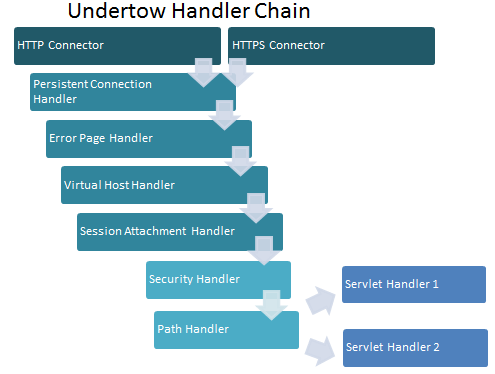
Using Undertow embedded
Firstly, we will learn how to start Undertow in embedded mode. The simplest way to do that is to leverage the Builder API and use the io.undertow.Undertow class. Here is a minimal Hello World class:
public class HelloWorldServer {

    public static void main(final String[] args) {
        Undertow server = Undertow.builder()
                .addHttpListener(8080, "localhost")
                .setHandler(new HttpHandler() {
                    @Override
                    public void handleRequest(final HttpServerExchange exchange) throws Exception {
                        exchange.getResponseHeaders().put(Headers.CONTENT_TYPE, "text/plain");
                        exchange.getResponseSender().send("Hello World!");
                    }
                }).build();
        server.start();
    }
}
In this example, the server listen on localhost and port 8080 until the server.stop() method is called. The HttpHandler will take care of incoming requests by setting the Response Header and returning the “Hello World!” response.
Using Undertow in WildFly
Here is the default undertow subsystem, as you can see it from WildFly / JBoss EAP configuration:
<subsystem xmlns="urn:jboss:domain:undertow:12.0" default-server="default-server" default-virtual-host="default-host" default-servlet-container="default" default-security-domain="other" statistics-enabled="${wildfly.undertow.statistics-enabled:${wildfly.statistics-enabled:false}}">
    <buffer-cache name="default"/>
    <server name="default-server">
        <http-listener name="default" socket-binding="http" redirect-socket="https" enable-http2="true"/>
        <https-listener name="https" socket-binding="https" ssl-context="applicationSSC" enable-http2="true"/>
        <host name="default-host" alias="localhost">
            <location name="/" handler="welcome-content"/>
            <http-invoker http-authentication-factory="application-http-authentication"/>
        </host>
    </server>
    <servlet-container name="default">
        <jsp-config/>
        <websockets/>
    </servlet-container>
    <handlers>
        <file name="welcome-content" path="${jboss.home.dir}/welcome-content"/>
    </handlers>
    <application-security-domains>
        <application-security-domain name="other" security-domain="ApplicationDomain"/>
    </application-security-domains>
</subsystem>
From the above configuration, you can manage the core Web server components such as Listeners and Handlers, Servlet Container and Security.
In networking terms, you will see a port opened by each listener configured.
Listeners are the entry point of the Web server. All incoming requests pass through a listener, and a listener is responsible for translating a request into an instance of the io.undertow.server.HttpServerExchange object, and then turning the result into a response that can be sent back to the client.
Out of the box, you can define HTTP/1.1, AJP and HTTP/2. HTTPS listeners in WildFly configurations.
Recommended reading
Finally, we recommend checking the following articles to learn more:
- How to configure Handlers: check this article Writing a custom Undertow Handler
- Manipulate your HTTP request and even make complex decisions on it: Configuring Predicates and Exchange with Undertow
- How to configure HTTPS: check in this tutorial: How to configure SSL/HTTPS on WildFly
Recommended Articles
Undertow Migration Guide: Mapping JBoss Web Valves to Undertow Handlers
Easily migrate JBoss Web valves to Undertow handlers for improved performance. Learn about key mappings here.
Get Started with Undertow Web Server in WildFly - Master the Boss
Learn how to deploy and use Undertow Web server as a fast and light Java Web server based on non-blocking IO. Deploying Undertow is easy, but setting it up correctly requires understanding of the framework version, dependencies, and configuration.
Create a Custom Undertow Handler for WildFly using Java
Learn how to create a custom Undertow handler in Java, package it as a WildFly module, and deploy it on WildFly.
Configuring WildFly as Reverse Proxy - Mastertheboss
Learn how to configure WildFly 41 Undertow as a high-performance reverse proxy using JBoss CLI, with modern HTTP/HTTPS backends, load balancing, and cloud-native Kubernetes considerations.