How to Map Your DTO Objects with MapStruct
In this tutorial, we will learn how to map your Data Transfer Objects (DTO) using the MapStruct framework and integrate it into a Jakarta EE / CDI application, using the current stable MapStruct 1.6.3.Final.
Understanding DTO Objects
DTO Objects are used to decouple the database model from the view that is transferred to the client. They are intended to be immutable objects, used only at the transport layer, and thus a Java Record is a perfect fit for this purpose.
There are several strategies to map your model with DTOs. You can either add a transformation layer in your application or use a framework that does it for you with simple annotations. MapStruct is an excellent option for this purpose, as it requires only a mapping interface to keep the two layers in sync — and, unlike reflection-based mappers, it generates plain Java mapping code at compile time, so there's no runtime reflection overhead. That matters more than it might seem once you're running many small services on Kubernetes/OpenShift, where JVM warm-up and per-request CPU cost both add up across a fleet of pods.
Creating the DTO and Entity
Let's begin with the DTO, defined as a Java Record:
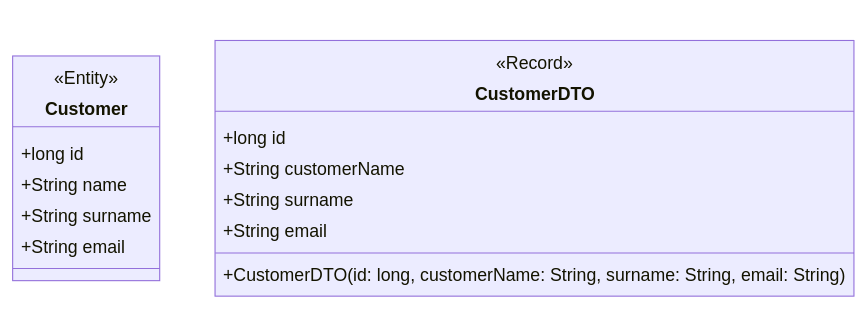
public record CustomerDTO(long id, String customerName, String surname, String email) {}This DTO maps to the following Customer entity. Note that we have intentionally named the field "customerName" differently from "name" to demonstrate mapping different field names:
@Entity
public class Customer {
    @Id
    @GeneratedValue(strategy = GenerationType.IDENTITY)
    private long id;

    private String name;
    private String surname;
    private String email;

    public Customer() {}
    // Getters/Setters removed for brevity
}
Here is an overview of the two structures:
Setting Up MapStruct
To use MapStruct, include the following dependencies in your project:
<dependency>
    <groupId>org.mapstruct</groupId>
    <artifactId>mapstruct</artifactId>
    <version>1.6.3.Final</version>
</dependency>
<dependency>
    <groupId>org.mapstruct</groupId>
    <artifactId>mapstruct-processor</artifactId>
    <version>1.6.3.Final</version>
    <scope>provided</scope>
</dependency>
Additionally, configure the Maven compiler to process the MapStruct annotations:
<plugin>
    <groupId>org.apache.maven.plugins</groupId>
    <artifactId>maven-compiler-plugin</artifactId>
    <version>3.13.0</version>
    <configuration>
        <source>21</source>
        <target>21</target>
        <annotationProcessorPaths>
            <path>
                <groupId>org.mapstruct</groupId>
                <artifactId>mapstruct-processor</artifactId>
                <version>1.6.3.Final</version>
            </path>
        </annotationProcessorPaths>
    </configuration>
</plugin>
Note: we bumped maven-compiler-plugin to 3.13.0 and the source/target level to 21 (current LTS) — MapStruct 1.6.x itself works from Java 8 up, but there's no reason to target an old language level in a new project.
Defining the Mapper
With the configuration in place, we can define the mapper to convert between Customer and CustomerDTO. Since this is a Jakarta EE / CDI application (not Spring), we use componentModel = "cdi" so MapStruct generates a proper CDI bean:
import org.mapstruct.Mapper;
import org.mapstruct.Mapping;

@Mapper(componentModel = "cdi")
public interface CustomerMapper {

    @Mapping(source = "name", target = "customerName")
    CustomerDTO toDTO(Customer customer);

    @Mapping(source = "customerName", target = "name")
    Customer toEntity(CustomerDTO customerDTO);
}
componentModel: "cdi" vs "spring" vs "default"
MapStruct's componentModel attribute controls how the generated mapper implementation is wired into your dependency injection framework:
"default"— the generated class exposes a plain staticINSTANCEfield, no DI container involved."cdi"— the generated implementation is annotated with@ApplicationScopedand can be@Inject-ed, which is the correct choice for Jakarta EE and Quarkus applications (like the one in this article)."spring"— the generated implementation is annotated with@Component, for injection into Spring beans.
Picking the wrong one is a common source of confusion when copy-pasting examples between Spring Boot and Jakarta EE/Quarkus projects — if your mapper isn't being injected as expected, this is the first thing to check. We cover the Spring-specific setup, including the official MapStruct Spring Extensions project, in a dedicated article (see the knowledge base box above).
The interface uses the @Mapping annotation to convert the field "name" to "customerName" and vice versa. If the fields had the same name, the mapper could be simplified:
@Mapper(componentModel = "cdi")
public interface CustomerMapper {
    CustomerDTO toDTO(Customer customer);
    Customer toEntity(CustomerDTO customerDTO);
}
Using the Mapper in Your Services
With the mapper in place, you can now convert the DTO to the model and vice versa in your services. Here's an example:
@ApplicationScoped
public class CustomerService {

    @Inject
    private CustomerRepository repository;

    @Inject
    private CustomerMapper mapper;

    public List<CustomerDTO> findAll() {
        return repository.findAll().stream()
                .map(mapper::toDTO)
                .collect(Collectors.toList());
    }

    public CustomerDTO findById(Long id) {
        return repository.findById(id)
                .map(mapper::toDTO)
                .orElseThrow(() -> new WebApplicationException("Customer not found", Response.Status.NOT_FOUND));
    }

    public CustomerDTO create(CustomerDTO customerDTO) {
        Customer customer = mapper.toEntity(customerDTO);
        repository.save(customer);
        return mapper.toDTO(customer);
    }

    public CustomerDTO update(CustomerDTO customerDTO, Long id) {
        Customer existingCustomer = repository.findById(id)
                .orElseThrow(() -> new WebApplicationException("Customer not found", Response.Status.NOT_FOUND));

        existingCustomer.setName(customerDTO.customerName());
        existingCustomer.setSurname(customerDTO.surname());
        existingCustomer.setEmail(customerDTO.email());

        repository.save(existingCustomer);
        return mapper.toDTO(existingCustomer);
    }

    public void delete(Long id) {
        repository.deleteById(id);
    }
}
Exposing the DTO Objects via REST Endpoint
Finally, we will expose the DTO objects through a REST endpoint:
@RequestScoped
@Path("/demo")
@Produces(MediaType.APPLICATION_JSON)
@Consumes(MediaType.APPLICATION_JSON)
public class DemoController {

    @Inject
    private CustomerService customerService;

    @GET
    @Path("/list")
    public List<CustomerDTO> findAll() {
        return customerService.findAll();
    }

    @GET
    @Path("/id")
    public Response findById(@QueryParam("id") Long id) {
        CustomerDTO customerDTO = customerService.findById(id);
        return Response.ok(customerDTO).build();
    }

    @POST
    @Path("/add")
    public Response create(CustomerDTO customerDTO) {
        CustomerDTO createdCustomer = customerService.create(customerDTO);
        return Response.status(Response.Status.CREATED).entity(createdCustomer).build();
    }

    @PUT
    @Path("/modify")
    public Response update(CustomerDTO customerDTO, @QueryParam("id") Long id) {
        CustomerDTO updatedCustomer = customerService.update(customerDTO, id);
        return Response.ok(updatedCustomer).build();
    }

    @DELETE
    @Path("/delete")
    public Response delete(@QueryParam("id") Long id) {
        customerService.delete(id);
        return Response.ok().build();
    }
}
Conclusion
In this tutorial, we provided a comprehensive overview of how to map Data Transfer Objects to models and vice versa, using MapStruct with the correct cdi component model to separate the two layers cleanly in a Jakarta EE application. This approach simplifies the process and maintains clear separation between your database models and the data transferred to clients, enhancing both maintainability and scalability of your application.
By following these steps, you can efficiently manage DTO mappings in a Jakarta EE application, leveraging the powerful features of MapStruct. Continue with the Advanced MapStruct Tutorial for multi-source mappings, expressions, and @AfterMapping, or browse the full knowledge base above.
Frequently Asked Questions
Should I use componentModel = "cdi" or "spring" for MapStruct?
Use "cdi" for Jakarta EE and Quarkus applications (like the one in this article) so the generated mapper is @ApplicationScoped and injectable via @Inject. Use "spring" only if your application is actually a Spring/Spring Boot project, where the generated mapper becomes a @Component injectable via Spring's own DI.
Why is a Java Record a good fit for a DTO?
Records are immutable, concise, and automatically provide equals/hashCode/toString based on their components — exactly the properties you want from an object whose only job is to carry data across the transport layer without being modified afterward.
What's the latest stable version of MapStruct?
1.6.3.Final is the current stable release. MapStruct 1.7 is in beta (as of mid-2026) with new features like native Optional support and improved Kotlin support, but isn't recommended for production yet — stick to 1.6.3.Final until 1.7 reaches a stable release.
Do I need Lombok alongside MapStruct?
Not required, but very common in real projects — and also a frequent source of build errors if the two annotation processors aren't ordered correctly on the compiler's processor path. See our dedicated article on MapStruct + Lombok integration issues in the knowledge base box above if you run into "unmapped target property" errors after adding Lombok.
Can MapStruct map directly to and from Java Records?
Yes. MapStruct has supported Records as both source and target types since 1.5.x, generating a canonical constructor call under the hood instead of setter calls. We cover Record-specific edge cases (nested records, builders) in a dedicated article in the knowledge base above.
Is MapStruct faster than ModelMapper or Dozer?
Generally yes, and by a wide margin for CPU-bound mapping work: MapStruct generates plain Java code at compile time, while ModelMapper and Dozer rely on reflection at runtime. See our dedicated comparison article for benchmarks and when each tool's trade-offs actually matter.
Recommended Articles
Architecting MapStruct with Spring Boot 3: Complete Integration Guide
Master MapStruct with Spring Boot 3. Build a type-safe, compile-time mapping pipeline using Spring 6, dependency injection, and the Conversion Service.
Mastering MapStruct Compilation Errors in Enterprise Java Applications
Learn how to resolve common MapStruct compile-time errors and ensure your Maven/Gradle builds succeed. #MapStruct #Java #EnterpriseJava #CompileTimeErrors
Mastering Enum Mapping in Enterprise Java Applications: From WildFly 29 to DTOs
Learn how to map Java Enums across database entities and external API DTOs with MapStruct, including @ValueMapping for explicit translations.
Advanced MapStruct Features: Mapping from Multiple Sources and Using Java Expressions
Advanced MapStruct 1.6.3 tutorial: mapping from multiple sources, Java expressions, @AfterMapping, nested mappings, custom methods, and common compile-time pitfalls.