Architecting MapStruct with Spring Boot 3: Complete Integration Guide
In enterprise Spring Boot architectures, mapping objects between layers is a classic performance and design bottleneck. Letting database-backed Hibernate entities leak into controllers degrades security and system stability.
To maintain clean layer isolation, you must transition data types across boundaries using Data Transfer Objects (DTOs). However, manually maintaining these conversions results in massive boilerplate code, whereas dynamic reflection-based mappers like ModelMapper drag down runtime performance under heavy load.
MapStruct solves this trade-off by compiling declarative interfaces directly into clean, reflection-free Java bytecode. Under Spring Boot 3 and Spring 6, MapStruct integrates directly into the application context, turning generated mappers into standard, type-safe Spring beans.
This hands-on guide details how to build and configure a production-grade mapping architecture under Spring Boot 3 using the core framework and MapStruct Spring Extensions.
Architectural Concept: Decoupling with the Conversion Service
In a traditional setup, if CarMapper needs to map a nested SeatConfiguration, you must manually inject the nested mapper into the outer mapper's dependency graph via the uses attribute. This creates tight coupling between individual mappers.
By leveraging the MapStruct Spring Extensions, you can bind your mappers directly to Spring's native ConversionService. Your controller or service relies on a unified entry point, while a generated adapter delegates type conversions under the hood, ensuring loose coupling.
[HTTP Request] ──> [Spring Controller]
                         │
                         ▼ (Delegates target conversion)
             [Spring ConversionService]
               /         │          \
              /          │           \
             ▼           ▼            ▼
      [CarMapper]  [UserMapper]  [AddressMapper]
             \           │            /
              ▼          ▼           ▼
        [Generated ConversionServiceAdapter] (Bridging SPI)
Prerequisites
To implement this guide, your environment must meet the following baselines:
- Java Runtime: JDK 17 or JDK 21 (Spring Boot 3 baseline)
- Spring Boot: 3.0.0 or higher (Spring Framework 6.x)
- Build System: Apache Maven 3.8+ (or Gradle 7.x+)
- MapStruct: 1.6.3
- MapStruct Spring Extensions: 2.0.0 (Supports Spring 6 and the
jakartanamespace)
Step-by-Step Implementation
Step 1: Configure the Maven pom.xml
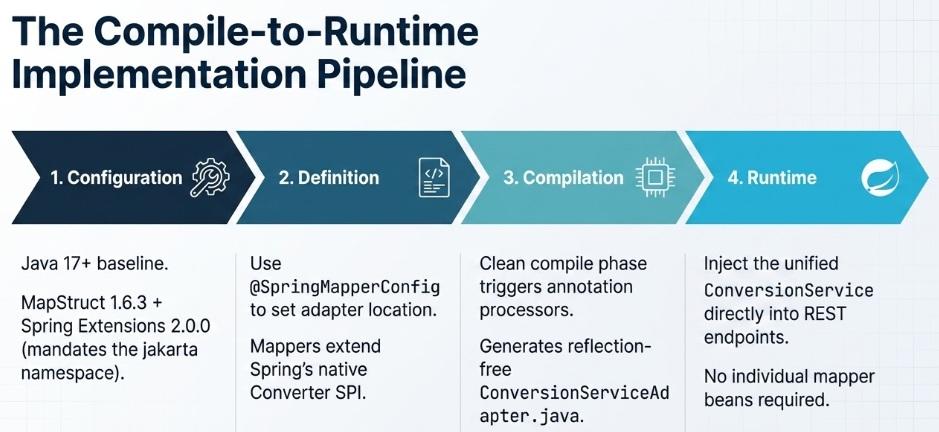
Because Spring Boot 3 mandates Java 17+ and replaces the legacy javax namespace with jakarta, you must use the 2.x stream of the MapStruct Spring Extensions.
Add the dependencies and configure the annotation processor paths in your compiler plugin:
<properties>
    <java.version>17</java.version>
    <spring-boot.version>3.3.2</spring-boot.version>
    <org.mapstruct.version>1.6.3</org.mapstruct.version>
    <org.mapstruct.spring.version>2.0.0</org.mapstruct.spring.version>
    <org.projectlombok.version>1.18.32</org.projectlombok.version>
</properties>

<dependencies>
    <!-- Core Spring Boot Web Starter -->
    <dependency>
        <groupId>org.springframework.boot</groupId>
        <artifactId>spring-boot-starter-web</artifactId>
        <version>${spring-boot.version}</version>
    </dependency>

    <!-- MapStruct Core Annotations -->
    <dependency>
        <groupId>org.mapstruct</groupId>
        <artifactId>mapstruct</artifactId>
        <version>${org.mapstruct.version}</version>
    </dependency>

    <!-- MapStruct Spring Annotations -->
    <dependency>
        <groupId>org.mapstruct.extensions.spring</groupId>
        <artifactId>mapstruct-spring-annotations</artifactId>
        <version>${org.mapstruct.spring.version}</version>
    </dependency>

    <!-- Project Lombok (For Data Boilerplate) -->
    <dependency>
        <groupId>org.projectlombok</groupId>
        <artifactId>lombok</artifactId>
        <version>${org.projectlombok.version}</version>
        <scope>provided</scope>
    </dependency>
</dependencies>

<build>
    <plugins>
        <plugin>
            <groupId>org.apache.maven.plugins</groupId>
            <artifactId>maven-compiler-plugin</artifactId>
            <version>3.13.0</version>
            <configuration>
                <source>${java.version}</source>
                <target>${java.version}</target>
                <annotationProcessorPaths>
                    <!-- Lombok compiles first -->
                    <path>
                        <groupId>org.projectlombok</groupId>
                        <artifactId>lombok</artifactId>
                        <version>${org.projectlombok.version}</version>
                    </path>
                    <!-- Lombok-MapStruct coordination binding -->
                    <path>
                        <groupId>org.projectlombok</groupId>
                        <artifactId>lombok-mapstruct-binding</artifactId>
                        <version>0.2.0</version>
                    </path>
                    <!-- Core MapStruct Compiler Processor -->
                    <path>
                        <groupId>org.mapstruct</groupId>
                        <artifactId>mapstruct-processor</artifactId>
                        <version>${org.mapstruct.version}</version>
                    </path>
                    <!-- MapStruct Spring Extensions Processor -->
                    <path>
                        <groupId>org.mapstruct.extensions.spring</groupId>
                        <artifactId>mapstruct-spring-extensions</artifactId>
                        <version>${org.mapstruct.spring.version}</version>
                    </path>
                </annotationProcessorPaths>
            </configuration>
        </plugin>
    </plugins>
</build>
Step 2: Define Shared Config and Adapter Target Package
To globally configure our mapping suite, we define a centralized configuration interface. Decorating it with @SpringMapperConfig lets us specify exactly where the generated ConversionServiceAdapter should reside and how it should refer to the Spring ConversionService bean.
package com.architect.config;

import org.mapstruct.MapperConfig;
import org.mapstruct.ReportingPolicy;
import org.mapstruct.extensions.spring.SpringMapperConfig;

@MapperConfig(
    componentModel = "spring", // Registers mappers as Spring beans automatically
    unmappedTargetPolicy = ReportingPolicy.ERROR // Build fails instantly if mappings are incomplete
)
@SpringMapperConfig(
    conversionServiceAdapterPackage = "com.architect.mapper.adapter",
    conversionServiceAdapterClassName = "MyCustomConversionServiceAdapter"
)
public interface CentralMappingConfig {
}
Step 3: Define Domain Models and DTOs
Let's model a nested structure representing a system Device entity and its corresponding flattened API representation, DeviceDto.
package com.architect.model;

import lombok.Data;

@Data
public class Device {
    private Long id;
    private String serialNumber;
    private HardwareSpec hardwareSpec;
}
package com.architect.model;

import lombok.Data;

@Data
public class HardwareSpec {
    private String modelName;
    private int memoryGigabytes;
}
package com.architect.dto;

import lombok.Data;

@Data
public class DeviceDto {
    private Long deviceId;
    private String serialNo;
    private String specModel;
    private int memoryGb;
}
Step 4: Write the Mapper Implementing Spring's Converter SPI
By extending Spring's native org.springframework.core.convert.converter.Converter interface, MapStruct compiles a mapper class that Spring automatically registers as an active converter inside the application context.
package com.architect.mapper;

import com.architect.config.CentralMappingConfig;
import com.architect.dto.DeviceDto;
import com.architect.model.Device;
import org.springframework.core.convert.converter.Converter;
import org.mapstruct.Mapper;
import org.mapstruct.Mapping;

@Mapper(config = CentralMappingConfig.class) // Inherits Spring componentModel and strict target policies
public interface DeviceMapper extends Converter<Device, DeviceDto> {

    @Override
    @Mapping(source = "id", target = "deviceId")
    @Mapping(source = "serialNumber", target = "serialNo")
    @Mapping(source = "hardwareSpec.modelName", target = "specModel")
    @Mapping(source = "hardwareSpec.memoryGigabytes", target = "memoryGb")
    DeviceDto convert(Device source);
}
Step 5: Trigger Compilation and Inspect the Adapter
Execute the clean compile phase to trigger the annotation processors:
mvn clean compile
MapStruct Spring Extensions will generate MyCustomConversionServiceAdapter.java under /target/generated-sources/annotations/com/architect/mapper/adapter/:
package com.architect.mapper.adapter;

import com.architect.dto.DeviceDto;
import com.architect.model.Device;
import org.springframework.context.annotation.Lazy;
import org.springframework.core.convert.ConversionService;
import org.springframework.core.convert.TypeDescriptor;
import org.springframework.stereotype.Component;
import jakarta.annotation.Generated;

@Generated(
    value = "org.mapstruct.extensions.spring.converter.ConversionServiceAdapterGenerator"
)
@Component
public class MyCustomConversionServiceAdapter {
    private final ConversionService conversionService;

    // Injected lazily to avoid circular startup dependencies
    public MyCustomConversionServiceAdapter(@Lazy final ConversionService conversionService) {
        this.conversionService = conversionService;
    }

    public DeviceDto mapDeviceToDeviceDto(final Device source) {
        return (DeviceDto) conversionService.convert(
            source,
            TypeDescriptor.valueOf(Device.class),
            TypeDescriptor.valueOf(DeviceDto.class)
        );
    }
}
Step 6: Inject and Use the Converters inside a REST Controller
Now, rather than injecting every mapper bean individually, you inject the unified ConversionService (or the generated adapter) into your REST endpoint layer.
package com.architect.controller;

import com.architect.dto.DeviceDto;
import com.architect.model.Device;
import org.springframework.core.convert.ConversionService;
import org.springframework.http.ResponseEntity;
import org.springframework.web.bind.annotation.PostMapping;
import org.springframework.web.bind.annotation.RequestBody;
import org.springframework.web.bind.annotation.RequestMapping;
import org.springframework.web.bind.annotation.RestController;

@RestController
@RequestMapping("/api/devices")
public class DeviceController {

    private final ConversionService conversionService;

    // Inject Spring's central ConversionService containing our registered MapStruct converters
    public DeviceController(ConversionService conversionService) {
        this.conversionService = conversionService;
    }

    @PostMapping("/convert")
    public ResponseEntity<DeviceDto> processDevice(@RequestBody Device device) {
        // Automatically routes to DeviceMapperImpl under the hood
        DeviceDto dto = conversionService.convert(device, DeviceDto.class);
        return ResponseEntity.ok(dto);
    }
}
Edge Cases and Pitfalls
1. Spring Framework Circular Dependencies
- The Issue: When you have complex nested object graphs where mappers reference each other using dependency injection, Spring may throw a
BeanCurrentlyInCreationExceptionduring startup. - The Fix: Instruct MapStruct to generate mappers that use setter injection rather than constructor injection, breaking the instantiation cycle:
@Mapper(config = CentralMappingConfig.class, injectionStrategy = InjectionStrategy.SETTER)
2. Injecting Spring Components (Protected Variable Access)
- The Issue: If your mapping logic relies on invoking a Spring-managed service helper class, you must define the mapper as an abstract class rather than an interface.
- The Danger: If you mark the
@Autowiredbean as private, compilation will fail. - The Solution: Always define dependency-injected beans in your abstract mappers as protected so that the generated implementation subclass can access them:
@Mapper(componentModel = "spring")
public abstract class CustomMapper {
    @Autowired
    protected HelperService helperService; // Must not be private
}
3. IDE Incremental Compiler Desync
- The Issue: When modifying nested POJO fields in a Spring Boot project, your IDE might not automatically regenerate the
ConversionServiceAdapteror the concreteMapperImplclasses, causing runtime type errors. - The Solution: Trigger a complete compilation sequence via your CLI to clean target directories and re-run all annotation processor rounds:
mvn clean compile
Conclusion
Combining MapStruct and Spring Boot 3 via the ConversionService API establishes a highly decoupled, maintainable, and type-safe architecture. By keeping your configuration centralized and letting annotation processors generate the conversion adapters at compile time, you guarantee native Java performance speeds without exposing entity-level structures or polluting your code with manual mapping boilerplate.
Recommended Articles
Mastering MapStruct Compilation Errors in Enterprise Java Applications
Learn how to resolve common MapStruct compile-time errors and ensure your Maven/Gradle builds succeed. #MapStruct #Java #EnterpriseJava #CompileTimeErrors
Advanced MapStruct Features: Mapping from Multiple Sources and Using Java Expressions
Advanced MapStruct 1.6.3 tutorial: mapping from multiple sources, Java expressions, @AfterMapping, nested mappings, custom methods, and common compile-time pitfalls.
Map Your Data Transfer Objects (DTO) with Java Records and MapStruct for Jakarta EE Applications
How to map DTO objects with MapStruct 1.6.3 in a Jakarta EE / CDI application: Java Records, entity-to-DTO mapping, REST exposure, and the correct componentModel for Jakarta EE vs Spring.
Mastering Collection Mapping with MapStruct: A Comprehensive Guide
Learn how MapStruct simplifies collection conversions between domain entities and DTOs. Customize mappings and handle null vs. empty collections efficiently.