Advanced MapStruct Tutorial
MapStruct is a powerful Java annotation processor that simplifies the mapping between Java bean types. In this advanced tutorial, updated for MapStruct 1.6.3.Final, we will explore several advanced features of MapStruct, such as mapping from multiple sources to a target object, using Java expressions in mappings, and much more!
Prerequisites
Before diving into the examples, ensure you have checked this introduction article to MapStruct: How to Map Your DTO Objects with MapStruct — it also covers the correct componentModel to use (cdi vs spring) depending on your stack, which we won't repeat here.
Then, make sure you have the following dependencies in your pom.xml if you are using Maven:
<dependencies>
    <dependency>
        <groupId>org.mapstruct</groupId>
        <artifactId>mapstruct</artifactId>
        <version>1.6.3.Final</version>
    </dependency>
    <dependency>
        <groupId>org.mapstruct</groupId>
        <artifactId>mapstruct-processor</artifactId>
        <version>1.6.3.Final</version>
        <scope>provided</scope>
    </dependency>
</dependencies>
For Gradle, add the following to your build.gradle:
dependencies {
    implementation 'org.mapstruct:mapstruct:1.6.3.Final'
    annotationProcessor 'org.mapstruct:mapstruct-processor:1.6.3.Final'
}
Using Lombok too? Order matters.
If your project also uses Lombok, the Lombok annotation processor must run before the MapStruct processor, or MapStruct won't see the getters/setters Lombok generates and you'll get "unmapped target property" errors even for fields that clearly exist. The quick fix is adding lombok-mapstruct-binding to your annotationProcessorPaths, ordered before mapstruct-processor. We cover this in depth, with the exact Maven/Gradle configuration, in our dedicated MapStruct + Lombok article in the knowledge base above.
1. Mapping from Multiple Sources
MapStruct allows you to map data from multiple source objects into a single target object. This is particularly useful when you need to aggregate data from different sources.
Example
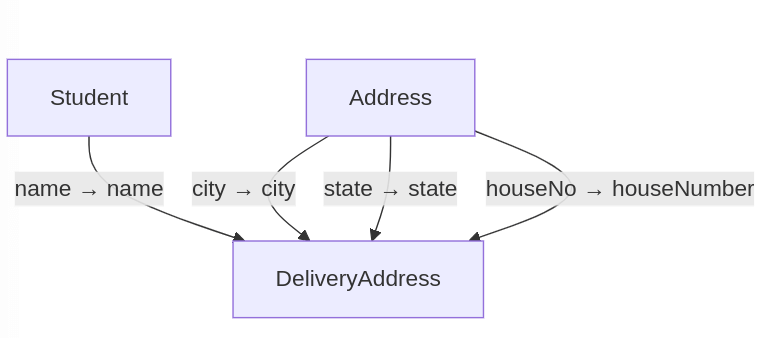
Suppose we have two source classes, Student and Address, and we want to create a DeliveryAddress object.
public class Student {
    private String name;
    private Long id;

    // Getters and Setters
}

public class Address {
    private String city;
    private String state;
    private int houseNo;

    // Getters and Setters
}

public class DeliveryAddress {
    private String name;
    private String city;
    private String state;
    private int houseNumber;

    // Getters and Setters
}
And here is the Mapper Interface which maps multiple source objects to DeliveryAddress:
@Mapper
public interface DeliveryAddressMapper {
    @Mapping(source = "student.name", target = "name")
    @Mapping(source = "address.city", target = "city")
    @Mapping(source = "address.state", target = "state")
    @Mapping(source = "address.houseNo", target = "houseNumber")
    DeliveryAddress getDeliveryAddress(Student student, Address address);
}
Finally, here is how you can use your DeliveryAddressMapper to build a DeliveryAddress:
Student student = new Student();
student.setName("John Doe");
Address address = new Address();
address.setCity("New York");
address.setState("NY");
address.setHouseNo(123);

DeliveryAddressMapper mapper = Mappers.getMapper(DeliveryAddressMapper.class);
DeliveryAddress deliveryAddress = mapper.getDeliveryAddress(student, address);
2. Using Java Expressions in Mappings
MapStruct allows you to use Java expressions to perform more complex mappings.
Example
Suppose we want to calculate the length of a student's name while mapping.
Mapper Interface with Expression
@Mapper
public interface StudentMapper {
    @Mapping(target = "nameLength", expression = "java(student.getName().length())")
    StudentDto toStudentDto(Student student);
}

public class StudentDto {
    private int nameLength;

    // Getters and Setters
}
Note: an expression like the one above is opaque to the annotation processor and isn't null-checked for you — if student.getName() can be null, guard it yourself inside the expression (e.g. student.getName() == null ? 0 : student.getName().length()) or, better, extract the logic into a default method and reference that instead, which stays readable and testable.
Usage
Student student = new Student();
student.setName("John Doe");

StudentMapper mapper = Mappers.getMapper(StudentMapper.class);
StudentDto studentDto = mapper.toStudentDto(student);
3. Lazy Mapping with @AfterMapping
The @AfterMapping annotation allows you to perform additional processing after the mapping is done, which can be useful for setting default values or further calculations once the target object is fully populated.
Example
Suppose we want to set a default value after mapping.
Mapper Interface with After Mapping
@Mapper
public interface UserMapper {

    UserDto userToUserDto(User user);

    @AfterMapping
    default void setDefaultValues(@MappingTarget UserDto userDto) {
        if (userDto.getRole() == null) {
            userDto.setRole("USER"); // Set default role if not provided
        }
    }
}
Usage
User user = new User();
user.setName("Jane Doe");

UserMapper mapper = Mappers.getMapper(UserMapper.class);
UserDto userDto = mapper.userToUserDto(user);
4. Additional Advanced Features
4.1 Nested Mappings
MapStruct can handle nested mappings easily by specifying the path for nested properties.
@Mapper
public interface OrderMapper {
    @Mapping(target = "customerName", source = "customer.name")
    OrderDto orderToOrderDto(Order order);
}
4.2 Custom Mapping Methods
You can define custom methods for complex mappings.
@Mapper
public interface ProductMapper {

    @Mappings({
        @Mapping(target = "price", source = "product.price"),
        @Mapping(target = "discountedPrice", expression = "java(calculateDiscount(product))")
    })
    ProductDto productToProductDto(Product product);

    default double calculateDiscount(Product product) {
        return product.getPrice() * 0.9; // Apply a 10% discount
    }
}
This custom mapping demonstrates an advanced use of MapStruct, including field mapping and custom logic for transformations. Here's an explanation:
What This Code Does:
The ProductMapper interface maps a Product object to a ProductDto object, while performing:
- Standard field mapping: Maps the
pricefield directly fromProducttoProductDto. - Custom field mapping: Calculates the
discountedPriceinProductDtousing a custom method (calculateDiscount).
Note: as of MapStruct 1.5.x, the plural @Mappings wrapper shown above is technically no longer required for a single mapper method — modern Java allows repeatable annotations, so you can list multiple @Mapping annotations directly without wrapping them in @Mappings. It still works and you'll see it in plenty of existing code, but new code can drop the wrapper:
@Mapper
public interface ProductMapper {

    @Mapping(target = "price", source = "product.price")
    @Mapping(target = "discountedPrice", expression = "java(calculateDiscount(product))")
    ProductDto productToProductDto(Product product);

    default double calculateDiscount(Product product) {
        return product.getPrice() * 0.9; // Apply a 10% discount
    }
}
Conclusion
In this advanced MapStruct tutorial, we explored various features that enhance object mapping in Java applications:
- Mapping from multiple sources into a single target object.
- Using Java expressions for complex field mappings.
- Implementing lazy mapping with the
@AfterMappingannotation. - Additional features like nested mappings and custom methods.
By leveraging these advanced features, you can create efficient and maintainable mappings in your Java applications using MapStruct. If you're hitting build errors while experimenting with these patterns, check Common MapStruct Compile Errors Explained in the knowledge base above.
Frequently Asked Questions
Do I still need to wrap multiple @Mapping annotations in @Mappings?
No, not since MapStruct 1.5.x / modern Java's support for repeatable annotations. You can list several @Mapping annotations directly on a method without the @Mappings wrapper; both forms still compile, but new code can skip the wrapper.
Are expression-based mappings null-safe?
No — a java(...) expression is inserted verbatim into the generated code and is not null-checked by MapStruct. Add your own null guard inside the expression, or move the logic into a default method on the mapper interface for something more readable and testable.
Can I combine multi-source mapping with @AfterMapping?
Yes — @AfterMapping methods run after the target object is populated regardless of how many source parameters the mapping method took, so you can use it to apply cross-field defaults or validation that depends on the fully-assembled target object.
What's the difference between @Mapping's expression and a custom default method?
An expression is quick for one-liners but is opaque Java source pasted into the generated mapper, with no compile-time checking against your actual logic beyond basic syntax. A custom default method (as used for calculateDiscount above) is regular Java code that IDEs can navigate, refactor, and unit test independently — prefer it once the logic is more than a trivial expression.
How do I debug why a MapStruct mapping isn't producing the expected output?
Look at the generated implementation class under target/generated-sources/annotations (Maven) — MapStruct generates plain, readable Java code, so you can usually see immediately which property was left unmapped or which method was picked for a given conversion.
Recommended Articles
Mastering MapStruct Compilation Errors in Enterprise Java Applications
Learn how to resolve common MapStruct compile-time errors and ensure your Maven/Gradle builds succeed. #MapStruct #Java #EnterpriseJava #CompileTimeErrors
Architecting MapStruct with Spring Boot 3: Complete Integration Guide
Master MapStruct with Spring Boot 3. Build a type-safe, compile-time mapping pipeline using Spring 6, dependency injection, and the Conversion Service.
Mastering Collection Mapping with MapStruct: A Comprehensive Guide
Learn how MapStruct simplifies collection conversions between domain entities and DTOs. Customize mappings and handle null vs. empty collections efficiently.
Map Your Data Transfer Objects (DTO) with Java Records and MapStruct for Jakarta EE Applications
How to map DTO objects with MapStruct 1.6.3 in a Jakarta EE / CDI application: Java Records, entity-to-DTO mapping, REST exposure, and the correct componentModel for Jakarta EE vs Spring.