Mapping Collections and Lists with MapStruct (List, Set, Map, Streams)
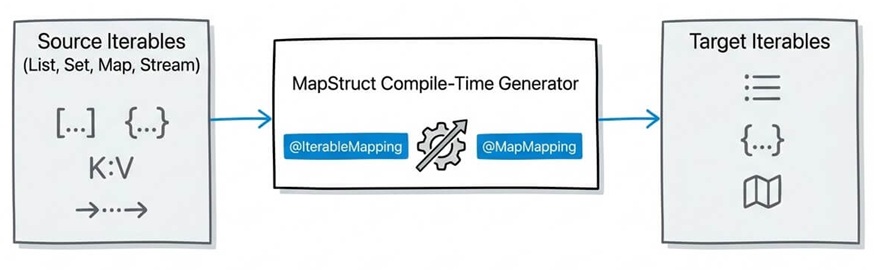
Mapping collections—such as List, Set, and Map—between domain entities and Data Transfer Objects (DTOs) is a routine task in Java applications. MapStruct simplifies this process by automatically generating null-safe, highly optimized loop code at compile time. In this comprehensive guide, we will explore how MapStruct handles collection conversions, how to customize element-level mapping with @IterableMapping and @MapMapping, how to handle null vs. empty collections, and how to update existing collection targets cleanly.
1. How Collection Mapping Works in MapStruct
MapStruct handles collection mappings seamlessly. If you define a mapping method for individual objects (e.g., User to UserDto), MapStruct automatically uses that method to generate iteration code for collection types like List<User> to List<UserDto> or Set<User> to Set<UserDto>.
You simply declare the collection mapping signature in your @Mapper interface:
import org.mapstruct.Mapper;
import java.util.List;
import java.util.Set;

@Mapper(componentModel = "cdi")
public interface UserMapper {

    // Single object mapping
    UserDto toDto(User user);

    // Collection mappings (MapStruct generates element-by-element loops automatically)
    List<UserDto> toDtoList(List<User> users);

    Set<UserDto> toDtoSet(Set<User> users);
}
Under the hood, MapStruct generates plain Java code that checks for null input, initializes an ArrayList or HashSet, iterates through the source collection, transforms each element using toDto(user), and returns the result.
2. Customizing Element-Level Mappings with @IterableMapping
When mapping a list, you might need to apply specific formatting, selection rules, or custom qualifier methods to every element in that list. MapStruct provides the @IterableMapping annotation for this exact purpose.
Example: Formatting Dates or Using Qualified Methods
Suppose you want to convert a list of Date objects into formatted String dates or invoke a specific named mapping method for list elements:
import org.mapstruct.IterableMapping;
import org.mapstruct.Mapper;
import org.mapstruct.Named;
import java.util.List;

@Mapper(componentModel = "cdi")
public interface OrderMapper {

    @Named("shortTitle")
    default String toShortTitle(String title) {
        if (title == null) return null;
        return title.length() > 10 ? title.substring(0, 10) + "..." : title;
    }

    // Apply specific qualifier to each element in the list
    @IterableMapping(qualifiedByName = "shortTitle")
    List<String> toShortTitleList(List<String> titles);
}
Note: You cannot use@Mappingon a collection mapping method directly.@Mappingapplies to object properties, whereas@IterableMappingapplies to collection elements.
3. Mapping Maps (Key-Value Pairs) with @MapMapping
Mapping Java Map<K, V> structures requires transforming both the keys and the values. MapStruct provides the @MapMapping annotation to control formatting, qualifiers, and target types for keys and values independently.
import org.mapstruct.MapMapping;
import org.mapstruct.Mapper;
import java.util.Date;
import java.util.Map;

@Mapper(componentModel = "cdi")
public interface InventoryMapper {

    @MapMapping(
        keyDateFormat = "yyyy-MM-dd",
        valueNumberFormat = "$#.00"
    )
    Map<String, String> toFormattedMap(Map<Date, Double> rawMap);
}
You can also use keyQualifiedByName and valueQualifiedByName to specify custom methods for keys or values individually:
@MapMapping(
    keyQualifiedByName = "stringToEnumKey",
    valueQualifiedByName = "entityToDtoValue"
)
Map<StatusEnum, UserDto> toStatusUserMap(Map<String, UserEntity> map);
4. Handling Null vs. Empty Collections
By default, if the source collection passed to a mapping method is null, MapStruct returns null. However, in many enterprise applications, returning an empty collection (e.g., Collections.emptyList()) is preferred to avoid NullPointerException downstream.
Configuring Null Iterable Strategy
You can change this behavior at the mapper level or globally using nullValueIterableMappingStrategy:
import org.mapstruct.Mapper;
import org.mapstruct.NullValueIterableMappingStrategy;

@Mapper(
    componentModel = "cdi",
    nullValueIterableMappingStrategy = NullValueIterableMappingStrategy.RETURN_DEFAULT
)
public interface CustomerMapper {

    // If source 'customers' is null, returns an empty ArrayList instead of null
    List<CustomerDto> toDtoList(List<Customer> customers);
}
Available strategies for NullValueIterableMappingStrategy:
RETURN_NULL(Default): Returnsnullif the input collection isnull.RETURN_DEFAULT: Returns an empty collection (e.g., emptyArrayList,HashSet, orHashMap) if the input isnull.
5. Updating Existing Target Collections (@MappingTarget)
When updating existing JPA entities or domain models, you often want to update a collection in-place rather than replacing the collection instance entirely (which can break ORM/Hibernate dirty checking and cascade operations).
You can control how MapStruct updates collections using CollectionMappingStrategy:
import org.mapstruct.CollectionMappingStrategy;
import org.mapstruct.Mapper;
import org.mapstruct.MappingTarget;
import java.util.List;

@Mapper(
    componentModel = "cdi",
    collectionMappingStrategy = CollectionMappingStrategy.ADDER_PREFERRED
)
public interface CompanyMapper {

    void updateCompanyFromDto(CompanyDto dto, @MappingTarget Company entity);
}
Collection Mapping Strategies Explained:
| Strategy | Behavior |
|---|---|
ACCESSOR_ONLY (Default) |
Clears or sets the target collection directly using getter/setter (e.g., target.setItems(...)). |
SETTER_PREFERRED |
Uses setter if available; falls back to getter and modifying collection elements directly. |
ADDER_PREFERRED |
Uses addXxx() / removeXxx() methods if present on the target class (ideal for JPA parent-child relationships). |
6. Mapping Java Streams
MapStruct natively supports mapping Java Stream objects to collections or other streams. This is particularly useful when working with reactive pipelines or database queries returning streams.
import org.mapstruct.Mapper;
import java.util.List;
import java.util.stream.Stream;

@Mapper(componentModel = "cdi")
public interface StreamMapper {

    UserDto toDto(User user);

    // Map Stream to List
    List<UserDto> toDtoList(Stream<User> userStream);

    // Map Stream to Stream
    Stream<UserDto> toDtoStream(Stream<User> userStream);
}
Caution with Streams: When mappingStreamtoStream, the returned stream should be closed properly (e.g., using a try-with-resources block) if the underlying source stream backed an active I/O or database session.
7. Quick Reference Matrix
| Requirement | Annotation / Strategy | Example Usage |
|---|---|---|
| Customize List element mapping | @IterableMapping |
@IterableMapping(qualifiedByName = "myConverter") |
| Format Map keys or values | @MapMapping |
@MapMapping(keyDateFormat = "yyyy-MM-dd") |
| Return empty list instead of null | NullValueIterableMappingStrategy |
RETURN_DEFAULT |
Use JPA addItem() methods |
CollectionMappingStrategy |
ADDER_PREFERRED |
8. Frequently Asked Questions (FAQ)
Can MapStruct map immutable collections like List.of() or Guava ImmutableList?
Yes. If your target type or constructor expects an immutable collection, MapStruct detects the immutable target or constructor signature and passes the generated array/collection to the appropriate constructor or factory method.
Why do I get a compilation error when using @Mapping on a List mapping method?
The @Mapping annotation is designed to map named properties of complex objects (e.g., dto.firstName to entity.firstName). For collections, use @IterableMapping to configure how elements inside the list are processed.
How does MapStruct handle Set implementations?
MapStruct instantiates a HashSet by default when mapping to a Set target type. If your target interface is SortedSet, MapStruct will instantiate a TreeSet automatically.
Conclusion
Mapping collections in MapStruct requires minimal boilerplate while offering fine-grained control over element conversion, null safety, and target collection updates. By leveraging @IterableMapping, @MapMapping, and CollectionMappingStrategy, you can keep your Java DTO mapping layer performant, type-safe, and clean.
Recommended Articles
Mastering Enum Mapping in Enterprise Java Applications: From WildFly 29 to DTOs
Learn how to map Java Enums across database entities and external API DTOs with MapStruct, including @ValueMapping for explicit translations.
Mastering MapStruct Compilation Errors in Enterprise Java Applications
Learn how to resolve common MapStruct compile-time errors and ensure your Maven/Gradle builds succeed. #MapStruct #Java #EnterpriseJava #CompileTimeErrors
Advanced MapStruct Features: Mapping from Multiple Sources and Using Java Expressions
Advanced MapStruct 1.6.3 tutorial: mapping from multiple sources, Java expressions, @AfterMapping, nested mappings, custom methods, and common compile-time pitfalls.
Architecting MapStruct with Spring Boot 3: Complete Integration Guide
Master MapStruct with Spring Boot 3. Build a type-safe, compile-time mapping pipeline using Spring 6, dependency injection, and the Conversion Service.