Deploying a Spring Boot 4 or 3 application on WildFly as a Web Application Archive (WAR) allows organizations to take advantage of existing WildFly application server infrastructure, centralized JNDI/JMS/JTA resources, and enterprise security management while maintaining modern Spring development workflows.
⚡ Key Requirements for WildFly Deployment
- Set application packaging to
war. - Extend
SpringBootServletInitializerin your main application class. - Exclude embedded Tomcat from
spring-boot-starter-web. - Mark
jakarta.servlet-apiand Logback dependencies asprovidedto prevent runtime class collisions with WildFly subsystems.
1. Preparing the Spring Boot Application Code
Firstly, initialize the application with Spring Boot initializer:
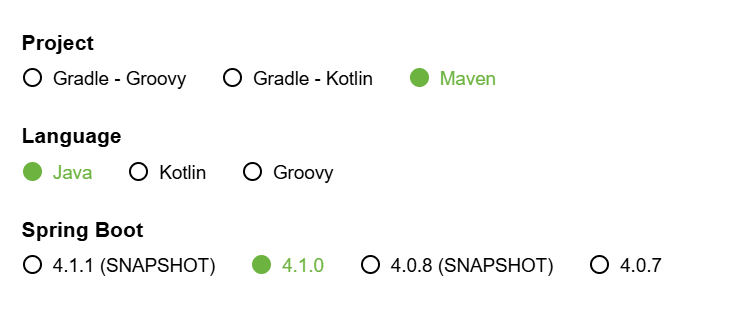
To enable WildFly to bootstrap your Spring Boot application inside its Servlet container, your main application class must extend SpringBootServletInitializer and override the configure method.
package com.example.demo;

import org.springframework.boot.SpringApplication;
import org.springframework.boot.autoconfigure.SpringBootApplication;
import org.springframework.boot.builder.SpringApplicationBuilder;
import org.springframework.boot.web.servlet.support.SpringBootServletInitializer;
import org.springframework.web.bind.annotation.GetMapping;
import org.springframework.web.bind.annotation.PathVariable;
import org.springframework.web.bind.annotation.RestController;

@SpringBootApplication
public class DemoApplication extends SpringBootServletInitializer {

    static {
        // Disable Spring Boot's internal LoggingSystem to let WildFly manage logging
        System.setProperty("org.springframework.boot.logging.LoggingSystem", "none");
    }

    public static void main(String[] args) {
        SpringApplication.run(DemoApplication.class, args);
    }

    @Override
    protected SpringApplicationBuilder configure(SpringApplicationBuilder application) {
        return application.sources(DemoApplication.class);
    }
}

@RestController
class HelloController {

    @GetMapping("/hello/{name}")
    public String hello(@PathVariable String name) {
        return "Hi " + name + " !";
    }
}
2. Configuring pom.xml for Spring Boot 4 / 3
Spring Boot 3 and 4 adhere to the Jakarta EE namespace (jakarta.servlet.*). Configure your pom.xml to generate a WAR file, exclude embedded Tomcat, and mark server-provided dependencies appropriately:
<?xml version="1.0" encoding="UTF-8"?>
<project xmlns="http://maven.apache.org/POM/4.0.0"
         xmlns:xsi="http://www.w3.org/2001/XMLSchema-instance"
         xsi:schemaLocation="http://maven.apache.org/POM/4.0.0 https://maven.apache.org/xsd/maven-4.0.0.xsd">
    <modelVersion>4.0.0</modelVersion>

    <parent>
        <groupId>org.springframework.boot</groupId>
        <artifactId>spring-boot-starter-parent</artifactId>
        <version>4.1.0</version>
        <relativePath />
    </parent>

    <groupId>com.example</groupId>
    <artifactId>springbootwildfly</artifactId>
    <version>0.0.1-SNAPSHOT</version>
    <packaging>war</packaging>
    <name>springbootwildfly</name>

    <properties>
        <java.version>21</java.version>
    </properties>

    <dependencies>
        <dependency>
            <groupId>org.springframework.boot</groupId>
            <artifactId>spring-boot-starter-web</artifactId>
            <exclusions>
                <!-- Exclude embedded Tomcat container -->
                <exclusion>
                    <groupId>org.springframework.boot</groupId>
                    <artifactId>spring-boot-starter-tomcat</artifactId>
                </exclusion>
                <!-- Exclude default logging starter to avoid Logback collisions -->
                <exclusion>
                    <groupId>org.springframework.boot</groupId>
                    <artifactId>spring-boot-starter-logging</artifactId>
                </exclusion>
            </exclusions>
        </dependency>

        <!-- Provided Servlet API -->
        <dependency>
            <groupId>jakarta.servlet</groupId>
            <artifactId>jakarta.servlet-api</artifactId>
            <scope>provided</scope>
        </dependency>

        <!-- Force provided scope for Logback to prevent bundling inside WAR -->
        <dependency>
            <groupId>ch.qos.logback</groupId>
            <artifactId>logback-classic</artifactId>
            <scope>provided</scope>
        </dependency>
        <dependency>
            <groupId>ch.qos.logback</groupId>
            <artifactId>logback-core</artifactId>
            <scope>provided</scope>
        </dependency>

        <dependency>
            <groupId>org.springframework.boot</groupId>
            <artifactId>spring-boot-starter-test</artifactId>
            <scope>test</scope>
        </dependency>
    </dependencies>

    <build>
        <finalName>springbootwildfly</finalName>
        <plugins>
            <plugin>
                <groupId>org.wildfly.plugins</groupId>
                <artifactId>wildfly-maven-plugin</artifactId>
                <version>6.0.1.Final</version>
            </plugin>
            <plugin>
                <groupId>org.springframework.boot</groupId>
                <artifactId>spring-boot-maven-plugin</artifactId>
            </plugin>
        </plugins>
    </build>
</project>
3. Deploying and Testing the Application
Deploy the application directly to a running WildFly server using the WildFly Maven plugin:
$ mvn clean package wildfly:deployVerify deployment success by accessing your REST endpoint via curl:
$ curl http://localhost:8080/springbootwildfly/hello/frankExpected Output:
Hi frank !4. Troubleshooting Logging Conflicts
A common error encountered when deploying Spring Boot to WildFly is a logging subsystem conflict:
java.lang.IllegalStateException: LoggerFactory is not a Logback LoggerContext but Logback is on the classpath. Either remove Logback or the competing implementation (class org.slf4j.impl.Slf4jLoggerFactory loaded from jar:file:/.../slf4j-jboss-logmanager.jar)Why this happens: Spring Boot defaults to Logback, while WildFly uses slf4j-jboss-logmanager. If Logback JARs remain inside WEB-INF/lib, Spring Boot attempts to cast the JBoss logger factory into a Logback context, triggering an exception.
Solution Option A: Let WildFly Manage Logging (Recommended)
- Mark
logback-classicandlogback-coreas<scope>provided</scope>in yourpom.xml. - Disable Spring Boot's internal logging system in
application.properties:org.springframework.boot.logging.LoggingSystem=none
Solution Option B: Isolate Application Logging via jboss-deployment-structure.xml
If you want your application to use its own Logback implementation independently, disable WildFly's logging subsystem for this deployment by adding src/main/webapp/WEB-INF/jboss-deployment-structure.xml:
<?xml version="1.0" encoding="UTF-8"?>
<jboss-deployment-structure xmlns="urn:jboss:deployment-structure:1.3">
    <deployment>
        <exclude-subsystems>
            <subsystem name="logging" />
        </exclude-subsystems>
    </deployment>
</jboss-deployment-structure>
📌 Note on Legacy Spring Boot 2 Applications
Legacy Spring Boot 2 applications rely on javax.servlet.* packages (Jakarta EE 8) and Java 8/11. When deploying Spring Boot 2 WARs, use javax.servlet-api (scope provided). Note that modern WildFly releases (27+) run on Jakarta EE 10/11 and require modern Spring Boot 3 or 4 versions using jakarta.servlet-api.
Conclusion
By properly extending SpringBootServletInitializer, excluding embedded servers, and addressing SLF4J/Logback classpath conflicts, you can seamlessly run Spring Boot 3 and 4 applications on WildFly.
Source code repository (Spring Boot 4) : https://github.com/fmarchioni/mastertheboss/tree/master/spring/springbootwildfly
Source code repository (Spring Boot 3) : https://github.com/fmarchioni/mastertheboss/tree/master/spring/springbootwildfly