How to Configure the Transaction Timeout in JBoss / WildFly
In modern WildFly and JBoss EAP versions, transaction timeout management remains an essential part of tuning enterprise applications to handle long-running operations gracefully. While the default timeout of 300 seconds works for most scenarios, microservices, cloud-native deployments, and Jakarta EE applications often require fine-tuned transaction settings to align with modern distributed architectures. This guide covers every level where a timeout can be set — and, since increasing the subsystem default alone often isn't the whole story, how to diagnose it when your transactions keep timing out anyway.
Configuring the Transaction Timeout in the Transactions Subsystem
Out of the box, the transactions subsystem does not show the default value of the JTA transaction timeout explicitly. For example, here is the transactions subsystem on a current WildFly release:
<subsystem xmlns="urn:jboss:domain:transactions:6.0">
    <core-environment node-identifier="${jboss.tx.node.id:1}">
        <process-id>
            <uuid/>
        </process-id>
    </core-environment>
    <recovery-environment socket-binding="txn-recovery-environment" status-socket-binding="txn-status-manager"/>
    <coordinator-environment statistics-enabled="${wildfly.transactions.statistics-enabled:${wildfly.statistics-enabled:false}}"/>
    <object-store path="tx-object-store" relative-to="jboss.server.data.dir"/>
</subsystem>
(The transactions subsystem namespace version shown above advances with each WildFly release — always compare against what your specific instance actually generates in standalone.xml rather than assuming a fixed number across upgrades.)
The value of default-timeout can be configured through the coordinator-environment element as follows:
<coordinator-environment default-timeout="300"/>Here is how you can increase the default transaction timeout with the CLI:
/subsystem=transactions:write-attribute(name=default-timeout,value=400)
{"outcome" => "success"}
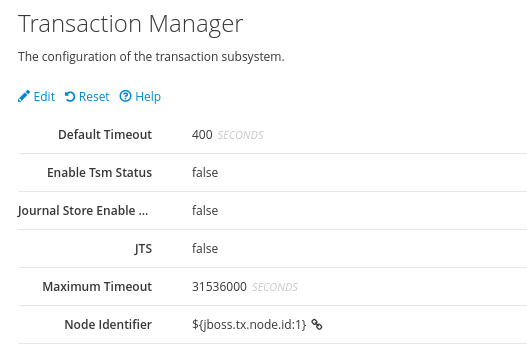
Here is the Transaction timeout setting, as you can see it from the Web Console:
Why Is My Transaction Still Timing Out After Increasing default-timeout?
This is, by a wide margin, the most common follow-up problem — you raise default-timeout, restart, and your transaction still fails. If you see the following warning in your server log, your transaction is genuinely hitting a timeout, and Narayana (WildFly's transaction manager) is telling you exactly that:
WARN [com.arjuna.ats.arjuna] (Transaction Reaper) ARJUNA012117: TransactionReaper::check timeout for TX 0:ffffc0a864c9:30ba8c4b:65afc50d:52dd2c8 in state RUNThe ARJUNA012117 message means the Transaction Reaper — the background thread that enforces timeouts — found a transaction that has been running longer than its allotted timeout and is about to cancel it. When you still see this after raising default-timeout, the cause is almost always one of these, roughly in order of how often they actually turn out to be it:
- A more specific timeout is overriding the subsystem default. An EJB-level
@TransactionTimeout, an MDB'stransactionTimeoutactivation property, or aUserTransaction.setTransactionTimeout()call in your code all take precedence over the subsystem default for that specific transaction — see the timeout layers table further down this article. - The server wasn't actually reloaded. Some attribute changes via the CLI require a
reloadto take effect (you'll see"process-state" => "reload-required"in the CLI response if so) — a change that "succeeded" without a subsequent reload can be silently running against the old value. - It's not the JTA timeout at all. A JDBC driver-level query timeout, an HTTP client timeout on an outbound REST call, or a connection pool's blocking timeout can all independently abort work well before the JTA transaction timeout is ever reached — increasing
default-timeoutdoes nothing for these, because they're different, unrelated timeout settings entirely.
Since a transaction may span multiple resources, there's no single hierarchy to reason about in the abstract — simply put, whichever timeout scope triggers first is the one that causes the failure, and it isn't always the JTA one you were looking at.
Timeout Layers at a Glance
| Layer | Where it's set | Scope |
|---|---|---|
| Subsystem default | coordinator-environment default-timeout |
Every transaction that doesn't set a more specific value |
| EJB (annotation) | @TransactionTimeout |
A single EJB method — overrides the subsystem default |
| EJB (descriptor) | jboss-ejb3.xml tx:trans-timeout |
Same as above, XML-based; less common today than the annotation |
| Message-Driven Bean | transactionTimeout ActivationConfigProperty |
That specific MDB's onMessage transaction |
| Bean-Managed Transactions | UserTransaction.setTransactionTimeout() |
Transactions explicitly begun after the call, in that thread |
| JDBC driver / datasource | Driver-specific query timeout property | Individual SQL statements — independent of JTA entirely |
Typically, the subsystem transaction timeout should be set large enough to comfortably cover your longest legitimate application case, with narrower, shorter timeouts applied deliberately at the EJB/MDB/BMT level for the specific operations that should fail fast.
Alternative Approaches to Transaction Timeout Management
Besides changing the global transaction timeout, you can set transaction timeouts programmatically using UserTransaction.setTransactionTimeout() within your application code for specific transactions only, reducing the risk of masking performance issues globally.
Additionally, if you are using Jakarta EE with WildFly, consider leveraging MicroProfile Fault Tolerance with timeout and retry policies for fine-grained control, especially in cloud-native deployments where transactions should align with microservice resilience strategies.
Finally, for advanced cases, you may integrate Narayana LRA (Long Running Actions) with WildFly to handle transactions exceeding traditional XA limits in a more scalable and cloud-friendly way — LRA is specifically designed for the case where a business process spans multiple services/pods and a distributed XA transaction simply isn't the right tool. Here's an article which discusses it in detail: MicroProfile LRA: A Comprehensive Guide
Configuring the Transaction Timeout in EJBs
You can set the transaction timeout for a specific EJB with the @org.jboss.ejb3.annotation.TransactionTimeout annotation:
import java.util.concurrent.TimeUnit;
import org.jboss.ejb3.annotation.TransactionTimeout;

@Stateless
public class SampleBean {

    @TransactionTimeout(value = 30, unit = TimeUnit.SECONDS)
    public String doSomething() throws RuntimeException {
        //
    }
}
For Bean Managed Transactions, use the setTransactionTimeout method of the UserTransaction interface to set the timeout before starting the transaction:
public void doSomething() {
    try {
        ut.setTransactionTimeout(600); // 10 minutes
        ut.begin();
        // ...
    } catch (Exception e) {
        // handle exception
    }
}
You can also use the jboss-ejb3.xml descriptor to set the transaction timeout. This XML-based approach still works, though the @TransactionTimeout annotation shown above is the more common choice on current projects:
<jboss:ejb-jar xmlns:jboss="http://www.jboss.com/xml/ns/javaee"
               xmlns="http://java.sun.com/xml/ns/javaee"
               xmlns:tx="urn:trans-timeout"
               xmlns:xsi="http://www.w3.org/2001/XMLSchema-instance"
               xsi:schemaLocation="http://www.jboss.com/xml/ns/javaee http://www.jboss.org/j2ee/schema/jboss-ejb3-2_0.xsd
http://java.sun.com/xml/ns/javaee http://java.sun.com/xml/ns/javaee/ejb-jar_3_1.xsd
urn:trans-timeout http://www.jboss.org/j2ee/schema/trans-timeout-1_0.xsd"
               version="3.1"
               impl-version="2.0">
    <enterprise-beans>
        <session>
            <ejb-name>SampleBean</ejb-name>
            <ejb-class>com.acme.SampleBean</ejb-class>
            <session-type>Stateless</session-type>
        </session>
    </enterprise-beans>
    <assembly-descriptor>
        <container-transaction>
            <method>
                <ejb-name>SampleBean</ejb-name>
                <method-name>*</method-name>
                <method-intf>Local</method-intf>
            </method>
            <tx:trans-timeout>
                <tx:timeout>30</tx:timeout>
                <tx:unit>Seconds</tx:unit>
            </tx:trans-timeout>
        </container-transaction>
    </assembly-descriptor>
</jboss:ejb-jar>
On the other hand, if you are using Message-Driven Beans, set the timeout as an ActivationConfigProperty of your MDB. Note the Jakarta EE namespace for the destination type on current WildFly/JBoss EAP releases:
@MessageDriven(name = "TestMDB", activationConfig = {
        @ActivationConfigProperty(propertyName = "destinationType", propertyValue = "jakarta.jms.Queue"),
        @ActivationConfigProperty(propertyName = "destination", propertyValue = "testQueue"),
        @ActivationConfigProperty(propertyName = "transactionTimeout", propertyValue = "4")
})
(If you're maintaining an older application still on javax.jms.Queue, that's a sign it predates the Jakarta EE 9+ namespace migration WildFly adopted years ago — worth planning to update alongside any other javax.* → jakarta.* package references in that codebase.)
Transaction Timeout Order
What happens when there are multiple points where a transaction timeout could occur? There is no fixed hierarchy that always "wins" — simply put, the first scope where a timeout actually happens is the one that causes the transaction to fail, regardless of what other, larger timeouts were also configured elsewhere.
Typically, the subsystem transaction timeout should be large enough to cover all application cases, with EJB/MDB-level timeouts used deliberately to fail fast on specific operations you know should complete quickly.
Transaction Timeouts on Kubernetes/OpenShift
A couple of container-specific wrinkles worth planning for once this moves off a single bare-metal server:
- Keep liveness probe timeouts and transaction timeouts conceptually separate. A long-running, legitimately slow transaction shouldn't cause Kubernetes to conclude the pod itself is unhealthy and restart it mid-transaction — size liveness probe timeouts independently, and don't assume a healthy pod always means "no long transaction currently in flight."
- Prefer LRA over distributed XA for anything crossing pod/service boundaries. A traditional JTA/XA transaction spanning multiple microservices is fragile in a dynamic, horizontally-scaled environment where any participant can be rescheduled mid-transaction; Narayana LRA is designed specifically for this scenario.
Conclusion
Configuring the transaction timeout in WildFly starts with a straightforward change — the default-timeout attribute of the coordinator-environment element — but knowing where else a timeout can be set, and how to read an ARJUNA012117 warning when the simple fix doesn't fully solve it, is what actually gets a stubborn timeout issue resolved rather than just moved somewhere else.
If you want to know more about configuring transactions with a JDBC store instead of the default file store, we recommend checking this article: How to configure a JDBC Store for Transactions
Frequently Asked Questions
What does the ARJUNA012117 warning mean?
It's logged by Narayana's Transaction Reaper when it detects a transaction that has exceeded its allotted timeout while still in the RUN state, and is about to cancel it. It confirms a real timeout occurred — the next step is finding which timeout (subsystem, EJB, MDB, or something outside JTA entirely) actually triggered it.
I increased default-timeout but my transaction still times out — why?
Most commonly because a more specific timeout is overriding the subsystem default (an EJB's @TransactionTimeout, an MDB's activation property, or a setTransactionTimeout() call), because the change requires a server reload that didn't happen, or because the actual limit you're hitting isn't the JTA timeout at all — a JDBC query timeout or an HTTP client timeout can fail the operation independently.
What is the default JTA transaction timeout in WildFly?
300 seconds, unless changed via the default-timeout attribute of the coordinator-environment element in the transactions subsystem.
Does a CLI change to default-timeout take effect immediately?
Not always — check the CLI response for "process-state" => "reload-required". If present, the new value won't actually apply until you run reload (or restart the server), even though the write itself reported success.
Should I use LRA instead of a longer JTA timeout for slow microservice calls?
For anything spanning multiple services or pods, yes — a distributed XA transaction held open across service boundaries for a long time is fragile in a dynamic, horizontally-scaled environment. Narayana LRA is purpose-built for long-running, multi-service business processes where a traditional transaction timeout isn't the right model at all.
Can EJB and subsystem transaction timeouts conflict?
They don't conflict so much as the more specific one wins: an EJB-level @TransactionTimeout overrides the subsystem default for that method's transactions. If you set a short EJB-level timeout, raising the subsystem default won't extend it — you need to change the EJB-level annotation instead.
Recommended Articles
Retrieve and Monitor Transactions with JBoss-WildFly AS
Learn how to retrieve transaction information from your Java EE applications running on JBoss/WildFly and combine it with the Narayana Transaction Analyser application.
Resolve WFLYTX0013: WildFly Transaction Subsystem Warning with Unique Node IDs
Step-by-step guide to configuring unique Narayana Xid node IDs in WildFly for ACID compliance and data integrity.
Configure and Monitor Transactions with Java Transaction API (JTA) on WildFly Application Server
Learn how to configure and monitor transactions using JTA on WildFly application server for improved system reliability.
Using Transactions in CDI Beans with Java EE 7
Learn how to use transactions in CDI beans with Java EE 7, simplifying transaction management and improving code maintainability.